Welcome to 8-Channel Tracking Module repository
9.Raspberry Pi car(RaspbotV2)
RaspbotV2 patrol car
RaspbotV2 patrol car1. Experimental preparation2. Car wiring2.1 Wiring of Roboduino and infrared sensor (this example uses serial communication)Main proceduresExperimental phenomenon:
1. Experimental preparation
Material preparation
RaspbotV2 car *1
Eight-way tracking module *1
7.4V battery *1
Several Dupont wires
Several M3 copper pillars and M3 screws
2. Car wiring
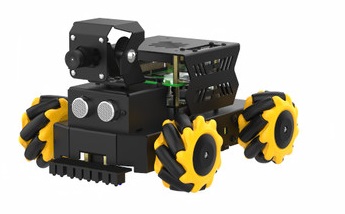
After assembling the car, it will look like the following figure
2.1 Wiring of Roboduino and infrared sensor (this example uses serial communication)
| RaspbotV2 | Infrared sensor |
|---|---|
| TX | RX |
| RX | TX |
| 5V | 5V |
| GND | GND |
If the cable is not long enough, you can use a ch340 to connect to the USB port of the Raspberry Pi, and then connect the line tracking module to the ch340, and then comment line 17 of tracking.py and uncomment line 18.
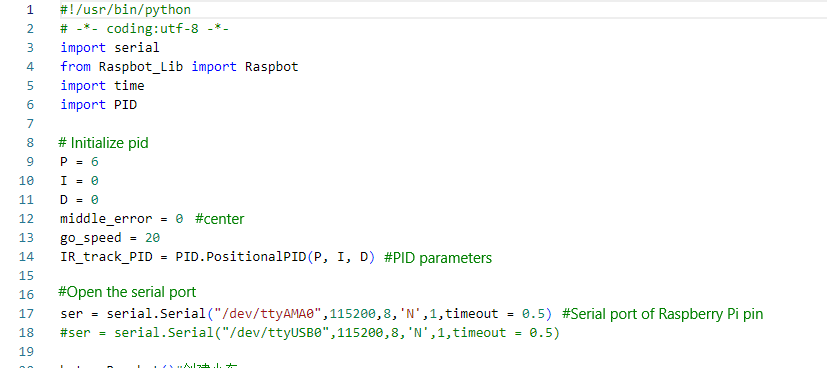
PID.py and tracking.py must be placed in the same folder in the car's image before they can be run. Otherwise, an error will be reported that the third-party library cannot be found in the following environment. You can install the corresponding library according to the information provided by the car to solve the error.
Main procedures
x#Main functionif __name__ == "__main__": print("start it") try: while True: usart_deal() except KeyboardInterrupt: pass finally: #Stop Movement bot.Ctrl_Car(0,1,0) #L1 motor backward 0 speed bot.Ctrl_Car(1,1,0) #L2 motor backward 0 speed bot.Ctrl_Car(2,1,0) #R1 motor backward 0 speed bot.Ctrl_Car(3,1,0) #R2 motor backward 0 speed ser.write(bytes("$0,0,0#",'utf-8'))
The main function is to perform PID processing for line patrol according to the value of the infrared probe, so that line patrol can be completed on the map with black lines and white background.
In tracking.py, there is a parameter for adjusting PID line patrol. If you want to increase or decrease the speed and optimize the effect, you can adjust the macro definition value inside.
xxxxxxxxxx#Initialize pidP = 6I = 0D = 0middle_error = 0 #centergo_speed = 20
P: P value of pid line patrol
I: I value of pid line patrol
D: D value of pid line patrol
go_speed: speed of line patrol
Experimental phenomenon:
On the premise of ensuring that the wiring and installation are correct, after the 8-way line patrol module is calibrated, the following command can be used to start line patrol.
xxxxxxxxxxpython3 tracking.pyIf the 8-way module probe still cannot detect the black and white lines normally, you need to wait until the module works normally before starting the command.