Welcome to WiFi Camera Module repository
Serial port configuration WiFi instructions
Computer serial port configuration instructions for this module
Computer serial port configuration instructions for this moduleThe module must be connected to the usbttl moduleSerial port configuration1. Configure wifi commands in STA mode (mode to connect to LAN)2. Configure wifi commands in AP mode (module spontaneous hotspot mode)3. Configure wifi mode4. Other instructions
The module must be connected to the usbttl module
| usbttl | wifi camera |
|---|---|
| RX | TX |
| TX | RX |
| GND | GND |
| VCC | VCC |
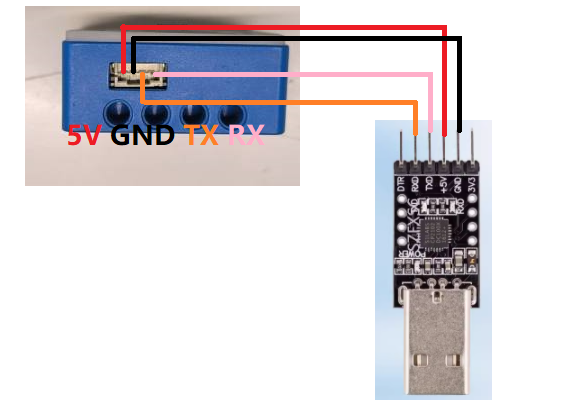
Serial port configuration
Baud rate 115200, no parity, no hardware flow control, 1 stop bit
If you are using the serial port assistant configuration, you need to remove the automatic sending of new lines (additional bits) when sending commands.
as the picture shows:
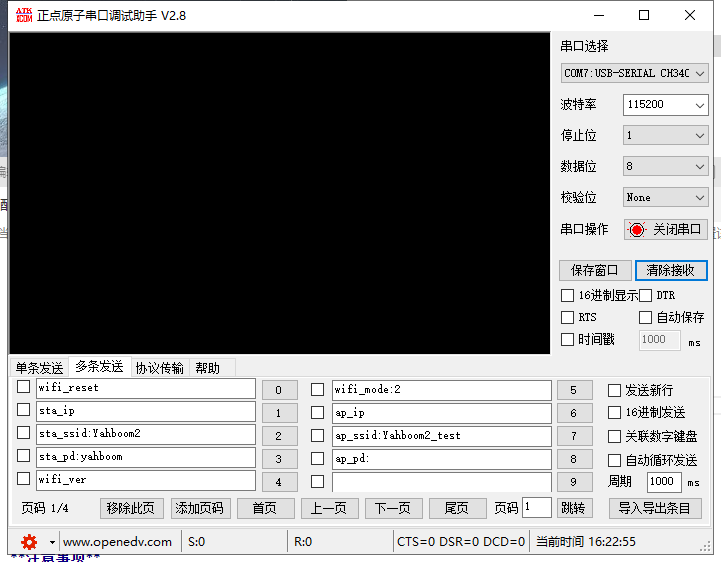
1. Configure wifi commands in STA mode (mode to connect to LAN)
| Command | Description | Example | Remarks |
|---|---|---|---|
| sta_ssid: | The name of the wifi to be connected | sta_ssid:yahboom | yahboom: is the wifi to be connected |
| sta_pd: | The wifi password to connect | sta_pd:12345678 | 12345678: is the wifi password to connect |
Precautions
- Whether it is sta_ssid or sta_pd, it must be followed by an English character punctuation mark, such as comma (,), colon (:), period (.), etc.
- When the wifi you want to connect to does not have a password, just send sta_pd: once like this.
- If the above command is successful, OK information will be returned. If no information is returned, please check the serial port wiring.
- When the sta_ssid: command is sent like this, the characters fail,ssid is null! will be returned, indicating that the connected wifi name cannot be empty.
- Instructions can be sent in all uppercase letters or all lowercase letters.
- Both the wifi name and password cannot exceed 30 characters in length, otherwise the configuration will fail.
- The name and password of the wifi cannot contain Chinese characters.
- Every time the wifi password is changed, it will be automatically reset. If you only change the wifi name, you need to manually power off and reset
2. Configure wifi commands in AP mode (module spontaneous hotspot mode)
| Command | Description | Example | Remarks |
|---|---|---|---|
| ap_ssid: | The name of the wifi to be set | ap_ssid:my_wifi | my_wifi: is the wifi to be set |
| ap_pd: | The wifi password to be set | ap_pd:12345678 | 12345678: is the wifi password to be set |
Precautions
- Whether it is ap_ssid or ap_pd, it must be followed by an English character punctuation mark, such as comma (,), colon (:), period (.), etc.
- When the wifi to be set up does not have a password, just send ap_pd: once like this.
- If the above command is successful, OK information will be returned. If no information is returned, please check the serial port wiring.
- When the ap_ssid: command is sent like this, the characters fail,AP_Name is null! will be returned, indicating that the wifi name cannot be empty.
- Instructions can be sent in all uppercase letters or all lowercase letters.
- Both the wifi name and password cannot exceed 30 characters in length, otherwise the configuration will fail.
- The name and password of the wifi cannot contain Chinese characters.
- Every time the wifi password is changed, it will be automatically reset. If you only change the wifi name, you need to manually power off and reset
3. Configure wifi mode
| Command | Description | Example | Remarks |
|---|---|---|---|
| wifi_mode: | Configure wifi mode | wifi_mode:2 | 0: AP mode 1: STA mode 2: AP+STA mode |
Precautions
- wifi_mode must be followed by an English character punctuation mark, such as comma (,), colon (:), period (.), etc.
- wifi_mode can only set 3 modes in total. If a negative number is passed in, the default is AP mode. If the number is greater than 2, the default is AP+STA mode.
4. Other instructions
| Command | Description | Example | Return value |
|---|---|---|---|
| sta_ip | Query the ip address in sta mode | sta_ip | Return the ip address connected to the LAN (such as sta_ip:192.168.2.199) |
| ap_ip | Query the ip address in ap mode | ap_ip | Return the ip address in wifi mode (such as ap_ip:192.168.4.1) |
| wifi_reset | Restore wifi configuration to factory settings | wifi_reset | Reset_OK |
| wifi_ver | Query wifi firmware version | wifi_ver | YAHBOOM VerSion:1.8.3 |
Precautions
- Instructions can be sent in all uppercase letters or all lowercase letters.
- If the above command is successful, there will be information corresponding to the return value. If there is no information returned, please check the serial port wiring.
- wifi_reset is to configure the wifi mode to AP+STA mode. The wifi name of ap is Yahboom_ESP32_WIFI. There is no password and it will be reset automatically. No manual reset is required.