yahboom
HomeLearn
Solution
Blog
Online Store
About Us
EN/中文
WiFi Camera Module📖
1.Configure WiFi camera on PC
  • Serial port configuration WiFi instructions
2.Configure WiFi camera on MCU
  • 1. jetson
  • 2. microbit
  • 3. STM32
  • 4. Raspberry Pi
3.APP control car
1. 4wd_uno car
  • 4wd_uno car
2. pico car
  • pico car
4. tinybit
  • 4. tinybit
5. Super:kit
  • A.Mobile shooter
  • B.Pretty car
  • C.Clip robot
  • D.Proficient carrier
  • E.Skip car
  • G.Spider
3. STM32 car
  • STM32 car
4.APP control PTZ
  • 1. 4wd_uno car (with PTZ)
  • 2. pico car (with PTZ)
  • 3. STM32 car (with PTZ)
  • 4. superkit-control servo PTZ
5.AI Vision
  • 1. AI visual recognition mode switching
  • 2. Cat and dog detection
  • 3. Face Detection
  • 4. Color recognition
  • 5. Person recognition
  • 6. QR code recognition
  • 7. Implementation of visual line inspection solution
Download
  • Annex
  • Code
  • PTZ Assembly Steps
Download ZIP

Welcome to WiFi Camera Module repository

3. Face Detection

Face detection

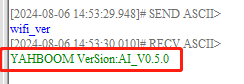
  1. First determine whether the version of the image transmission module is the AI ​​version firmware. If you already know the firmware version, you can ignore this step and use the wifi_ver command to query, as shown in the figure below image-2024080600001
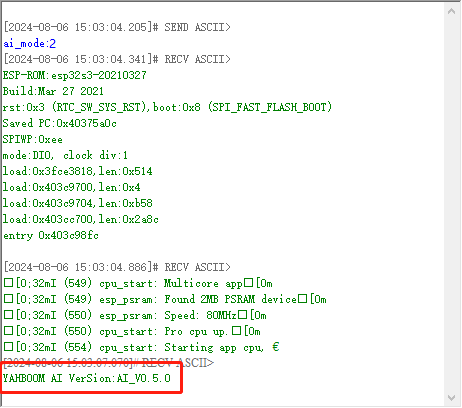
  2. Switch the mode to face detection mode. Use the following command to send ai_mode:2 through the serial assistant. After successful configuration, the module will restart and print the current firmware version. Then, face detection can start, as shown in the figure image-2024080600002
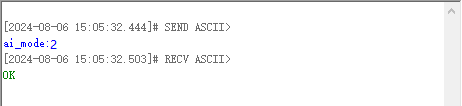
Note: If the current mode is already face detection mode, the module only returns ok image-2024080600003
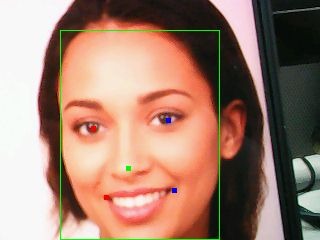
  1. Start recognizing faces If recognized, the coordinates of the upper left corner and lower right corner of the first frame will be sent out through the serial port. The specific content is $upper left corner x-axis coordinate, upper left corner y-axis coordinate, lower right corner x-axis coordinate, lower right corner y-axis coordinate, # Note: You need to open the screen to start recognition. If the screen is closed in the middle, the recognition will also be closed.

Face image-2024080600005 Result: image-2024080600004

Serial port information: image-2024080600008

Cat and dog detection
Color recognition

COMPANY

  • About us
  • Team Style
  • Blog

LEARNING & EXPLORATION

  • Tutorials
  • Edge AI hardware
  • Educational robots
  • Embedded intelligent hardware

WHERE TO BUY

  • Yahboom Online Store
  • Amazon
  • Alibaba
  • AliExpress
  • Mercado

TECHNOLOGY SUPPORT

  • Email: support@yahboom.com

BE A DISTRIBUTOR

  • Email: sales@yahboom.com
QR Code

Copyright © 2017-2026 Yahboom. All Rights Reserved.

EN/中文