Welcome to 10-axis IMU Navigation Module repository
MSPM0G3519 serial port application
10-axis imu data acquisition
1. Learning objectives
Serial port prints the data of the imu module.
2. Hardware connection
MSPM0G3519 and ten-axis imu module pin connection
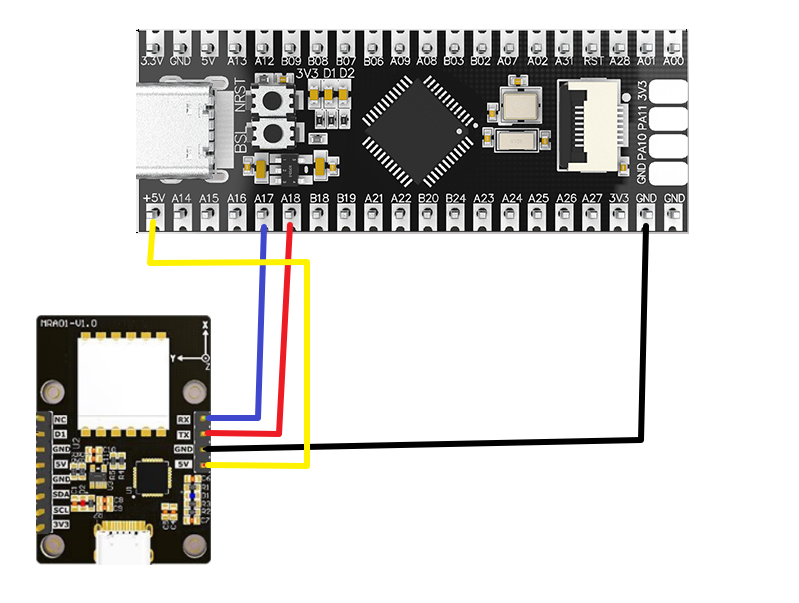
| imu module | MSPM0G3519 |
|---|---|
| RX | PA17 |
| TX | PA18 |
| 5V | 5V |
| GND | GND |
3. Program description
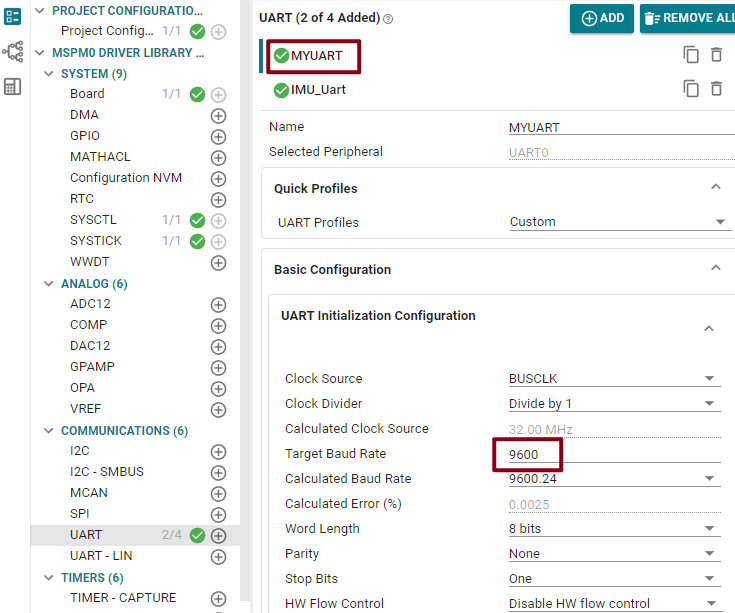
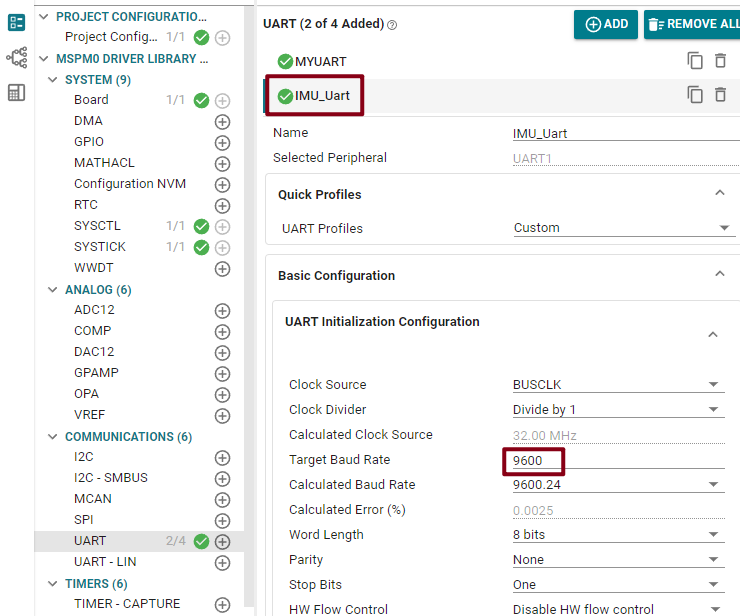
This example sets the baud rate of the serial port printing to 9600 bps, and the baud rate of the IMU module connection to 9600 bps.
bsp_imu.c
x
volatile unsigned char imu_data = 0;
void Imu_init(void){
NVIC_ClearPendingIRQ(IMU_Uart_INST_INT_IRQN);//清除串口中断标志 Clear the serial port interrupt flag NVIC_EnableIRQ(IMU_Uart_INST_INT_IRQN);//使能串口中断 Enable serial port interrupt
}
//串口发送单个字符void uart1_send_char(char ch){ //当串口1忙的时候等待,不忙的时候再发送传进来的字符 //Wait when serial port 1 is busy, and send the incoming characters when it is not busy while( DL_UART_isBusy(IMU_Uart_INST) == true ); //发送单个字符 Send a single character DL_UART_Main_transmitData(IMU_Uart_INST, ch);}//串口发送字符 Send characters via serial portvoid uart1_send_string(char* str){ //当前字符串地址不在结尾 并且 字符串首地址不为空 //The current string address is not at the end and the string's first address is not empty while(*str!=0&&str!=0) { //发送字符串首地址中的字符,并且在发送完成之后首地址自增 //Send the characters in the first address of the string, and the first address will increment automatically after the sending is completed. uart1_send_char(*str++); }}
//串口的中断服务函数 Serial port interrupt service functionvoid IMU_Uart_INST_IRQHandler(void){
//如果产生了串口中断 If a serial port interrupt occurs switch( DL_UART_getPendingInterrupt(IMU_Uart_INST) ) { case DL_UART_IIDX_RX://如果是接收中断 If it is a receive interrupt //接收发送过来的数据保存在变量中 The data received and sent is stored in the variable imu_data = DL_UART_Main_receiveData(IMU_Uart_INST); //将保存的数据再发送出去 Send the saved data again
// DueData(imu_data);//解析imu数据 Parsing imu data// uart0_send_char(imu_data); break;
default://其他的串口中断 Other serial port interrupts break; }
}It mainly implements the function of receiving and initially processing IMU data based on UART, and uses functions such as DL_UART_isBusy and DL_UART_Main_transmitData to simplify the hardware operation of UART.
imu_use.c
xxxxxxxxxxvoid DueData(uint8_t inputdata) { if (inputdata == 0x55 && start == 0) { start = 1; data_length = 10; RxBuff[0] = 0x55; CheckSum = 0x55; return; } if(start == 1) { if(inputdata == 0x53) //因为速率太高,不能获取全部信息,该历程只获取姿态角度 Because the speed is too high, it is not possible to obtain all the information. This process only obtains the attitude angle { start = 2 ; } else { //防止其他数据出现0×53的有效数据 Prevent other data from showing valid data of 0×53 memset(RxBuff,0,11); start = 0; } } if (start == 2) { CheckSum += inputdata; //校验码计算 会把校验位加上 The checksum calculation will add the check digit RxBuff[11-data_length] = inputdata; //保存数据 Save data data_length = data_length - 1; //长度减一 Length minus one if (data_length == 0) //接收到完整的数据 Received complete data { CheckSum = (CheckSum-inputdata) & 0xff; start = 0; //清0 Clear memcpy(RxBuffnew,RxBuff,11); CheckSumnew = CheckSum; // g_newflag = 1; memset(RxBuff,0,11); GetDataDeal(); } }}The DueData function is used to process the data received from the IMU module through the serial port. It parses the data according to the module-specific protocol and prepares it for further processing.
xxxxxxxxxxvoid GetDataDeal(void){ if(RxBuffnew[10] != CheckSumnew) //校验码不正确 The check code is incorrect { CheckSumnew = 0; memset(RxBuffnew,0,11); return; } if(RxBuffnew[1] == 0x53) //姿态角度输出 Attitude angle output { angle[0] = (RxBuffnew[3] << 8 | RxBuffnew[2]) / 32768.0 * 180.0; angle[1] = (RxBuffnew[5] << 8 | RxBuffnew[4]) / 32768.0 * 180.0; angle[2] = (RxBuffnew[7] << 8 | RxBuffnew[6]) / 32768.0 * 180.0; printf("angle:x:%d y:%d z:%d \r\n" ,(int)angle[0],(int)angle[1],(int)angle[2]); } CheckSumnew = 0; memset(RxBuffnew,0,11);}The main purpose of the GetDataDeal function is to process the data received from the imu module. This data has been received and stored in the RxBuffnew array through the DueData function, and the checksum is stored in CheckSumnew. If the checksum is incorrect, the CheckSumnew and RxBuffnew arrays are cleared. If RxBuffnew[1] is 0×53, the attitude angle is output for a long time. The function will parse three angle values from the RxBuffnew array and print them out.
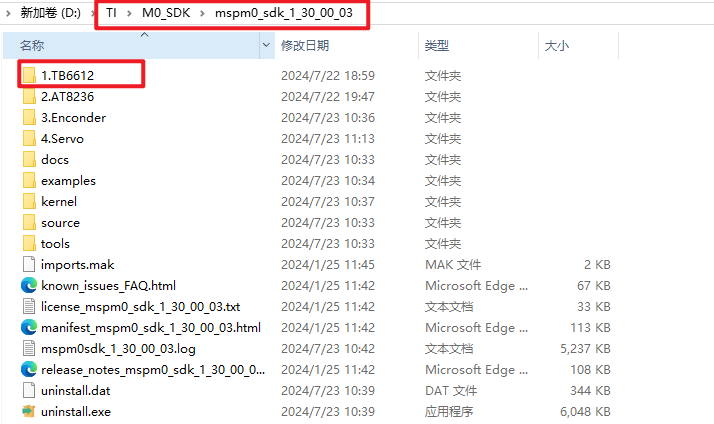
Note: The project source code must be placed in the SDK path for compilation.
For example, the path:D:\TI\M0_SDK\mspm0_sdk_1_30_00_03\TB6612