yahboom
HomeTutorialsProduct
Solution
Blog
Online Store
About Us
EN/中文
Store
DOFBOT-JetsonNANO📖
00.Must Read Before Use!!
  • 00.Must Read Before Use!!
01.First Trial
  • 1.First Trial
  • 2.Analysis of common problems
  • 3.Calibration offset
  • 4.Precautions for DIY Robotic Arm
  • 5.Jetson Nano Version – Must Read
  • 6.Robotic arm gripping anomaly solutions
02.Assemble Course
  • 1.Installation video
  • 2.Calibrate the Robotic Arm
  • 3.Install the map
03.Remote control course
  • 1.Mobile APP control
  • 2.USB handle control
  • 3.PC web page programming
04.Preparation
  • 1.Manage APP control service
  • 2.Manage JupyterLab service
  • 3.Manage OLED service
  • 4.Modifying ROS_DOMAIN_ID for Multi-Machine
  • 5.Jetpack old system upgraded to SUPER system
05.Basic control course
  • 1.Control RGB light
  • 2.Control buzzer
  • 3.Control single servo
  • 4.Read servo angle
  • 5.Control all servo
  • 6.DOFBOT up down left right
  • 7.DOFBOT dancing
  • 8.DOFBOT memory action
  • 9.DOFBOT grab block
  • 10.Porter
  • 11.Stacked Arhat
  • 12.Synchronous action
  • 13.USB camera display
06.AI vision basic course
  • 1.Gesture Recognition
  • 2.Color threshold adjustment&Color calibration
  • 3.Color recognition
  • 4.Face recognition
  • 5.YOLOv11 garbage recognition
  • 6.YOLOv11 object recognition
07.2D Visual Tracking Course
  • 1.PID algorithm basics
  • 2.Color block positioning
  • 3.Color block tracking
  • 4.Face positioning
  • 5.Face tracking
  • 6.Gesture recognition fixed action
08.2D Visual Grasping Course
  • 1.Gesture recognition stack blocks
  • 2.Color recognition grab blocks
  • 3.Catch game
  • 4.Color sorting and stacking
  • 5.Garbage sorting
  • 6.Color interaction
09.Mediapipe course
  • 1.Hand detection
  • 02.Posture detection
  • 3.Overall detection
  • 4.Facial Detection
  • 5.Face Detection
  • 6.Face effects
  • 7.3D object recognition
  • 8.Paintbrush
  • 9.Finger control
  • 10.Gesture Recognition
  • 11.Gesture control robotic arm action group
  • 12.Arm posture control robotic arm
  • 13.Palm Targeting
  • 14.Robotic arm tracks the palm
  • 15.Fingertip trajectory recognition
  • 16.Fingertip trajectory control robotic arm
  • 17.Gesture Grasp and Release Objects
  • 18.Finger Control Robot Arm
10.AI Large Model Voice Module (Must Read)new
  • 1. Introduction to AI Large Model Voice Module
  • 2. Flash the firmware (Must read)
  • 3. Modify the wake-up word and command word
11.2D Voice Control Coursenew
  • 01.Simple Voice Control
  • 02.Smart Voice Control
  • 03.Voice Action Control
  • 04.Memory Learning Mode
  • 05.Color Recognition with Voice Broadcast
  • 06.Color Recognition and Grasping with Voice Broadcast
  • 07.Color Recognition and Sorting with Voice Broadcast
  • 08.Voice Recognition Target Tracking
  • 09.Voice Control Stacking
  • 10.Voice Control Color Sorting and Stacking
  • 11.Garbage Recognition with Voice Broadcast
  • 12.Garbage Sorting with Voice Broadcast
12.Robotic Arm Control and Inverse Kinematics
  • 1. Robotic arm ROS control
  • 2. Inverse solution
13.3D Sorting and Grasping Coursenew
  • 1.AprilTag ID sorting
  • 2.MediaPipe Gesture-AprilTag ID sorting
  • 3.MediaPipe Gesture-AprilTag distance sorting
  • 4.Block color sorting
  • 5.Block different shape sorting
  • 6.Yolov11 garbage sorting
14.3D Tracking Coursenew
  • 1.AprilTag Tracking
  • 2.Color Block Tracking
  • 3.KCF Object Tracking
15.3D Voice Control for Sorting & Tracking Coursenew
  • 1.Voice Control AprilTag ID Sorting
  • 2.Voice Control Color Block Sorting
  • 3.Voice Control Yolov11 Garbage Recognition Sorting
  • 4.Voice Control AprilTag Tracking
  • 5.Voice Control Color Block Tracking
  • 6.Voice Control Object Tracking
16.AI Model Basicsnew
  • 1.AI large model types and principles
  • 2.RAG retrieval enhancement and model training samples
  • 3.Embodied intelligent robot system architecture
  • 4.Embodied intelligent functions core source code
17.AI Model Developmentnew
  • 1.Register a model service provider account
  • 2. Configure API-KEY
  • 3. Introduction to Dify
  • 4. Basic Dify Features
  • 5. Deploy the RAG knowledge base
  • 6. AI Large Model Development - chatbot
  • 7. RAG knowledge base + chatbot
  • 8. AI agent workflow
18.AI Model – Text Versionnew
  • 1. Semantic understand instruction following
  • 2. Multimodal visual understand
  • 3. Text Large Model + robotic arm control
  • 4. Multimodal Large Model+video understanding
  • 5. Multimodal Large Model+robotic arm gripping
  • 6. Multimodal Large Model+robotic arm tracking
  • 7. Multimodal Large Model+robotic arm sorting
  • 8. Multimodal Large Model+robotic arm handling
  • 9. Multimodal Large Model+Color Blocks Back In Place
  • 10. Multimodal Large Model + Intent Prediction + Robotic Arm Gripping
  • 11. Text Large Model + YOLOv11 + Intelligent Garbage Classification
19.AI Model – Voice Versionnew
  • 1. Semantic understand instruction following
  • 2. Multimodal visual understand
  • 3. Text Large Model + robotic arm control
  • 4. Multimodal Large Model+video understanding
  • 5. Multimodal Large Model+robotic arm gripping
  • 6. Multimodal Large Model+robotic arm tracking
  • 7. Multimodal Large Model+robotic arm sorting
  • 8. Multimodal Large Model+robotic arm handling
  • 9. Multimodal Large Model+Color Blocks Back In Place
  • 10. Multimodal Large Model + Intent Prediction + Robotic Arm Gripping
  • 11. Text Large Model + YOLOv11 + Intelligent Garbage Classification
20.AI Model – Fun Applicationsnew
  • 1.AI Butler-Intent Inference
  • 2.AI Encyclopedia-Arithmetic Master
  • 3.AI Encyclopedia-You asked I Pointed
  • 4.AI Encyclopedia-Nutritional Analysis
  • 5.AI Encyclopedia-Problem Solving Expert
  • 6.AI Encyclopedia-English Spelling
  • 7.AI Butler-Garbage Sorting
  • 8.AI Top Chef
21.MoveIt2 Course
  • 1.MoveIt configuration
  • 2. MoveIt Usage
  • 3. MoveIt Drive Real Robot
  • 4. MoveIt Random Movement
  • 5. MoveIt Forward Kinematics Design
  • 6. MoveIt Inverse Kinematics Design
  • 7. MoveIt Cartesian Path
  • 8. MoveIt Scene Design
  • 9. MoveIt Trajectory Planning
  • 10. MoveIt Collision Detection
22.YOLOv11 Development Course
  • 1. YOLO Environment Setup
  • 2. CLI Usage
  • 3. Object Detection
  • 4. Instance Segmentation
  • 5. Pose Estimation
  • 6. Image Classification
  • 7. Oriented Bounding Boxes Object Detection
  • 8. Model Conversion
  • 9. Model Prediction
23.Linux Operating System
  • 1.Introduction to Linux system
  • 2.Ubuntu file system
  • 3.Ubuntu common commands
  • 4.Ubuntu common editors
  • 5.Ubuntu software operation commands
  • 6.Virtual machine installation
  • 7.SSH remote control
  • 8.VNC remote control
  • 9.Transfer files remotely
  • 10.Driver library and communication
  • 11.Capacity expansion and resource allocation
  • 12.Bind device ID
  • 13.Capacity expansion and resource allocation
  • 14.Update system software sources
  • 15.Set root user password
  • 16.sudo free password
  • 17.Connect to WiFi network
  • 18.View system version
  • 19.Customized service management
  • 20.Back up system image
24.GPIO Hardware Control Course
  • 1.GPIO description
  • 2.GPIO library installation
  • 3.GPIO reading
  • 4.GPIO output
  • 5.Serial communication
  • 6.I2C communication
25.OpenCV course
  • 0. Must Read!
  • 1. Introduction to Open Source CV
  • 2. Image reading and display
  • 3. Image writing
  • 4. Image quality
  • 5. Pixel Operation
  • 6.Image zoom
  • 7.Picture cut
  • 8.Picture pan
  • 9.Picture mirroring
  • 10.Affine transformation
  • 11.Picture rotation
  • 12.perspective transformation
  • 13.Grayscale processing
  • 14.Binary image
  • 15.Edge green detection
  • 16.Line segment drawing
  • 17.Rectangular circle drawing
  • 18.Text and picture drawing
26.ROS2 Basic Course
  • 1.Introduction to ROS2
  • 2.ROS2 install Humble
  • 3.ROS2 development environment
  • 4.ROS2 workspace
  • 5.ROS2 function package
  • 6.ROS2 node
  • 7.ROS2 topic communication
  • 8.ROS2 service communication
  • 9.ROS2 action communication
  • 10.ROS2 custom interface message
  • 11.ROS2 parameter service case
  • 12.ROS2 meta-function package
  • 13.ROS2 distributed communication
  • 14.ROS2 DDS
  • 15.ROS2 time related API
  • 16.ROS2 common command tools
  • 17.ROS2 rviz2 use
  • 18.ROS2 rqt toolbox
  • 19.ROS2 Launch startup file configuration
  • 20.ROS2 recording and playback tool
  • 21.ROS2 URDF model
  • 22.ROS2 Gazebo simulation platform
  • 23.ROS2 TF2 coordinate transformation
27. Advanced Visuals Course
  • 0. Must Read! Porting and Compilation
  • 1. QR Code
  • 2. Human Pose Estimation
  • 3. Object Detection
  • 4. AR Vision
  • 5. ROS + OpenCV Basics
28.Jupyter Lab Usage Course
  • 0.Read the document before operation
  • 1.Jupyter Lab environment construction
  • 2.Basic use of Jupyter Lab
  • 3.Jupyter Lab plug-in installation
  • 4.Basic use of Jupyter Widgets
29.Docker Course
  • 1.Docker overview and docker installation
  • 2.Common commands for docker image containers
  • 3.Docker images deeply understand and publish images
  • 4.Docker hardware interaction and data processing
  • 5.Start the Dofbot container
30.Python Programming Basics
  • 1.Python usage
  • 2.Use APT to install Python packages
  • 3.Python virtual environment
  • 4.GPIO Zero
  • 5.Pin output high and low levels
  • 6.Pin reads high and low levels
  • 7.Pin output PWM
Download
  • APP(iOS/Android)
  • Code
  • SystemFile
  • VM File
  • PC software
  • Instruction manual
  • Jetson_Boot_USB.tar.gz
  • More Annex
  • Tools
Download ZIP
FAQ
  • 1、Why i can't robotic arm start normally
  • 2、When you control the No.1 servo, all servos will turn.
  • 3、How open VNC service on DOFBOT system
  • 4、Where can I get the URDF file?
  • 5、Gesture recognition cannot work normally.
  • 6、Write system image into U disk
  • 7、Write EMMC boot file

Welcome to DOFBOT-JetsonNANO repository

6.Voice Control Object Tracking

Voice Control Object Tracking

1. Function Description

After the program runs, when a handheld object appears within the camera's view, use the mouse to frame the object to be tracked. Wake up the voice module through "Hello yahboom", then give the voice command "Tracking and picking up objects". The robotic arm will adjust its posture to keep the object's center near the screen center. When moving the object slowly, the robotic arm will follow the object's movement. Wake up the voice module through "Hello yahboom", give the voice command "stop following", and the robotic arm will cancel tracking the object and return to the initial posture.

2. Function Startup

After entering the docker container, enter the following commands in the docker terminal:

# Start USB camera node and inverse kinematics node
ros2 launch dofbot_info camera_arm_kin.launch.py
# Start speech recognition and broadcast node
ros2 launch yahboom_speech speech.launch.py
# Start voice control object tracking node
ros2 run dofbot_voice_ctrl KCF_follow

After the program runs successfully, the robotic arm will move to the initial posture, and the handheld object appears within the camera's view. Use the mouse to frame the object to be tracked, as shown in the figure below:
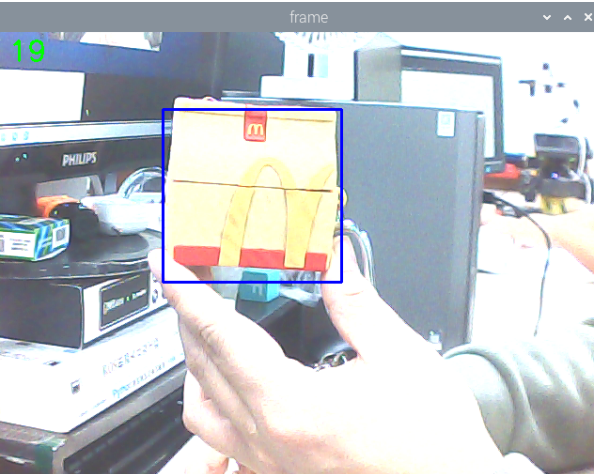
image-20260311143418012

Then, wake up the voice module through "Hello yahboom", then give the voice command "Tracking and picking up objects". When moving the object slowly, the robotic arm will follow the movement; after waking up with "Hello yahboom", the stop tracking voice command is: stop following, the robotic arm stops tracking and returns to the initial tracking posture.

3. Code Analysis

After entering the docker container, the source code path is located at:

xxxxxxxxxx
/root/dofbot_ws/src/dofbot_voice_ctrl/dofbot_voice_ctrl/KCF/KCF_follow.py

Import necessary library files:

xxxxxxxxxx
import cv2
import rclpy
from rclpy.node import Node
import numpy as np
from sensor_msgs.msg import Image
from cv_bridge import CvBridge
import cv2 as cv
import threading
import time
import math
import os
from std_msgs.msg import Int8
from Arm_Lib import Arm_Device
import dofbot_follow.PID as PID
from  dofbot_follow.Track_Lib import *

Create robotic arm control object and control the robotic arm to move to initial posture:

xxxxxxxxxx
self.Arm = Arm_Device()
self.init_joints = [90, 150, 0, 20, 90, 0]
self.Arm.Arm_serial_servo_write6_array(self.init_joints,2000)

Initialize PID:

xxxxxxxxxx
self.xservo_pid = PID.PositionalPID(0.5, 0.1, 0.1)
self.yservo_pid = PID.PositionalPID(0.5, 0.1, 0.1)

Create subscribers:

xxxxxxxxxx
# Create subscriber to subscribe to image topic
self.subscription = self.create_subscription(Image,'/image_raw',self.ImageCallback,1)
# Create subscriber to subscribe to speech recognition result topic
self.sub_voice = self.create_subscription(Int8,"voice_result",self.getVoiceResultCallBack,1)

Speech recognition result topic callback function getVoiceResultCallBack:

xxxxxxxxxx
def getVoiceResultCallBack(self,msg):
    # If the received speech recognition result topic message is 107, change self.start_flag value to True, indicating that tracking can be performed
    if msg.data == 107:
        self.start_follow = True
        print("Start tracking .")
    elif msg.data == 76:
    # If the received speech recognition result topic message is 76, execute Reset() function, which includes changing self.start_follow value to False and controlling the robotic arm to return to initial posture
        self.Reset()

Image topic callback function ImageCallback:

xxxxxxxxxx
def ImageCallback(self,color_frame):
    # Process received image topic messages, convert to image
    rgb_image = self.rgb_bridge.imgmsg_to_cv2(color_frame,'bgr8')
    result_image = np.copy(rgb_image)
    #depth_image
    action = cv.waitKey(10) & 0xFF
    if action == 32:
        self.start_follow = True
    result_image = cv.resize(result_image, (640, 480))
    # Pass the image as parameter to process for framing the object and getting the center point coordinates of the object's outer boundary. For this part, refer to the code analysis in [3D Space Tracking]\[3.KCF Object Tracking].
    result_frame = self.process(result_image,action)  
    # If the object center point coordinates are not 0 and self.start_follow value is True, then tracking can be performed
    if self.cx!=0 and self.cy!=0 and self.start_follow == True:
        # If the object's center coordinates x or y are not within the center range, execute XY_track function with the current object center coordinates as parameters
        if (abs(self.cx-320) >10 or abs(self.cy-240)>10) :
            self.XY_track(self.cx,self.cy)
            print("Tracking")
            print("-------------------------------------")
        
    cv2.circle(result_frame, (int(self.cx),int(self.cy)), 10, (255,255,0), thickness=None, lineType=None, shift=None)
    cur_time = time.time()
    fps = str(int(1/(cur_time - self.pr_time)))
    self.pr_time = cur_time
    cv2.putText(result_frame, fps, (10, 30), cv2.FONT_HERSHEY_SIMPLEX, 1, (0, 255, 0), 2)              
    cv.imshow(self.windows_name, result_frame)


Voice Control Color Block Tracking
AI large model types and principles

COMPANY

  • About us
  • Team Style
  • Blog

LEARNING & EXPLORATION

  • Tutorials
  • Edge AI hardware
  • Educational robots
  • Embedded intelligent hardware

WHERE TO BUY

  • Yahboom Online Store
  • Amazon
  • Alibaba
  • AliExpress
  • Mercado

TECHNOLOGY SUPPORT

  • Email: support@yahboom.com

BE A DISTRIBUTOR

  • Email: sales@yahboom.com
QR Code

Copyright © 2017-2026 Yahboom. All Rights Reserved.

EN/中文