yahboom
HomeTutorialsProduct
Solution
Blog
Online Store
About Us
EN/中文
Store
IMX 415 Camera Module📖
0. Precautions for Focus Adjustment (Must Read)new
  • Precautions for Focus Adjustment (Must Read)
1. Jetson Orin Nano‑NX Usage Course
JP6.2.1
  • 1. Camera Driver Course
  • 2.1 Advanced AI Vision-Traffic Detection—DeepStream environment
  • 2.2 Advanced AI Vision-Traffic Detection—Four types of detection(traffic)
  • 3. YOLO11 Object Detection
  • 4. YOLO26 Object Detection
  • 5. Mediapipe Environment
  • 6. Mediapipe Hand Detection
  • 7. MediaPipe Face Detection
  • 8. MediaPipe Face Effects
  • 9. MediaPipe 3D Object Recognition
  • 10. MediaPipe Virtual Brush
  • 11. MediaPipe Gesture Recognition
  • 12. MediaPipe Finger Control
  • 13. MediaPipe Posture Estimation
  • 14. MediaPipe Face Mask
  • 15. MediaPipe Overall Detection
  • 16. MediaPipe Green Scene Rremoval(Human)
  • 17. QR code recognition
JP7.2.1
  • 1. Camera Driver Course
  • 2.1.DeepStream environment
  • 2.2.Four types of detection(traffic)
  • 3. YOLO11 Object Detection
  • 4. YOLO26 Object Detection
  • 5. Mediapipe Environment
  • 6. Mediapipe Hand Detection
  • 7. MediaPipe Face Detection
  • 8. MediaPipe Face Effects
  • 9. MediaPipe 3D Object Recognition
  • 10. MediaPipe Virtual Brush
  • 11. MediaPipe Gesture Recognition
  • 12. MediaPipe Finger Control
  • 13. MediaPipe Posture Estimation
  • 14. MediaPipe Face Mask
  • 15. MediaPipe Overall Detection
  • 16. MediaPipe Green Scene Rremoval(Human)
  • 17. QR code recognition
2. Raspberry Pi 5 Usage Course
  • 1. Camera Driver Course
  • 2. Advanced AI Vision-Human Pose Estimation
  • 3. Target Detection
  • 4. QR Code
  • 5. Face Detection
  • 6. Color Recognition
  • 7. YOLO11 Object Detection
  • 8. YOLO26 Object Detection
  • 9. MediaPipe Face Effects
  • 10. MediaPipe Face Detection
  • 11. MediaPipe 3D Object Recognition
  • 12. MediaPipe Virtual Brush
  • 13. MediaPipe Finger Control
  • 14. MediaPipe Gesture Recognition
3. RDK X5 Usage Course
  • 1. Camera Driver Course
  • 2. Target Detection Algorithm-FCOS
  • 3. Target Detection Algorithm-YOLOv5s
  • 4. YOLO26 Object Detection
4. Camera Bracket Installation (Optional Video)
  • Installation Video
5.Connect to official Jetson ORIN NANO
  • Connect to official Jetson ORIN NANO
Download
  • Code
  • SystemFile
  • 3D_Model_File
  • Hardware_Info
Download ZIP

Welcome to IMX 415 Camera Module repository

2.2.Four types of detection(traffic)

Four Types of Detection (Traffic)

  • Four Types of Detection (Traffic)
    • 1. Video Detection
    • 2. Real-time Detection
      • 2.1 IMX415 Camera

Four types of detection is a demo case built into DeepStream: it detects and counts people, vehicles, road signs, and bicycles in the frame.

This tutorial only provides a basic demonstration; other applications need to be developed by the user

1. Video Detection

Enter the folder where the case is located:

cd /opt/nvidia/deepstream/deepstream-9.1/sources/apps/sample_apps/deepstream-test1

Compile the source code: refer to the README in the same folder

sudo make CUDA_VER=13.2 # The factory image has already compiled it; users do not need to compile

Orin NX: enter the following command to preview

./deepstream-test1-app dstest1_config.yml
or
./deepstream-test1-app ../../../../samples/streams/sample_720p.h264

Orin NANO: enter the following command to preview

sudo deepstream-test1-app dstest1_config.yml
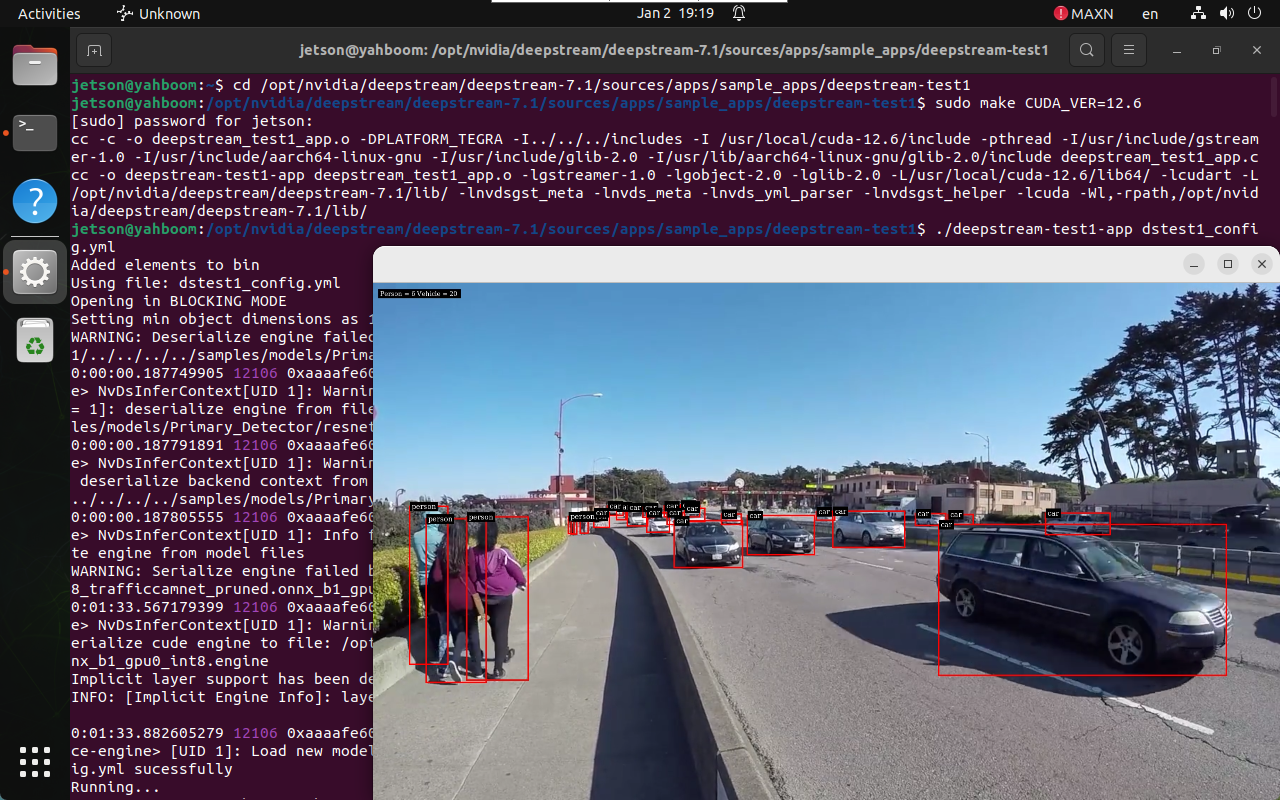
image-20250102191922399

Configuration file: dstest1_config.yml

################################################################################
# SPDX-FileCopyrightText: Copyright (c) 2022 NVIDIA CORPORATION & AFFILIATES. All rights reserved.
# SPDX-License-Identifier: LicenseRef-NvidiaProprietary
#
# NVIDIA CORPORATION, its affiliates and licensors retain all intellectual
# property and proprietary rights in and to this material, related
# documentation and any modifications thereto. Any use, reproduction,
# disclosure or distribution of this material and related documentation
# without an express license agreement from NVIDIA CORPORATION or
# its affiliates is strictly prohibited.
################################################################################

source:
  location: ../../../../samples/streams/sample_720p.h264

streammux:
  batch-size: 1
  batched-push-timeout: 40000
  width: 1920
  height: 1080

# Inference using nvinfer:
primary-gie:
  plugin-type: 0
  config-file-path: dstest1_pgie_config.yml

## Inference using nvinferserver:
#primary-gie:
#  plugin-type: 1
#  config-file-path: dstest1_pgie_nvinferserver_config.txt

2. Real-time Detection

If multiple cameras are used, modify the .txt configuration file yourself: the following cases are the results when the mainboard is connected to only one camera.

2.1 IMX415 Camera

cd /opt/nvidia/deepstream/deepstream-9.1/samples/configs/deepstream-app
sudo deepstream-app -c source1_csi_dec_infer_resnet.txt 
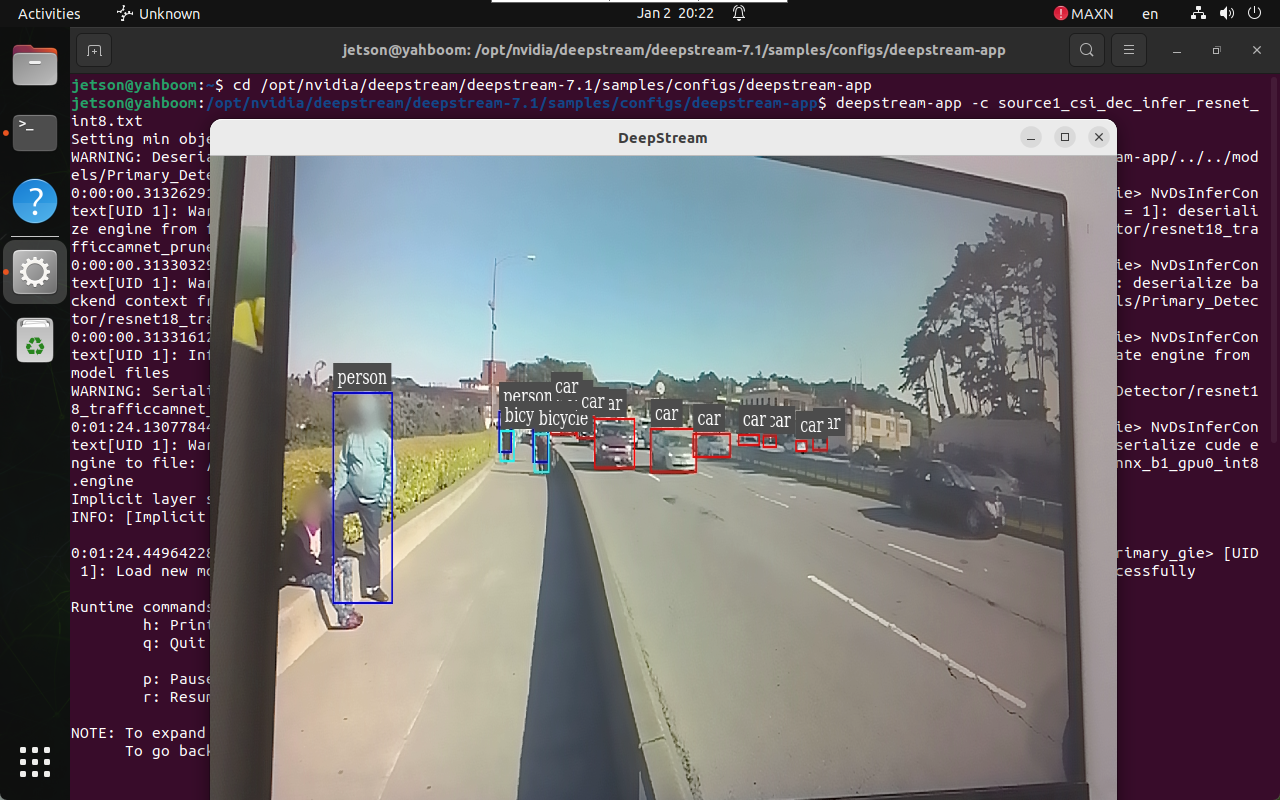
image-20250102202305616

DeepStream environment
YOLO11 Object Detection

COMPANY

  • About us
  • Team Style
  • Blog

LEARNING & EXPLORATION

  • Tutorials
  • Edge AI hardware
  • Educational robots
  • Embedded intelligent hardware

WHERE TO BUY

  • Yahboom Online Store
  • Amazon
  • Alibaba
  • AliExpress
  • Mercado

TECHNOLOGY SUPPORT

  • Email: support@yahboom.com

BE A DISTRIBUTOR

  • Email: sales@yahboom.com
QR Code

Copyright © 2017-2026 Yahboom. All Rights Reserved.

EN/中文