yahboom
HomeLearn
Solution
Blog
Online Store
About Us
EN/中文
520 Motor📖
1.About motor
  • About motor
2.ROS robot control board drive
  • 2.1 Control motor
  • 2.2 Timer captures encoder data
  • 2.3 PID control robot car
  • 2.4 Kinematic Analysis-Mecanum wheel structure
  • 2.5 Kinematic Analysis-Ackerman structure
  • 2.6 Kinematic Analysis-4WD structure
3.STM32 Self-balancing car tutorials
Get started quickly
  • 03.P, PI, PD controller theory
  • 01.Balancing car assembly
  • 02.Get started quicklyy
  • 03.Balance car interface description
  • 04.Common Problem Analysis
  • 05.Balance Car V2 Library Function Development Manual
Environment construction and development
  • 01.MDK-ARM installation
  • 02.STM32CubeIDE installation
  • 03.Common driver installation
  • 04.Download the program
  • 05.MDK-ARM project usage
  • 06.Program simulation
Robot car PID control course
  • 01.PID basic concept
  • 02.PID example analysis
  • 04.Position PID
  • 05.Incremental PID
  • 06.Cascade PID
  • 07.Balance principle of car
  • 08.Car upright control (PD)
  • 09.Car speed ​​control (PI)
  • 10.Car steering control (PD)
  • 11.Got angle and angular velocity (DMP algorithm)
  • 12.Got angle and angular velocity (Kalman filter algorithm)
  • 13.Got angle and angular velocity(Complementary filter algorithm)
Robot car basic course
  • 01.Car parameter adjustment
  • 02.Ultrasonic obstacle avoidance
  • 03.Ultrasonic follow
  • 04.Bluetooth remote control
  • 05.Load balance
Robot car LQR control
  • Robot car LQR control
Circuit design
  • 01.Overall circuit design
  • 02.STM32 minimum system
  • 03.Serial port circuit design
  • 04.Power circuit design
  • 05.MPU6050 Circuit Design
  • 06.Motor drive circuit design
Mathematical model
  • Balance car mathematical model
4.4-channel motor drive module
Introduction and Debug
  • 1.Introduction to 4-channel motor drive board
  • 2.Control command
  • 3.Motor introduction and usage
  • 4.PC host
IIC communication
  • For Arduino
  • For ESP32
  • For Jetson NANO
  • For MSPM0G3507
  • For MSPM0G3519new
  • For PICO2
  • For RDK X5
  • For RPi5
  • For STM32
USART communication
  • For Arduino
  • For ESP32
  • For Jetson NANO
  • For MSPM0G3507
  • For MSPM0G3519new
  • For PICO2
  • For RDK X5
  • For RPi5
  • For STM32
5.2-channel motor drive module
For MSPM0G3507
  • 1.AT8236 drive tutorials
  • 2.TB6612 drive tutorials
For MSPM0G3519
  • 1.AT8236 drive tutorialsnew
  • 2.TB6612 drive tutorialsnew
Download
  • Model File
  • Annex_ROS_robot_board
  • Annex_STM32_balancing_car
  • Annex_4channel_motor_drive
  • Annex_2channel_motor_drive
Download ZIP

Welcome to 520 Motor repository

04.Common Problem Analysis

Common Problem Analysis

Common Problem Analysis

Use Type-C data cable to connect to the computer, FlyMCU software does not search for the corresponding serial port

Answer: Use the system's built-in device manager to check whether the serial port device corresponding to the development board is recognized normally.

xxxxxxxxxx
If there is no CH340 device or an exclamation mark appears, you can follow the tutorial to install the driver
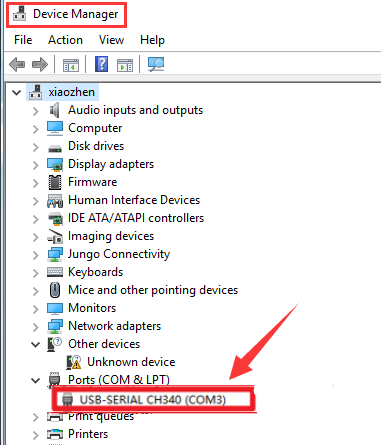
image-20240828095137070

Keil5 (MDK-ARM) sets ST-Link option and the software crashes

Answer: Update the latest driver file on Keil MDK official website

Replace the STLinkUSBDriver.dll in [Driver Path: Attachment → Software Tools → STLinkUSBDriver6.1.2.0Signed.zip] with the STLinkUSBDriver.dll in the MDK-ARM software installation directory [C:\Keil_v5\ARM\STLink]

The balancing car turns on the power switch, and the buzzer keeps ringing

Answer: Both the balancing car case and the buzzer control involve programs that keep the buzzer ringing. You need to check whether the buzzer control program is burned; if it is not the buzzer control program, it triggers the low voltage alarm of the balancing car, reminding the user to charge the development board.

The balancing effect of the balancing car is not ideal

Answer: The motor, weight and other factors of the balancing car may affect the effect of the balancing car. Users can adjust the PID parameters according to the balancing car parameter adjustment tutorial.

Balance car interface description
Balance Car V2 Library Function Development Manual

COMPANY

  • About us
  • Team Style
  • Blog

LEARNING & EXPLORATION

  • Tutorials
  • Edge AI hardware
  • Educational robots
  • Embedded intelligent hardware

WHERE TO BUY

  • Yahboom Online Store
  • Amazon
  • Alibaba
  • AliExpress
  • Mercado

TECHNOLOGY SUPPORT

  • Email: support@yahboom.com

BE A DISTRIBUTOR

  • Email: sales@yahboom.com
QR Code
QR Code

Copyright © 2017-2026 Yahboom. All Rights Reserved.

EN/中文