yahboom
HomeLearn
Solution
Blog
Online Store
About Us
EN/中文
520 Motor📖
1.About motor
  • About motor
2.ROS robot control board drive
  • 2.1 Control motor
  • 2.2 Timer captures encoder data
  • 2.3 PID control robot car
  • 2.4 Kinematic Analysis-Mecanum wheel structure
  • 2.5 Kinematic Analysis-Ackerman structure
  • 2.6 Kinematic Analysis-4WD structure
3.STM32 Self-balancing car tutorials
Get started quickly
  • 03.P, PI, PD controller theory
  • 01.Balancing car assembly
  • 02.Get started quicklyy
  • 03.Balance car interface description
  • 04.Common Problem Analysis
  • 05.Balance Car V2 Library Function Development Manual
Environment construction and development
  • 01.MDK-ARM installation
  • 02.STM32CubeIDE installation
  • 03.Common driver installation
  • 04.Download the program
  • 05.MDK-ARM project usage
  • 06.Program simulation
Robot car PID control course
  • 01.PID basic concept
  • 02.PID example analysis
  • 04.Position PID
  • 05.Incremental PID
  • 06.Cascade PID
  • 07.Balance principle of car
  • 08.Car upright control (PD)
  • 09.Car speed ​​control (PI)
  • 10.Car steering control (PD)
  • 11.Got angle and angular velocity (DMP algorithm)
  • 12.Got angle and angular velocity (Kalman filter algorithm)
  • 13.Got angle and angular velocity(Complementary filter algorithm)
Robot car basic course
  • 01.Car parameter adjustment
  • 02.Ultrasonic obstacle avoidance
  • 03.Ultrasonic follow
  • 04.Bluetooth remote control
  • 05.Load balance
Robot car LQR control
  • Robot car LQR control
Circuit design
  • 01.Overall circuit design
  • 02.STM32 minimum system
  • 03.Serial port circuit design
  • 04.Power circuit design
  • 05.MPU6050 Circuit Design
  • 06.Motor drive circuit design
Mathematical model
  • Balance car mathematical model
4.4-channel motor drive module
Introduction and Debug
  • 1.Introduction to 4-channel motor drive board
  • 2.Control command
  • 3.Motor introduction and usage
  • 4.PC host
IIC communication
  • For Arduino
  • For ESP32
  • For Jetson NANO
  • For MSPM0G3507
  • For MSPM0G3519new
  • For PICO2
  • For RDK X5
  • For RPi5
  • For STM32
USART communication
  • For Arduino
  • For ESP32
  • For Jetson NANO
  • For MSPM0G3507
  • For MSPM0G3519new
  • For PICO2
  • For RDK X5
  • For RPi5
  • For STM32
5.2-channel motor drive module
For MSPM0G3507
  • 1.AT8236 drive tutorials
  • 2.TB6612 drive tutorials
For MSPM0G3519
  • 1.AT8236 drive tutorialsnew
  • 2.TB6612 drive tutorialsnew
Download
  • Model File
  • Annex_ROS_robot_board
  • Annex_STM32_balancing_car
  • Annex_4channel_motor_drive
  • Annex_2channel_motor_drive
Download ZIP

Welcome to 520 Motor repository

08.Car upright control (PD)

Car upright control (PD)

Car upright control (PD)Physical analysisPD controllerImplementation codeSoftware code

The tutorial mainly introduces the upright control of the balance car.

Physical analysis

Assuming that when the car tilts to the right, the wheels of the car are controlled to make the car accelerate, and the acceleration is a.

Force analysis diagram
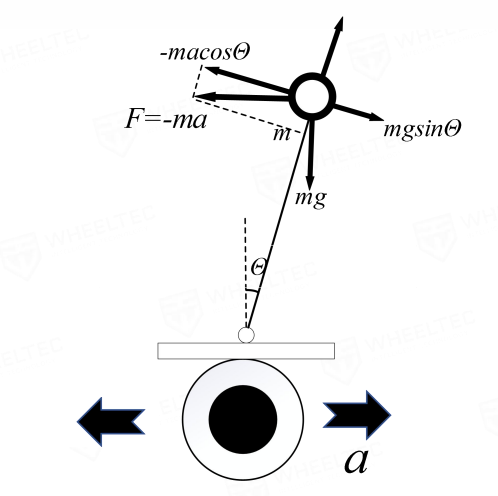
image-20240812181107286

Force analysis

If the force of the inverted pendulum is analyzed with the wheel of the car as the reference system (non-inertial reference system), the ball above the car will be subjected to an inertial force that is opposite to the acceleration of the wheel and proportional to the acceleration.

F=mgsinθ−macosθ≈mgθ−mk1θ
xxxxxxxxxx
θ is very small → sinθ = 0, cosθ = 1; k_1 is the proportionality coefficient between acceleration a and the inclination angle of the car

If k1 > g, the direction of the restoring force is opposite to the direction of displacement.

In order to allow the inverted pendulum to return to the vertical position and stabilize as quickly as possible, it is necessary to increase the damping force; the increased damping force is proportional to the speed of the deflection angle and in the opposite direction, so the formula can be changed to:

F=mgθ−mk1θ−mk2θ′=mgθ−m(k1θ+k2θ′)
xxxxxxxxxx
(k_2 is the proportionality coefficient between damping force and angular velocity, θ' is the differential of the angle (i.e. angular velocity))

According to the inverted pendulum model, the algorithm for controlling the acceleration of the car wheel can be obtained: as long as k1 > g, k2 > 0, the car can be balanced.

a=k1θ+k2θ′

According to the above content, establish the proportional differential negative feedback control of the speed to make the balance car maintain stable conditions through closed-loop control.

xxxxxxxxxx
The MPU6050 measures the tilt angle θ and angular acceleration θ' of the balance car. The PD controller calculates the control signal based on the measured tilt angle and angular acceleration to adjust the speed of the balance car so that the vehicle can remain upright.

PD controller

The main function of differential (D) control in PID control is to reduce the dynamic error and oscillation of the system, and the main function of integral (I) control is to eliminate static error.

Proportional control (P) can quickly reach the set speed, and differential (D) control is equivalent to damping force, which can effectively suppress the vibration of the car model.

Implementation code

​x
int Balance_PD(float Angle,float Gyro)
{
float Angle_bias,Gyro_bias;
int balance;
Angle_bias=Mid_Angle-Angle; //Find the median value of the balance angle and mechanical related
Gyro_bias=0-Gyro;
balance=-Balance_Kp/100*Angle_bias-Gyro_bias*Balance_Kd/100; //Calculate the motor PWM PD control for balance control kp is the P coefficient kd is the D coefficient

return balance;
}

Software code

Balance car PID control basics: 08-13 tutorial only provides one project file.

Product supporting materials source code path: Attachment → Source code summary → 3.PID_Course → 08-13.Balanced_Car_PID
Balance principle of car
Car speed ​​control (PI)

COMPANY

  • About us
  • Team Style
  • Blog

LEARNING & EXPLORATION

  • Tutorials
  • Edge AI hardware
  • Educational robots
  • Embedded intelligent hardware

WHERE TO BUY

  • Yahboom Online Store
  • Amazon
  • Alibaba
  • AliExpress
  • Mercado

TECHNOLOGY SUPPORT

  • Email: support@yahboom.com

BE A DISTRIBUTOR

  • Email: sales@yahboom.com
QR Code

Copyright © 2017-2026 Yahboom. All Rights Reserved.

EN/中文