yahboom
HomeTutorialsProduct
Solution
Blog
Online Store
About Us
EN/中文
Store
520 Motor📖
1.About motor
  • About motor
2.ROS robot control board drive
  • 2.1 Control motor
  • 2.2 Timer captures encoder data
  • 2.3 PID control robot car
  • 2.4 Kinematic Analysis-Mecanum wheel structure
  • 2.5 Kinematic Analysis-Ackerman structure
  • 2.6 Kinematic Analysis-4WD structure
3.STM32 Self-balancing car tutorials
Circuit design
  • 03.P, PI, PD controller theory
  • 01.Overall circuit design
  • 02.STM32 minimum system
  • 03.Serial port circuit design
  • 04.Power circuit design
  • 05.MPU6050 Circuit Design
  • 06.Motor drive circuit design
Environment construction and development
  • 01.MDK-ARM installation
  • 02.STM32CubeIDE installation
  • 03.Common driver installation
  • 04.Download the program
  • 05.MDK-ARM project usage
  • 06.Program simulation
Get started quickly
  • 01.Balancing car assembly
  • 02.Get started quicklyy
  • 03.Balance car interface description
  • 04.Common Problem Analysis
  • 05.Balance Car V2 Library Function Development Manual
Mathematical model
  • Balance car mathematical model
Robot car basic course
  • 01.Car parameter adjustment
  • 02.Ultrasonic obstacle avoidance
  • 03.Ultrasonic follow
  • 04.Bluetooth remote control
  • 05.Load balance
Robot car LQR control
  • Robot car LQR control
Robot car PID control course
  • 01.PID basic concept
  • 02.PID example analysis
  • 04.Position PID
  • 05.Incremental PID
  • 06.Cascade PID
  • 07.Balance principle of car
  • 08.Car upright control (PD)
  • 09.Car speed ​​control (PI)
  • 10.Car steering control (PD)
  • 11.Got angle and angular velocity (DMP algorithm)
  • 12.Got angle and angular velocity (Kalman filter algorithm)
  • 13.Got angle and angular velocity(Complementary filter algorithm)
4.4-channel motor drive module
IIC communication
  • For Arduino
  • For ESP32
  • For Jetson NANO
  • For MSPM0G3507
  • For MSPM0G3519new
  • For PICO2
  • For RDK X5
  • For RPi5
  • For STM32
Introduction and Debug
  • 1.Introduction to 4-channel motor drive board
  • 2.Control command
  • 3.Motor introduction and usage
  • 4.PC host
USART communication
  • For Arduino
  • For ESP32
  • For Jetson NANO
  • For MSPM0G3507
  • For MSPM0G3519new
  • For PICO2
  • For RDK X5
  • For RPi5
  • For STM32
5.2-channel motor drive module
For MSPM0G3507
  • 1.AT8236 drive tutorials
  • 2.TB6612 drive tutorials
For MSPM0G3519
  • 1.AT8236 drive tutorialsnew
  • 2.TB6612 drive tutorialsnew
Download
  • Model File
  • Annex_ROS_robot_board
  • Annex_STM32_balancing_car
  • Annex_4channel_motor_drive
  • Annex_2channel_motor_drive
Download ZIP

Welcome to 520 Motor repository

05.MPU6050 Circuit Design

MPU6050 Circuit Design

MPU6050 Circuit DesignBasic functionsMPU6050 circuit

The attitude sensor integrates a three-axis gyroscope, a three-axis accelerometer, a temperature sensor, and a built-in digital motion processor DMP.

Basic functions

Three-axis gyroscope: can measure the angular velocity around the X, Y, and Z axes, and is used to detect the rotation and turning motion of an object; Three-axis accelerometer: can measure the acceleration in the X, Y, and Z axes, including the acceleration of gravity and the linear acceleration of the object; Temperature sensor: MPU6050 also integrates a temperature sensor to measure the temperature of the environment.

DMP is the motion engine inside the MPU6050, the full name of which is Digital Motion Processor. It directly outputs quaternions, which can reduce the workload of the peripheral microprocessor and avoid cumbersome filtering and data fusion

MPU6050 circuit

The development board presets the MPU6050 installation interface to facilitate users to install and replace modules.

MPU6050 uses IIC for communication, SDA and SCL are pulled up to VCC using pull-up resistors, and the master responds to data updates in real time based on the INT pin.
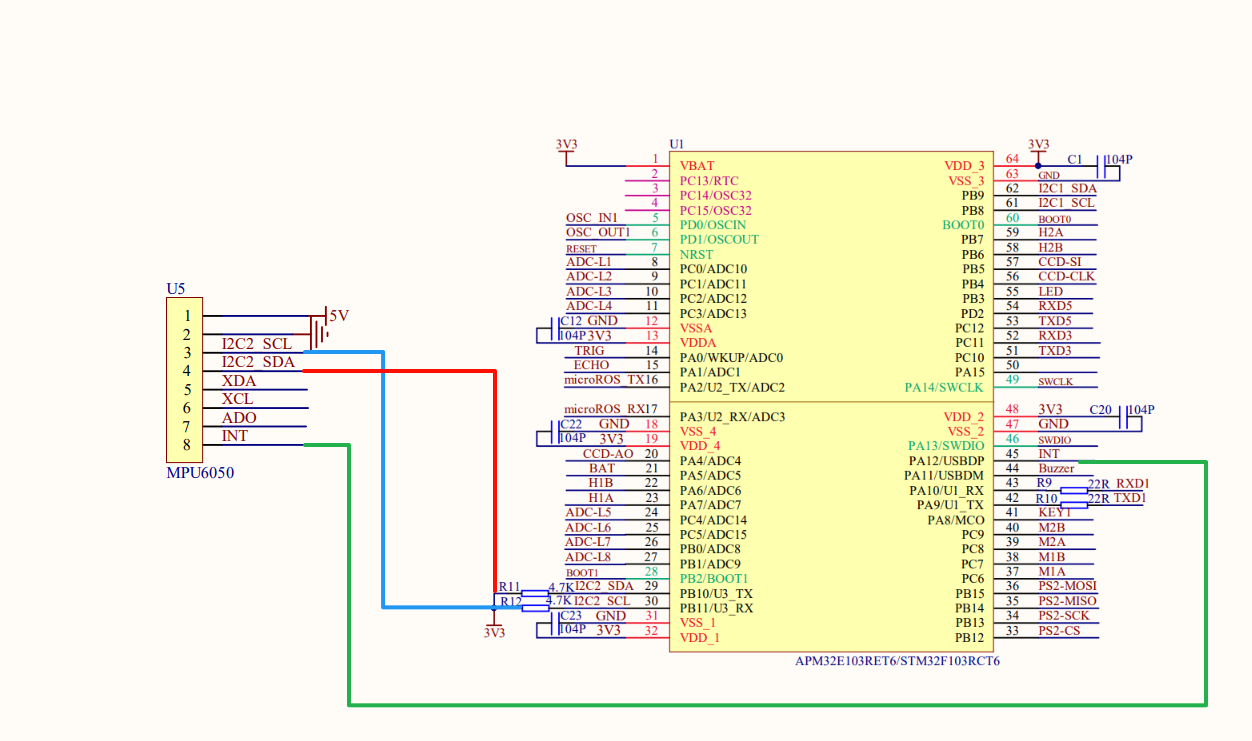
image-20240822182755555

Power circuit design
Motor drive circuit design

COMPANY

  • About us
  • Team Style
  • Blog

LEARNING & EXPLORATION

  • Tutorials
  • Edge AI hardware
  • Educational robots
  • Embedded intelligent hardware

WHERE TO BUY

  • Yahboom Online Store
  • Amazon
  • Alibaba
  • AliExpress
  • Mercado

TECHNOLOGY SUPPORT

  • Email: support@yahboom.com

BE A DISTRIBUTOR

  • Email: sales@yahboom.com
QR Code

Copyright © 2017-2026 Yahboom. All Rights Reserved.

EN/中文