Welcome to ROS-WiFi Camera Module repository
0.Installation of media pipe
If using a virtual machine provided by Yahboom, you can skip this course
0.Mediapipe Install
1. Installation steps for media pipe
- Run the following command on a Linux system with a hub version of ROS2
sudo apt updatepip install numpypip3 install opencv-pythonpip3 install opencv-contrib-pythonpip install mediapipepip3 install dlibIf there is an error indicating that the module cannot be found in Python, you can use this command to install the corresponding third-party module
xxxxxxxxxxpip3 install third-party module
If the package for ROS2 cannot be found, you can use this command to install the corresponding package
xxxxxxxxxxsudo apt install ros-humble-Package
Kind reminder: If you don't understand how to operate, copying Google incorrectly will solve the problem.
- The installation of midiapipe is completed by running the above commands.
2. Building the Mediapipe Function Package
- Note: If the tutorial for viewing the camera in * * 2. ROS2 * * has already created the path "yahboomcar_ws/src", then the information will be savedyahboom_esp32_mediapipe.zipPass to this path and run the following command
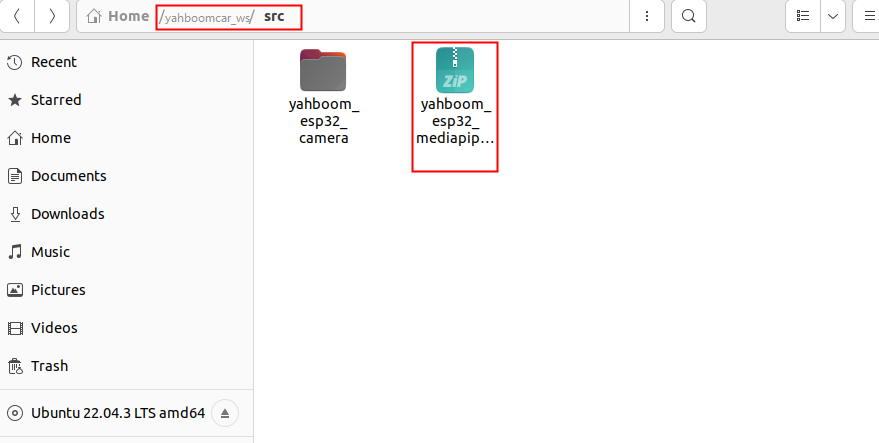
xxxxxxxxxxuzip yahboom_esp32_mediapipe.zipcd ../yahboomcar_ws #Enter this foldercolcon buildOnce the compilation is successful, the mediatipe feature package is successfully loaded into the ROS2 environment, as shown in the figure

- If you are directly reading this tutorial and haven't seen the previous tutorial, please run the following command first
xxxxxxxxxxmkdir -p ~/yahboomcar_ws/srcecho "source ~/yahboomcar_ws/install/setup.bash " >> ~/.bashrcsource ~/.bashrcThen go back to the first step of operation
The yahboom_esp32_camera in the picture is built in the 2. ROS2 View Camera tutorial, and this feature pack and the mediape feature pack do not affect each other.