Welcome to ROS-WiFi Camera Module repository
10. Gesture recognition
Gesture recognition
1、synopsis
MediaPipe is a data stream processing machine learning application development framework developed and open-source by Google. It is a graph based data processing pipeline that enables the construction of various forms of data sources, such as video, frequency, sensor data, and any time series data. MediaPipe is cross platform and can run on embedded platforms (such as Raspberry Pi), mobile devices (iOS and Android), workstations, and servers, while supporting mobile GPU acceleration. MediaPipe provides cross platform, customizable ML solutions for real-time and streaming media. The core framework of MediaPipe is implemented in C++and provides support for languages such as Java and Objective C. The main concepts of MediaPipe include Packets, Streams, Calculators, Graphs, and Subgraphs.
The characteristics of MediaPipe:
- End to end acceleration: Built in fast ML inference and processing that can accelerate even on regular hardware。
- Build once, deploy anytime, anywhere: Unified solution suitable for Android, iOS, desktop/cloud, web, and IoT。
- Instant solution: A cutting-edge ML solution that showcases all features of the framework。
- Free and open source: Framework and solution under Apache 2.0, fully scalable and customizable.
2、Gesture recognition
Gesture recognition based on the right hand design can be accurately recognized when certain conditions are met.Recognisable gestures:[Zero、One、Two、Three、Four、Five、Six、Seven、Eight、Ok、Rock、Thumb_up(点赞)、Thumb_down(拇指向下)、Heart_single(单⼿⽐⼼)].
2.1、activate
- First set the proxy IP for the ROS-wifi image transfer module. For specific steps, please refer to the basic use 1. The use of ROS-wifi image transfer module in micros car tutorial
- The Linux system connects to the ROS-wifi image transfer module, starts docket, and enters the following command to connect the ROS-wifi image transfer module
#Use the provided system for direct inputsh start_Camera_computer.shxxxxxxxxxx#Systems that are not data:docker run -it --rm -v /dev:/dev -v /dev/shm:/dev/shm --privileged --net=host microros/micro-ros-agent:humble udp4 --port 9999 -v4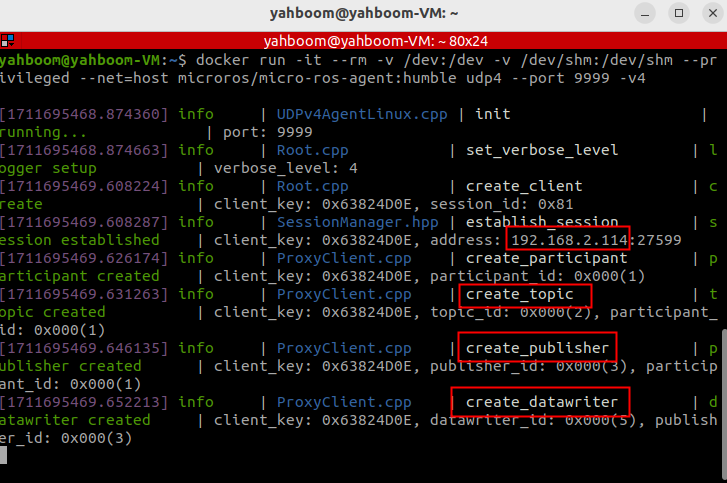 If the preceding information is displayed, the proxy connection is successful
- Open a new terminal and execute the following command
xxxxxxxxxxros2 run yahboom_esp32_mediapipe 11_GestureRecognition
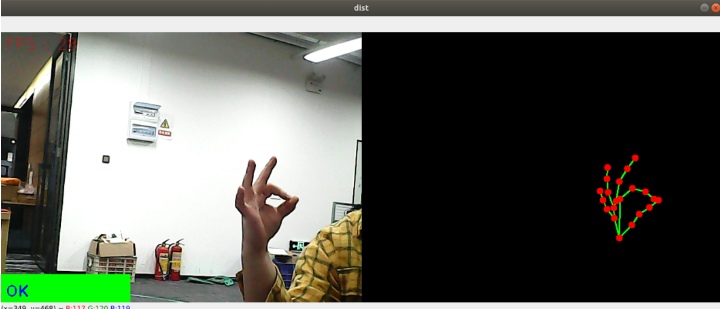
- If the camera picture is upside down, see 3. Camera picture correction (must-read) tutorial, this tutorial is no longer explained
2.2、Code parsing
xxxxxxxxxx~/yahboomcar_ws/src/yahboom_esp32_mediapipe/yahboom_esp32_mediapipe/11_GestureRecognition.py
xclass handDetector: def __init__(self, mode=False, maxHands=2, detectorCon=0.5, trackCon=0.5): self.tipIds = [4, 8, 12, 16, 20] self.mpHand = mp.solutions.hands self.mpDraw = mp.solutions.drawing_utils self.hands = self.mpHand.Hands( static_image_mode=mode, max_num_hands=maxHands, min_detection_confidence=detectorCon, min_tracking_confidence=trackCon ) self.lmList = [] self.lmDrawSpec = mp.solutions.drawing_utils.DrawingSpec(color=(0, 0, 255), thickness=-1, circle_radius=6) self.drawSpec = mp.solutions.drawing_utils.DrawingSpec(color=(0, 255, 0), thickness=2, circle_radius=2)
def get_dist(self, point1, point2): x1, y1 = point1 x2, y2 = point2 return abs(math.sqrt(math.pow(abs(y1 - y2), 2) + math.pow(abs(x1 - x2), 2)))
def calc_angle(self, pt1, pt2, pt3): point1 = self.lmList[pt1][1], self.lmList[pt1][2] point2 = self.lmList[pt2][1], self.lmList[pt2][2] point3 = self.lmList[pt3][1], self.lmList[pt3][2] a = self.get_dist(point1, point2) b = self.get_dist(point2, point3) c = self.get_dist(point1, point3) try: radian = math.acos((math.pow(a, 2) + math.pow(b, 2) - math.pow(c, 2)) / (2 * a * b)) angle = radian / math.pi * 180 except: angle = 0 return abs(angle)
def findHands(self, frame, draw=True): self.lmList = [] img = np.zeros(frame.shape, np.uint8) img_RGB = cv.cvtColor(frame, cv.COLOR_BGR2RGB) self.results = self.hands.process(img_RGB) if self.results.multi_hand_landmarks: for i in range(len(self.results.multi_hand_landmarks)): if draw: self.mpDraw.draw_landmarks(frame, self.results.multi_hand_landmarks[i], self.mpHand.HAND_CONNECTIONS, self.lmDrawSpec, self.drawSpec) self.mpDraw.draw_landmarks(img, self.results.multi_hand_landmarks[i], self.mpHand.HAND_CONNECTIONS, self.lmDrawSpec, self.drawSpec) for id, lm in enumerate(self.results.multi_hand_landmarks[i].landmark): h, w, c = frame.shape cx, cy = int(lm.x * w), int(lm.y * h) self.lmList.append([id, cx, cy]) return frame, img
def frame_combine(slef,frame, src): if len(frame.shape) == 3: frameH, frameW = frame.shape[:2] srcH, srcW = src.shape[:2] dst = np.zeros((max(frameH, srcH), frameW + srcW, 3), np.uint8) dst[:, :frameW] = frame[:, :] dst[:, frameW:] = src[:, :] else: src = cv.cvtColor(src, cv.COLOR_BGR2GRAY) frameH, frameW = frame.shape[:2] imgH, imgW = src.shape[:2] dst = np.zeros((frameH, frameW + imgW), np.uint8) dst[:, :frameW] = frame[:, :] dst[:, frameW:] = src[:, :] return dst
def fingersUp(self): fingers=[] # Thumb if (self.calc_angle(self.tipIds[0], self.tipIds[0] - 1, self.tipIds[0] - 2) > 150.0) and ( self.calc_angle( self.tipIds[0] - 1, self.tipIds[0] - 2, self.tipIds[0] - 3) > 150.0): fingers.append(1) else: fingers.append(0) # 4 finger for id in range(1, 5): if self.lmList[self.tipIds[id]][2] < self.lmList[self.tipIds[id] - 2][2]: fingers.append(1) else: fingers.append(0) return fingers
def get_gesture(self): gesture = "" fingers = self.fingersUp() if self.lmList[self.tipIds[0]][2] > self.lmList[self.tipIds[1]][2] and \ self.lmList[self.tipIds[0]][2] > self.lmList[self.tipIds[2]][2] and \ self.lmList[self.tipIds[0]][2] > self.lmList[self.tipIds[3]][2] and \ self.lmList[self.tipIds[0]][2] > self.lmList[self.tipIds[4]][2] : gesture = "Thumb_down"
elif self.lmList[self.tipIds[0]][2] < self.lmList[self.tipIds[1]][2] and \ self.lmList[self.tipIds[0]][2] < self.lmList[self.tipIds[2]][2] and \ self.lmList[self.tipIds[0]][2] < self.lmList[self.tipIds[3]][2] and \ self.lmList[self.tipIds[0]][2] < self.lmList[self.tipIds[4]][2] and \ self.calc_angle(self.tipIds[1] - 1, self.tipIds[1] - 2, self.tipIds[1] - 3) < 150.0 : gesture = "Thumb_up" if fingers.count(1) == 3 or fingers.count(1) == 4: if fingers[0] == 1 and ( self.get_dist(self.lmList[4][1:], self.lmList[8][1:])<self.get_dist(self.lmList[4][1:], self.lmList[5][1:]) ): gesture = "OK" elif fingers[2] == fingers[3] == 0: gesture = "Rock" elif fingers.count(1) == 3: gesture = "Three" else: gesture = "Four" elif fingers.count(1) == 0: gesture = "Zero" elif fingers.count(1) == 1: gesture = "One" elif fingers.count(1) == 2: if fingers[0] == 1 and fingers[4] == 1: gesture = "Six" elif fingers[0] == 1 and self.calc_angle(4, 5, 8) > 90: gesture = "Eight" elif fingers[0] == fingers[1] == 1 and self.get_dist(self.lmList[4][1:], self.lmList[8][1:]) < 50: gesture = "Heart_single" else: gesture = "Two" elif fingers.count(1)==5:gesture = "Five" if self.get_dist(self.lmList[4][1:], self.lmList[8][1:]) < 60 and \ self.get_dist(self.lmList[4][1:], self.lmList[12][1:]) < 60 and \ self.get_dist(self.lmList[4][1:], self.lmList[16][1:]) < 60 and \ self.get_dist(self.lmList[4][1:], self.lmList[20][1:]) < 60 : gesture = "Seven" if self.lmList[self.tipIds[0]][2] < self.lmList[self.tipIds[1]][2] and \ self.lmList[self.tipIds[0]][2] < self.lmList[self.tipIds[2]][2] and \ self.lmList[self.tipIds[0]][2] < self.lmList[self.tipIds[3]][2] and \ self.lmList[self.tipIds[0]][2] < self.lmList[self.tipIds[4]][2] and \ self.calc_angle(self.tipIds[1] - 1, self.tipIds[1] - 2, self.tipIds[1] - 3) > 150.0 : gesture = "Eight" return gesture
class MY_Picture(Node): def __init__(self, name): super().__init__(name) self.bridge = CvBridge() self.sub_img = self.create_subscription( CompressedImage, '/espRos/esp32camera', self.handleTopic, 1)
self.hand_detector = handDetector(detectorCon=0.75)
def handleTopic(self, msg): start = time.time() frame = self.bridge.compressed_imgmsg_to_cv2(msg) frame = cv.resize(frame, (640, 480))
cv.waitKey(1) frame, img = self.hand_detector.findHands(frame, draw=False)
if len(self.hand_detector.lmList) != 0: totalFingers = self.hand_detector.get_gesture() cv.rectangle(frame, (0, 430), (230, 480), (0, 255, 0), cv.FILLED) cv.putText(frame, str(totalFingers), (10, 470), cv.FONT_HERSHEY_PLAIN, 2, (255, 0, 0), 2) end = time.time() fps = 1 / (end - start) text = "FPS : " + str(int(fps)) cv.putText(frame, text, (20, 30), cv.FONT_HERSHEY_SIMPLEX, 0.9, (0, 0, 255), 1) dist = self.hand_detector.frame_combine(frame, img) cv.imshow('dist', dist)
'''Zero One Two Three Four Five Six Seven EightOk: OKRock: rockThumb_up : Thumb upThumb_down: Thumb downHeart_single: Compare hearts with one hand'''
def main(): print("start it") rclpy.init() esp_img = MY_Picture("My_Picture") try: rclpy.spin(esp_img) except KeyboardInterrupt: pass finally: esp_img.destroy_node() rclpy.shutdown()The main process of the program: subscribe to the image from esp32, through MediaPipe to do the relevant recognition, and then through opencv to display the processed image.