Welcome to ROS-WiFi Camera Module repository
2. Geometric transformation
Open Source CV Geometric transformation
1、OpenCV image scaling
1.1 、 Implement image scaling functions in OpenCV
cv2.resize(InputArray src, OutputArray dst, Size, fx, fy, interpolation)
Parameter meanings:
InputArray src:Input image
OutputArray ds:Output image
Size:Output image size
fx,fy:Scale factor along the x-axis and y-axis
interpolation:Insertion method, can be selected as INTERNEAREST (nearest neighbor interpolation), INTERLINEAR (bilinear interpolation (default setting)), INTERAREA (resampling using pixel region relationships), INTER-CUBIC (bicubic interpolation for 4x4 pixel neighborhoods), INTER-LANCZOS4 (Lanczos interpolation for 8x8 pixel neighborhoods)
Attention needs to be paid:
1.The output size format is (width, height)
2.The default interpolation method is bilinear interpolation
1.2、Code and actual effect display
cd ~/yahboomcar_ws/src/yahboom_esp32ai_car/scripts/opencvpython3 2_1.py
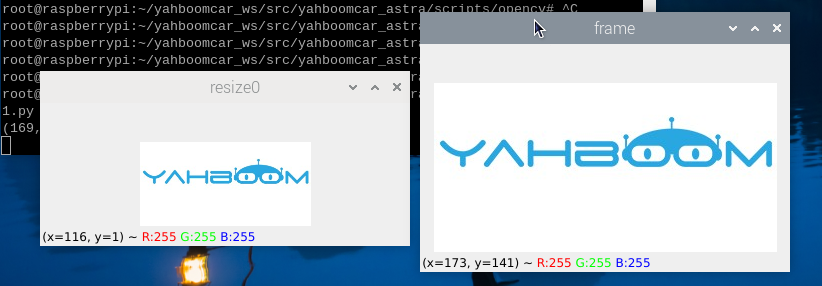
xxxxxxxxxximport cv2if __name__ == '__main__': img = cv2.imread('yahboom.jpg') print(img.shape) x, y = img.shape[0:2] img_test1 = cv2.resize(img, (int(y / 2), int(x / 2))) while True : cv2.imshow("frame",img) cv2.imshow('resize0', img_test1) action = cv2.waitKey(10) & 0xFF if action == ord('q') or action == 113: break img.release() cv2.destroyAllWindows()After running the program, the effect image
2、OpenCV Image cropping
2.1、Image clipping
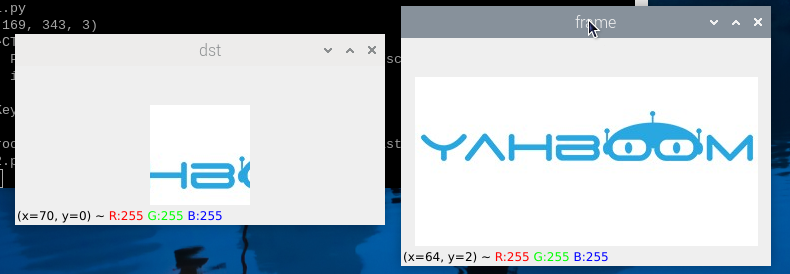
First, read the image, and then retrieve the pixel area from the array. Select the shape area in the following codeX:300-500 Y:500-700,Please note that the image size is 800 * 800, so the selected area should not exceed this resolution.
2.2、Code and actual effect display
Running programs
xxxxxxxxxxcd ~/yahboomcar_ws/src/yahboom_esp32ai_car/scripts/opencvpython3 2_2.py
xxxxxxxxxximport cv2if __name__ == '__main__':img = cv2.imread('yahboom.jpg')dst = img[0:100,100:200]while True :cv2.imshow("frame",img)cv2.imshow('dst', dst)action = cv2.waitKey(10) & 0xFFif action == ord('q') or action == 113:breakimg.release()cv2.destroyAllWindows()
After running the program, the effect image,
3、OpenCV Image Pan
3.1、In OpenCV, the method used to achieve image translation through affine transformation is
cv2.warpAffine(src, M, dsize[,dst[, flags[, borderMode[, borderValue]]]])
Parameter meanings:
src - input image 。
M - Transformation matrix。
dsize - Output image size。
flags - Combination of interpolation methods(int)
borderMode - Boundary Pixel Mode(int)
borderValue - (Key!) Boundary filling values; By default, it is 0.
Among the above parameters, M is the affine transformation matrix, which generally reflects the relationship between translation or rotation, and is a 2x3 transformation matrix of the InputArray type. In daily affine transformation, only setting the first three parameters, such as cv2. warpAffine (img, M, (rows, cols)), can achieve basic affine transformation effects.
3.2、How to obtain the transformation matrix M? Here is an example to illustrate,
Transforming the original image src into the target image dst through the transformation matrix M:
dst(x, y) = src(M11x + M12y+M13, M21x+M22y+M23)
If the original image src is moved 200 pixels to the right and 100 pixels to the down, then its corresponding relationship is:
dst(x, y) = src(x+200, y+100)
Complete the above expression, i.e:
dst(x, y) = src(1·x + 0·y + 200, 0·x + 1·y + 100)
Based on the above expression, it can be determined that the values of each element in the corresponding transformation matrix M are:
M11=1
M12=0
M13=200
M21=0
M22=1
M23=100
Substitute the above values into the transformation matrix M to obtain :
M = [ ]
3.3、Code and actual effect display
Running programs
xxxxxxxxxxcd ~/yahboomcar_ws/src/yahboom_esp32ai_car/scripts/opencvpython3 2_3.py
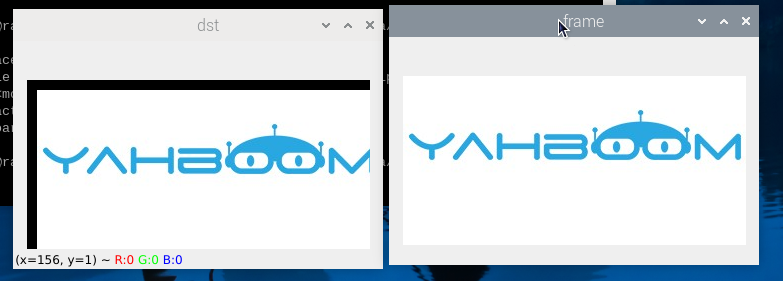
xxxxxxxxxximport cv2import numpy as npif __name__ == '__main__':img = cv2.imread('yahboom.jpg')imgInfo = img.shapeheight = imgInfo[0]width = imgInfo[1]matShift = np.float32([[1,0,10],[0,1,10]])# 2*3dst = cv2.warpAffine(img, matShift, (width,height))while True :cv2.imshow("frame",img)cv2.imshow('dst', dst)action = cv2.waitKey(10) & 0xFFif action == ord('q') or action == 113:breakimg.release()cv2.destroyAllWindows()
After running the program, the effect image,
4、OpenCV image mirroring
4.1、The principle of image mirroring
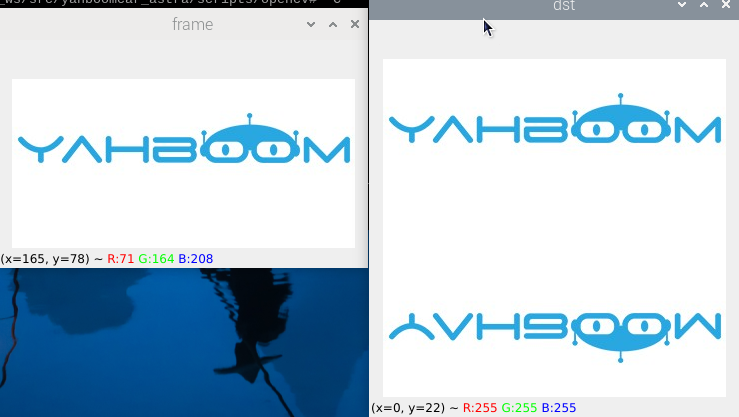
The mirror transformation of images can be divided into two types: horizontal mirror and vertical mirror. Horizontal mirroring is based on the vertical centerline of the image, swapping the pixels of the image, that is, swapping the left and right halves of the image. Vertical mirroring is based on the horizontal centerline of the image, swapping the upper and lower parts of the image.
Transformation principle:
Set the width of the image to width and the length to height. (x, y) represents the transformed coordinates, and (x0, y0) represents the coordinates of the original image
Horizontal Mirror Transformation
Forward mapping:x=width-x0-1,y=y0
Backward mapping:x0=width-x-1,y0=y
Vertical mirror transformation
Upward mapping: x=x0,y=height-y0-1
Downward mapping: x0=x,y0=height-y-1
Summary:
During the horizontal mirror transformation, the entire image was traversed and each pixel was processed based on the mapping relationship. In fact, horizontal mirror transformation is the process of moving the columns of image coordinates to the right and the columns on the right to the left, which can be transformed in columns. The same applies to vertical mirror transformations, which can be transformed in behavioral units.
4.2、Taking vertical transformation as an example, let's take a look at how Python is written
xxxxxxxxxxcd ~/yahboomcar_ws/src/yahboom_esp32ai_car/scripts/opencvpython3 2_4.py
xxxxxxxxxximport cv2import numpy as npif __name__ == '__main__': img = cv2.imread('yahboom.jpg') imgInfo = img.shape height = imgInfo[0] width = imgInfo[1] deep = imgInfo[2] newImgInfo = (height*2,width,deep) dst = np.zeros(newImgInfo,np.uint8)#uint8 for i in range(0,height): for j in range(0,width): dst[i,j] = img[i,j] dst[height*2-i-1,j] = img[i,j] while True : cv2.imshow("frame",img) cv2.imshow('dst', dst) action = cv2.waitKey(10) & 0xFF if action == ord('q') or action == 113: break img.release() cv2.destroyAllWindows()After running the program, the effect image,