yahboom
HomeLearn
Solution
Blog
Online Store
About Us
EN/中文
Tiny:bit Pro📖
0.First Trial and Assemble
  • 1.0 Installation Video
  • 1.1 First Trial
1.Preparation before programming
  • 1.Online programming
  • 2.Offline programming
  • 3.Python Programming
  • 4.Import Tiny:bit library
  • 5.Tiny:bit MicroPython API
  • 6.How to download program
2.Lighting with Tiny bit
  • 3.1 LED light
  • 3.2 RGB Searching light
  • 3.3 RGB light exchange lighting
  • 3.4 LED light exchange lighting
  • 3.5 Breathing light
3.Singing withTiny bit
  • 4.1 Playing internal music
  • 4.2 Play Merry Christma with lights
4.Running with Tiny bit
  • 5.1 Advance
  • 5.2 CarRun
  • 5.3 Control speed
  • 5.4 Dancer
  • 5.5 Route plan
5.Playing with Tiny bit
  • 6.1 Measuring worker
  • 6.2 Distance control light
  • 6.3 Ultrasonic obstacle avoidanc
  • 6.4 Magic hand
  • 6.5 Radar detector
  • 6.6 Playing black paino
  • 6.7 Tracking
  • 6.8 Voice control light
  • 6.9 Coward
  • 6.10 Musical rhythm
  • 6.11 Listener
  • 6.12 Wobble when touch
  • 6.13 Spinning top
  • 6.14 Frog beating
  • 6.15 Adventure car
6.Interacting with Tiny bit
  • 7.1 IR Control
  • 7.2 Android bluetooth APP control
  • 7.3 iOS bluetooth APP control
  • 7.4 Handle remote control
7.MicroPython course
  • 1.Hello,World
  • 2.Display built-in image
  • 3.Display custom image
  • 4.Display custom animation
  • 5.Button game
  • 6.Play built-in music
  • 7.Car Headlights
  • 8.Drive Motor
  • 9.Tracking
  • 10.Sound sensor
  • 11.Ultrasonic
  • 12.IR control
  • 13.LED light
8.AI vision course
1. Preparation
  • 3.12.1 K210 Identification Information and Adjust
  • 1. K210 module download code
  • 1.2 Parsing K210 protocol data
  • 1.3 microbit connection use
2. Basic course
  • 2.1 Color recognition
  • 2.2 Barcode recognition
  • 2.3 QR code recognition
  • 2.4 Machine code recognition
  • 2.5 Object recognition
  • 2.6 Learning and classification
  • 2.7 Mask warning
  • 2.8 Facial recognition
  • 2.9 Handwriting digit recognition
3. Tinybit course
  • 3.1 Color response
  • 3.2 Barcode recognition
  • 3.3 QR code recognition
  • 3.4 Object detection
  • 3.5 Signposting action
  • 3.6 Mask Testing
  • 3.7 Face Detection
  • 3.8 Handwritten digital control
  • 3.9 Color patrol
  • 3.10 Machine code following
  • 3.11 Color tracking
  • 3.12.2 Autopilot
9.Charging and Battery
  • Charging and Battery
Download
  • APP(Android/iOS)
  • Code
  • Manual
  • Hardware Info
  • APP communication protocol
  • RoadSign File
  • Bluetooth Remote Control with ultrasonic V2.hex
  • Bluetooth Remote ControlV1.5.hex
  • Bluetooth Remote Control with ultrasonicV1.5.hex
  • IR control V1.5.hex
  • IR control V1.5.hex
  • IR control V2.hex
  • Tiny:bit V1 MicroPython Library
  • Tiny:bit V2 MicroPython Library
  • Tiny:bit MicroPython API
Download ZIP

Welcome to Tiny:bit Pro repository

4.Import Tiny:bit library

4.Import Tiny:bit library


How to import Yahboom Tiny:bit Micropython library and programming

1. You need to connect BBC micro:bit board to your computer. You will see a letter drive, as shown below:
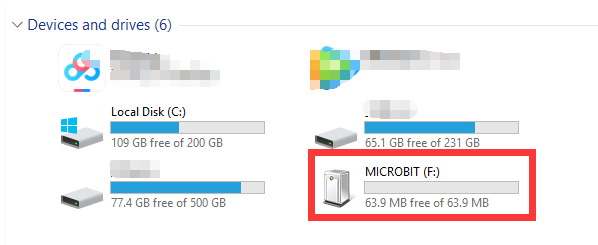
image.png 

2. You need to send “tinybit_micropython.hex” we provided to micro:bit board. As shown below:
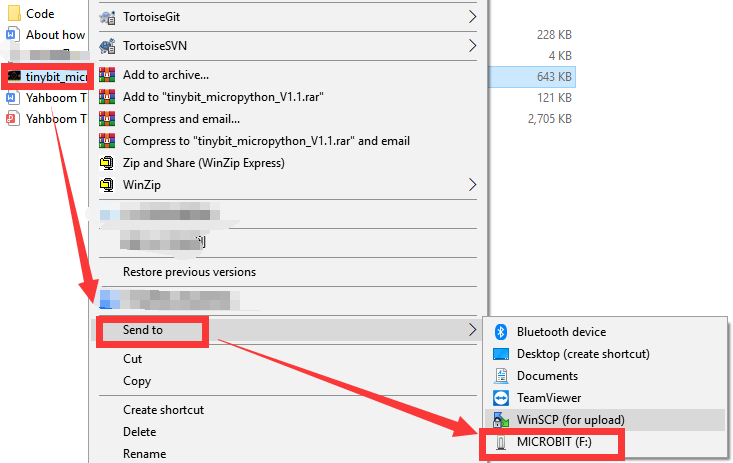
image.png 

Enter the micropython editor and click 【REPL】 in the menu bar. If the prompt "MicroPython for Tinybit Modified by Yahboom Team" appears in the lower left corner of the interface, as shown below. It proves that you have successfully imported our library file.
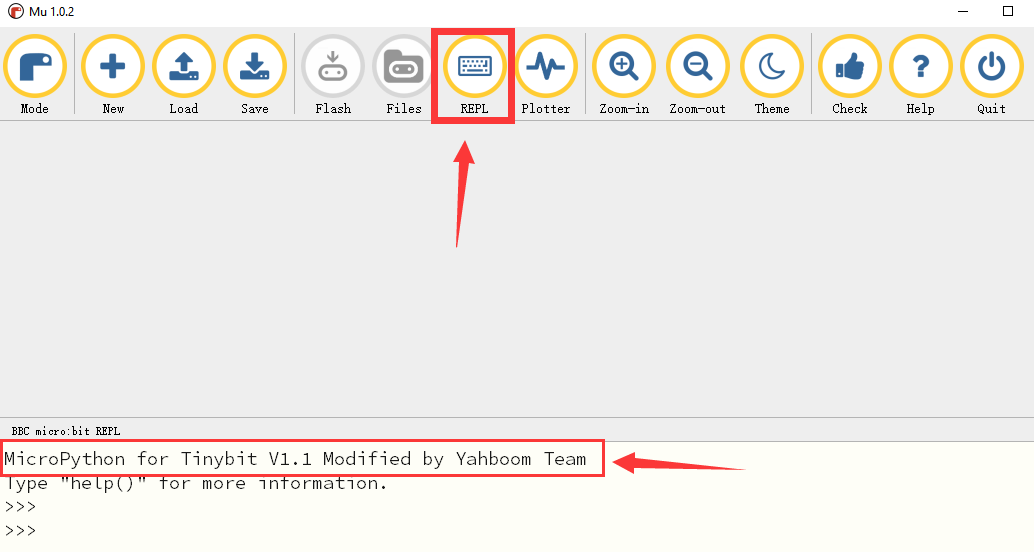
image.png 

3. Next, you can start programming with Micropython, as shown below:
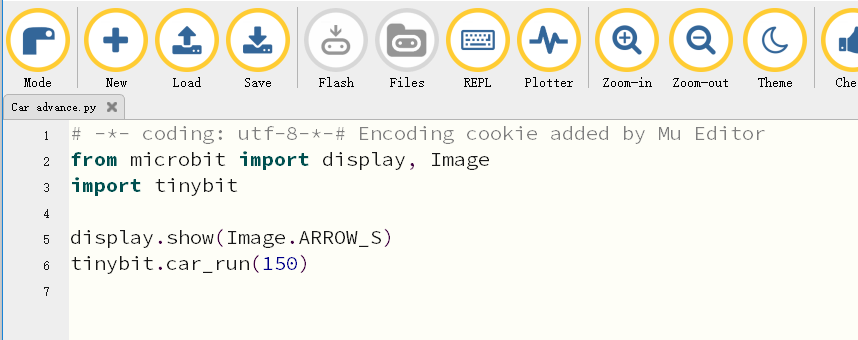
image.png

4. You need to close【REPL】 before clicking 【Flash】 to download the program.
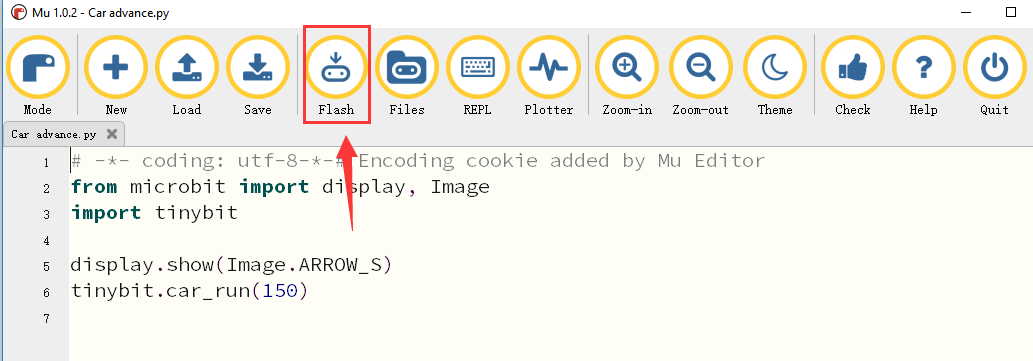
image.png 

!Note:

If you downloaded other programs on your BBC micro: bit board, except tiny:bit micropython program.

Before you next use Micropython to program Building:bit, you need to send “tinybit_micropython.hex” to BBC micro:bit again.

If you always use the same BBC micro: bit for Building:bit Micropython programming, you didn't need to send the “tinybit_micropython.hex” file to the micro: bit multiple times.


Python Programming
Tiny:bit MicroPython API

COMPANY

  • About us
  • Team Style
  • Blog

LEARNING & EXPLORATION

  • Tutorials
  • Edge AI hardware
  • Educational robots
  • Embedded intelligent hardware

WHERE TO BUY

  • Yahboom Online Store
  • Amazon
  • Alibaba
  • AliExpress
  • Mercado

TECHNOLOGY SUPPORT

  • Email: support@yahboom.com

BE A DISTRIBUTOR

  • Email: sales@yahboom.com
QR Code
QR Code

Copyright © 2017-2026 Yahboom. All Rights Reserved.

EN/中文