Welcome to AI Voice Interaction Module repository
2. Modify the wake-up word and command word
Modify the wake-up word and command word
1. Notes
- Please modify the wake-up word in a quiet scene. A noisy environment will affect the recognition accuracy of the voice interaction module.
- Please modify the command word in a quiet scene. A noisy environment will affect the recognition accuracy of the voice interaction module.
- When speaking the word, the voice should be loud and the speed should not be too fast. It is recommended to keep within 5 meters of the module.
2. Device connection
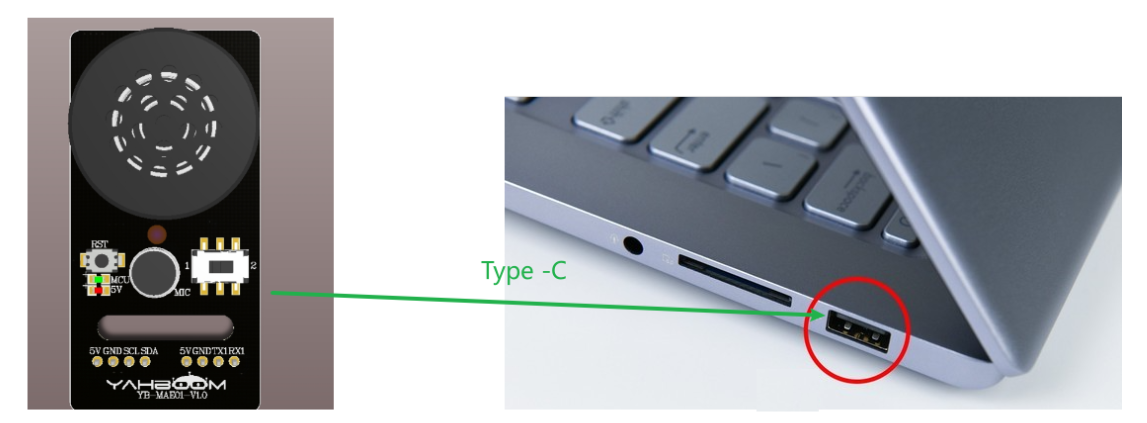
3. Modify the wake-up word
- Say "Hi, Yahboom" to the voice interaction module to wake up the voice interaction module. When the module replies "I am here", it indicates that it is currently in a recognizable state
- Then say "study wake" to the voice interaction module. The voice interaction module responds "please follow the prompts to study wake up words in a quiet environment", and you can enter the wake-up word learning function state
- Then say the wake-up word you want to set to the voice interaction module. The wake-up word should be as short as possible. Here, we take "Hi, Yahboom" as an example
- When the voice interaction module recognizes successfully, it will broadcast "Learning success", indicating that the wake-up word has been successfully modified. At this time, we can use the "Hi, Yahboom" entry to wake up the module
Note: The wake-up word "Hi, Yahboom" in the factory firmware is a basic wake-up word and cannot be modified or deleted by voice. Only one wake-up word that the user modifies by voice can exist at the same time, and it must exist together with the basic wake-up word
4. Modify the command word
The factory firmware of the voice interaction module presets 8 command words that can be modified by voice, as shown below:
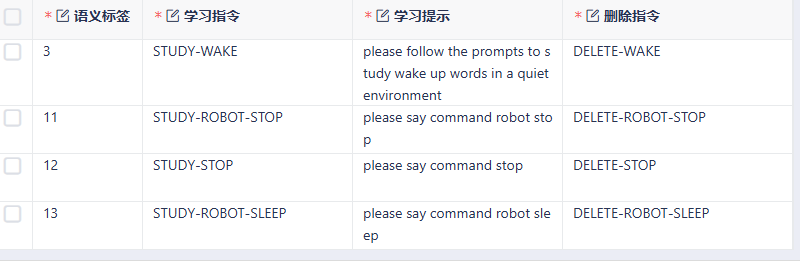
The usage example is as follows:
- Say "Hi, Yahboom" to the voice interaction module to wake up the voice interaction module. When the module replies "I am here", it indicates that it is currently in a recognizable state
- Then say "study robot stop" to the voice interaction module, and the voice interaction module responds "Please say command robot stop", and you can enter the command word learning function state
- Then tell the voice interaction module the command words you want to set. The command words should be as short as possible. Here, set the "Stop ahead" position.
- When the voice interaction module recognizes successfully, it will broadcast "Learning successful", indicating that the command word has been successfully modified. At this time, we can use the "Stop ahead" entry to achieve the same effect as the "Stop" command word.
- If you need to delete the "Stop ahead" entry, just say "Delete robot stop", and when you reply "Delete successful", the entry can be deleted (Here only "Stop ahead" will be deleted, not "Stop").
Note: The command words in the factory firmware are basic command words and cannot be modified or deleted by voice. The command words modified by the user using voice can only exist at the same time, and they coexist with the basic command words