Welcome to AI Voice Interaction Module repository
3. Voice control Autopilot
3. Voice control Autopilot
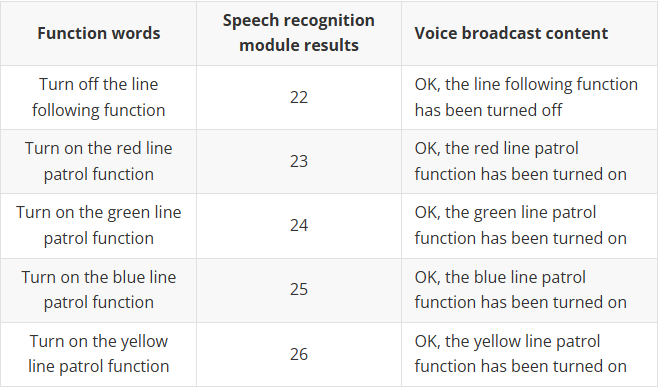
This course needs to be combined with the Rosmaster-X3 car hardware, and only code analysis is done here. First, let's look at the built-in voice commands,
1. Program startup
Terminal input,
xxxxxxxxxx#Start chassis controlroslaunch yahboomcar_voice_ctrl voice_ctrl_followline.launch#OpenLine patrol functionpython3 ~/driver_ws/src/yahboomcar_voice_ctrl/scripts/voice_Ctrl_follow_line.pyTake the yellow line patrol as an example, put ROSMASTER on the yellow line, adjust the camera position, and bend the camera down. After the program starts, call ROSMASTER "Hi Yahboom" to wake up the module. When it says "Yes", it means the module is awakened. Then you can say "Patrol the yellow line" to it, and ROSMASTER will say "OK, the patrol function has been turned on".
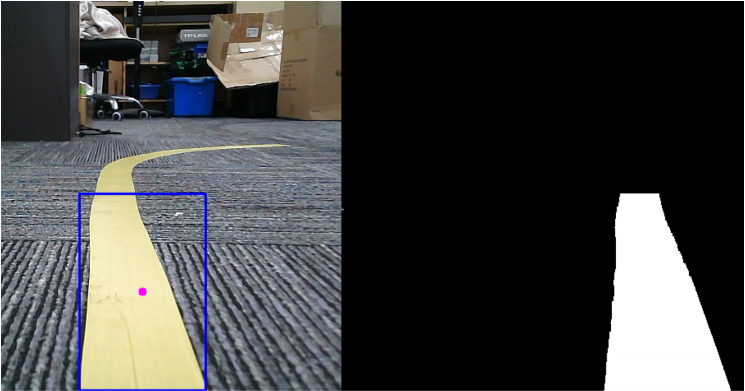
Then, we release the control of ROSMASTER by pressing the R2 button of the handle, and ROSMASTER starts patrolling the yellow line. If there is no remote control, you can also enter the following command through the terminal,
xxxxxxxxxxrostopic pub /JoyState std_msgs/Bool False
If you want to cancel the patrol function, say "Turn off patrol" to ROSMASTER, ROSMASTER stops, and the voice will say "OK, the patrol function has been turned off".
2. Core code
Code path: ~/driver_ws/src/yahboomcar_voice_ctrl/scripts/voice_Ctrl_follow_line.py
xxxxxxxxxx#导入语音识别库和创建语音识别对象 Import the speech recognition library and create a speech recognition objectfrom Speech_Lib import Speechself.spe = Speech()#根据读取语音识别到的内容,修改hsv_range的值(process函数),然后获取circle的值 According to the content of the speech recognition, modify the value of hsv_range (process function), and then get the value of circleself.command_result = self.spe.speech_read()self.spe.void_write(self.command_result)if self.command_result == 23 : self.model = "color_follow_line" print("red follow line") self.hsv_range = [(0, 106, 175), (180, 255, 255)]elif self.command_result == 24 : self.model = "color_follow_line" print("green follow line") self.hsv_range = [(55, 105, 136), (95, 255, 255)]elif self.command_result == 25 : self.model = "color_follow_line" print("bule follow line") self.hsv_range = [(55, 134, 218), (125, 253, 255)]elif self.command_result == 26 : self.model = "color_follow_line" print("yellow follow line") self.hsv_range = [(17, 55, 187), (81, 255, 255)]rgb_img, binary, self.circle = self.color.line_follow(rgb_img, self.hsv_range)#根据获取到的self.circle的值,作为实际参数传入execute,数据处理,判断是否避障,最后发布速度话题数据 According to the obtained value of self.circle, it is passed as the actual parameter to execute, data processing, whether to avoid obstacles, and finally publishing the speed topic dataif color_radius == 0: self.ros_ctrl.pub_cmdVel.publish(Twist())else: twist = Twist() b = Bool() [z_Pid, _] = self.PID_controller.update([(point_x - 320)/16, 0]) if self.img_flip == True: twist.angular.z = +z_Pid else: twist.angular.z = -z_Pid twist.linear.x = self.linear if self.warning > 10: rospy.loginfo("Obstacles ahead !!!") self.ros_ctrl.pub_cmdVel.publish(Twist()) self.Buzzer_state = True b.data = True self.pub_Buzzer.publish(b) else: if self.Buzzer_state == True: b.data = False for i in range(3): self.pub_Buzzer.publish(b) self.Buzzer_state = False self.ros_ctrl.pub_cmdVel.publish(twist)