Welcome to AI Voice Interaction Module repository
4. Voice control color tracking
4. Voice control color tracking
This course requires the use of Rosmaster-X3 car hardware, so only code analysis is done here. First, let's look at the built-in voice commands,
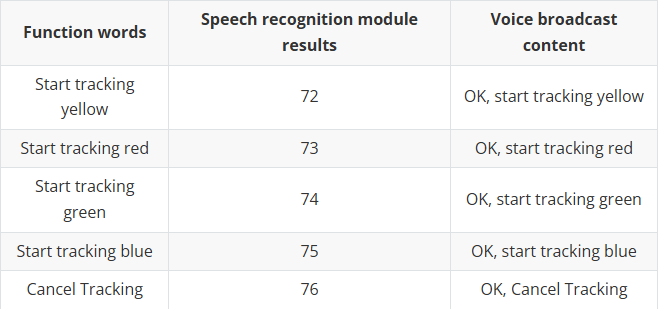
1. Program startup
Terminal input,
xxxxxxxxxxroslaunch yahboomcar_voice_ctrl voice_ctrl_colorTracker.launchpython ~/driver_ws/src/yahboomcar_voice_ctrl/scripts/voice_Ctrl_color_tracker.py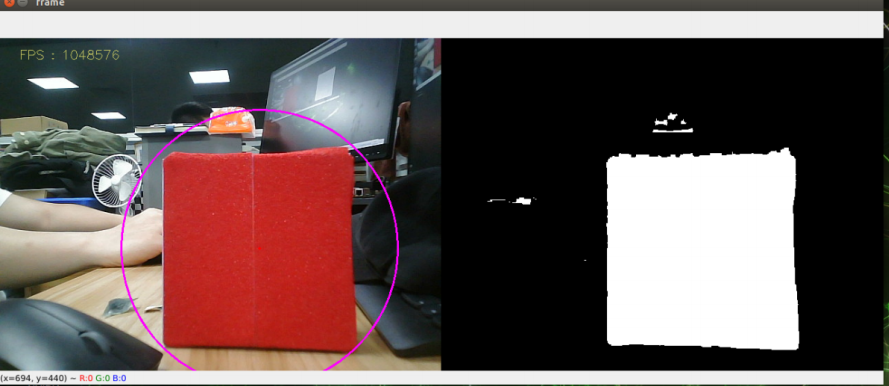
After the program is started, call "Hi Yahboom" to ROSMASTER to wake up the module. When it broadcasts "Yes", it means the module is awakened. Take tracking red as an example. Next, you can say "start tracking red" to it, and ROSMASTER will broadcast "OK, start tracking red". Then, we release the controller's control over ROSMASTER by pressing the R2 button on the controller, and ROSMASTER starts tracking red. If there is no remote control, you can also enter the following command through the terminal,
xxxxxxxxxxrostopic pub /JoyState std_msgs/Bool False
2. Core code
Code path:~/driver_ws/src/yahboomcar_voice_ctrl/yahboomcar_voice_ctrl/Voice_Ctrl_colorHSV.py
Mainly parse voice commands and load the value of hsv_range
xxxxxxxxxx#判断语音指令,加载对应的hsv_range值 Determine the voice command and load the corresponding hsv_range valuecommand_result = self.spe.speech_read()self.spe.void_write(command_result)if command_result == 73 : self.model = "color_follow_line" print("tracker red") self.hsv_range = [(20, 215, 111), (180, 253, 255)] self.dyn_update = True elif command_result == 74 : self.model = "color_follow_line" print("tracker green") self.hsv_range = [(44, 138, 91), (84, 255, 255)] self.dyn_update = True#根据hsv_range的值,计算圆心坐标 According to the value of hsv_range, calculate the coordinates of the center of the circlergb_img, binary, self.circle = self.color.object_follow(rgb_img,self.hsv_range)#根据圆心的坐标值,发布圆心坐标的值 According to the coordinate value of the center of the circle, publish the value of the center coordinateif self.circle[2] != 0: threading.Thread(target=self.execute, args=(self.circle[0], self.circle[1],self.circle[2])).start()def execute(self, x, y, z): position = Position() position.angleX = x position.angleY = y position.distance = z self.pub_position.publish(position)#有了圆心坐标位置,加上深度相机获取到距离信息,根据PID计算出速度,这部分参考代码,这里不进行解析 With the coordinate position of the center of the circle, plus the distance information obtained by the depth camera, the speed is calculated according to the PID. This part of the reference code is not analyzed here.