Welcome to AI Voice Interaction Module repository
4. Voice control color tracking
4. Voice control of car color tracking
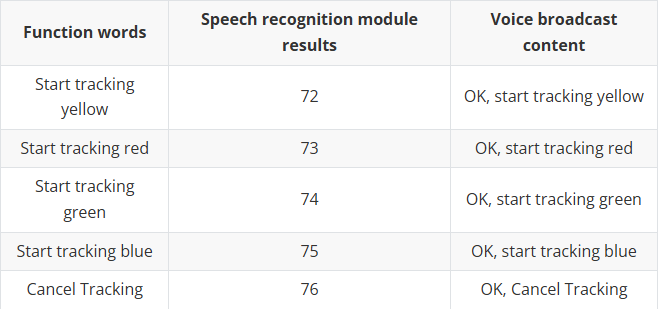
This course requires the combination of Rosmaster-X3 car hardware, and only code analysis is done here. First, let's look at the built-in voice commands,
1. Program startup
Terminal input,
#Start the handle control noderos2 run yahboomcar_ctrl yahboom_joy_X3ros2 run joy joy_node#Start the voice control color tracking noderos2 run yahboomcar_voice_ctrl Voice_Ctrl_colorHSVros2 run yahboomcar_voice_ctrl Voice_Ctrl_colorTracker#Start the car chassisros2 run yahboomcar_voice_ctrl Voice_Ctrl_Mcnamu_driver_X3#Start the depth camera and get the depth imageros2 launch astra_camera astra.launch.xml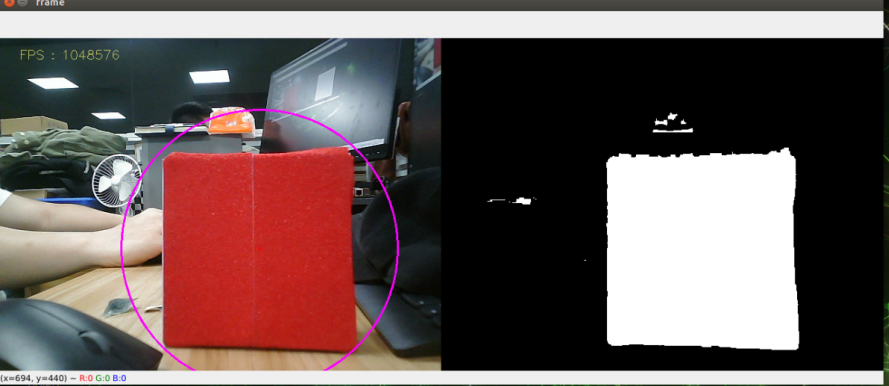
Take tracking red as an example. After waking up the module, tell it "start tracking red" and press the R2 button on the remote control. After receiving the command, the program starts processing the image, then calculates the center coordinates of the red object and publishes the center coordinates of the object; combines the depth information provided by the depth camera, calculates the speed, and finally publishes it to drive the car.
2. Core code
Code path: ~/driver_ws/src/yahboomcar_voice_ctrl/yahboomcar_voice_ctrl/Voice_Ctrl_colorHSV.py
This part mainly parses voice commands and image processing, and finally publishes the center coordinates.
xxxxxxxxxx#定义一个发布者,发布检测物体的中心坐标 Define a publisher to publish the center coordinates of the detected objectself.pub_position = self.create_publisher(Position,"/Current_point", 10)#导入语音驱动库 Import the voice driver libraryfrom Speech_Lib import Speech#创建语音控制对象 Creating a Voice Control Objectself.spe = Speech()#以下是获取指令,然后对识别结果进行判断,加载相对应的HSV的值 The following is to obtain the instruction, then judge the recognition result and load the corresponding HSV valuecommand_result = self.spe.speech_read()self.spe.void_write(command_result)if command_result == 73 :self.model = "color_follow_line"print("tracker red")self.hsv_range = [(0, 175, 149), (180, 253, 255)]#处理图像,计算检测物体的中心坐标,进入execute函数,发布中心坐标 Process the image, calculate the center coordinates of the detected object, enter the execute function, and publish the center coordinatesrgb_img, binary, self.circle = self.color.object_follow(rgb_img, self.hsv_range)if self.circle[2] != 0: threading.Thread( target=self.execute, args=(self.circle[0], self.circle[1],self.circle[2])).start()if self.point_pose[0] != 0 and self.point_pose[1] != 0: threading.Thread( target=self.execute, args=(self.point_pose[0],self.point_pose[1], self.point_pose[2])).start()Code path: ~/driver_ws/src/yahboomcar_voice_ctrl/yahboomcar_voice_ctrl/Voice_Ctrl_colorTracker.py
This part receives the topic data and depth data of the center coordinates, then calculates the speed and publishes it to the chassis.
xxxxxxxxxx#定义一个订阅者,订阅深度信息 Define a subscriber to subscribe to depth informationself.sub_depth = self.create_subscription(Image,"/camera/depth/image_raw",self.depth_img_Callback, 1) #定义一个订阅者,订阅中心坐标信息 Define a subscriber to subscribe to the center coordinate informationself.sub_position =self.create_subscription(Position,"/Current_point",self.positionCallback,1)#回调者函数 Callback functiondef positionCallback(self, msg)#获取中心坐标值 Get the center coordinatesdef depth_img_Callback(self, msg) #获取深度信息 Get depth information#传入中心坐标的X值以及深度信息,计算出速度发布给底盘 The X value of the center coordinate and the depth information are passed in, and the speed is calculated and released to the chassis.def execute(self, point_x, dist)