yahboom
HomeLearn
Solution
Blog
Online Store
About Us
EN/中文
AI Voice Interaction Module📖
1. Module information
  • 0. Get started quickly
  • 1. Introduction to Voice Interaction Module
  • 2. Modify the wake-up word and command word
  • 3. Customized protocol entry creation
2. Firmware burning
  • Module firmware burning method
3. Multi-master communication
IIC communication
  • For STM32
  • For Arduino
  • For MSPM0G3507
  • For MSPM0G3519new
  • For ESP32
  • For PICO
  • For RPi5
  • For Jetson
  • For RDK X5
USART communication
  • For STM32
  • For Arduino
  • For MSPM0G3507
  • For MSPM0G3519new
  • For ESP32
  • For PICO2
  • For RPi5
  • For Jetson
  • For RDK X5
4. PC serial port communication
  • PC serial port communication
5. ROS voice interaction
ROS1
  • 1. Environment Construction
  • 2. Voice control car movement
  • 3. Voice control Autopilot
  • 4. Voice control color tracking
  • 5. Voice control multi-point navigation
ROS2
  • 1. Environment Construction
  • 2. Voice control car movement
  • 3. Voice control Autopilot
  • 4. Voice control color tracking
  • 5. Voice control multi-point navigation
Download
  • Code
  • Python driver library
  • Firmware
  • Communication Protocol
  • Software Tools
  • Voice chip datasheet
  • 3D Model File
Download ZIP

Welcome to AI Voice Interaction Module repository

2. Voice control car movement

2. Voice control of car movement

Take our company's product Rosmaster-X3 as an example to explain how to call the Speech_Lib library in the program for voice recognition and then control the movement of the car/robot. This course needs to be combined with the Rosmaster-X3 car hardware, and only code analysis is done here. First, let's look at the built-in voice commands,
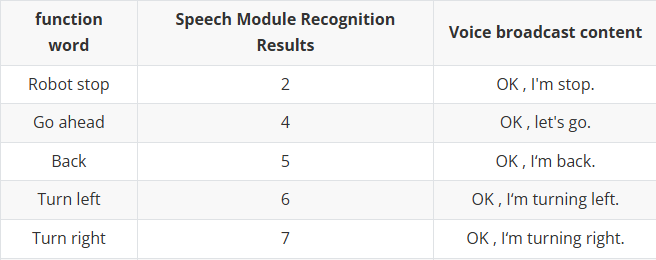
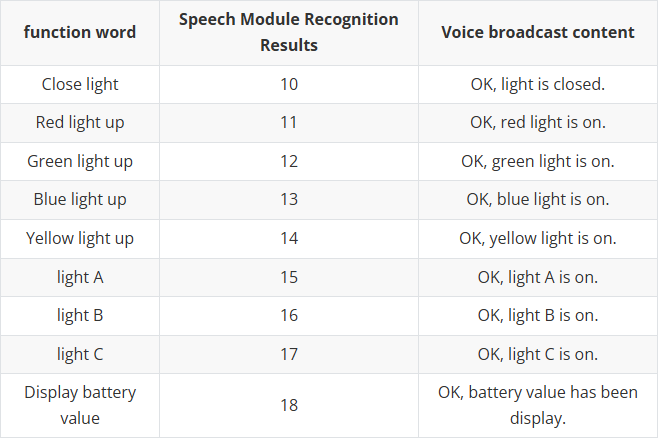
image-20230530181142910

image-20230530181159610

1. Start the program

Terminal input,

xxxxxxxxxx
roslaunch yahboomcar_voice_ctrl voice_ctrl_yahboomcar.launch
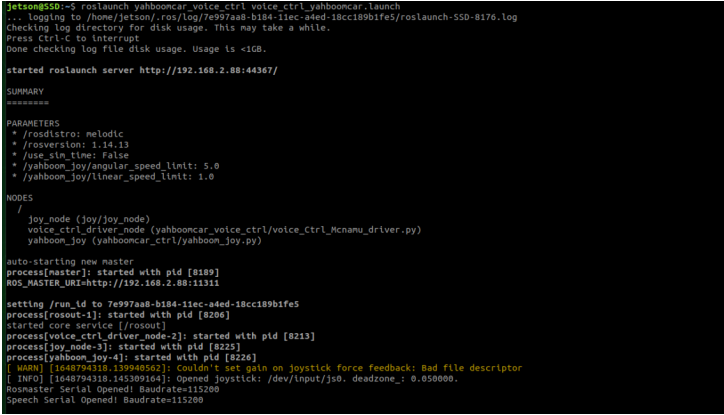
image-20230530201200072

2. Core code

Code path: ~/driver_ws/src/yahboomcar_voice_ctrl/scripts/voice_Ctrl_Mcnamu_driver.py

xxxxxxxxxx
#导入语音识别的库 Import the speech recognition library
from Speech_Lib import Speech
from Rosmaster_Lib import Rosmaster
#创建语音识别的对象和驱动控制对象 Create speech recognition objects and driver control objects
spe = Speech()
car = Rosmaster()
#读取语音识别到的内容 Read the content of speech recognition
speech_r = spe.speech_read()
#发送语音播报内容 Send the speech broadcast content
spe.void_write(speech_r)


Environment Construction
Voice control Autopilot

COMPANY

  • About us
  • Team Style
  • Blog

LEARNING & EXPLORATION

  • Tutorials
  • Edge AI hardware
  • Educational robots
  • Embedded intelligent hardware

WHERE TO BUY

  • Yahboom Online Store
  • Amazon
  • Alibaba
  • AliExpress
  • Mercado

TECHNOLOGY SUPPORT

  • Email: support@yahboom.com

BE A DISTRIBUTOR

  • Email: sales@yahboom.com
QR Code

Copyright © 2017-2026 Yahboom. All Rights Reserved.

EN/中文