Welcome to T-mini Plus LiDAR repository
22.ROS distributed communication
22.ROS distributed communication
A running ROS system can contain multiple nodes distributed across multiple computers. Depending on the system configuration, any node may need to communicate with any other node at any time. However, a necessary condition for implementing this distributed communication is that each machine must be on the same local area network. In this lesson, we will use Raspberry Pi and Virtual Machine as an example to illustrate how to configure and implement distributed communication.
22.1 Preparation work
22.1.1 Configuration
Require:
The virtual machine and Raspberry Pi are connected to the same LAN;
Select one as the host. The host needs to start roscore. Here, select Raspberry Pi as the host and the virtual machine as the slave. The Raspberry Pi here needs to have ros-noetic installed;
Install the ssh and chrony packages on each device for synchronization. You can enter the following instructions to install.
sudo apt-get install chrony openssh-server -y
22.1.2 Check ip address
Both are connected to the same LAN, query the network IP address through the following command,
xxxxxxxxxxifconfigVirtual machine side,
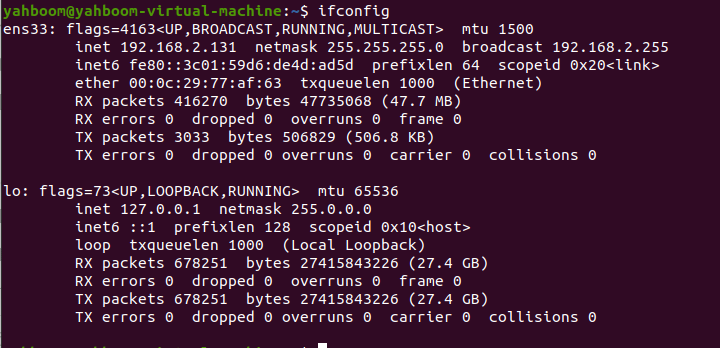
The address found is 192.168.2.131
Raspberry Pi side,
xxxxxxxxxxifconfig
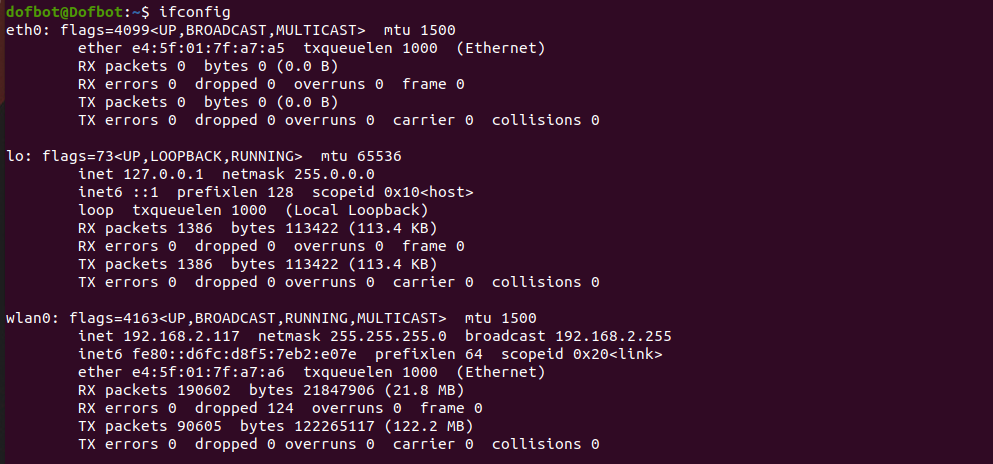
The found address is 192.168.2.117
22.2 Modify configuration file
22.2.1 Virtual machine side
Taking the virtual machine as a slave machine as an example, you need to modify the ROS_MASTER_URI of the virtual machine to the Raspberry Pi IP. Here is the 192.168.2.117 you just queried, enter it in the terminal,
xxxxxxxxxxsudo gedit ~/.bashrc
After entering the password, add it at the bottom of the file,
xxxxxxxxxxexport ROS_MASTER_URI=http://192.168.2.117:11311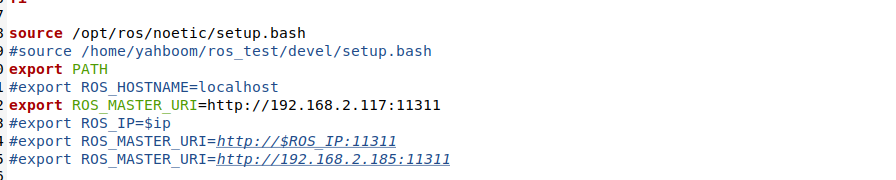
Exit after saving and reopen the terminal to refresh the environment variables to take effect.
Then, modify the/etc/hosts file,
xxxxxxxxxxsudo gedit /etc/hosts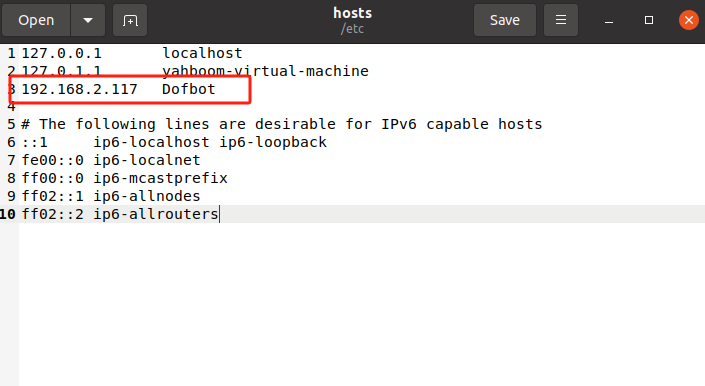
As shown in the picture above, add the Raspberry Pi's IP and machine name, save and exit.
22.2.2 Raspberry Pi terminal
The modified files and steps are almost the same as above. The only differenc