Welcome to DOFBOT Pro repository
5.1 Garbage Identification(Jetson-Nano)
Garbage Identification(Jetson-Nano)
Testing based on the trained model can identify the name of the trained object.
Note:
- Before starting the program, please follow the [Assembly and Installation Tutorial] -> [Install Map] tutorial to correctly install the map before proceeding.
- This example runs on the host machine; simply open a web browser and enter the IP address:8888
1. Main code
Code path:
~/dofbot_ws/src/dofbot_basic_visual/scripts/05_Garbage_Identify.ipynb
Import header file
ximport syssys.path.append('/home/jetson/dofbot_ws/src/dofbot_garbage_yolov5')import Arm_Libimport osimport cv2 as cvimport threadingfrom time import sleepimport ipywidgets as widgetsfrom IPython.display import displayfrom garbage_identify import garbage_identifyfrom dofbot_utils.fps import FPSfrom dofbot_utils.robot_controller import Robot_ControllerInitialize the posture of the robot arm.
xxxxxxxxxxrobot = Robot_Controller()robot.move_look_map()garbage = garbage_identify()fps = FPS()model = "General"Garbage name list:
xxxxxxxxxx def garbage_getName(self): name = "None" if self.status == 'waiting': self.frame, msg = self.garbage_identify.garbage_run(self.frame) for key, pos in msg.items(): name = key if name == "Zip_top_can": (self.garbage_num, self.garbage_class) = ('00', '01') if name == "Old_school_bag": (self.garbage_num, self.garbage_class) = ('01', '01') if name == "Newspaper": (self.garbage_num, self.garbage_class) = ('02', '01') if name == "Book": (self.garbage_num, self.garbage_class) = ('03', '01') if name == "Toilet_paper": (self.garbage_num, self.garbage_class) = ('04', '02') if name == "Peach_pit": (self.garbage_num, self.garbage_class) = ('05', '02') if name == "Cigarette_butts": (self.garbage_num, self.garbage_class) = ('06', '02') if name == "Disposable_chopsticks": (self.garbage_num, self.garbage_class) = ('07', '02') if name == "Egg_shell": (self.garbage_num, self.garbage_class) = ('08', '03') if name == "Apple_core": (self.garbage_num, self.garbage_class) = ('09', '03') if name == "Watermelon_rind": (self.garbage_num, self.garbage_class) = ('10', '03') if name == "Fish_bone": (self.garbage_num, self.garbage_class) = ('11', '03') if name == "Expired_tablets": (self.garbage_num, self.garbage_class) = ('12', '04') if name == "Expired_cosmetics": (self.garbage_num, self.garbage_class) = ('13', '04') if name == "Used_batteries": (self.garbage_num, self.garbage_class) = ('14', '04') if name == "Syringe": (self.garbage_num, self.garbage_class) = ('15', '04') if name == "None": (self.garbage_num, self.garbage_class) = ('None', 'None')Main thread:
xxxxxxxxxxdef camera(): # 打开摄像头 Open camera capture = cv.VideoCapture(0) capture.set(cv.CAP_PROP_FRAME_WIDTH, 640) capture.set(cv.CAP_PROP_FRAME_HEIGHT, 480) while capture.isOpened(): try: _, img = capture.read() fps.update_fps() img, msg = garbage.garbage_run(img) if len(msg) > 0: for name, pos in msg.items(): print("name:", name) if model == 'Exit': cv.destroyAllWindows() capture.release() break fps.show_fps(img) imgbox.value = cv.imencode('.jpg', img)[1].tobytes() except Exception as e: capture.release() print(e) breakFirst open the system terminal and run roscore
xxxxxxxxxxroscore
Program Click the Run Entire Program button on the jupyterlab toolbar, then scroll to the bottom to see the camera component display.

If you put the garbage block face-up in the camera screen at this time, the garbage will be framed and the garbage name will be displayed.
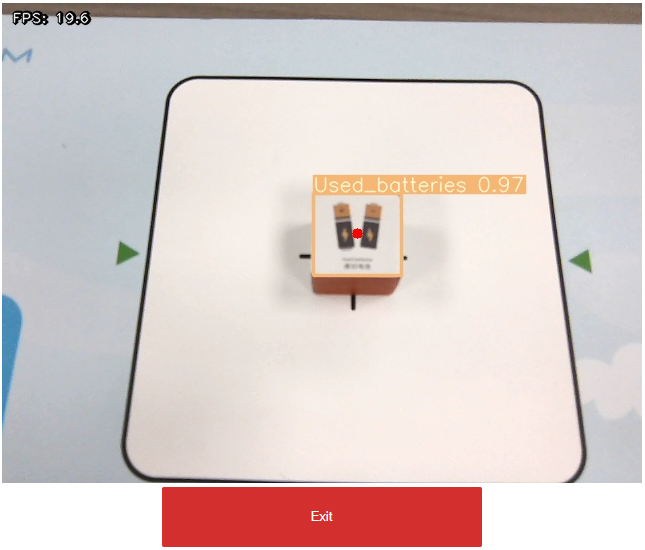
Note: The garbage block must be placed face-up to ensure that the camera screen is facing the garbage icon, otherwise it may not be recognized.
If you need to exit the program, click the [Exit] button.