Welcome to DOFBOT Pro repository
1. Voice Control AprilTag ID Sorting
Voice Control AprilTag ID Sorting
Before running the function, you need to close the App and large programs. For the closing method, refer to [4. Preparation] - [1. Manage APP control services].
1. Function Description
Voice commands are issued to sort AprilTag IDs. The robotic arm will grasp the AprilTag block with the corresponding ID according to the command.
The wooden blocks used in this lesson: 30x30x30mm Machine Code Blocks.
2. Startup and Operation
2.1. Startup
Users with Jetson-Nano board version need to enter the docker container and input the following commands. Orin board users can directly open the terminal and input the following commands:
#Start camera and inverse kinematicsros2 launch dofbot_pro_info camera_arm_kin.launch.py #Start speech recognition and broadcastros2 launch yahboom_speech speech.launch.py#Start AprilTag recognitionros2 run dofbot_pro_voice_ctrl apriltag_detect#Start AprilTag graspingros2 run dofbot_pro_voice_ctrl apriltag_grasp_VC2.2. Operation Steps
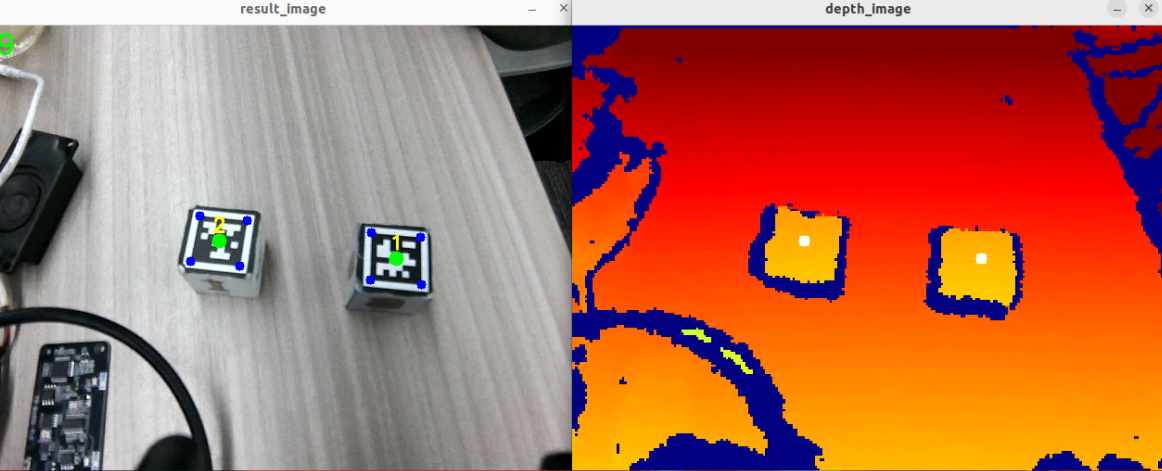
After all programs are running, place four AprilTags with different IDs in the image. Say "Hello, yahboom" to the speech recognition module, and the speaker will broadcast "here". Then say "Sorting machine code number one"/"Sorting machine code number two"/"Sorting machine code number three"/"Sorting machine code number four" to the speech module. The robotic arm will lower its gripper to grasp the target ID AprilTag block, and the speech module will broadcast "OK". After grasping the AprilTag block, it will place it at the designated position. Finally, the robotic arm returns to its initial posture, and the speech broadcast module will announce "Placement complete".
3. Core Code Analysis
3.1. Speech Recognition Node speech_recognize_node
Source code path: ~/dofbot_pro_ws/src/yahboom_speech/yahboom_speech/speech_recognize.py
Mainly explains how to create a publisher for speech recognition results and how to call the function library to get recognition results, and finally publish the speech recognition results.
xxxxxxxxxx#Import speech recognition and broadcast libraryfrom Speech_Lib import Speech#Create speech recognition and broadcast objectmySpeech = Speech()#Create publisher for speech recognition resultsself.pub_res = self.create_publisher(Int8,'voice_result',1)#Call function in the library to get recognition resultresult = mySpeech.speech_read()#Publish speech recognition result topicself.voice_command.data = resultself.pub_res.publish(self.voice_command)3.2. Voice Broadcast Node voice_player_node
Source code path: ~/dofbot_pro_ws/src/yahboom_speech/yahboom_speech/voice_player.py
Mainly explains how to create a subscriber for voice broadcast and how to call the function library to broadcast voice.
x#Import speech recognition and broadcast libraryfrom Speech_Lib import Speech#Create speech recognition and broadcast objectmySpeech = Speech()#Create subscriber for voice broadcast resultsself.sub_playID = self.create_subscription(Int8,'player_id',self.playercallback,1000)#Callback functiondef playercallback(self,msg): #Extract voice broadcast topic data ID_value = msg.data print("ID_value: ",ID_value) if ID_value!=0: play_id = ID_value print("play_id = ",play_id) #Call void_write in the library to play audio file mySpeech.void_write(int(play_id))3.3. AprilTag Recognition Node apriltag_detect.py
Source code path: ~/dofbot_pro_voice_ctrl/dofbot_pro_voice_ctrl/AprilTag/apriltag_detect.py
Mainly explains how to subscribe to and process speech recognition result topics and publish voice broadcast topics.
xxxxxxxxxx#Create subscriber for speech recognition result topicself.sub_voice = self.create_subscription(Int8,"voice_result",self.getVoiceResultCallBack,1)#Create publisher for voice broadcast topicself.pub_playID = self.create_publisher(Int8,"player_id", 1)#Callback functiondef getVoiceResultCallBack(self,msg): #When the data of speech recognition result topic is 95, 96, 97, 98, it respectively represents the command to sort AprilTag one/two/three/four if msg.data == 95 or msg.data == 96 or msg.data == 97 or msg.data == 98: #Change self.pubPos_flag, indicating that AprilTag position information topic can be published self.pubPos_flag = True play_id = Int8() #Voice broadcast result 45, plays audio "OK", publish this topic information to voice broadcast node play_id.data = 45 self.pub_playID.publish(play_id)3.4. Robotic Arm AprilTag Grasping Node apriltag_grasp_VC.py
Source code path: ~/dofbot_pro_voice_ctrl/dofbot_pro_voice_ctrl/AprilTag/apriltag_grasp_VC.py
Mainly explains how to subscribe to and process speech recognition result topics and publish voice broadcast topics.
xxxxxxxxxx#Create subscriber for speech recognition result topicself.sub_voice = self.create_subscription(Int8,"voice_result",self.getVoiceResultCallBack,1)#Create publisher for voice broadcast topicself.pub_playID = self.create_publisher(Int8,"player_id", 1)#Callback function, processes received speech recognition result topic data, 95 to 98 correspond to AprilTags 1 to 4, self.set_id represents the id of the AprilTag to be sorteddef getVoiceResultCallBack(self,msg): if msg.data == 95: self.set_id = 1 elif msg.data == 96: self.set_id = 2 elif msg.data == 97: self.set_id = 3 elif msg.data == 98: self.set_id = 4 print("id:",self.set_id) self.grasp_flag = True#Publish voice broadcast topic, broadcast "Placement completed" audioplay_id = Int8()play_id.data = 81self.pub_playID.publish(play_id)