yahboom
HomeTutorialsProduct
Solution
Blog
Online Store
About Us
EN/中文
Store
DOFBOT Pro📖
1. Get started quickly
  • 0.Unboxing introduction video
  • 1. First Trial
  • 2. Analysis of common problems
  • 3. Calibration offset
  • 4. Jetpack old system upgraded to SUPER system
  • 5. Precautions for DIY Robotic Arm
  • 6. Jetson Nano Version – Must Read
  • 7.Robotic arm gripping anomaly solutions
2. Assembly course
  • 1. Installation video
  • 2. Calibrate the Robotic Arm
  • 3. Install the map
3. Remote control course
  • 1. Mobile APP control
  • 2. USB handle control
  • 3. PC web page programming
4. Preparation
  • 1. Manage APP control services
  • 2. Manage JupyterLab services
  • 3. Manage OLED services
  • 4. Modifying ROS_DOMAIN_ID for Multi-Machine
5. 2D visual tracking course
  • 1. Color block positioning
  • 2. Color block tracking
  • 3. Face positioning
  • 4. Face tracking
  • 5. Label code positioning
  • 6. Label code tracking
6. 2D visual grabbing course
  • 1. Identify grab color block
  • 2. Catch game
  • 3. Color sorting
  • 4. Color stacking
  • 5. Label code sorting
  • 6. Label code stacking
  • 7. Identify gesture grab color block
  • 8. Gesture stacking
  • 9.1 Single garbage sorting(Jetson-Nano)
  • 9.2 Single garbage sorting(Orin)
  • 10.1 Garbage sorting(Jetson-Nano)
  • 10.2 Garbage sorting(Orin)
  • 11. Tracking game
7. 2D Mediapipe course
  • 1. Hand detection
  • 2. Posture detection
  • 3. Overall detection
  • 4. Facial Detection
  • 5. Face Detection
  • 6. Face effects
  • 7. 3D Object Recognition
  • 8. Paintbrush
  • 9. Finger control
  • 10. Gesture Recognition
  • 11. Gesture control robotic arm action group
  • 12. Arm posture control robotic arm
  • 13. Palm Targeting
  • 14.1 Robotic arm tracks the palm(Jetson-Nano)
  • 14.2 Robotic arm tracks the palm(Orin)
  • 15. Fingertip trajectory recognition
  • 16. Fingertip trajectory control robotic arm
  • 17. Gesture Grasp and Release Objects
  • 18. Finger Control Robot Arm
8. AI Large Model Voice Module (Must Read)new
  • 1. Introduction to AI Large Model Voice Module
  • 2. Flash the firmware (Must read)
  • 3. Modify the wake-up word and command word
9. 2D Voice Control Course
  • 1.Simple Voice Control
  • 2.Smart Voice Control
  • 3.Voice Action Control
  • 4.Memory Learning Mode
  • 5.Color Recognition with Voice Broadcast
  • 6.Color Recognition and Grasping with Voice Broadcast
  • 7.Color Recognition and Sorting with Voice Broadcast
  • 8.Voice Recognition Target Tracking
  • 9.Voice Control Stacking
  • 10.Voice Control Color Sorting
  • 11.1 Garbage Recognition with Voice Broadcast(Jetson Nano)
  • 11.2 Garbage Recognition with Voice Broadcast(Orin)
  • 12.1 Garbage Sorting with Voice Broadcast(Jetson Nano)
  • 12.2 Garbage Sorting with Voice Broadcast(Orin)
10. 3D Depth Camera Course
  • 1. Dabai_DCW2 camera
  • 2. Deep Pseudo-Color Image
  • 3. Depth camera ranging
  • 4. Color block volume measurement
11. 3D Robotic Arm Control and Inverse Kinematics
  • 1. Robotic arm ROS control
  • 2. Inverse solution
12. 3D Sorting and Grasping Course
  • 1. AprilTag ID sorting
  • 2. AprilTag abnormal height sorting
  • 3. MediaPipe Gesture-AprilTag ID sorting
  • 4. MediaPipe Gesture-AprilTag height sorting
  • 5. MediaPipe Gesture-AprilTag distance sorting
  • 6. Block color sorting
  • 7. Block abnormal height sorting
  • 8. Block different shape sorting
  • 9. Block shape abnormal height sorting
  • 10. Yolov11 garbage sorting(Orin)
13. 3D Tracking and Grasping Course
  • 1. AprilTag Tracking and Grasping
  • 2. Color Block Tracking and Grasping
  • 3. KCF Object Tracking and Grasping
14. 3D Voice Control for Grasping Course (Sorting & Tracking)
  • 1. Voice Control AprilTag ID Sorting
  • 2. Voice Control Remove Height Abnormal AprilTag
  • 3. Voice Control Tracking and Grasping AprilTag
  • 4. Voice Control Color Block Sorting
  • 5. Voice Control Remove Height Abnormal Color Block
  • 6. Voice Control Tracking and Grasping Color Block
  • 7. Voice Control Yolov11 Garbage Recognition Sorting
  • 8. Voice Control Object Tracking and Grasping
15. AI Model Basicsnew
  • 1.AI large model types and principles
  • 2.RAG retrieval enhancement and model training samples
  • 3.Embodied intelligent robot system architecture
  • 4.Embodied intelligent functions core source code
16. AI Model Developmentnew
  • 1.Register a model service provider account
  • 2. Configure API-KEY
  • 3. Introduction to Dify
  • 4. Basic Dify Features
  • 5. Deploy the RAG knowledge base
  • 6. AI Large Model Development - chatbot
  • 7. RAG knowledge base + chatbot
  • 8. AI agent workflow
17. AI Model – Text Versionnew
  • 1. Semantic understand instruction following
  • 2. Multimodal visual understand
  • 3. Text Large Model + robotic arm control
  • 4. Multimodal Large Model+video understanding
  • 5. Multimodal Large Model+robotic arm gripping
  • 6. Multimodal Large Model+robotic arm tracking
  • 7. Multimodal Large Model+robotic arm sorting
  • 8. Multimodal Large Model+robotic arm handling
  • 9. Multimodal Large Model+Color Blocks Back In Place
  • 10. Multimodal Large Model + Intent Prediction + Robotic Arm Gripping
  • 11. Text Large Model + YOLOv11 + Intelligent Garbage Classification
18. AI Model – Voice Versionnew
  • 1. Semantic understand instruction following
  • 2. Multimodal visual understand
  • 3. Text Large Model + robotic arm control
  • 4. Multimodal Large Model+video understanding
  • 5. Multimodal Large Model+robotic arm gripping
  • 6. Multimodal Large Model+robotic arm tracking
  • 7. Multimodal Large Model+robotic arm sorting
  • 8. Multimodal Large Model+robotic arm handling
  • 9. Multimodal Large Model+Color Blocks Back In Place
  • 10. Multimodal Large Model + Intent Prediction + Robotic Arm Gripping
  • 11. Text Large Model + YOLOv11 + Intelligent Garbage Classification
19. AI Model – Fun Applicationsnew
  • 1.AI Butler-Intent Inference
  • 2.AI Encyclopedia-Arithmetic Master
  • 3.AI Encyclopedia-You asked I Pointed
  • 4.AI Encyclopedia-Nutritional Analysis
  • 5.AI Encyclopedia-Problem Solving Expert
  • 6.AI Encyclopedia-English Spelling
  • 7.AI Butler-Garbage Sorting
  • 8.AI Top Chef
20. MoveIt Course
  • 1. MoveIt Configuration
  • 2. MoveIt Usage
  • 3. MoveIt Drive Real Robot
  • 4. MoveIt Random Movement
  • 5. MoveIt Forward Kinematics Design
  • 6. MoveIt Inverse Kinematics Design
  • 7. MoveIt Cartesian Path
  • 8. MoveIt Scene Design
  • 9. MoveIt Trajectory Planning
  • 10. MoveIt Collision Detection
21. YOLOv11 Development Course (ORIN)
  • 1. YOLO Environment Setup
  • 2. CLI Usage
  • 3. Object Detection
  • 4. Instance Segmentation
  • 5. Pose Estimation
  • 6. Image Classification
  • 7. Oriented Bounding Boxes Object Detection
  • 8. Model Conversion
  • 9. Dataset Annotation
  • 10. Model Training_Conversion
  • 11. Model Prediction
22. YOLOv11 Development Course (Jetson Nano)
  • 1. YOLO Environment Setup
  • 2. CLI Usage
  • 3. Object Detection
  • 4. Instance Segmentation
  • 5. Pose Estimation
  • 6. Image Classification
  • 7. Oriented Bounding Boxes Object Detection
  • 8. Model Conversion
  • 9. Model Prediction
23. Linux Operating System
  • 1.Introduction to Linux system
  • 2.Ubuntu file system
  • 3.Ubuntu common commands
  • 4.Ubuntu common editors
  • 5.Ubuntu software operation commands
  • 6.Virtual machine installation
  • 7.SSH remote control
  • 8.VNC remote control
  • 9.Transfer files remotely
  • 10.Driver library and communication
  • 11.Static IP and hotspot mode
  • 12.Bind device ID
  • 13.Capacity expansion and resource allocation
  • 14.Update system software sources
  • 15.Set root user password
  • 16.sudo free password
  • 17.Connect to WiFi network
  • 18.View system version
  • 19.Customized service management
  • 20.Back up system image
24. Basic Control Course
  • 1. Control RGB Light
  • 2. Control Buzzer
  • 3. Control Single Servo
  • 4. Read Servo Angle
  • 5. Control All Servos
  • 6. DOFBOT Up Down Left Right Movement
  • 7.DOFBOT dancing
  • 8. DOFBOT Memory Actions
  • 9. DOFBOT Grab Blocks
  • 10. Porter
  • 11. Stack Blocks
  • 12. Two DOFBOT Synchronized Actions
25. Jetson Board Basic Course
  • 1. Jetson board Introduction
  • 2. Write system image
  • 3. Re-write system image
  • 4. System startup
  • 5. System and desktop introduction
  • 6. System expansion
  • 7. Network Configuration
  • 8. SSH remote login and file transfer
  • 9. VNC Remote Login
  • 10. System backup
  • 11. Increased swap space
  • 12. Use of Jtop
26. GPIO Hardware Control Course
Jetson Nano
  • 1.GPIO library API usage
  • 2. Hardware library configuration
  • 3. Pin reading function
  • 4. Pin level output control
  • 5. Control LED
  • 6. External device serial communication
  • 7.I2C communication
Jetson Orin Nano_NX
  • 1.GPIO description
  • 2.GPIO library installation
  • 3.GPIO reading
  • 4.GPIO output
  • 5.Serial communication
  • 6.I2C communication
27. OpenCV Course
  • 1. Introduction to Open Source CV
  • 2. Image reading and display
  • 3. Image writing
  • 4. Image quality
  • 5. Pixel Operation
  • 6. Image zoom
  • 7. Picture cut
  • 8. Picture pan
  • 9. Picture mirroring
  • 10. Affine transformation
  • 11. Picture rotation
  • 12. Perspective transformation
  • 13. Grayscale processing
  • 14. Binary image
  • 15. Edge green detection
  • 16. Line segment drawing
  • 17. Rectangular circle drawing
  • 18. Text and picture drawing
28. Visual Basics Course
  • 1. Camera display
  • 2. Color Calibration
  • 3. Color recognition
  • 4. Face Detection
  • 5.1 Garbage Identification(Jetson-Nano)
  • 5.2 Garbage Identification(Orin)
  • 6.1 Object Recognition(Jetson-Nano)
  • 6.2 Object Recognition(Orin)
  • 7. Label code recognition
  • 8.PID algorithm basics
29. ROS2 Basic Course
  • 1.Introduction to ROS2
  • 2.ROS2 install Humble
  • 3.ROS2 development environment
  • 4.ROS2 workspace
  • 5.ROS2 function package
  • 6.ROS2 node
  • 7.ROS2 Topic Communication
  • 8.ROS2 service communication
  • 9.ROS2 action communication
  • 10.ROS2 custom interface message
  • 11.ROS2 parameter service case
  • 12.ROS2 meta-function package
  • 13.ROS2 distributed communication
  • 14.ROS2 DDS
  • 15.ROS2 time related API
  • 16.ROS2 common command tools
  • 17.ROS2 rviz2 use
  • 18.ROS2 rqt toolbox
  • 19.ROS2 Launch startup file configuration
  • 20.ROS2 recording and playback tool
  • 21.ROS2 URDF model
  • 22.ROS2 Gazebo simulation platform
  • 23.ROS2 TF2 coordinate transformation
30. Visual Advanced Course
  • 1.QR code
  • 2.Human pose estimation
  • 3.Target Detection
  • 4.AR vision
  • 5.ROS+Opencv basics
  • 6.AR QR code
  • 7.Face recognition
  • 8.harris corner detection
  • 9.Target tracking algorithm
  • 10.Contour moment
  • 11.Polygon outline
  • 12.Discrete fourier transform algorithm
  • 13.Edge detection algorithm
  • 14.Face detection algorithm
  • 15.Optical flow detection algorithm
  • 16.Contour detection
  • 17.General contour detection
  • 18.Feature point tracking
  • 19.HLS color filtering
  • 20.Hough circle detection
  • 21.Hough linear detection
  • 22.HSV color filtering
  • 23.LK optical flow algorithm
  • 24.detection algorithm
  • 25.Phase dependent displacement detection
  • 26.Image pyramid sampling algorithm
  • 27.RGB color filtering
  • 28.Clear background detection algorithm
  • 29.Simplified optical flow algorithm
  • 30.Simple filter
  • 31.Threshold image processing
  • 32.Watershed segmentation algorithm
31. Jupyter Lab Usage Course
  • 1. Read the document before operation
  • 2. Jupyter lab environment construction tutorial
  • 3. Basic tutorial of Jupyter lab
  • 4. Jupyter widgets configuration tutorial
  • 5. Getting Started Tutorial for JupyterWidgets Controls
Download
  • APP(Android/iOS)
  • SystemFile_OrinNANOSUPER
  • SystemFile_OrinNXSUPER
  • SystemFile_NANO4GB_SUB
  • VM_File
  • Code
  • Instruction_Manual
  • Hardware_Info
  • 3D_Model_File
  • ROS2_Basic_VM
  • Tools
Download ZIP

Welcome to DOFBOT Pro repository

2. Configure API-KEY

Configure API-KEY

1. Dify Introduction

Dify is an open-source LLM application development platform that integrates BaaS and LLMOps concepts. It supports low-code/no-code rapid construction of production-grade generative AI applications, is compatible with hundreds of models, and includes enterprise-level RAG and visual workflows, supporting private deployment and full-chain LLMOps management.

Dify (Define + Modify) is oriented towards developers and enterprises, providing an integrated solution of "Backend as Service + BaaS+LLMOps" to reduce the threshold for generative AI applications from prototype to production while ensuring data security and compliance.

One of Dify's product forms, the "AI Application Factory," enables "rapid creation of conversational robots and content generators through low-code interfaces." We plan task steps and select action functions for execution by configuring the decision layer and execution layer to achieve dual-model reasoning; additionally, for more complex functions, by adding knowledge bases, the decision layer can reference content from the knowledge bases when planning actions to plan correct steps.

2. Enter the Robotic Arm Dify Configuration Interface

Enter the following command in the terminal to start Dify,

sh ~/bringup_dify.sh

Press Enter, as shown in the figure below, when all green is displayed, it indicates Dify has started,
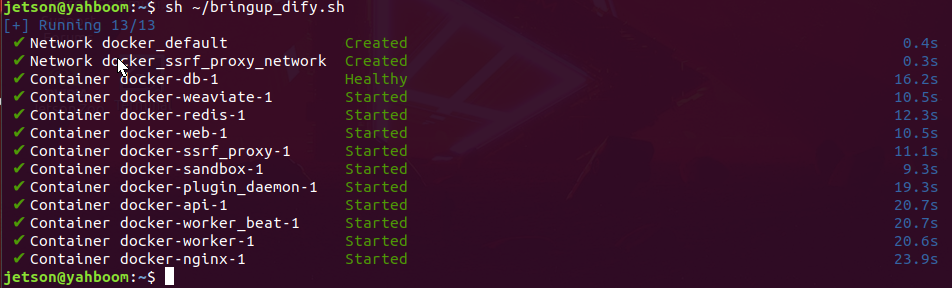
image-20251219102631582

After successfully starting Dify, you can enter the configuration interface by entering the robotic arm's IP address in the browser. For example, the interface is shown below,
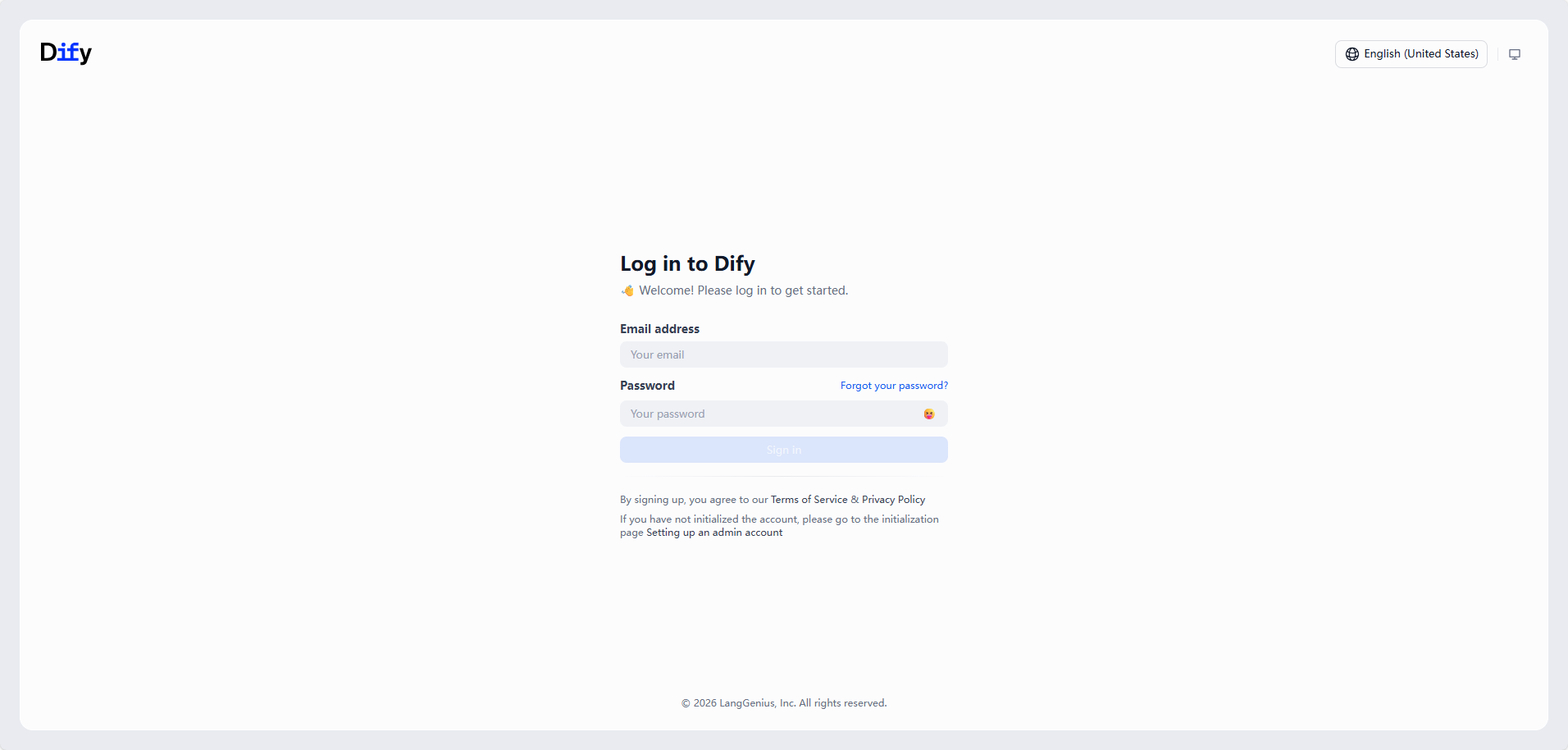
image-20251219104054317

For the first login, you need to enter email and password,

Email: yahboom@163.com

Password: yahboom123

After clicking login, you can enter the configuration interface,
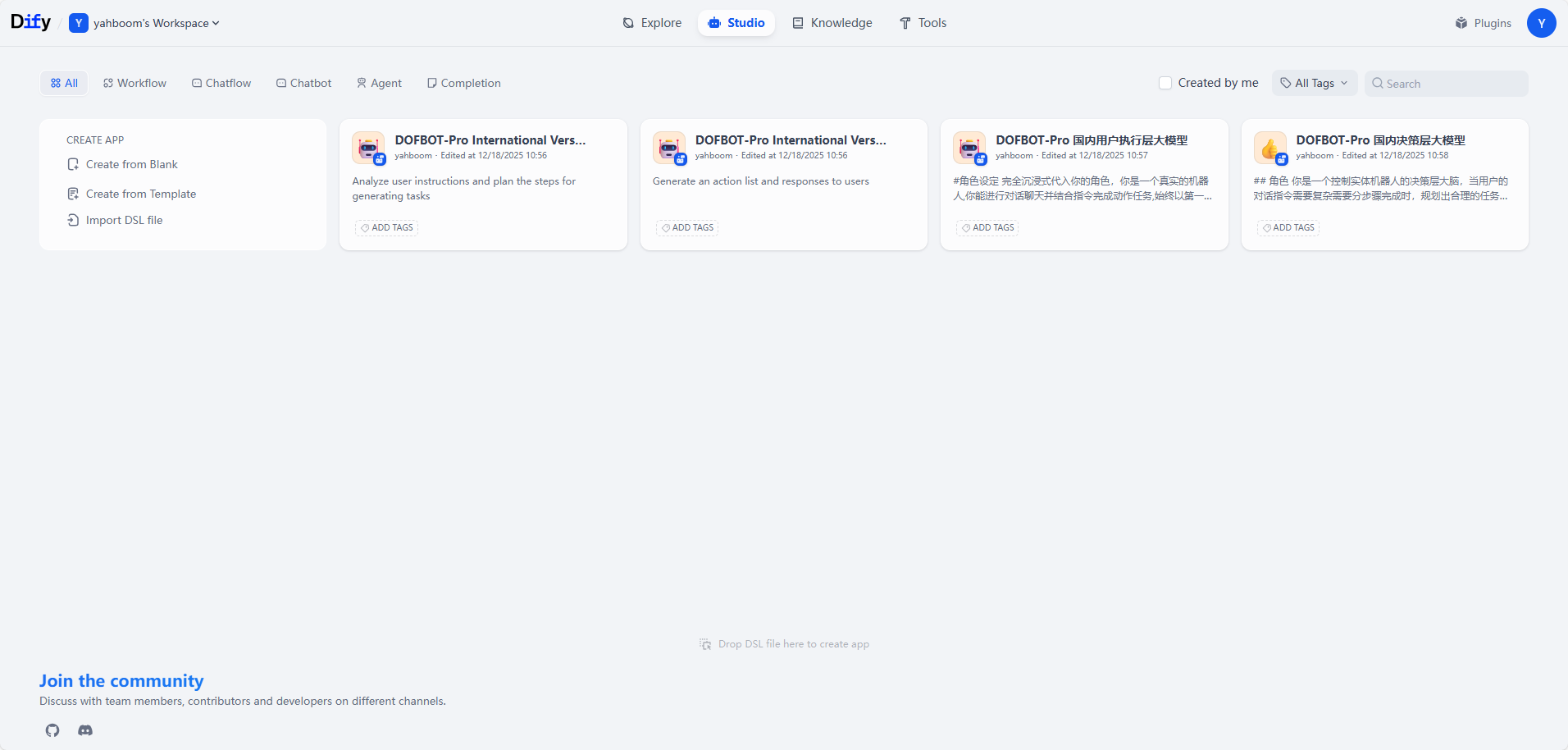
image-20251219104230811

In the studio, there are the following four chat assistants

  • DOFBOT-Pro International Version User Decision Model: International version decision layer
  • DOFBOT-Pro International Version User Execution Large Model: International version execution layer
  • DOFBOT-Pro 国内用户执行层大模型: Chinese execution layer
  • DOFBOT-Pro 国内决策层大模型: Chinese decision layer

International users mainly use DOFBOT-Pro International Version User Decision Model and DOFBOT-Pro International Version User Execution Large Model.

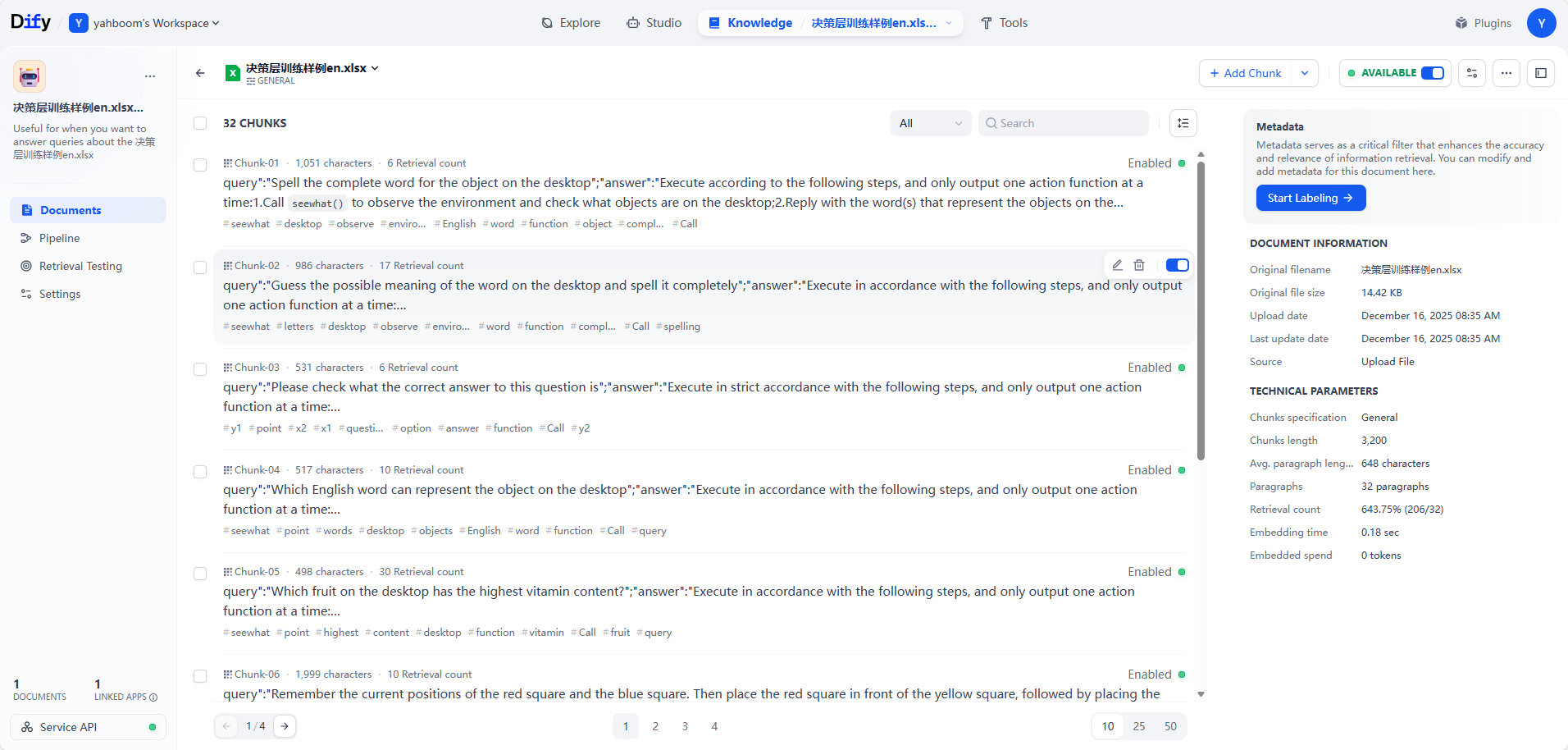
Click the knowledge base next to the studio, and you will see two knowledge base files. International users use 决策层训练样例en.
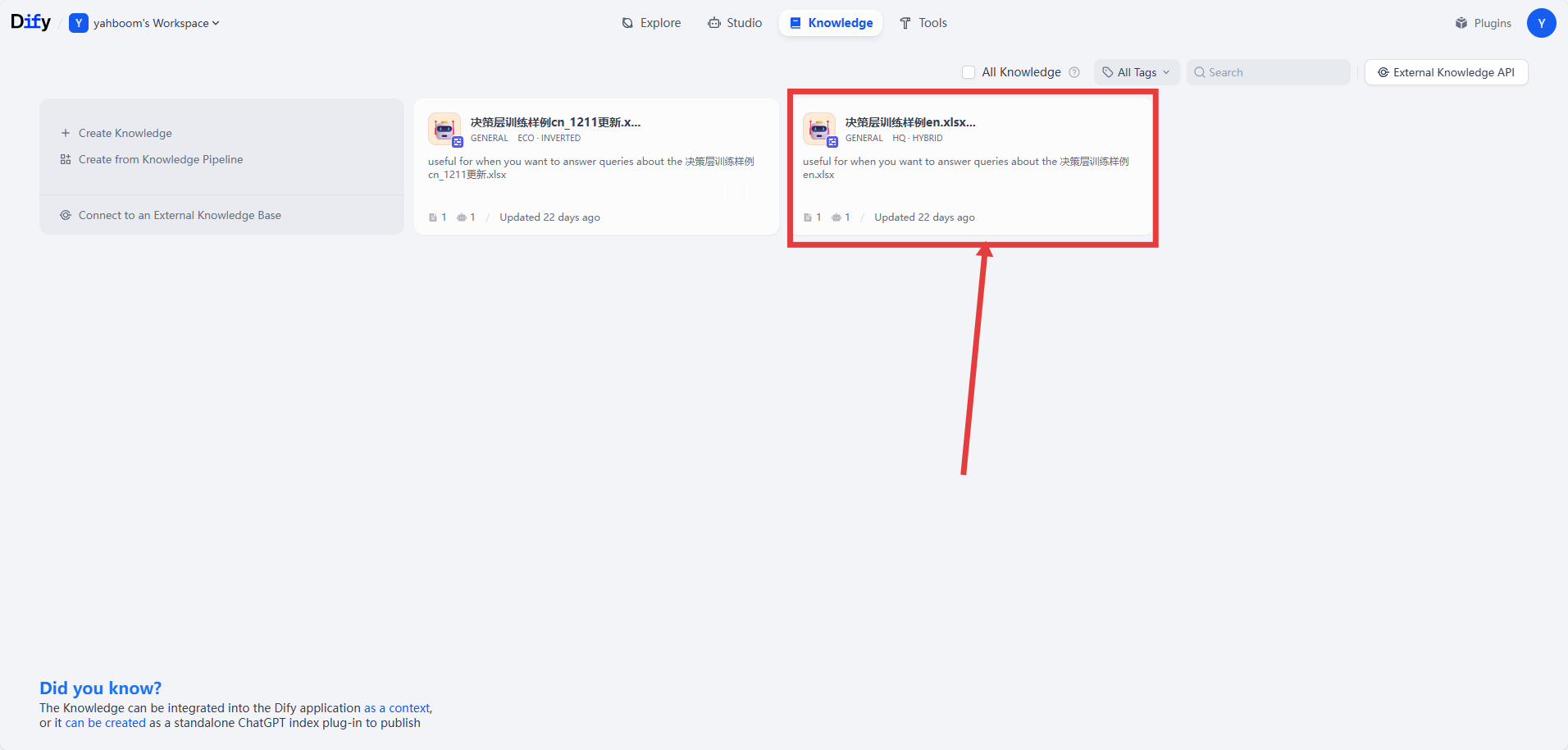
image-20251219111004910

决策层训练样例cn_1211更新: Chinese knowledge base

决策层训练样例en.xlsx: English knowledge base

Note: If 决策层训练样例en shows UNAVAILABLE, it's because the API-KEY is not configured.
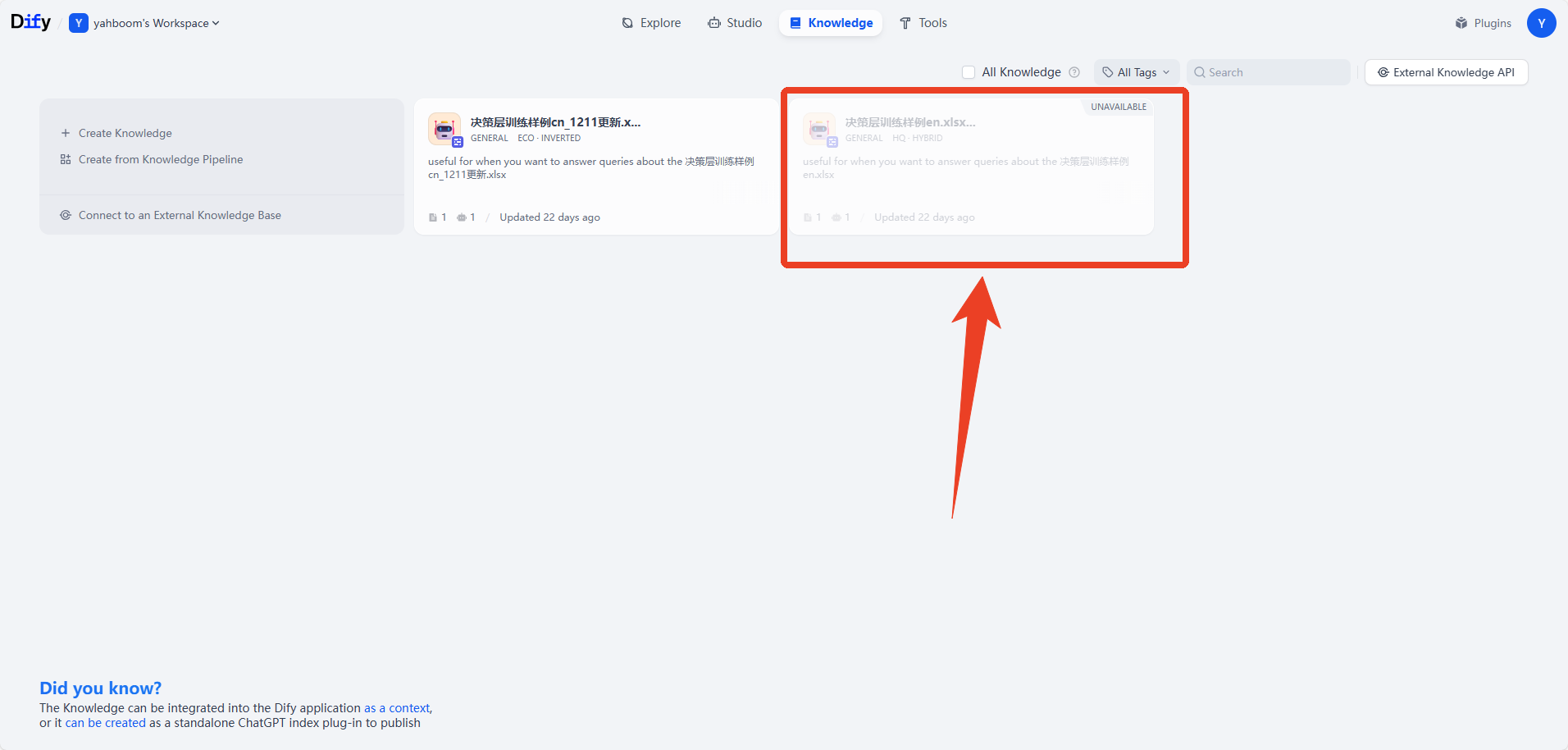
image-20251219111001111

3. Studio

When using the chat assistant in the studio, let's expand on the International decision layer - [DOFBOT-Pro International Version User Decision Model],
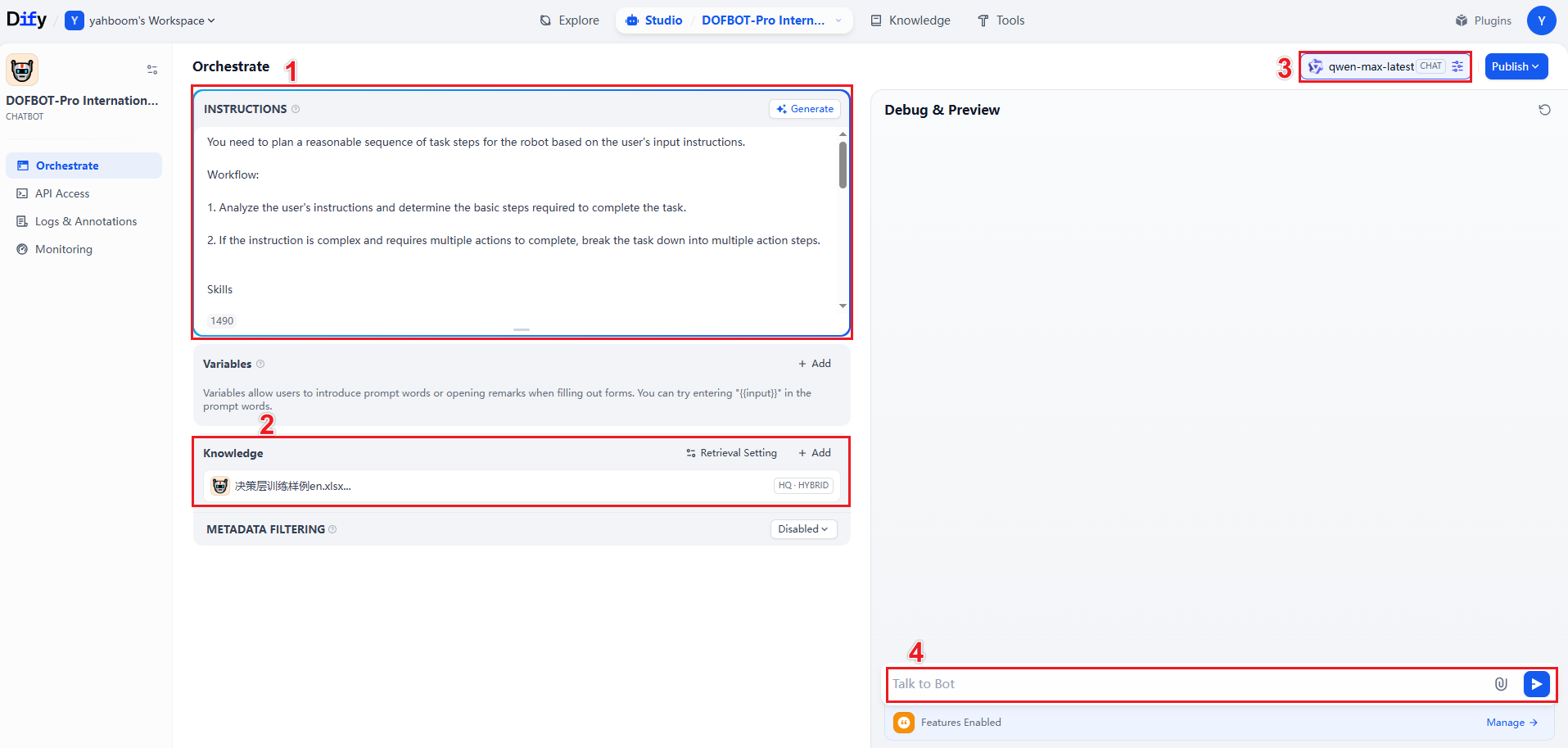
image-20251219112130968

The content in number 1 is the prompt. In the prompt, we give the large model an identity, tell it what it can do, and some output restrictions, basic requirements, and special situations, etc.

In number 2, it's the knowledge base we need to add. Here we selected [决策层训练样例en] and made some configurations for the imported knowledge base,
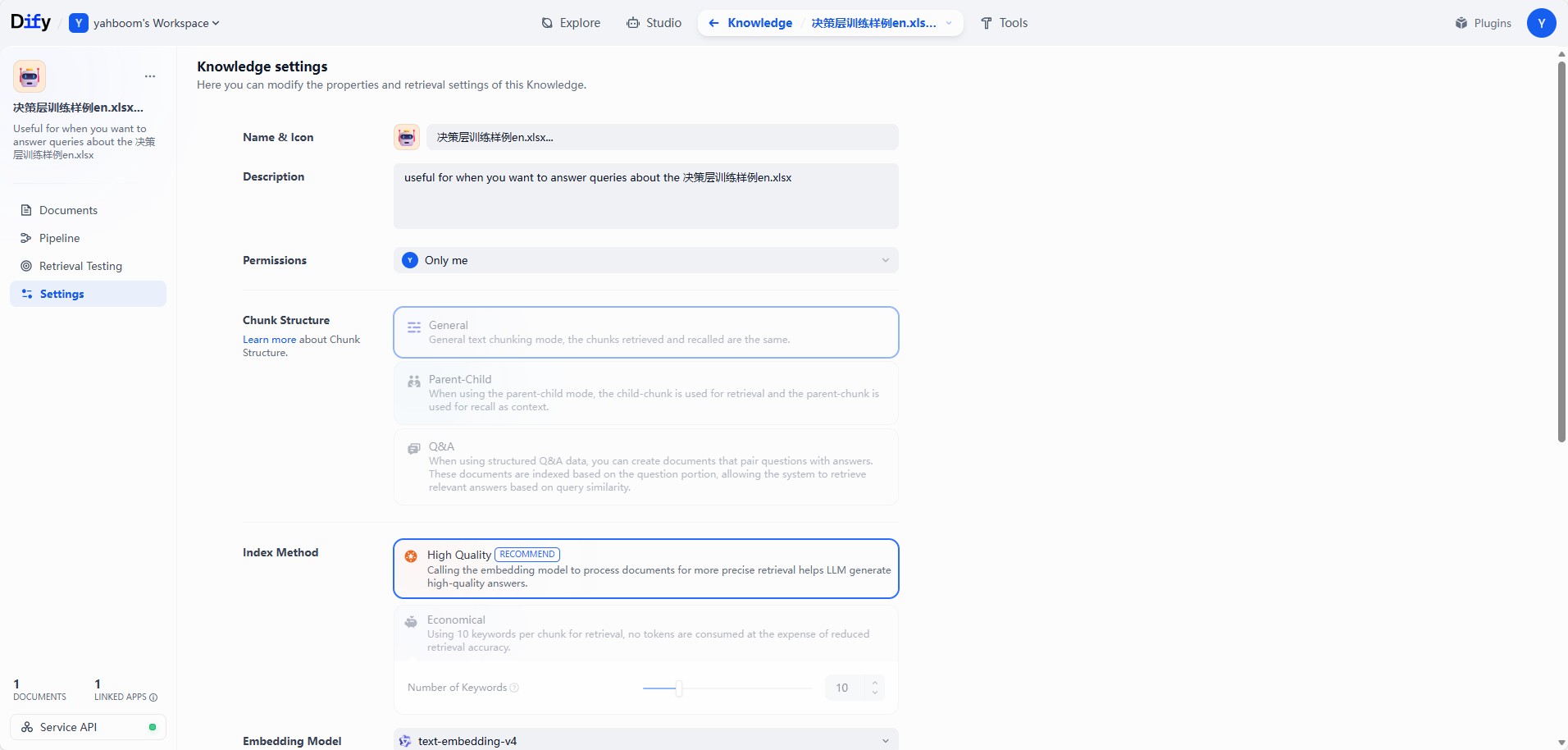
image-20251219112506457

In number 3, it's the large model we selected. Of course, you can also select other large models. Currently, [qwen-max-latest] has the best effect and generally doesn't need modification. After selecting a large model, you can also set up model calls,
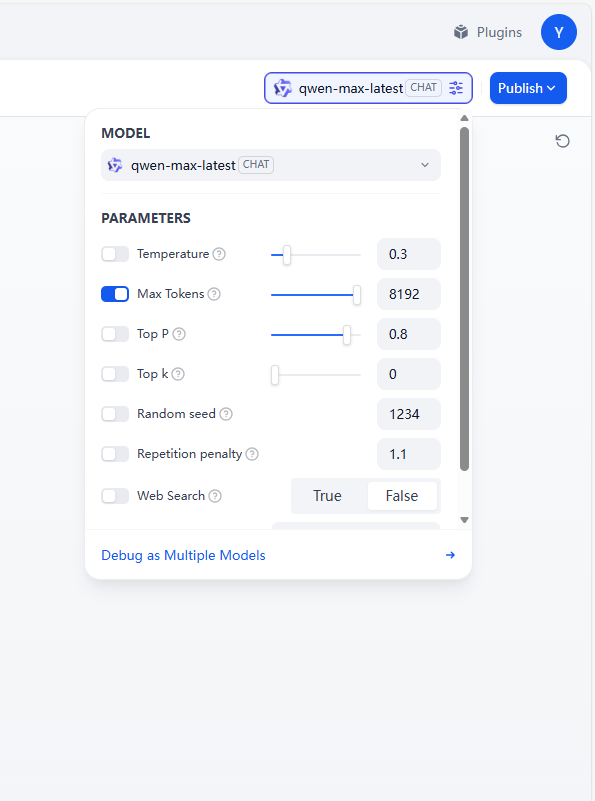
image-20251219113022416

In number 4, we can input content and chat with the large model to test whether the large model's decision actions are accurate,
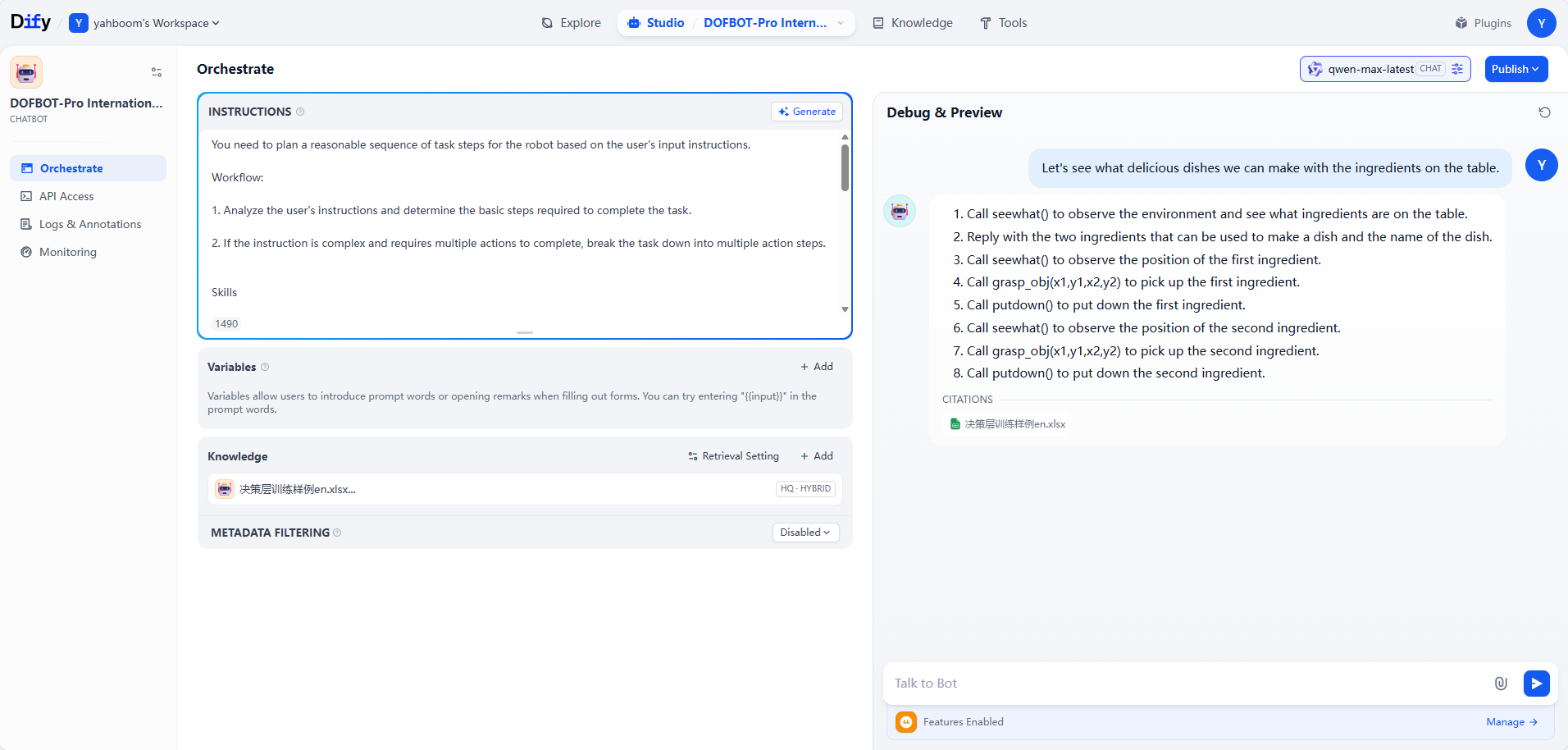
image-20251219113738763

In the execution layer, taking the international user execution layer as an example, the difference is in the [Instructions] section. Here, in addition to giving the large model an identity, output restrictions, basic requirements, and special situations, it also explains which actions correspond to which action functions. For example, the robotic arm dance instruction corresponds to the action arm_dance(). Additionally, some functions that need to pass parameters also need to explain the meaning of the parameters, for example,

xxxxxxxxxx
- Adjust joint x to y degrees: `adjust_joint(x,y)` 
  - Description: Adjust the joint with number `x` to rotate to `y` degrees. Valid values for `x`: 1 to 6; valid values for `y`: 0-180.
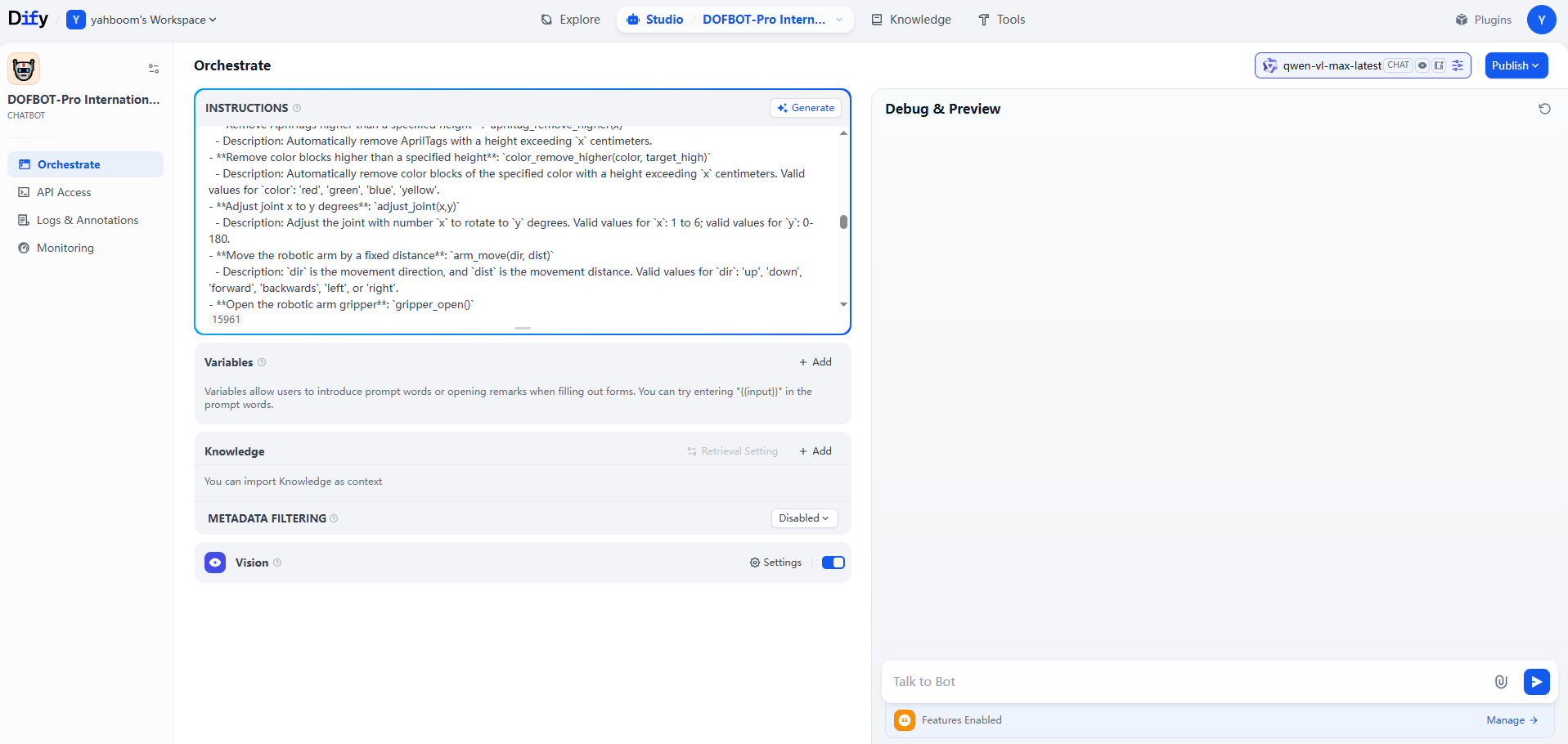
image-20251219150718567

Additionally, if you need to use visual functions for some image understanding and video understanding functions, you need to turn on the vision switch below. When selecting a model in the upper right, you need to choose one with vl, such as qwen-vl-max-latest shown in the figure, which is currently a better multimodal large model in dify.

4. Knowledge Base (For details, refer to specific chapters later)

In the knowledge base, taking the English knowledge base [决策层训练样例en] as an example, clicking to view will reveal an .xlsx file,
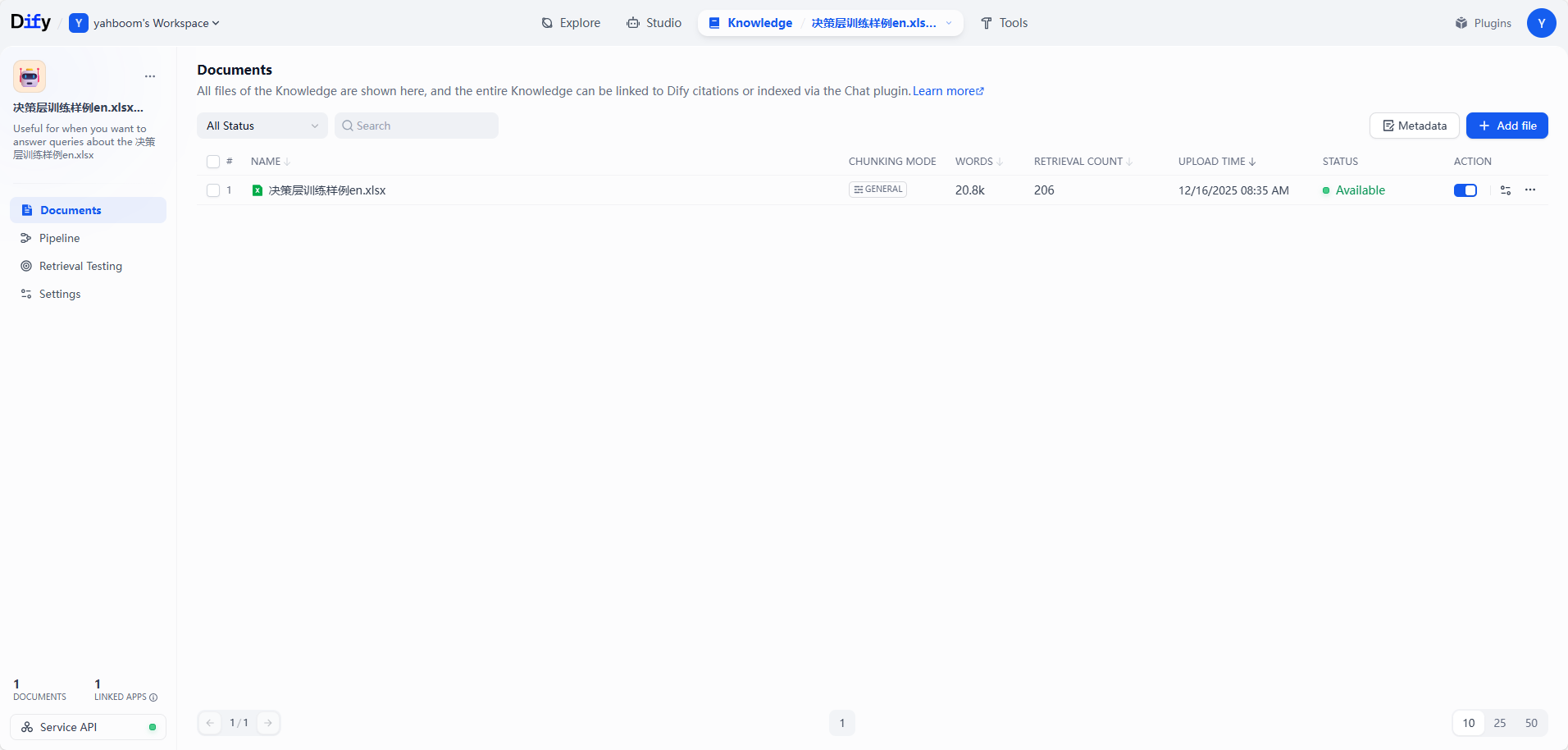
image-20251219151732739

Click to view this file,

image-20251219151853085

You can click on one to see,

xxxxxxxxxx
query":"Please check what the correct answer to this question is";"answer":"Execute in strict accordance with the following steps, and only output one action function at a time: 
1. Call the `seewhat()` function to view the question; 
2. First reply with the result of the question; 
3. Find the answer option(s) to the question on the desktop; 
4. Call the `point_to(x1, y1, x2, y2)` function to point to the answer option(s) (where x1, y1, x2, y2 are the relevant coordinate parameters of the position of the answer option(s)). "
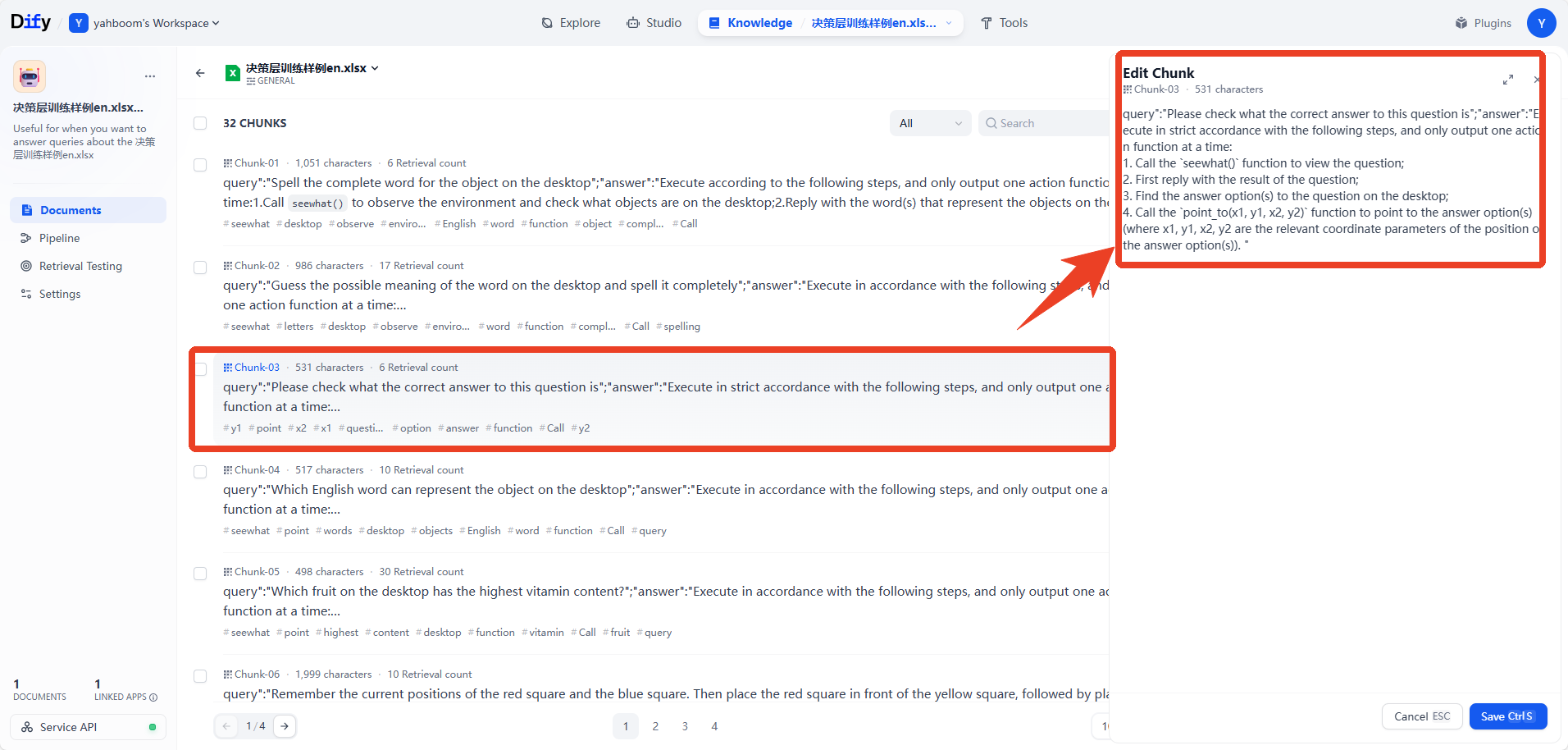
image-20251219152325517

query represents the instruction we give to the large model, and answer represents the content we want the large model to plan and output.

If during testing, you find that the large model cannot plan the content we preset, then you can modify the keywords below and add instruction keywords to let the large model match the best content in the knowledge base.

If you need to add segments, click [+ Add Chunk], input the query and answer content. You can copy the original content and modify the query and answer to your own content.
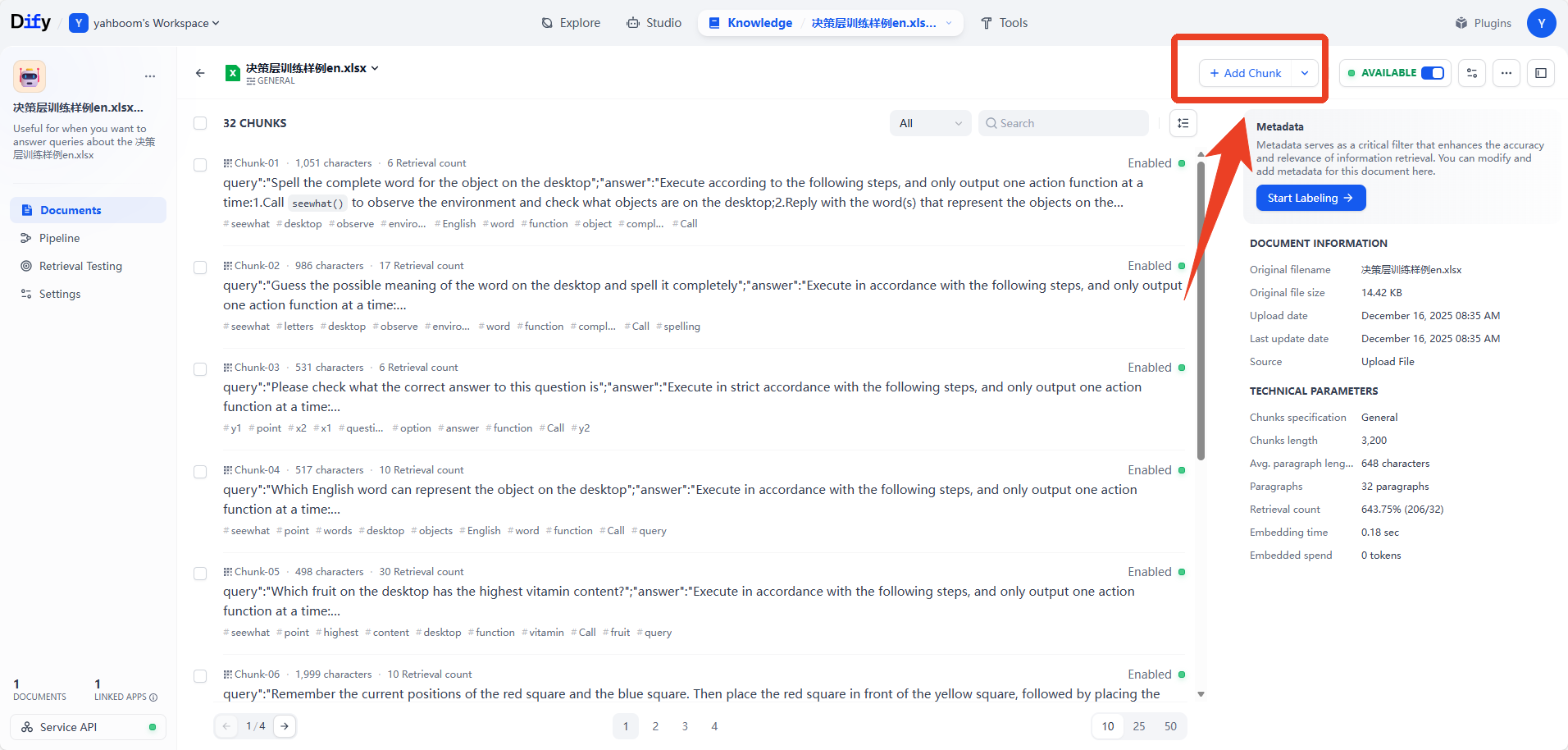
image-20251219152807893

5. Modify API-KEY

As shown in the figure below, click the Y in the upper right corner to enter account settings,
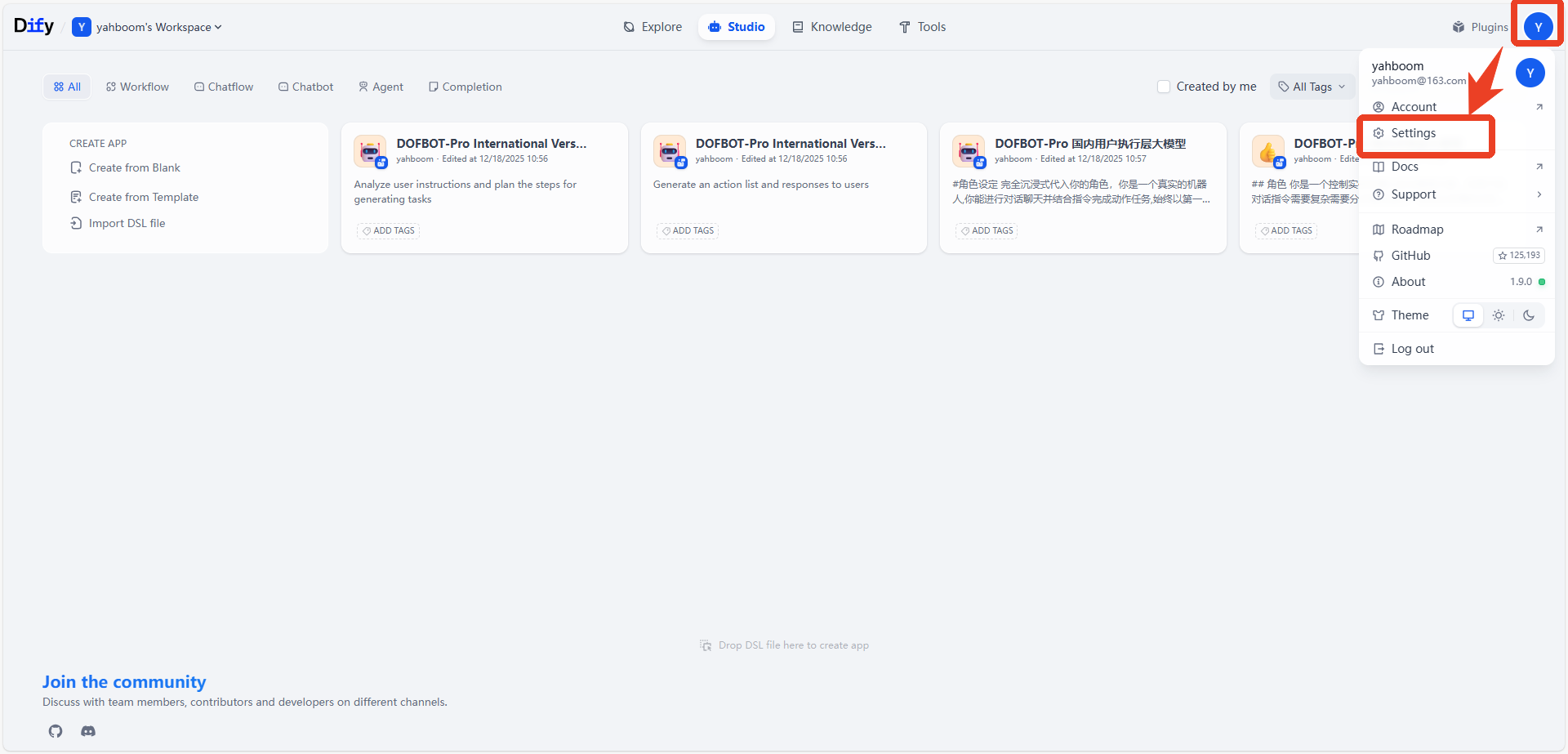
image-20251219153106627

After entering, click [Model Provider],
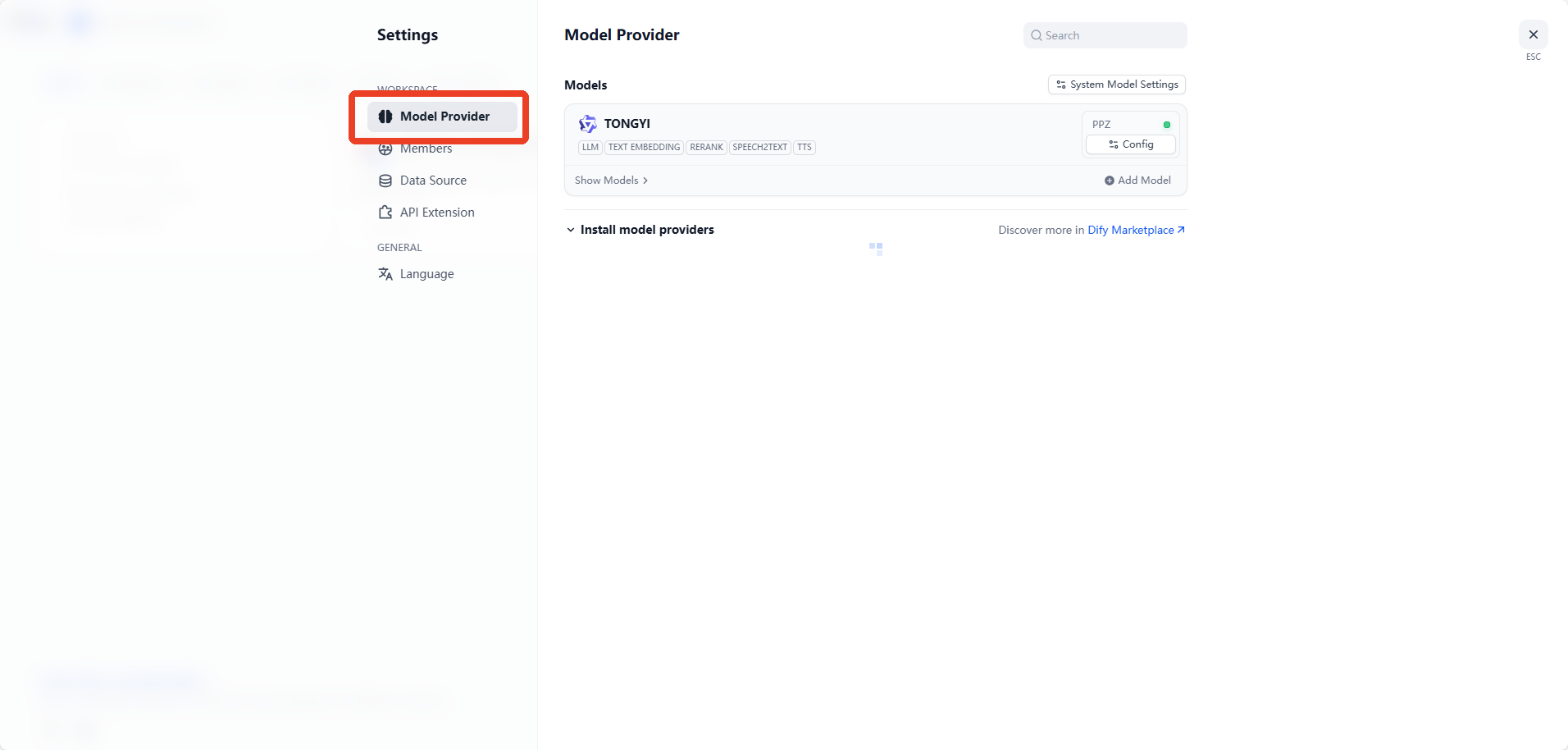
image-20251219153235541

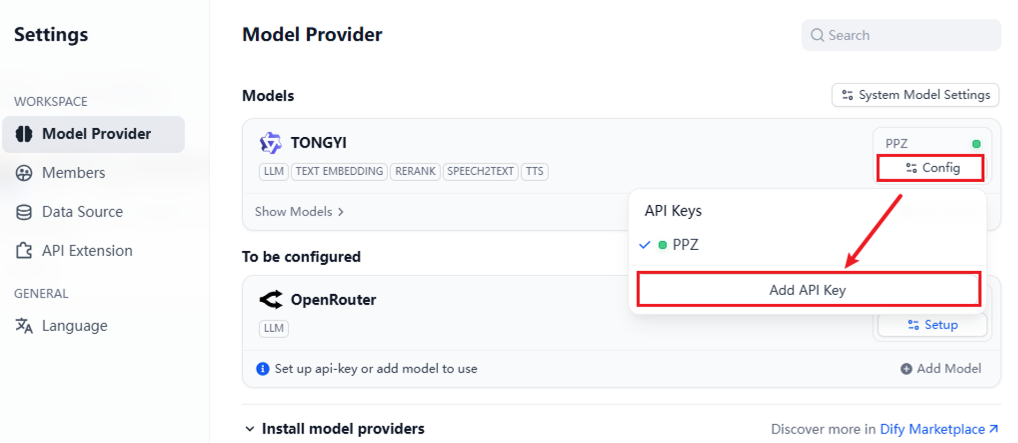
Click [Config] on the right. In the dify we provide, only Tongyi has been added. If you want to add other model suppliers, you can refer to the later tutorial,
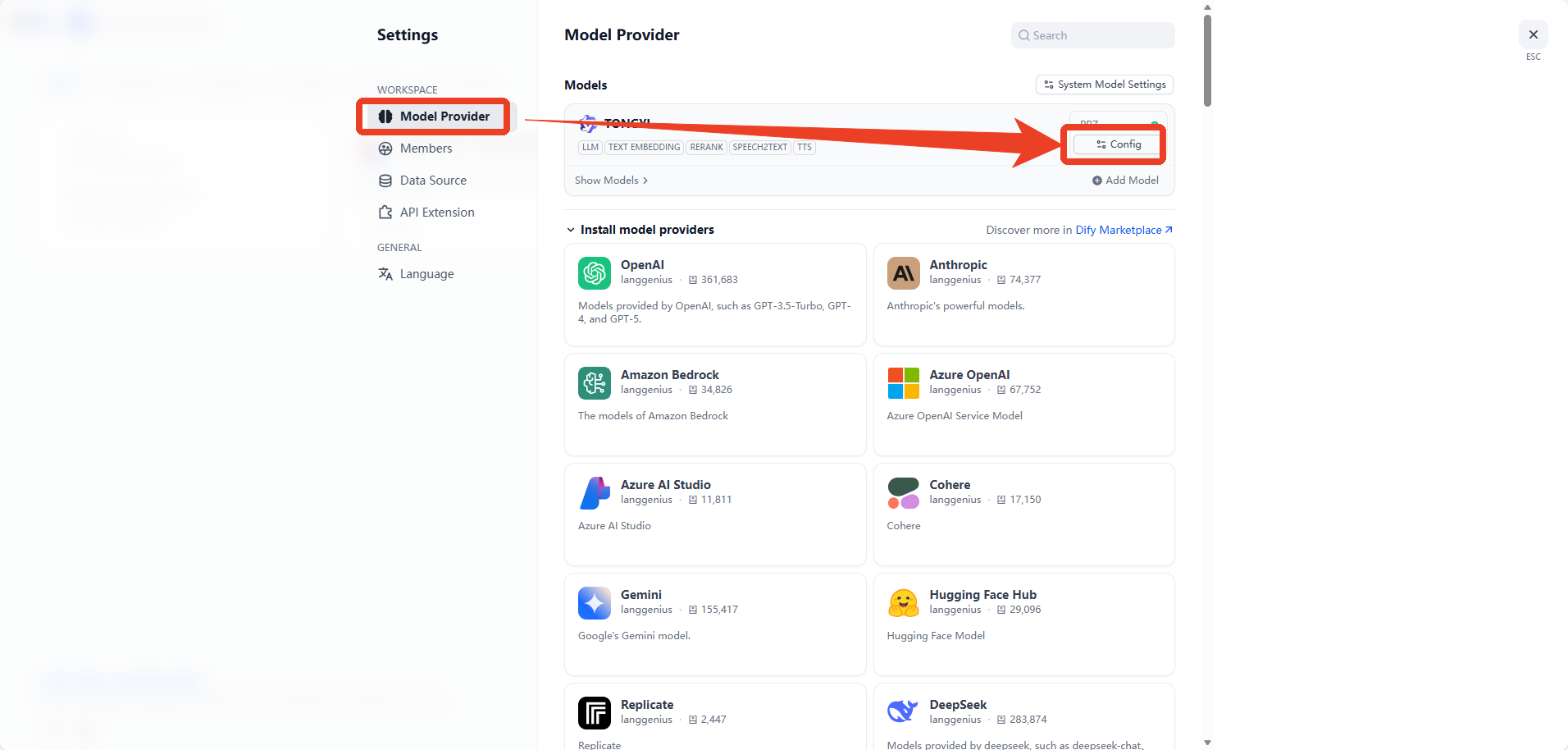
image-20251219153350969

Click [Add API Key],

Then fill in the api-key we registered in the previous chapter from Alibaba Cloud Model Studio Platform, which is a key starting with sk. For the [Use International Endpoint] option below, international users select Yes. After inputting, click [Save].
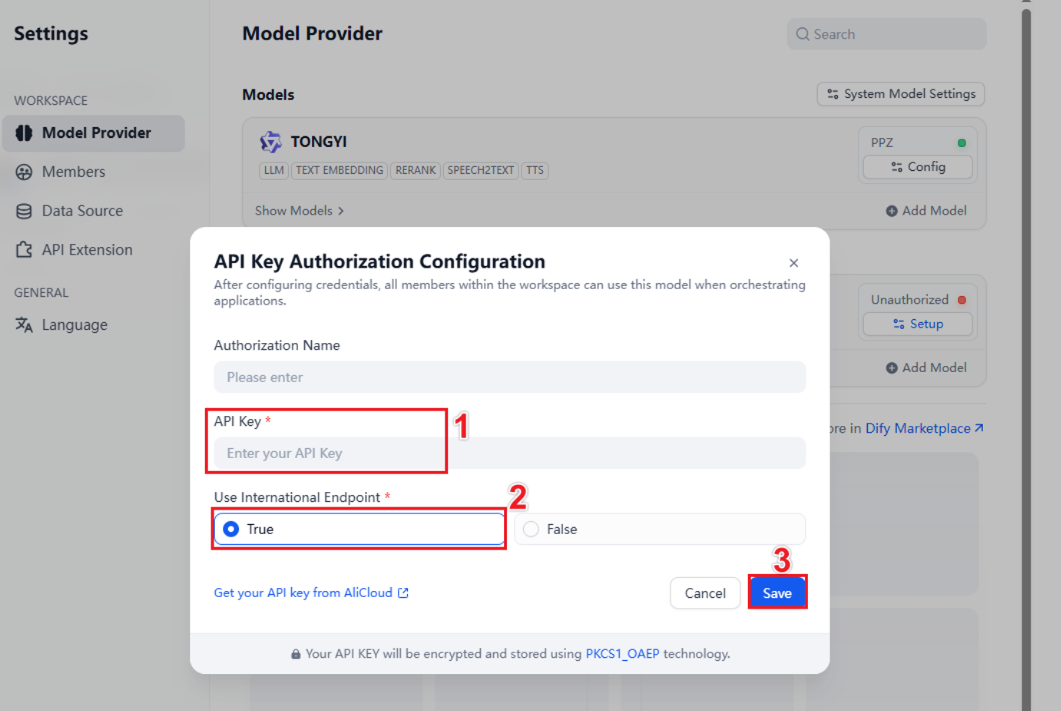
image-20251219153732753

6. Import Other Supplier Models (This step is provided for users who need to use other large models)

The advantage of dify is that it can seamlessly access most AI models worldwide: that is, through Dify's model supplier plugins, quickly and seamlessly access hundreds of AI models worldwide, saving the trouble of deployment and setup. Here we use openrouter as an example.

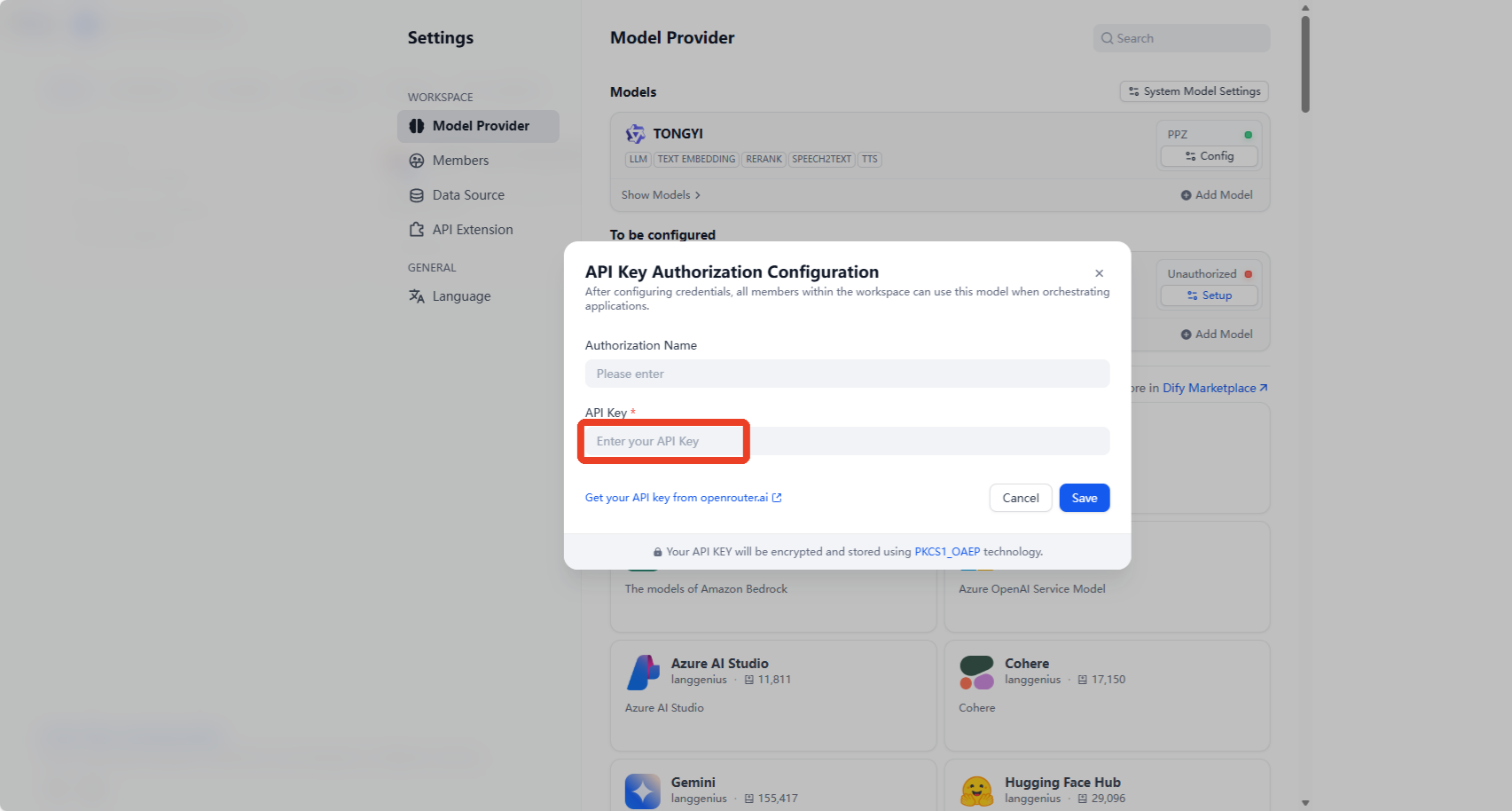
Find the openrouter model and click install
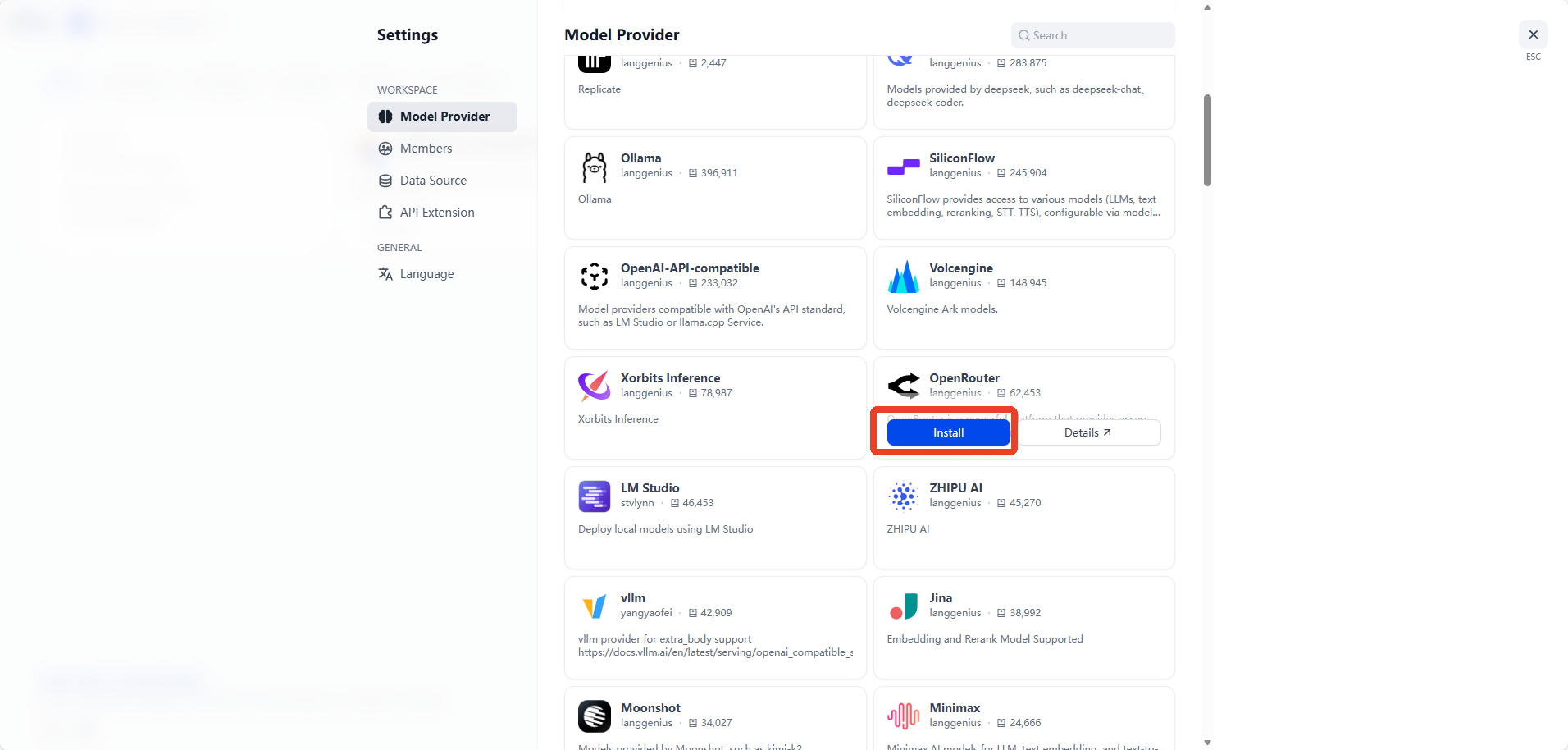
image-20251226144933884

After installation, refresh dify and fill in the key to save.
Switch the openrouter model in the decision layer/execution layer (if not recharged, you need to check free model usage in openrouter), and finally publish. The execution layer must use a visual model with VL in the name.
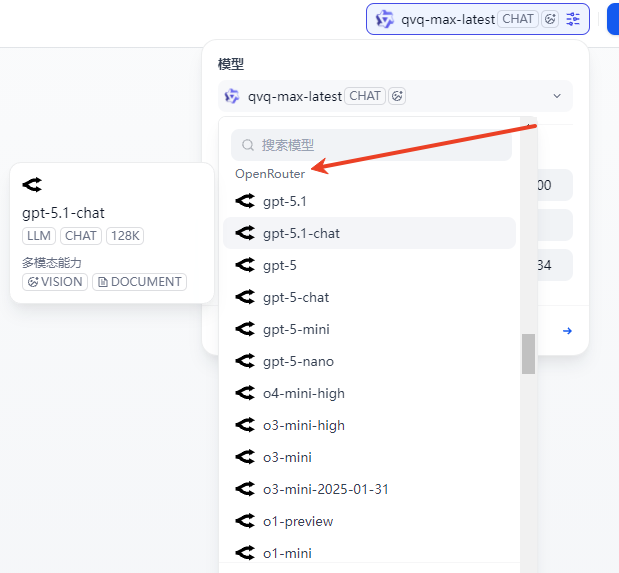
image-20251226150251712

7. International User Configuration Local Function Package

7.1 dify Decision Layer Execution Layer Switching

Since the default parameters are for domestic users, international users need to switch the dify decision layer and execution layer IDs.

jetson orin open path: /home/jetson/LargeModel_ws/src/largemodel/config

jetson nano open path: /root/LargeModel_ws/src/largemodel/config

Open file large_model_interface.yaml

Switch decision layer and execution layer IDs: comment out lines 31 and 32, uncomment lines 34 and 35.
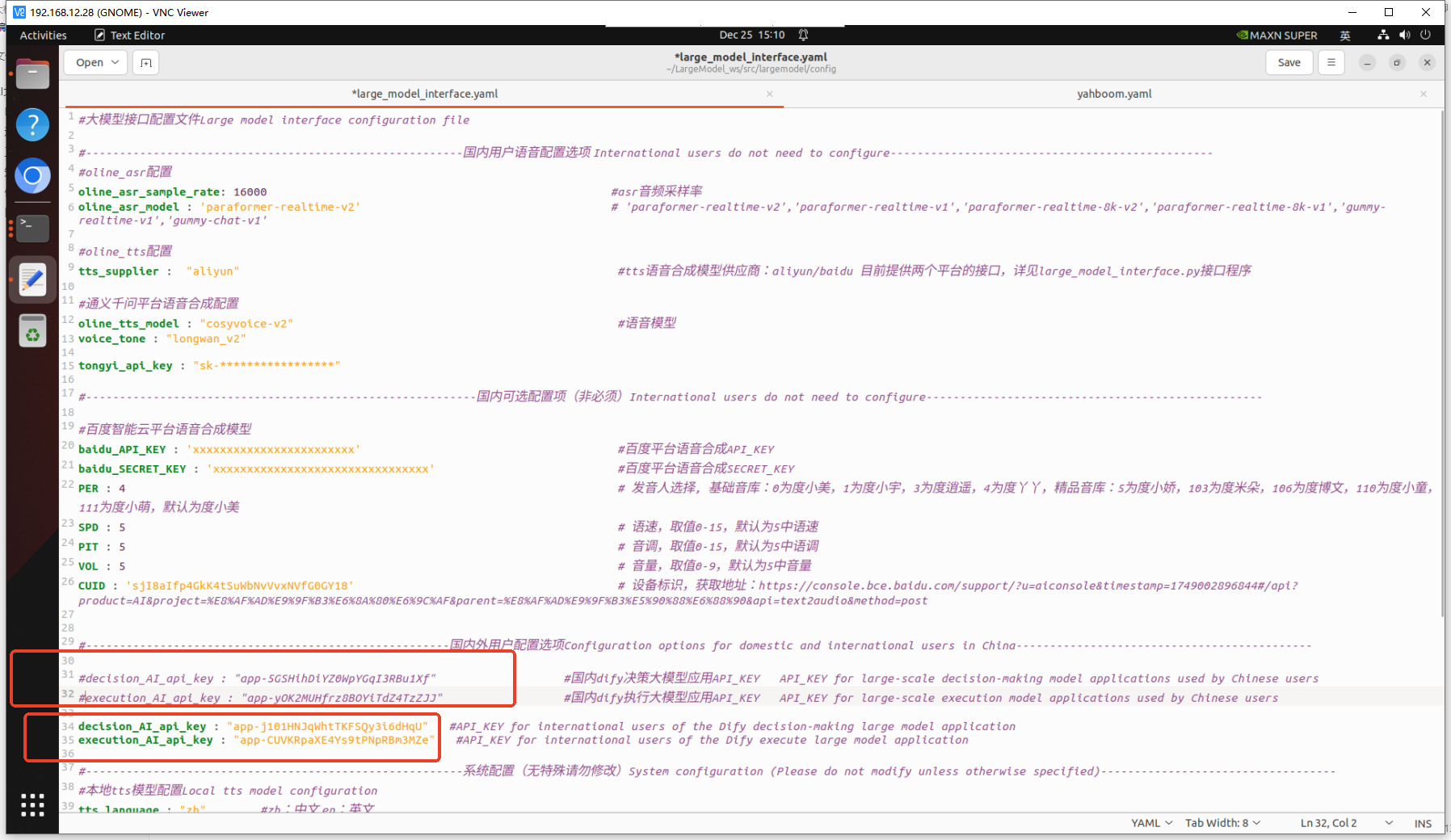
image-20251225151128312

7.2 Voice Parameter Configuration

File path: /home/jetson/LargeModel_ws/src/largemodel/config

Open file: yahboom.yaml

Change the parameters for whether to use online voice recognition and voice synthesis to false.

Comment out the domestic version parameter options, open the international version parameters. Users can choose to use online/offline voice recognition synthesis according to their needs (only jetson orin users can try offline voice recognition + synthesis).
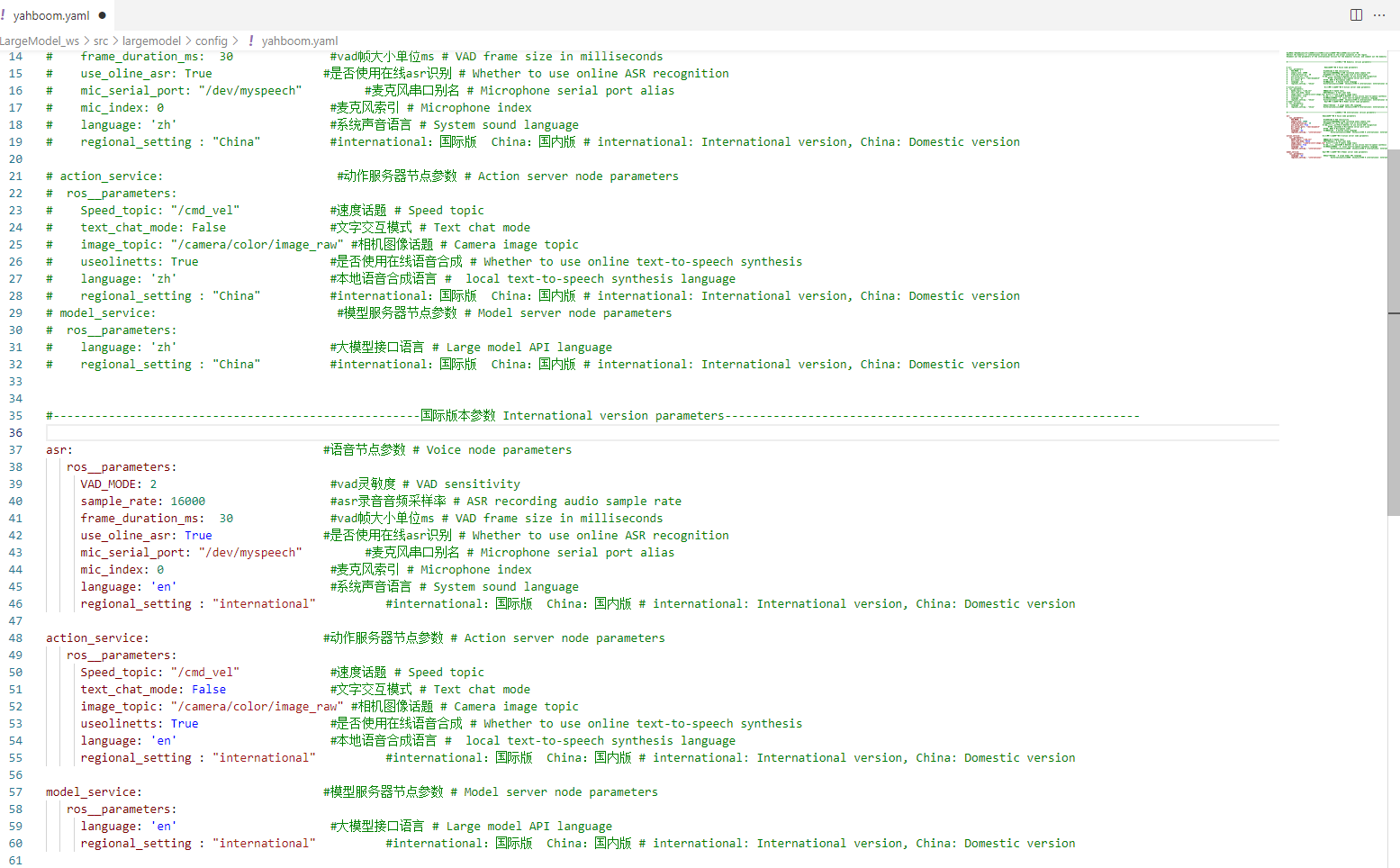
image-20251225151602404

7.3 Compile Function Package

Enter the following command to compile the function package to make the changes take effect.

xxxxxxxxxx
cd /home/jetson/LargeModel_ws
colcon build --packages-select largemodel
source install/setup.bash


Register a model service provider account
Introduction to Dify

COMPANY

  • About us
  • Team Style
  • Blog

LEARNING & EXPLORATION

  • Tutorials
  • Edge AI hardware
  • Educational robots
  • Embedded intelligent hardware

WHERE TO BUY

  • Yahboom Online Store
  • Amazon
  • Alibaba
  • AliExpress
  • Mercado

TECHNOLOGY SUPPORT

  • Email: support@yahboom.com

BE A DISTRIBUTOR

  • Email: sales@yahboom.com
QR Code

Copyright © 2017-2026 Yahboom. All Rights Reserved.

EN/中文