Welcome to DOFBOT Pro repository
7. Label code recognition
Label Code Recognition
For Orin board users, directly open a web page and enter the IP address:8888 to access jupyter-lab and run directly. For Jetson-Nano board users, you need to first enter the docker container, then enter the following command in docker:
cdjupyter-lab --allow-rootThen open a web page and enter the IP address:9999 to access jupyter-lab and run the following program.
1. Introduction
Apriltag label codes are coded markers commonly used in machine vision. They have high recognition rates and reliability, and can be used for various tasks including augmented reality, robotics, and camera calibration.
2. Startup
2.1. Preparation Before Program Startup
This apriltag label code uses the TAG36H11 format. The factory has already equipped the corresponding label codes and attached them to building blocks. You need to take out the building blocks and place them under the camera view for recognition.
2.2. Source Code
Code path:
xxxxxxxxxx#Jetson-Nano users need to enter the docker container to view~/dofbot_pro/dofbot_basic_visual/scripts/07.Apriltag_Recognition.ipynb
xxxxxxxxxximport cv2 as cvimport threadingimport randomfrom time import sleepimport ipywidgets as widgetsfrom IPython.display import displayfrom apriltag_identify import ApriltagIdentifyfrom dofbot_utils.fps import FPSfrom dofbot_utils.robot_controller import Robot_Controllerxxxxxxxxxxapriltag_Identify = ApriltagIdentify()model = 'General'
xxxxxxxxxxrobot = Robot_Controller()robot.move_look_map()fps = FPS()
xxxxxxxxxxbutton_layout = widgets.Layout(width='320px', height='60px', align_self='center')output = widgets.Output()# exitexit_button = widgets.Button(description='Exit', button_style="danger", layout=button_layout)# Image widgetimgbox = widgets.Image(format='jpg', height=480, width=640, layout=widgets.Layout(align_self='center'))# Vertical layoutdisplay_box = widgets.VBox([imgbox, exit_button], layout=widgets.Layout(align_self='center'))
xdef exit_button_Callback(value):global modelmodel = 'Exit'exit_button.on_click(exit_button_Callback)
xxxxxxxxxxdef camera():global HSV_learning,model# Open cameracapture = cv.VideoCapture(0)capture.set(3, 640)capture.set(4, 480)capture.set(5, 30)# Be executed in loop when the camera is opened normallywhile capture.isOpened():try:_, img = capture.read()fps.update_fps()img, msg = apriltag_Identify.getApriltagPosition(img)if model == 'Exit':capture.release()breakfps.show_fps(img)imgbox.value = cv.imencode('.jpg', img)[1].tobytes()except Exception as e:print("program end")print(e)capture.release()
xxxxxxxxxxdisplay(display_box,output)threading.Thread(target=camera, ).start()
2.3. Program Description
Click the "Run entire program" button on the jupyterlab toolbar, then scroll to the bottom to see the camera component display.

Place the label code into the camera view, and the system will recognize and frame the four vertices of the label code, displaying the label code's ID number.
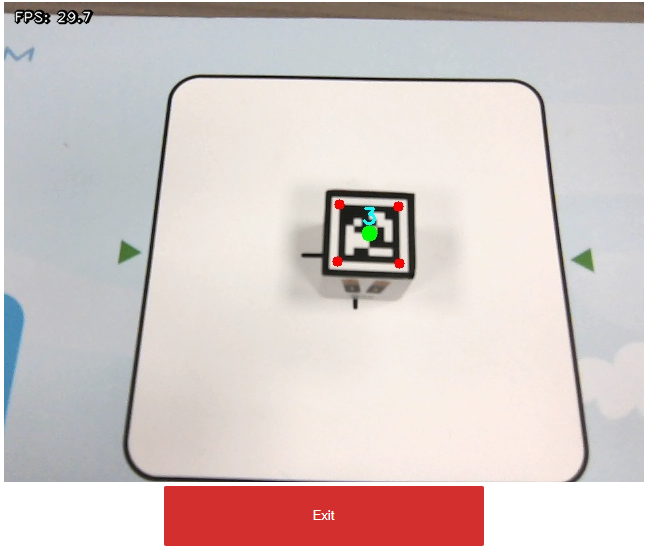
If you need to exit the program, please click the [Exit] button.