Welcome to DOFBOT Pro repository
3.Embodied intelligent robot system architecture
Embodied Intelligent Robot System Architecture
1. Course Content
- Explanation of the large model reasoning architecture for AI embodied intelligent robots
- Explanation of basic concepts in the system to lay the foundation for practical operations in subsequent courses
2. System Composition
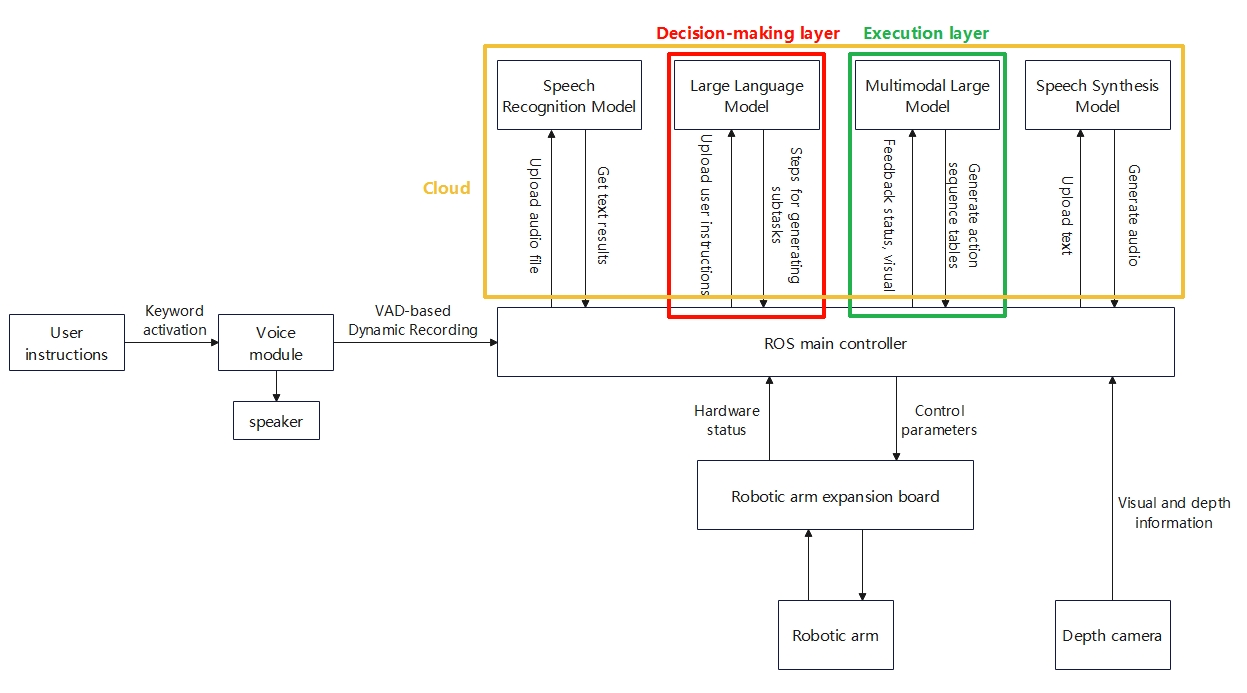
3. AI Large Model Reasoning Architecture Diagram
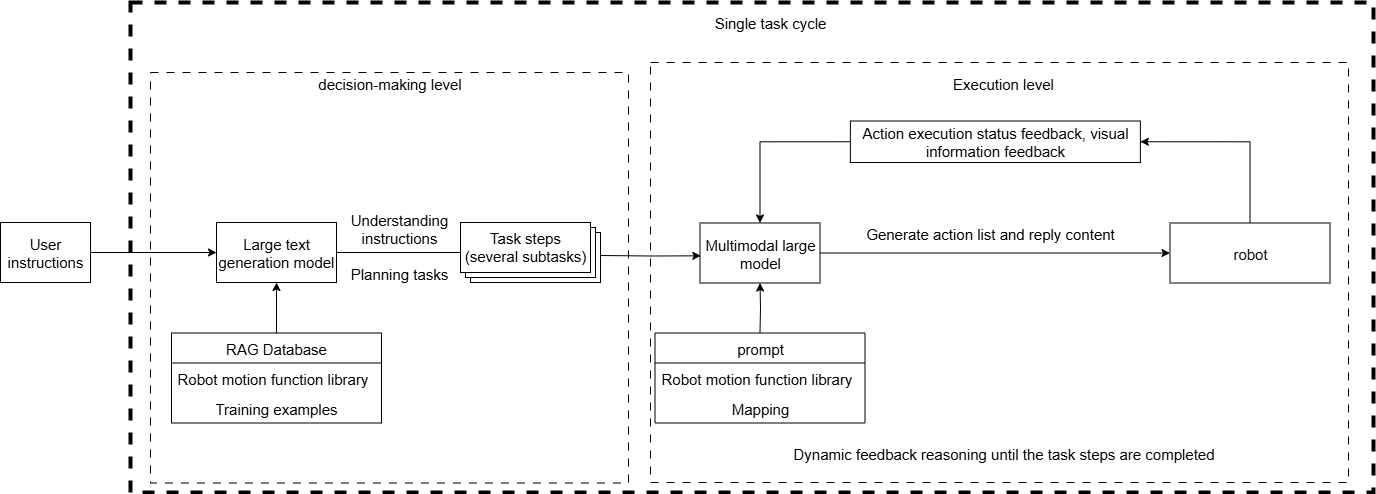
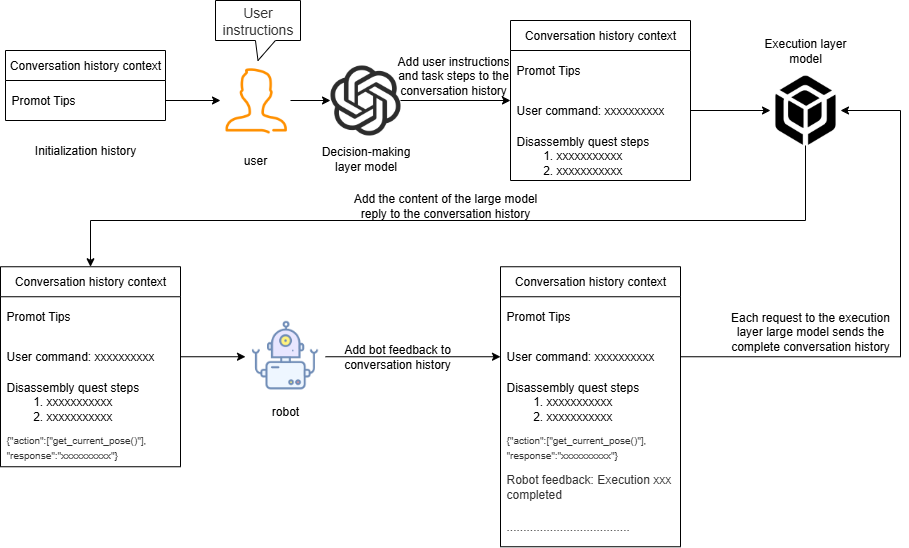
The robot adopts a dual-model reasoning and dynamic feedback reasoning design in program development, improving the robot's processing capability when facing long-process complex tasks. Compared to single-model architectures, it possesses stronger system robustness. Here are several key concepts: decision-layer large model, execution-layer large model, task cycle, and conversation history, which will be explained individually below.
4. Large Model Reasoning Architecture Explanation
4.1 Dual-Model Architecture Principles
- The robot's large model control system is designed based on text generation large models and multimodal large models, where the text generation large model serves as the decision layer, functioning as an upper-level task planner to decompose complex, abstract human instructions into tasks
- The multimodal large model serves as the execution layer, responsible for receiving task steps generated by the decision layer and users' temporary instructions (generally simple instructions asking the robot to end tasks or rest), monitoring the robot's task execution progress and making real-time adjustments to execution actions, generating a list of action functions that the robot can parse and responses to users
- The action function list contains pre-written basic action functions that can directly output parameters to control robot movement.
4.2 Advantages of Dual-Model Reasoning Architecture
4.2.1 Decoupling of Decision Logic and Action Control
- Multimodal large models are inferior to text generation large models in natural language semantic understanding and logical reasoning capabilities, and are prone to modal interference when executing complex tasks. Therefore, the system design decouples decision logic from action control.
- Text generation large models focus on semantic understanding and task planning (such as parsing "Can you help me get the blue block from room A?" and breaking down task steps into "Record current position → Navigate to room A → Get current robot perspective image → Locate blue block coordinates → Grab blue block → Return to starting position → Put down blue block"), avoiding the complexity of traditional single models needing to process action details simultaneously during semantic parsing.
- Multimodal large models are responsible for action generation and environment interaction (such as obtaining visual images to locate object coordinates, outputting action functions and parameters), reducing the situation where single models experience action logic confusion and large deviations due to task complexity.
4.2.2 Reducing Model Training Sample Complexity
When using a single model reasoning approach, multimodal large models need to simultaneously perform "natural language understanding + environment perception + process decomposition + action function output", which easily leads to modal interference (language ambiguity or overly long instructions causing understanding errors). The dual model achieves this through phased processing, with the decision layer focusing on language space mapping and the execution layer focusing on vision-movement space mapping.
4.2.3 Flexible Extension
Decision layer and execution layer large models can be flexibly combined using various large models from Alibaba Bailian large model platform (sometimes also called Tongyi Qianwen platform). Through custom training samples and RAG knowledge bases, the models can adapt to tasks in different scenarios, greatly enhancing the generalization capability of AI embodied intelligent robots in different scenarios.
4.3 Decision Layer Large Model
4.3.1 Decision Layer Model Function
- Each task step corresponds to the minimum action the robot can complete, and then the execution layer large model implements specific robot movements by calling API functions from this robot's action function library.
4.3.2 Robot Action Function Library (Simplified)
The robot action library defines all the minimum actions that the robot can actually execute. When planning task steps, the decision layer model will select appropriate actions from it for arrangement and combination.
Basic Action Class
- Turn on red light
- Turn on green light
- Turn on blue light
- Turn on alarm
- Turn off alarm
- Turn off light
Robotic Arm Class
- Adjust servo x to y degrees Description: Rotate the specified numbered servo to the specified angle
- Robotic arm movement Description: Move the end of the robotic arm a specified distance in the specified direction
- Robotic arm upward movement
- Robotic arm nodding
- Robotic arm shaking head
- Robotic arm dancing Similar semantics: shaking head, head shaking gesture.
- Robotic arm applauding Similar semantics: applauding, applauding gesture.
- Robotic arm gripping, grabbing objects Similar semantics: pick up, collect
- Robotic arm putting down items Description: Robotic arm releases gripped items
- Robotic arm gripper opening Description: Adjust servo 6 angle to 0 degrees
- Robotic arm gripper closing Description: Adjust servo 6 angle to 180 degrees
- Sorting, gripping x-numbered machine code Description: Sort and grip the specified numbered machine code.
- Track object, description: track the specified object
- Remove machine code of specified height
- Remove color blocks of specified height, description: automatically remove specified colors exceeding x centimeters in height, color values: 'red', 'green', 'blue', 'yellow'
- Sort x type of garbage Description: Call garbage sorting function, sort x type of garbage, x values are 'rec', 'tox', 'wet' or 'dry'.
- Move A to the side of B Description: Change the spatial position of gripped object A to the left side of object B, parameters: (x1,y1) are the pixel coordinates of the top-left corner of object A's outer bounding box, (x2,y2) are the pixel coordinates of the bottom-right corner of object A's outer bounding box, (x3,y3) are the pixel coordinates of the top-left corner of object B's outer bounding box, (x4,y4) are the pixel coordinates of the bottom-right corner of object B's outer bounding box, src represents the name of object A, if A is a color block, src represents the color of the block, tar represents the name of object B, similarly, if B is a color block, tar represents the color of the block; side represents five directions: front, back, left, right, top, with values 1 for front, 2 for back, 3 for left, 4 for right, 5 for top. Similar semantics include: grip A to the side of B, put A to the side of B, place A to the side of B
- Color block stacking Description: Grip color blocks in the image according to the given order.
- Return color blocks to original position Description: Return color blocks to their original position Similar semantics include: return color blocks to position, put color blocks back to original position.
- Track object
- Track machine code
- Cancel tracking machine code
- Cancel tracking object
- Remember current position of object
- Robotic arm pointing
- Garbage sorting
- Garbage cleaning
- Sort color blocks according to given sorting order
Image Acquisition Class
- Get current perspective image Description: Get current perspective image for observing environment or locating items.
- Record x seconds of video Description: Record video of specified duration, x represents duration in seconds.
- Play a guess object/small ball game Description: Record 20 seconds of video.
- Video understanding Description: Parse the content of the recorded 20-second video
Other Class
- Query weather
- Calculate math problems
- Guess object English
- Tell jokes
4.4 Execution Layer Large Model
- The robot's execution layer large model defaults to using the Tongyi Qianwen-VL series model.
- The execution layer large model is primarily responsible for generating action lists that control the robot's movements and responses to users. During the robot's execution of the action list, it continuously receives feedback from robot action execution results (success/failure), visual images, and infers the next action to execute based on whether the action execution status was successful.
- The execution layer large model acts as a supervisor, continuously monitoring the progress of the robot's task step execution, and based on result feedback after robot action execution and environmental information, thinks and judges the next action to execute, until the task is successfully completed or ended early due to special circumstances.
4.4.1 Task Cycle
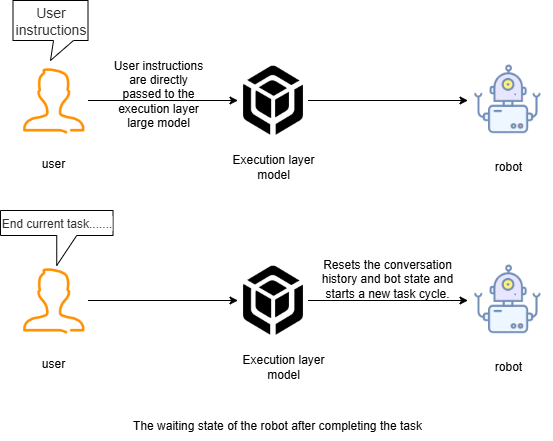
- In a new task cycle, user instructions first go through the decision layer large model, then through the execution layer large model. If the execution layer large model determines that the robot has completed all task steps, it will enter a waiting state, where subsequent user instructions are directly handed to the execution layer large model.
- For example: when the user requests to end the current task and let the robot rest, the robot will reset conversation history and robotic arm state, start a new task cycle, and user instructions will begin execution from the decision layer large model. The following shows the waiting state:
4.4.2 Historical Context
The robot maintains a conversation history context in its local program. The conversation history context contains user instructions, task steps generated by the decision layer model, action lists generated by the execution layer model, and robot feedback status information. Each time the robot requests the execution layer large model, it sends the complete conversation history, so the execution layer large model can know the progress of robot task execution. The execution layer large model combines the conversation history context to infer the next action to execute. In summary, the execution layer large model deduces the next future action based on the sum of past states.
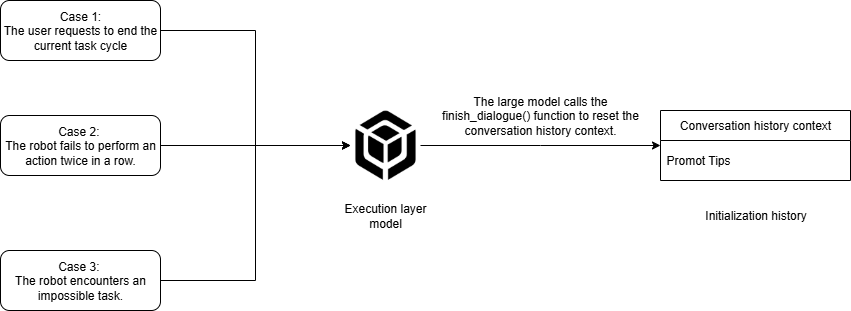
Under normal circumstances, the execution layer large model will determine task completion progress based on conversation history. When it determines that the robot has completed all task steps, it will enter a waiting state, waiting for user temporary instructions. Temporary instructions will no longer go through the decision layer large model, but are directly passed to the execution layer large model. There are three situations that cause the robot to clear conversation context history, end the current task cycle, and start a new task cycle.
- Case 1: User actively requests to end the task cycle. In the waiting state, when the user says something like "You can rest now" or "You may leave" indicating the robot is no longer needed, the execution layer large model will call the finish_dialogue() function to end the current task cycle, reset conversation history, and start a new task cycle. The same applies to the following cases.
- Case 2: The robot fails twice consecutively when executing a certain action. If an action fails, the execution layer large model will control the robot to retry at most once. If it fails again, the execution layer large model will control the robot to end the task cycle early and start a new task cycle.
- Case 3: When the robot encounters an impossible task, for example, when the user asks the robot to go to a location not mentioned in "map mapping", the robot will request to end the task cycle early and inform the user that this task cannot be completed.
4.4.4 Robot Action Function Library
The API functions in the robot action function library are the bridge for large models to control the robot's interaction with the real world. These API functions define the minimum actions that physical robots can complete in the physical world. The principle of API functions is to control the underlying hardware of physical robots through the ROS2 system to accomplish various functions.
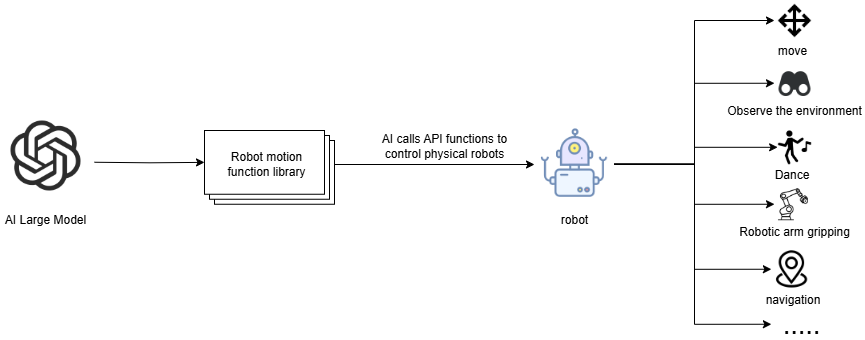
All action functions and their corresponding functions are shown in the following table:
| Function Name | Parameters | Implemented Function | Call Command |
|---|---|---|---|
| arm_dance() | - | Trigger robotic arm dance action | Robotic arm dance |
| arm_up() | - | Robotic arm upward lift | Robotic arm up |
| arm_down() | - | Robotic arm downward movement | Robotic arm down |
| arm_nod() | - | Robotic arm nod | Nod |
| arm_shake() | - | Robotic arm shake head | Shake head |
| arm_applaud() | - | Robotic arm applaud | Applaud |
| grip_pose() | - | Robotic arm gripping object posture | Robotic arm adjust to gripping posture |
| track_pose() | - | Robotic arm tracking object posture | Robotic arm adjust to tracking posture |
| cancel_KCF_follow | - | Cancel tracking object | Cancel tracking object |
| grasp_obj(x1, y1, x2, y2) | (x1, y1, x2, y2) coordinates of top-left and bottom-right points of target object's outer bounding box | Robotic arm grab an object | Grab xxx |
| remove_obj(x1, y1, x2, y2,color) | (x1, y1, x2, y2) are coordinates of top-left and bottom-right points of the outer bounding box of the top color block of obstacle color block. color represents the color of obstacle color block. | Remove obstacle color block | Remove x color block |
| putdown() | - | Robotic arm put down gripped item | Put down xxx |
| apriltag_sort(x) | x: machine code number | Sort out specified numbered machine code | Sort out x number machine code |
| track(x1, y1, x2, y2) | (x1, y1, x2, y2) coordinates of top-left and bottom-right points of target object's outer bounding box | Track specified object in field of view | Track xx |
| apriltag_remove_higher(x) | x: height | Remove machine code of specified height | Remove machine code higher than x centimeters |
| color_remove_higher(color, target_high) | color: color target_high: height | Remove color blocks of specified height | Remove color color blocks higher than target_high centimeters |
| garbage_sort(type_) | type_: garbage type to be sorted | Sort specified type of garbage | Sort recyclable garbage |
| change_pose(x1, y1, x2, y2,x3,y3,x4,y4,src,tar,side) | x1, y1, x2, y2,x3,y3,x4,y4: coordinates of top-left and bottom-right corners of top outer bounding boxes of target搬运 color block and target placement color block respectively; src represents color of target搬运 color block, tar represents color of target placement color block, side represents placement direction | Move color block to direction of another color block | Place blue color block on top of yellow color block |
| record_video(time_) | time_ represents duration of recorded video | Record video | Record a video of x seconds |
| apriltag_follow(target_id) | target_id: machine code ID | Track machine code of specified ID | Track x number machine code |
| compute_pose(x1,y1,x2,y2,name) | x1,y1,x2,y2: coordinates of top-left and bottom-right corners of outer bounding box of color block whose position needs to be recorded, name represents color of color block whose position needs to be recorded | Record current position of specified color color block | Record current position of x color block |
| compute_pose_order(x1,y1,x2,y2,name,order) | x1,y1,x2,y2: coordinates of top-left and bottom-right corners of outer bounding box of top color block, name color of top color block, order represents stacking order of color blocks from top to bottom | Record position of each stacked color block | Record current position of color blocks on desktop |
| return_to_orin(name) | name: represents color of color block that needs to return to original position | Put color block of specified color back to original position | Put x color block back to original position |
| light_on(color) | color: LED light color | Turn on LED light | Turn on * color light |
| light_off() | - | Turn off LED light | Turn off light |
| beep_on() | - | Turn on buzzer | Buzzer alarm |
| beep_off() | - | Turn off buzzer | Turn off buzzer |
| adjust_joint(joint_id,angle) | joint_id: servo ID, angle: servo angle | Set servo angle | Set x number servo to y degrees |
| gripper_open() | - | Open gripper | Open gripper |
| gripper_close() | - | Close gripper | Close gripper |
| color_back_to_orin() | - | Publish color block return to original position order | Put color blocks on desktop back to original position |
| grasp_from_rm_list(color) | color: color block color | Grip color block from gripping list | Grip x color block in gripping list |
| arm_move(Dir,Dist) | Dir: direction of robotic arm end adjustment takes values up down left right front back, Dist distance of robotic arm end adjustment, unit is centimeters | Adjust position of robotic arm end | Robotic arm adjust x by y centimeters |
| point_to(x1, y1, x2, y2) | x1, y1, x2, y2: coordinates of top-left and bottom-right corners of outer bounding box of pointed object | Robotic arm point to object | Robotic arm point to x |
| garbage_sort_all() | - | Garbage label code sorting | Clean garbage on desktop |
| grasp_from_down_list(color) | color: color block color | Grip color block from placement list | Grip x color block from placement list |
| check_remove(color) | - | Check if specified color block exists in removal list | Check if x color block exists in removal list |
| seewhat() | - | Take a photo of robot's current perspective and upload to execution layer large model | Observe environment |
| video_understanding() | - | Understand video content | What is the content in the video just recorded |
| finish_dialogue() | - | Reset historical context, start new task cycle | - |
| wait(x) | x: time, unit: seconds | Wait for a period of time, execute no operation | Wait x seconds |
| finishtask() | - | Automatically called after robot completes task, used to stop feeding back status to execution layer model | - |
5. Application of Voice Model in System
5.1 Voice Recognition
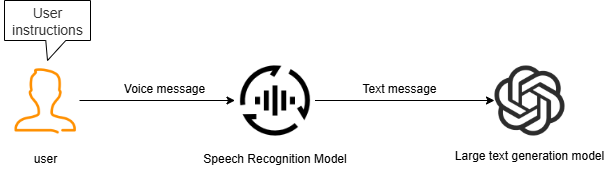
Since the decision layer and execution layer large models are text generation model and visual multimodal model respectively, they cannot directly receive user voice information, so it is necessary to use voice recognition large model to convert user voice instructions into corresponding text, then hand them to AI large model.
5.2 VAD Voice Activity Detection
VAD (Voice Activity Detection) is a technology that can automatically identify speech segments and non-speech segments (such as silence, noise) in speech signals. It locates the start and end positions of speech in audio streams and filters out invalid background sounds.
In subsequent practical courses, when users use the wake-up word "Hello, yahboom" to wake up the robot, it will enter VAD voice activity detection. The system will automatically detect the user's speaking duration and save effective sound segments as WAV audio files, then convert the audio files to text using the speech recognition model.
5.3 Voice Synthesis
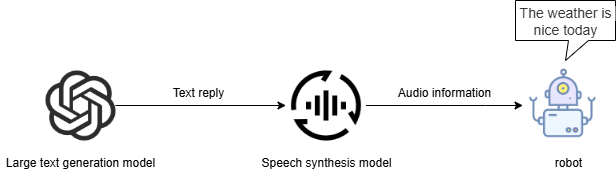
The text responses generated by the large model for users are converted into audio through the voice synthesis model, then played by hardware speakers.