Welcome to IMU Sensor Module repository
For Raspberry Pi Pico
Pico Serial Port Data Reading
This example uses the Pico2 development board, a Windows computer, several DuPont wires, and an IMU attitude sensor.
1. Connecting the Device
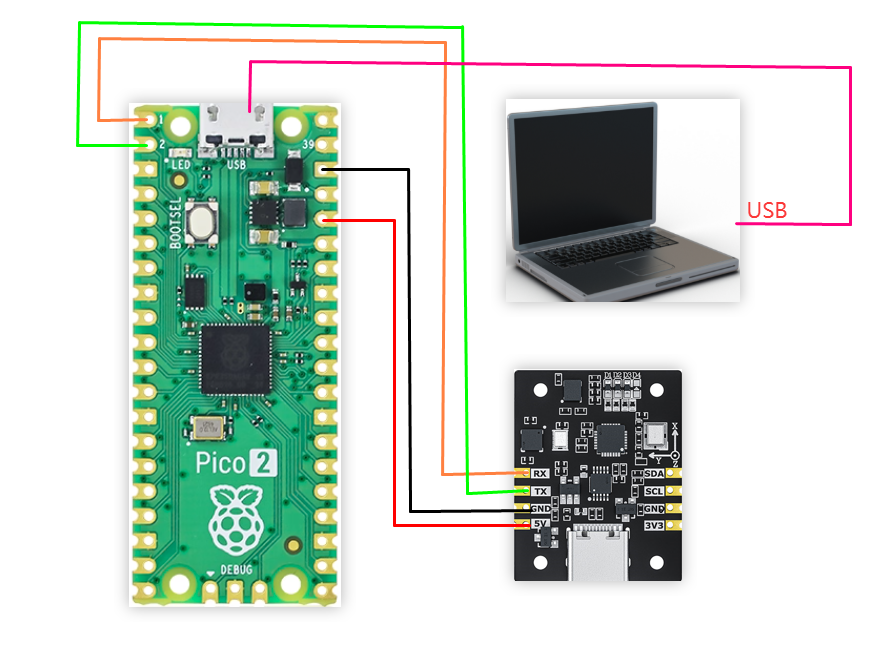
| IMU Attitude sensor | Pico2 |
|---|---|
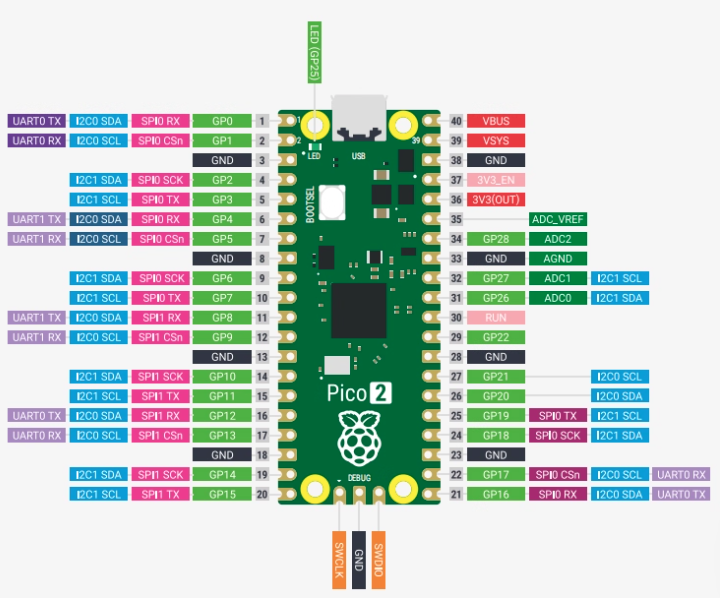
| RX | GP0 |
| TX | GP1 |
| GND | GND |
| 5V | 3V3(OUT) |
2. Key Code Analysis
Please refer to the source code in the documentation for specific code examples.
x
# According to the type of data frame to make the corresponding parsing def _parse_data(self, ext_type, ext_data): # print("parse_data:", ext_data, ext_type) # the original gyroscope, accelerometer, magnetometer data if ext_type == self.FUNC_REPORT_IMU_RAW: # Convert unit to g accel_ratio = 16 / 32767.0 self._ax = struct.unpack('h', bytearray(ext_data[0:2]))[0]*accel_ratio self._ay = struct.unpack('h', bytearray(ext_data[2:4]))[0]*accel_ratio self._az = struct.unpack('h', bytearray(ext_data[4:6]))[0]*accel_ratio # Convert units to rad/s AtoR = math.pi / 180.0 gyro_ratio = (2000 / 32767.0) * AtoR self._gx = struct.unpack('h', bytearray(ext_data[6:8]))[0]*gyro_ratio self._gy = struct.unpack('h', bytearray(ext_data[8:10]))[0]*gyro_ratio self._gz = struct.unpack('h', bytearray(ext_data[10:12]))[0]*gyro_ratio # # Convert units to uT mag_ratio = 800.0 / 32767.0 self._mx = struct.unpack('h', bytearray(ext_data[12:14]))[0]*mag_ratio self._my = struct.unpack('h', bytearray(ext_data[14:16]))[0]*mag_ratio self._mz = struct.unpack('h', bytearray(ext_data[16:18]))[0]*mag_ratio # the attitude Angle of the board elif ext_type == self.FUNC_REPORT_IMU_EULER: self._roll = struct.unpack('f', bytearray(ext_data[0:4]))[0] self._pitch = struct.unpack('f', bytearray(ext_data[4:8]))[0] self._yaw = struct.unpack('f', bytearray(ext_data[8:12]))[0] # the quaternion of IMU elif ext_type == self.FUNC_REPORT_IMU_QUAT: self._q0 = struct.unpack('f', bytearray(ext_data[0:4]))[0] self._q1 = struct.unpack('f', bytearray(ext_data[4:8]))[0] self._q2 = struct.unpack('f', bytearray(ext_data[8:12]))[0] self._q3 = struct.unpack('f', bytearray(ext_data[12:16]))[0] # Analyzing barometer data elif ext_type == self.FUNC_REPORT_BARO: self._height = round(struct.unpack('f', bytearray(ext_data[0:4]))[0], 2) self._temperature = round(struct.unpack('f', bytearray(ext_data[4:8]))[0], 2) self._pressure = round(struct.unpack('f', bytearray(ext_data[8:12]))[0], 5) self._pressure_contrast = round(struct.unpack('f', bytearray(ext_data[12:16]))[0], 5) elif ext_type == self.FUNC_VERSION: self._version_H = struct.unpack('B', bytearray(ext_data[0:1]))[0] self._version_M = struct.unpack('B', bytearray(ext_data[1:2]))[0] self._version_L = struct.unpack('B', bytearray(ext_data[2:3]))[0] elif ext_type == self.FUNC_RETURN_STATE: self._rx_func = struct.unpack('B', bytearray(ext_data[0:1]))[0] self._rx_state = struct.unpack('B', bytearray(ext_data[1:2]))[0]# receive data def _receive_data(self, data): if self.rx_flag == 0: if data == self._HEAD1: self.rx_flag = 1 elif self.rx_flag == 1: if data == self._HEAD2: self.rx_flag = 2 else: self.rx_flag = 0 elif self.rx_flag == 2: self.data_len = data if self.data_len <= self._RX_MAX_LEN: self.rx_flag = 3 else: self.data_len = 0 self.rx_flag = 0 elif self.rx_flag == 3: self.data_func = data self.rx_data = [] self.rx_count = 4 self.rx_flag = 4 elif self.rx_flag == 4: self.rx_data.append(data) self.rx_count = self.rx_count + 1 if self.rx_count >= self.data_len - 1: self.rx_flag = 5 elif self.rx_flag == 5: self.rx_flag = 0 rx_check_num = data check_sum = self._HEAD1 + self._HEAD2 + self.data_len + self.data_func for a in self.rx_data: check_sum = a + check_sum check_sum = check_sum % 256 if rx_check_num == check_sum: # print("parse_data", self.data_func, self.rx_data) self._parse_data(self.data_func, self.rx_data) else: if self._debug: print("check sum error:", rx_check_num, check_sum) print("data:", self.data_len, self.data_func, self.rx_data)_receive_data: Receives data and calls parse_frame_data to parse data conforming to the communication protocol.
_parse_frame_data(): Parses the data.
3. Reading IMU Data
After the program runs, the IMU data can be displayed in the terminal below.
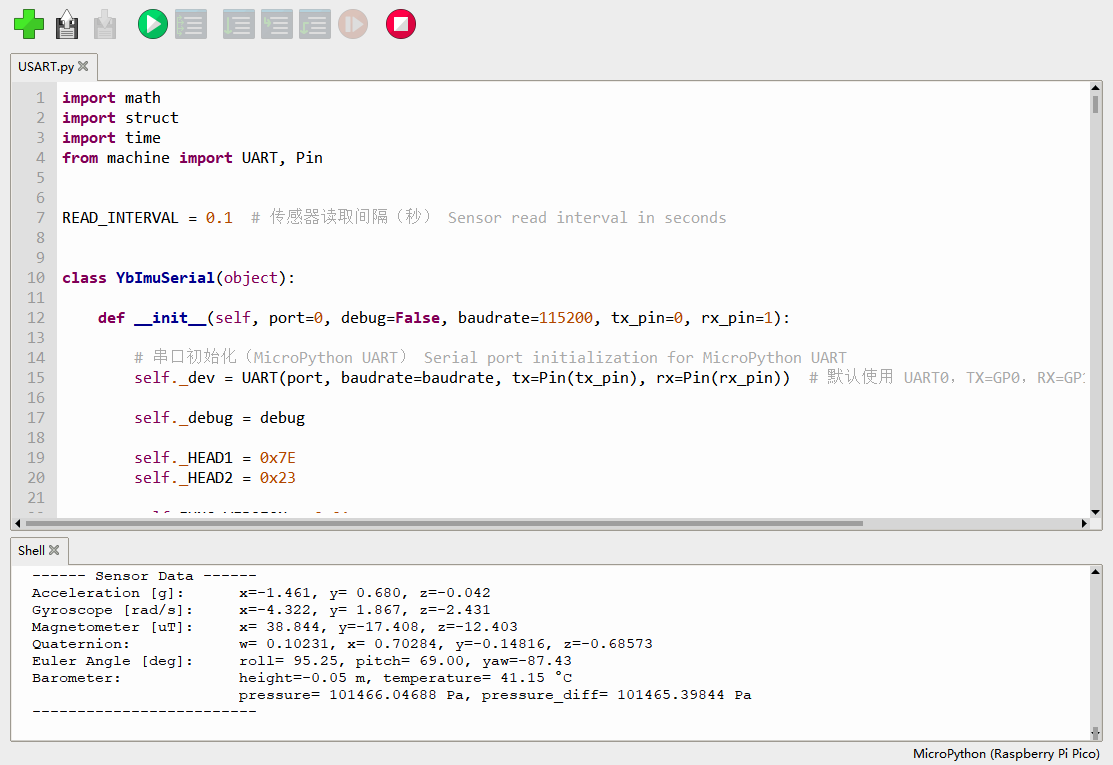
Note: The above data is for a 10-axis IMU; 6-axis data is without a magnetometer and barometer; 9-axis data is without a barometer.