Welcome to IMU Sensor Module repository
For STM32F103C8T6
STM32-IIC Data Reading
This example uses the STM32F103C8T6 core board (Yabo), a Windows computer, several DuPont wires, and an IMU attitude sensor.
1. Connecting the Device
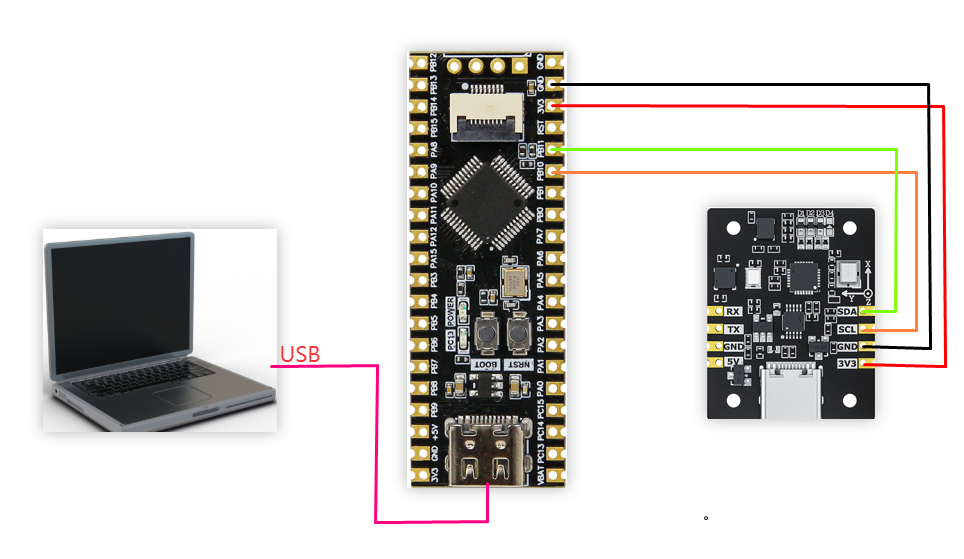
| IMU Attitude Sensor | STM32F103C8T6 Core Board (Yahboom) |
|---|---|
| SDA | PB11 |
| SCL | PB10 |
| GND | GND |
| 3V3 | 3V3 |
2. Key Code Analysis
Please refer to the source code in the documentation for specific code.
x
/** * @brief Read acceleration in g. * */int IMU_I2C_ReadAccelerometer(float out[3]){ uint8_t register_data[6]; if (read_register(IMU_FUNC_RAW_ACCEL, register_data, 6) != 0) { return -1; } if (out != NULL) { float ratio = 16.0f / 32767.0f; out[0] = to_int16(®ister_data[0]) * ratio; out[1] = to_int16(®ister_data[2]) * ratio; out[2] = to_int16(®ister_data[4]) * ratio; } return 0;}/** * @brief Read angular velocity in rad/s. * */int IMU_I2C_ReadGyroscope(float out[3]){ uint8_t register_data[6]; if (read_register(IMU_FUNC_RAW_GYRO, register_data, 6) != 0) { return -1; } if (out != NULL) { float ratio = (2000.0f / 32767.0f) * (3.1415926f / 180.0f); out[0] = to_int16(®ister_data[0]) * ratio; out[1] = to_int16(®ister_data[2]) * ratio; out[2] = to_int16(®ister_data[4]) * ratio; } return 0;}/** * @brief 读取磁场强度(单位 uT) * */int IMU_I2C_ReadMagnetometer(float out[3]){ uint8_t register_data[6]; if (read_register(IMU_FUNC_RAW_MAG, register_data, 6) != 0) { return -1; } if (out != NULL) { float ratio = 800.0f / 32767.0f; out[0] = to_int16(®ister_data[0]) * ratio; out[1] = to_int16(®ister_data[2]) * ratio; out[2] = to_int16(®ister_data[4]) * ratio; } return 0;}/** * @brief Read quaternion (w, x, y, z). * */int IMU_I2C_ReadQuaternion(float out[4]){ uint8_t register_data[16]; if (read_register(IMU_FUNC_QUAT, register_data, 16) != 0) { return -1; } if (out != NULL) { out[0] = to_float(®ister_data[0]); out[1] = to_float(®ister_data[4]); out[2] = to_float(®ister_data[8]); out[3] = to_float(®ister_data[12]); } return 0;}/** * @brief Read Euler angles (rad). * */int IMU_I2C_ReadEuler(float out[3]){ uint8_t register_data[12]; if (read_register(IMU_FUNC_EULER, register_data, 12) != 0) { return -1; } if (out != NULL) { const float RAD2DEG = 57.2957795f; out[0] = to_float(®ister_data[0]) * RAD2DEG; out[1] = to_float(®ister_data[4]) * RAD2DEG; out[2] = to_float(®ister_data[8]) * RAD2DEG; } return 0;}IMU_I2C_ReadAccelerometer(): Reads acceleration data (in g)
IMU_I2C_ReadGyroscope(): Reads angular velocity (in g) (rad/s)
IMU_I2C_ReadQuaternion(): Reads quaternions
IMU_I2C_ReadEuler(): Reads Euler angles (radians)
3. Reading IMU Data
After downloading the program into the STM32, open the serial port assistant (configuration parameters are shown in the figure below). You can see the IMU module's data being continuously printed. When we change the IMU module's orientation, the data will change.
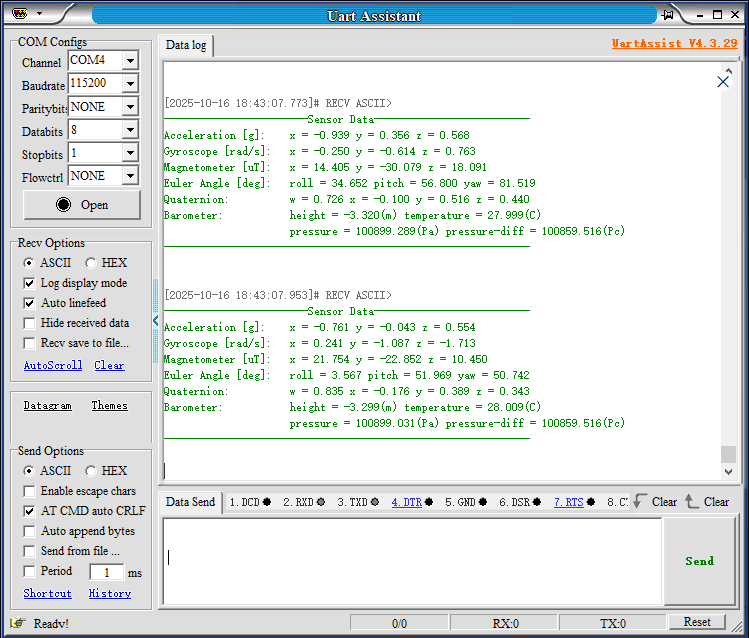
Note: The above is for reading data from a 10-axis IMU; 6-axis data is without a magnetometer and barometer; 9-axis data is without a barometer.