yahboom
HomeLearn
Solution
Blog
Online Store
About Us
EN/中文
ROS Robot Expansion Board📖
1.Expansion board STM32 driver
  • 0. Precautions
  • 1.1 Expansion Board Introduction_V3.0
  • 1.1 Expansion Board Introduction_V1.0
  • 1.2 STM32 Development environment
  • 1.3 Button to control the buzzer to whistle
  • 1.4 FreeRTOS application
  • 1.5 Serial communication
  • 1.6 SBUS model aircraft remote control
  • 1.7 CAN bus communication
  • 1.8 RGB colorful light bar
  • 1.9 Timer interrupt to control PWM servo
  • 1.10 Control serial port servos
  • 1.11 Nine-axis attitude sensor to obtain data
  • 1.12 Control the forward and reverse rotation of the motor
  • 1.13 The timer captures the encoder data
  • 1.14.1 Robot kinematics analysis theory
  • 1.14.2 Mecanum wheel kinematics analysis
  • 1.15 PID control robot movement
  • 1.16 OLED character display
2.Python basic control
  • 2.0 Bind PCB port devices
  • 2.1 Update the firmware of the expansion board
  • 2.2 Turn off the self-starting large program at startup
  • 2.3 Install the Rosmaster driver library
  • 2.4 Buzzer whistle
  • 2.5 Control PWM servo
  • 2.6 RGB colorful light bar special effects display
  • 2.7 Control the forward and reverse rotation of the motor
  • 2.8 Control the movement of the robot
  • 2.9 Control Serial Servo
3.ROS1 Basic Course
  • 1.ROS introduction
  • 2.ROS installation
  • 3.ROS common command tools
  • 4.ROS workspace
  • 5.ROS function package
  • 6.ROS node
  • 7.ROS topic publisher
  • 8.ROS topic subscribers
  • 9.ROS service client
  • 10.ROS service server
  • 11.ROS action client
  • 12.ROS action server
  • 13.ROS custom message reception
  • 14.ROS-launch file
  • 15.ROS-TF transformation
  • 16.ROS parameter service
  • 17.ROS-rviz use
  • 18.ROS-rqt tool usage
  • 19.Topic message recording and playback
  • 20.urdf model introduction
  • 21.gazebo introduction
  • 22.ROS distributed communication
4.ROS1 robot control
  • 0. Bind PCB port devices
  • 1. Package Use the tutorial
  • 2. Package Description
  • 3. Robot keyboard control
  • 4. Robot state estimation
  • 5. Robot imu calibration
  • 6. Robot URDF Model
5.ROS2 Basic Course
  • 1.Introduction to ROS2
  • 2.ROS2 install Humble
  • 3.ROS2 development environment
  • 4.ROS2 workspace
  • 5.ROS2 function package
  • 6.ROS2 node
  • 7.ROS2 topic communication
  • 8.ROS2 service communication
  • 9.ROS2 action communication
  • 10.ROS2 custom interface message
  • 11.ROS2 parameter service case
  • 12.ROS2 meta-function package
  • 13.ROS2 distributed communication
  • 14.ROS2 DDS
  • 15.ROS2 time related API
  • 16.ROS2 common command tools
  • 17.ROS2 rviz2 use
  • 18.ROS2 rqt toolbox
  • 19.ROS2 Launch startup file configuration
  • 20.ROS2 recording and playback tool
  • 21.ROS2 URDF model
  • 22.ROS2 Gazebo simulation platform
  • 23.ROS2 TF2 coordinate transformation
6.ROS2 robot control
  • 0. Bind PCB port devices
  • 1. Package Use the tutorial
  • 2. Robot information release
  • 3. Robot keyboard control
  • 4. Robot state estimation
  • 5. Robot calibration
  • 6. URDF model
7.RDK X3 course
  • 1. Update the firmware of the expansion board
  • 2. Turn off the self-starting large program at startup
  • 3. Install the Rosmaster driver library
  • 4. Buzzer whistle
  • 5. Control PWM servo
  • 6. RGB colorful light bar special effects
  • 7. Control motor forward reverse
  • 8. Control robot movement
  • 9. Control Serial Servo
Download
  • Rules_File
  • Hardware Info
  • Code
  • 3D Model File
  • RDK Code
  • ROS2_Basic_VM
Download ZIP

Welcome to ROS Robot Expansion Board repository

10.ROS2 custom interface message

10. ROS2 Custom Interface Messages

1. Introduction to Communication Interfaces

In the ROS system, whether it's topics, services, or actions, a key concept is used: the communication interface.

Communication isn't just one person talking to themselves; it's an exchange between two or more people. What's the content of this communication? To make it easier for everyone to understand, we can define a standard structure for the data being passed. This is the communication interface.

Interfaces reduce dependencies between programs, making it easier for us to use others' code and for others to use ours. This is the core goal of ROS: to reduce reinventing the wheel.
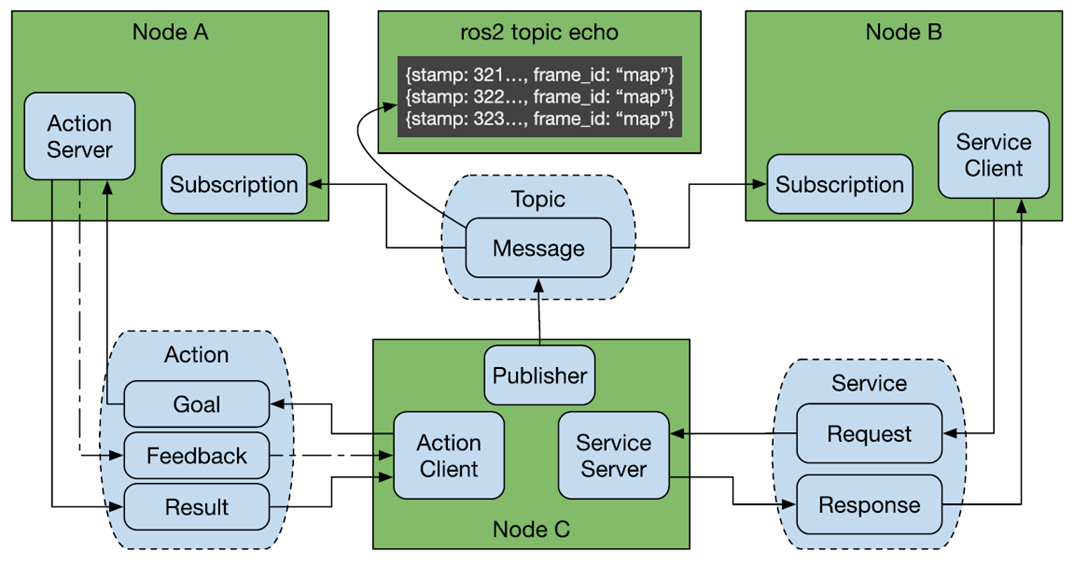
image-20220528001533911

ROS has three common communication mechanisms: topics, services, and actions. Through the interfaces defined for each communication type, various nodes are organically connected.

2. Creating a Custom Interface Process

The process for creating custom interface messages is similar to writing an executable program in a function package. The main steps are as follows:

  1. Create the interface function package;
  2. Create and edit the .msg file, .srv file, and .action file;
  3. Edit the configuration file;
  4. Compile;
  5. Test.

3. Creating a Custom Action Communication Interface

In the [11. ROS2 Action Communication Server Implementation] example, we demonstrated the complete process for creating an action communication interface. You can review it first; we will not repeat it here.

4. Create a custom interface for topic communication

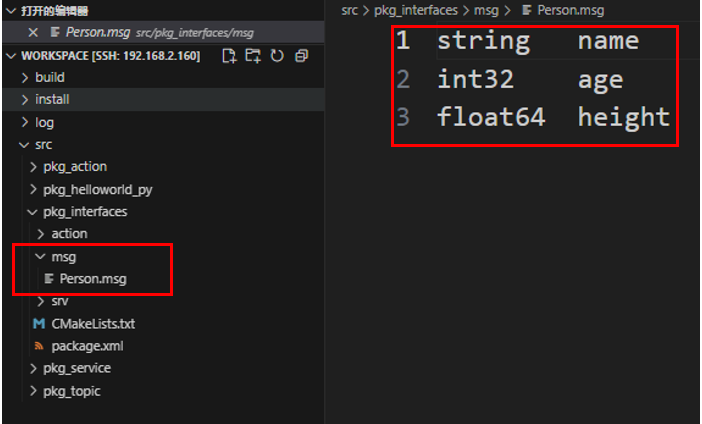
  1. In the [ROS2 Action Communication Server Implementation] course, we created a custom interface package. Create a folder called msg in the package pkg_interfaces and a file called Person.msg in the msg folder. Enter the following content in the file:
xxxxxxxxxx
string name
int32 age
float64 height

image-20250905144617408

  1. Add the following configuration to package.xml and CMakeLists.txt:
  • CMakeLists.txt
xxxxxxxxxx
rosidl_generate_interfaces(${PROJECT_NAME}
"action/Progress.action"
"msg/Person.msg"
)
  • package.xml
xxxxxxxxxx
<buildtool_depend>rosidl_default_generators</buildtool_depend>
<exec_depend>rosidl_default_runtime</exec_depend>
<depend>action_msgs</depend>
<member_of_group>rosidl_interface_packages</member_of_group>
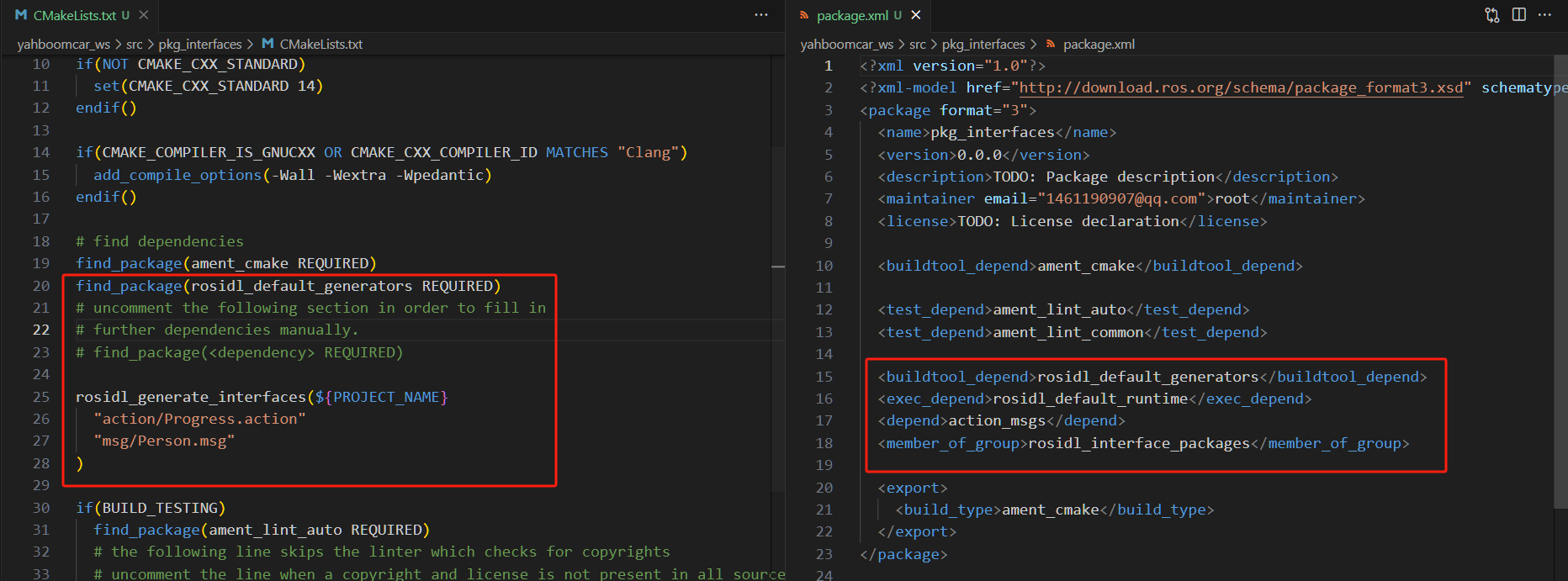
image-20231030180212876

  1. Enter the current workspace in the terminal and compile the function package:
xxxxxxxxxx
colcon build --packages-select pkg_interfaces
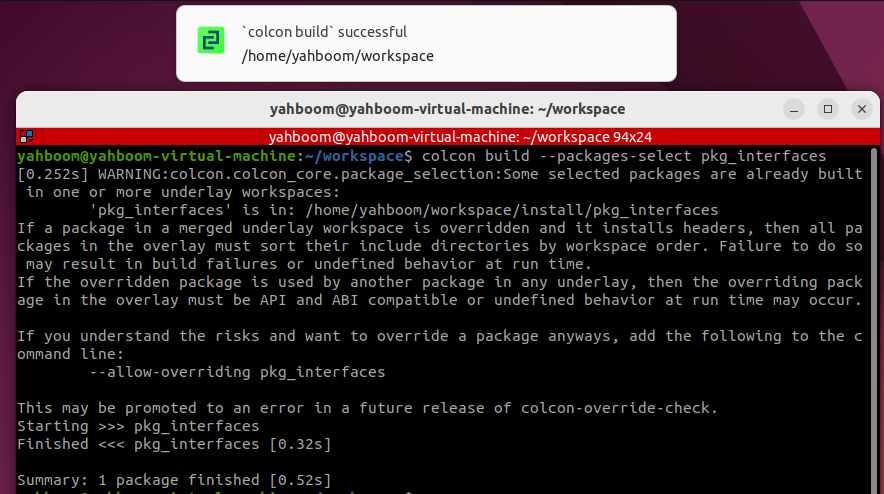
image-20250905145029972

  1. Test whether the interface is functioning properly.
  • First, refresh the environment variables.
xxxxxxxxxx
source install/setup.bash
  • Check the interface type
xxxxxxxxxx
ros2 interface show pkg_interfaces/msg/Person

Under normal circumstances, the terminal output will be consistent with the Person.msg file.

image-20231030175731991

5. Create a custom service communication interface

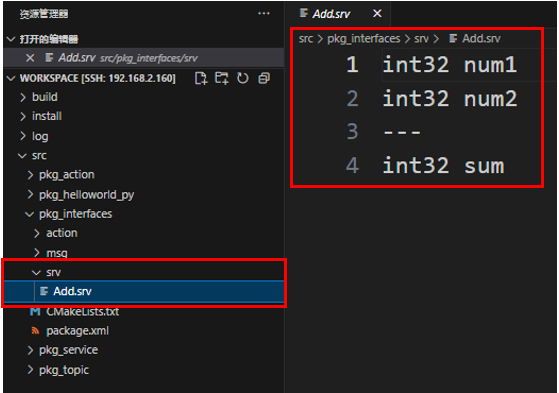
  1. In the [ROS2 Action Communication Server Implementation] course, we created a custom interface function package. Create a new folder called srv under the function package pkg_interfaces. Create a new file called Add.srv within the srv folder and enter the following content in the file:
xxxxxxxxxx
int32 num1
int32 num2
---
int32 sum

image-20250905145354692

  1. Add the following configuration to package.xml and CMakeLists.txt:
  • CMakeLists.txt
xxxxxxxxxx
rosidl_generate_interfaces(${PROJECT_NAME}
  "action/Progress.action"
  "msg/Person.msg"
  "srv/Add.srv"
)
  • package.xml
xxxxxxxxxx
<buildtool_depend>rosidl_default_generators</buildtool_depend>
<exec_depend>rosidl_default_runtime</exec_depend>
<depend>action_msgs</depend>
<member_of_group>rosidl_interface_packages</member_of_group>
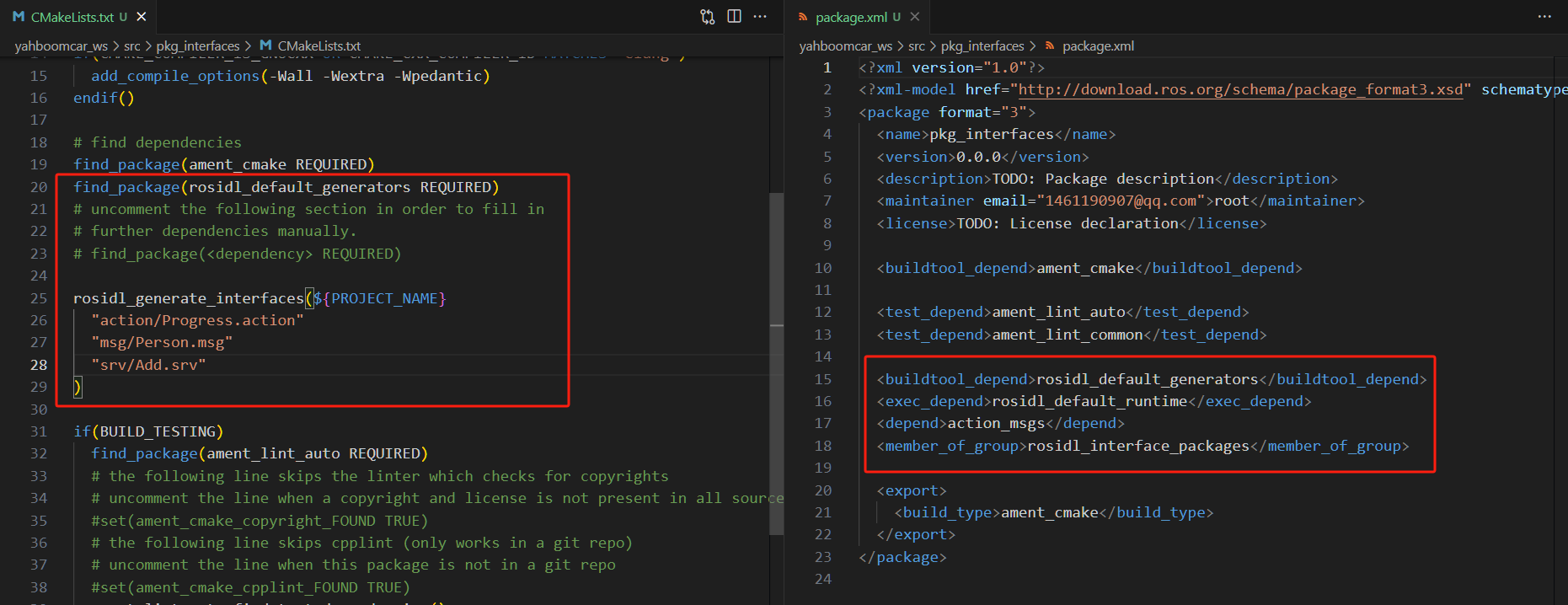
image-20231030180424883

  1. Enter the current workspace in the terminal and compile the feature package:
xxxxxxxxxx
cd ~/yahboomcar_ros2_ws/yahboomcar_ws
colcon build --packages-select pkg_interfaces
source install/setup.bash
  1. Testing
xxxxxxxxxx
ros2 interface show pkg_interfaces/srv/Add

Under normal circumstances, the terminal will output the same content as the Person.msg file.

image-20231030180541929

ROS2 action communication
ROS2 parameter service case

COMPANY

  • About us
  • Team Style
  • Blog

LEARNING & EXPLORATION

  • Tutorials
  • Edge AI hardware
  • Educational robots
  • Embedded intelligent hardware

WHERE TO BUY

  • Yahboom Online Store
  • Amazon
  • Alibaba
  • AliExpress
  • Mercado

TECHNOLOGY SUPPORT

  • Email: support@yahboom.com

BE A DISTRIBUTOR

  • Email: sales@yahboom.com
QR Code

Copyright © 2017-2026 Yahboom. All Rights Reserved.

EN/中文