Welcome to ROS Robot Expansion Board repository
1.16 OLED character display
16. OLED character display
16. OLED character display 16.1 the purpose of the experiment 16.2 configuration, pin information 16.3 the experimental flow chart parsing 16.4 the core code explanation 16.5 hardware connection 16.6 the experimental effect
16.1 the purpose of the experiment
Through I2C communication, learning to drive SSD1306 chip, thereby driving the OLED display character.
16.2 configuration, pin information
Because each new project requires configuration information, too much trouble, good STM32CubeIDE provides the import. ioc file, you can help us save time.
1.From the OLED project import ioc file, and the name of the OLED.
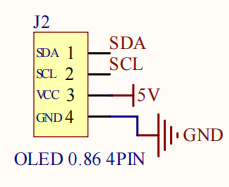
2.According to the principles of the figure shows: reserved OLED with I2C interface control PIN is connected to the STM32 chip PB10 and PB11 pin. Due to our present times the use of software IO analog I2C communication, so you need to PB10 and PB11 set to GPIO_Output mode, and modify the label for SCL and SDA, the other configuration is shown below.

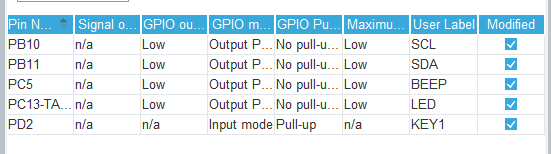
Save and generate code.
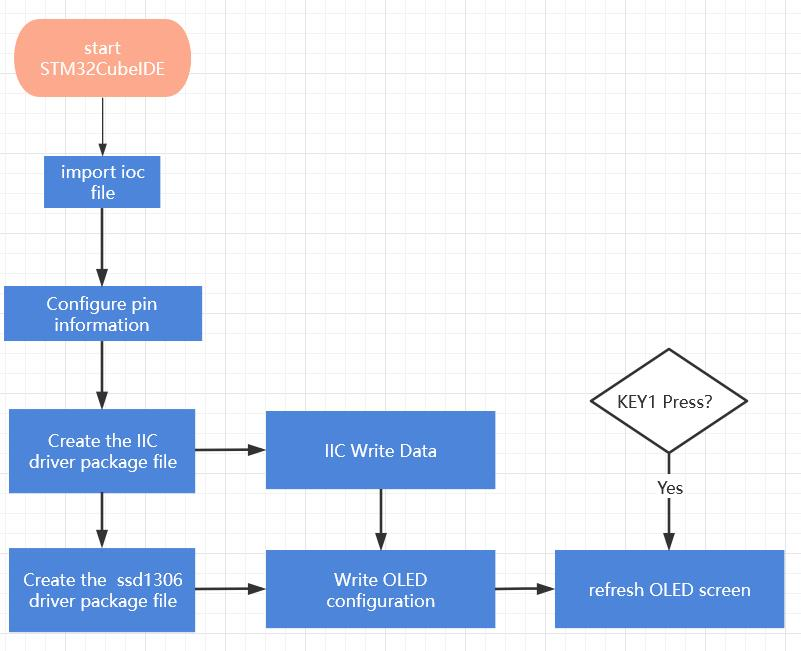
16.3 the experimental flow chart parsing
16.4 the core code explanation
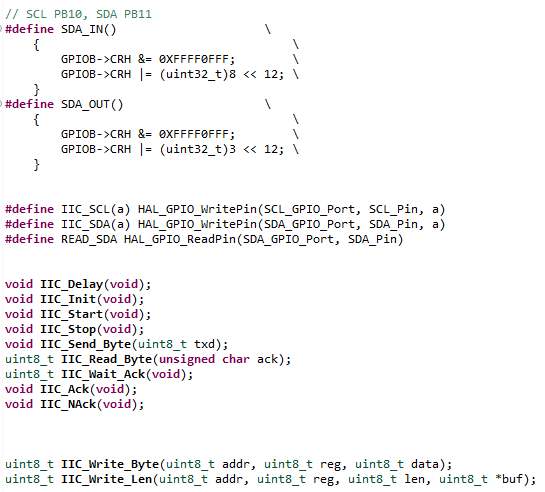
1.New bsp_io_i2c. h and bsp_io_i2c. c, and in bsp_io_i2c. h add the following content:
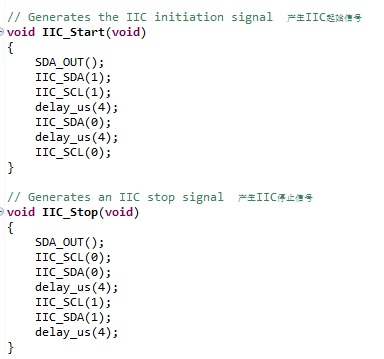
2.In bsp_io_i2c. c file in the new the following:
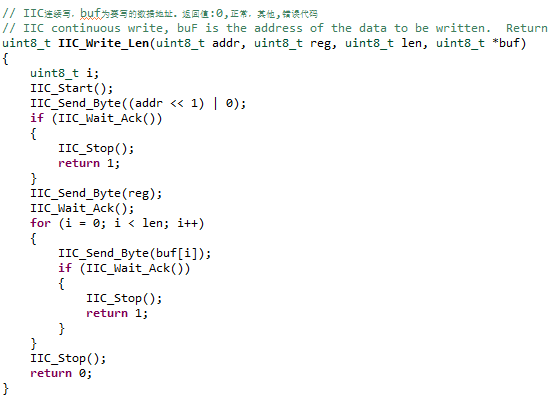
According to the IIC Protocol content, IIC_Start()to generate the IIC start signal, IIC_Stop()to generate the IIC stop signal.
3.IIC response correlation function.
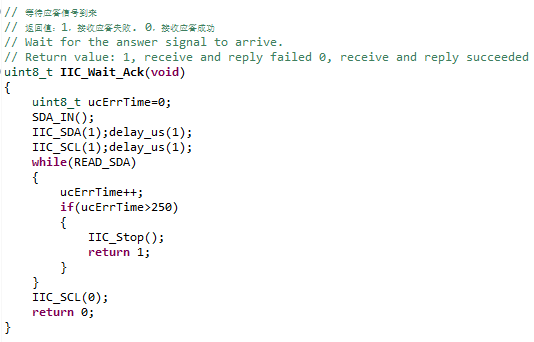
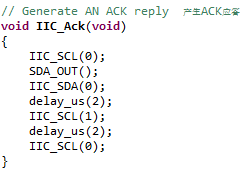
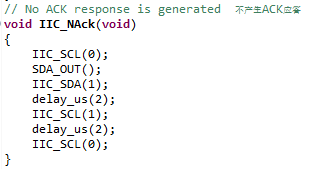
4.IIC send and read the data of the relevant function.
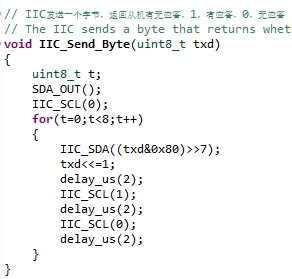
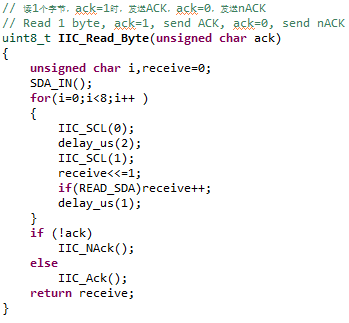
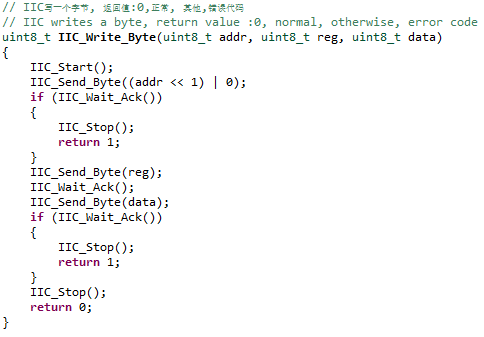
5.New bsp_ssd1306. h and bsp_ssd1306. c, and in bsp_ssd1306. h add the following content:
xxxxxxxxxx#ifndef __BSP_SSD1306_H__#define __BSP_SSD1306_H__#include "oled_fonts. h"#include "stdint. h"#define SSD1306_I2C_ADDR 0x3C#define SSD1306_WIDTH 128#define SSD1306_HEIGHT 32typedef enum {SSD1306_COLOR_BLACK = 0x00, /*!< Black color, no pixel */SSD1306_COLOR_WHITE = 0x01 /*!< Pixel is set. Color depends on LCD */} SSD1306_COLOR_t;uint8_t SSD1306_Init(void);void SSD1306_UpdateScreen(void);void SSD1306_ToggleInvert(void);void SSD1306_Fill(SSD1306_COLOR_t Color);void SSD1306_DrawPixel(uint16_t x, uint16_t y, SSD1306_COLOR_t color);void SSD1306_GotoXY(uint16_t x, uint16_t y);char SSD1306_Putc(char ch, FontDef_t* Font, SSD1306_COLOR_t color);char SSD1306_Puts(char* str, FontDef_t* Font, SSD1306_COLOR_t color);void SSD1306_DrawLine(uint16_t x0, uint16_t y0, uint16_t x1, uint16_t y1, SSD1306_COLOR_t c);void SSD1306_DrawRectangle(uint16_t x, uint16_t y, uint16_t w, uint16_t h, SSD1306_COLOR_t c);void SSD1306_DrawFilledRectangle(uint16_t x, uint16_t y, uint16_t w, uint16_t h, SSD1306_COLOR_t c);void SSD1306_DrawTriangle(uint16_t x1, uint16_t y1, uint16_t x2, uint16_t y2, uint16_t x3, uint16_t y3, SSD1306_COLOR_t color);void SSD1306_DrawCircle(int16_t x0, int16_t y0, int16_t r, SSD1306_COLOR_t c);void SSD1306_DrawFilledCircle(int16_t x0, int16_t y0, int16_t r, SSD1306_COLOR_t c);void ssd1306_I2C_Init(void);void ssd1306_I2C_Write(uint8_t address, uint8_t reg, uint8_t data);void ssd1306_I2C_WriteMulti(uint8_t address, uint8_t reg, uint8_t *data, uint16_t count);#endif /* __BSP_SSD1306_H__ */
6.在bsp_ssd1306.c增加以下相关函数。
xxxxxxxxxx#include "bsp_ssd1306.h"#include "bsp_io_i2c.h"/* Write command */#define SSD1306_WRITECOMMAND(command) ssd1306_I2C_Write(SSD1306_I2C_ADDR, 0x00, (command))/* Write data */#define SSD1306_WRITEDATA(data) ssd1306_I2C_Write(SSD1306_I2C_ADDR, 0x40, (data))/* Absolute value *//* SSD1306 data buffer */static uint8_t SSD1306_Buffer[SSD1306_WIDTH * SSD1306_HEIGHT / 8];typedef struct{uint16_t CurrentX;uint16_t CurrentY;uint8_t Inverted;uint8_t Initialized;} SSD1306_t;static SSD1306_t SSD1306;static uint16_t ABS(int a){int temp = a;if (a < 0) temp = -a;return temp;}/* 初始化SSD1306芯片 Initialize the SSD1306 chip*/uint8_t SSD1306_Init(void){/* A little delay */uint32_t p = 2500;while (p > 0)p--;/* Init LCD */SSD1306_WRITECOMMAND(0xae); // display offSSD1306_WRITECOMMAND(0xa6); // Set Normal Display (default)SSD1306_WRITECOMMAND(0xAE); // DISPLAYOFFSSD1306_WRITECOMMAND(0xD5); // SETDISPLAYCLOCKDIVSSD1306_WRITECOMMAND(0x80); // the suggested ratio 0x80SSD1306_WRITECOMMAND(0xA8); // SSD1306_SETMULTIPLEXSSD1306_WRITECOMMAND(0x1F);SSD1306_WRITECOMMAND(0xD3); // SETDISPLAYOFFSETSSD1306_WRITECOMMAND(0x00); // no offsetSSD1306_WRITECOMMAND(0x40 | 0x0); // SETSTARTLINESSD1306_WRITECOMMAND(0x8D); // CHARGEPUMPSSD1306_WRITECOMMAND(0x14); // 0x014 enable, 0x010 disableSSD1306_WRITECOMMAND(0x20); // com pin HW config, sequential com pin config (bit 4), disable left/right remap (bit 5),SSD1306_WRITECOMMAND(0x02); // 0x12 //128x32 OLED: 0x002, 128x32 OLED 0x012SSD1306_WRITECOMMAND(0xa1); // segment remap a0/a1SSD1306_WRITECOMMAND(0xc8); // c0: scan dir normal, c8: reverseSSD1306_WRITECOMMAND(0xda);SSD1306_WRITECOMMAND(0x02); // com pin HW config, sequential com pin config (bit 4), disable left/right remap (bit 5)SSD1306_WRITECOMMAND(0x81);SSD1306_WRITECOMMAND(0xcf); // [2] set contrast controlSSD1306_WRITECOMMAND(0xd9);SSD1306_WRITECOMMAND(0xf1); // [2] pre-charge period 0x022/f1SSD1306_WRITECOMMAND(0xdb);SSD1306_WRITECOMMAND(0x40); // vcomh deselect levelSSD1306_WRITECOMMAND(0x2e); // Disable scrollSSD1306_WRITECOMMAND(0xa4); // output ram to displaySSD1306_WRITECOMMAND(0xa6); // none inverted normal display modeSSD1306_WRITECOMMAND(0xaf); // display on/* Clear screen */SSD1306_Fill(SSD1306_COLOR_BLACK);/* Update screen */SSD1306_UpdateScreen();/* Set default values */SSD1306.CurrentX = 0;SSD1306.CurrentY = 0;/* Initialized OK */SSD1306.Initialized = 1;/* Return OK */return 1;}/* 刷新数据 Update Screen */void SSD1306_UpdateScreen(void){uint8_t m;for (m = 0; m < 8; m++){SSD1306_WRITECOMMAND(0xB0 + m);SSD1306_WRITECOMMAND(0x00);SSD1306_WRITECOMMAND(0x10);/* Write multi data */ssd1306_I2C_WriteMulti(SSD1306_I2C_ADDR, 0x40, &SSD1306_Buffer[SSD1306_WIDTH * m], SSD1306_WIDTH);}}/* 像素反转 Pixel Invert */void SSD1306_ToggleInvert(void){uint16_t i;/* Toggle invert */SSD1306.Inverted = !SSD1306.Inverted;/* Do memory toggle */for (i = 0; i < sizeof(SSD1306_Buffer); i++){SSD1306_Buffer[i] = ~SSD1306_Buffer[i];}}/* 填充颜色 Fill color*/void SSD1306_Fill(SSD1306_COLOR_t color){/* Set memory */memset(SSD1306_Buffer, (color == SSD1306_COLOR_BLACK) ? 0x00 : 0xFF, sizeof(SSD1306_Buffer));}/* Draw a Pixel draw a pixel*/void SSD1306_DrawPixel(uint16_t x, uint16_t y, SSD1306_COLOR_t color){if (x >= SSD1306_WIDTH || y >= SSD1306_HEIGHT){return; // error, out of range Error, out of scope}/* Check whether the Pixel is inverted Check if the pixel is Inverted*/if (SSD1306.Inverted){color = (SSD1306_COLOR_t)!color;}/* 设置颜色 set colors */if (color == SSD1306_COLOR_WHITE){SSD1306_Buffer[x + (y / 8) * SSD1306_WIDTH] |= 1 << (y % 8);}else{SSD1306_Buffer[x + (y / 8) * SSD1306_WIDTH] &= ~(1 << (y % 8));}}/* 设置当前点X Y值 Set the current point(X , Y) value */void SSD1306_GotoXY(uint16_t x, uint16_t y){SSD1306. CurrentX = x;SSD1306. CurrentY = y;}/* A character is converted to a pixel point Convert a character into pixels */char SSD1306_Putc(char ch, FontDef_t *Font, SSD1306_COLOR_t color){a uint32_t that i, b, j;if (SSD1306_WIDTH <= (SSD1306. CurrentX + Font->FontWidth) ||SSD1306_HEIGHT <= (SSD1306. CurrentY + Font->FontHeight)){return 0; // error, out of range Error, out of scope}for (i = 0; i < Font->FontHeight; i++){b = Font->data[(ch - 32) * Font->FontHeight + i];for (j = 0; j < Font->FontWidth; j++){if ((b << j) & 0x8000){SSD1306_DrawPixel(SSD1306.CurrentX + j, (SSD1306.CurrentY + i), (SSD1306_COLOR_t)color);}else{SSD1306_DrawPixel(SSD1306.CurrentX + j, (SSD1306.CurrentY + i), (SSD1306_COLOR_t)!color);}}}/* Increase pointer */SSD1306.CurrentX += Font->FontWidth;/* Return character written */return ch;}/* 将字符串转化成像素 Converts a string to pixels */char SSD1306_Puts(char *str, FontDef_t *Font, SSD1306_COLOR_t color){/* Write characters */while (*str){/* Write character by character */if (SSD1306_Putc(*str, Font, color) != *str){/* Return error */return *str;}/* Increase string pointer */str++;}/* Everything OK, zero should be returned */return *str;}/* 画一条线 Draw a Line*/void SSD1306_DrawLine(uint16_t x0, uint16_t y0, uint16_t x1, uint16_t y1, SSD1306_COLOR_t c){int16_t dx, dy, sx, sy, err, e2, i, tmp;/* Check for overflow */if (x0 >= SSD1306_WIDTH){x0 = SSD1306_WIDTH - 1;}if (x1 >= SSD1306_WIDTH){x1 = SSD1306_WIDTH - 1;}if (y0 >= SSD1306_HEIGHT){y0 = SSD1306_HEIGHT - 1;}if (y1 >= SSD1306_HEIGHT){y1 = SSD1306_HEIGHT - 1;}dx = (x0 < x1) ? (x1 - x0) : (x0 - x1);dy = (y0 < y1) ? (y1 - y0) : (y0 - y1);sx = (x0 < x1) ? 1 : -1;sy = (y0 < y1) ? 1 : -1;err = ((dx > dy) ? dx : -dy) / 2;if (dx == 0){if (y1 < y0){tmp = y1;y1 = y0;y0 = tmp;}if (x1 < x0){tmp = x1;x1 = x0;x0 = tmp;}/* Vertical line */for (i = y0; i <= y1; i++){SSD1306_DrawPixel(x0, i, c);}/* Return from function */return;}if (dy == 0){if (y1 < y0){tmp = y1;y1 = y0;y0 = tmp;}if (x1 < x0){tmp = x1;x1 = x0;x0 = tmp;}/* Horizontal line */for (i = x0; i <= x1; i++){SSD1306_DrawPixel(i, y0, c);}/* Return from function */return;}while (1){SSD1306_DrawPixel(x0, y0, c);if (x0 == x1 && y0 == y1){break;}e2 = err;if (e2 > -dx){err -= dy;x0 += sx;}if (e2 < dy){err += dx;y0 += sy;}}}/* 画一个矩形 Draw a Rectangle */void SSD1306_DrawRectangle(uint16_t x, uint16_t y, uint16_t w, uint16_t h, SSD1306_COLOR_t c){/* Check input parameters */if (x >= SSD1306_WIDTH ||y >= SSD1306_HEIGHT){/* Return error */return;}/* Check width and height */if ((x + w) >= SSD1306_WIDTH){w = SSD1306_WIDTH - x;}if ((y + h) >= SSD1306_HEIGHT){h = SSD1306_HEIGHT - y;}/* Draw 4 lines */SSD1306_DrawLine(x, y, x + w, y, c); /* Top line */SSD1306_DrawLine(x, y + h, x + w, y + h, c); /* Bottom line */SSD1306_DrawLine(x, y, x, y + h, c); /* Left line */SSD1306_DrawLine(x + w, y, x + w, y + h, c); /* Right line */}/* 画一个实心的矩形 Draw a Filled Rectangle*/void SSD1306_DrawFilledRectangle(uint16_t x, uint16_t y, uint16_t w, uint16_t h, SSD1306_COLOR_t c){uint8_t i;/* Check input parameters */if (x >= SSD1306_WIDTH ||y >= SSD1306_HEIGHT){/* Return error */return;}/* Check width and height */if ((x + w) >= SSD1306_WIDTH){w = SSD1306_WIDTH - x;}if ((y + h) >= SSD1306_HEIGHT){h = SSD1306_HEIGHT - y;}/* Draw lines */for (i = 0; i <= h; i++){/* Draw lines */SSD1306_DrawLine(x, y + i, x + w, y + i, c);}}/* 画一个三角形 Draw a Triangle */void SSD1306_DrawTriangle(uint16_t x1, uint16_t y1, uint16_t x2, uint16_t y2, uint16_t x3, uint16_t y3, SSD1306_COLOR_t color){/* Draw lines */SSD1306_DrawLine(x1, y1, x2, y2, color);SSD1306_DrawLine(x2, y2, x3, y3, color);SSD1306_DrawLine(x3, y3, x1, y1, color);}/* 画一个实心的三角形 Draw a Filled Triangle*/void SSD1306_DrawFilledTriangle(uint16_t x1, uint16_t y1, uint16_t x2, uint16_t y2, uint16_t x3, uint16_t y3, SSD1306_COLOR_t color){int16_t deltax = 0, deltay = 0, x = 0, y = 0, xinc1 = 0, xinc2 = 0,yinc1 = 0, yinc2 = 0, den = 0, num = 0, numadd = 0, numpixels = 0,curpixel = 0;deltax = ABS(x2 - x1);deltay = ABS(y2 - y1);x = x1;y = y1;if (x2 >= x1){xinc1 = 1;xinc2 = 1;}else{xinc1 = -1;xinc2 = -1;}if (y2 >= y1){yinc1 = 1;yinc2 = 1;}else{yinc1 = -1;yinc2 = -1;}if (deltax >= delta){xinc1 = 0;yinc2 = 0;den = deltax;num = deltax / 2;numadd = deltay;numpixels = deltax;}else{xinc2 = 0;yinc1 = 0;den = deltay;num = deltay / 2;numadd = deltax;numpixels = deltay;}for (curpixel = 0; curpixel <= numpixels; curpixel++){SSD1306_DrawLine(x, y, x3, y3, color);num += numadd;if (num >= den){num -= den;x += xinc1;y += yinc1;}x += xinc2;y += yinc2;}}/* 画一个圆 Draw a Circle */void SSD1306_DrawCircle(int16_t x0, int16_t y0, int16_t r, SSD1306_COLOR_t c){int16_t f = 1 - r;int16_t ddF_x = 1;int16_t ddF_y = -2 * r;int16_t x = 0;int16_t y = r;SSD1306_DrawPixel(x0, y0 + r, c);SSD1306_DrawPixel(x0, y0 - r, c);SSD1306_DrawPixel(x0 + r, y0, c);SSD1306_DrawPixel(x0 - r, y0, c);while (x < y){if (f >= 0){y--;ddF_y += 2;f += ddF_y;}x++;ddF_x += 2;f += ddF_x;SSD1306_DrawPixel(x0 + x, y0 + y, c);SSD1306_DrawPixel(x0 - x, y0 + y, c);SSD1306_DrawPixel(x0 + x, y0 - y, c);SSD1306_DrawPixel(x0 - x, y0 - y, c);SSD1306_DrawPixel(x0 + y, y0 + x, c);SSD1306_DrawPixel(x0 - y, y0 + x, c);SSD1306_DrawPixel(x0 + y, y0 - x, c);SSD1306_DrawPixel(x0 - y, y0 - x, c);}}/* 画一个实心圆 Draw a Filled Circle */void SSD1306_DrawFilledCircle(int16_t x0, int16_t y0, int16_t r, SSD1306_COLOR_t c){int16_t f = 1 - r;int16_t ddF_x = 1;int16_t ddF_y = -2 * r;int16_t x = 0;int16_t y = r;SSD1306_DrawPixel(x0, y0 + r, c);SSD1306_DrawPixel(x0, y0 - r, c);SSD1306_DrawPixel(x0 + r, y0, c);SSD1306_DrawPixel(x0 - r, y0, c);SSD1306_DrawLine(x0 - r, y0, x0 + r, y0, c);while (x < y){if (f >= 0){y--;ddF_y += 2;f += ddF_y;}x++;ddF_x += 2;f += ddF_x;SSD1306_DrawLine(x0 - x, y0 + y, x0 + x, y0 + y, c);SSD1306_DrawLine(x0 + x, y0 - y, x0 - x, y0 - y, c);SSD1306_DrawLine(x0 + y, y0 + x, x0 - y, y0 + x, c);SSD1306_DrawLine(x0 + y, y0 - x, x0 - y, y0 - x, c);}}/* 打开SSD1306 */void SSD1306_ON(void){SSD1306_WRITECOMMAND(0x8D);SSD1306_WRITECOMMAND(0x14);SSD1306_WRITECOMMAND(0xAF);}/* 关闭SSD1306 */void SSD1306_OFF(void){SSD1306_WRITECOMMAND(0x8D);SSD1306_WRITECOMMAND(0x10);SSD1306_WRITECOMMAND(0xAE);}/////////////////////////////////////////////////////////////////////////////////////////////////////////////////////////////////////////////////////////////////////////////////////////////////////////////////////////////////////////////////////////////////////////////////////////////////////////////////////////////////* IIC一次写多个数据 Write Multi Data */void ssd1306_I2C_WriteMulti(uint8_t address, uint8_t reg, uint8_t *data, uint16_t count){IIC_Write_Len(address, reg, count, data);}/* IIC write data Write Data*/void ssd1306_I2C_Write(uint8_t address, uint8_t reg, uint8_t data){IIC_Write_Byte(address, reg, data);}
7.New oled_fonts. h and oled_fonts. c, is mainly responsible for the character encoding conversion pixel of the features.
8.New bsp_oled. h and bsp_oled. c, and in bsp_oled. h add the following content:
xxxxxxxxxx/** bsp_oled. h** Created on: Oct 14, 2022* Author: Administrator*/#ifndef BSP_OLED_H_#define BSP_OLED_H_#include "stdint. h"/* OLED Clear clear the screen */void OLED_Clear(void);/* OLED Refresh to refresh the screen */void OLED_Refresh(void);/* Draw String to write into the character */void OLED_Draw_String(char *data, uint8_t x, uint8_t y, uint8_t clear, uint8_t refresh);/* Draw Line, write a line of characters */void OLED_Draw_Line(char *data, uint8_t line, uint8_t clear, uint8_t refresh);#endif /* BSP_OLED_H_ */
9.In bsp_oled. c add the following correlation function.
xxxxxxxxxx#include "bsp_oled.h"#include "bsp_ssd1306.h"/* OLED Clear clear the screen */void OLED_Clear(void){SSD1306_Fill(SSD1306_COLOR_BLACK);}/* OLED Refresh to refresh the screen */void OLED_Refresh(void){SSD1306_UpdateScreen();}/* Draw String to write into the character */void OLED_Draw_String(char *data, uint8_t x, uint8_t y, uint8_t clear, uint8_t refresh){if (clear) OLED_Clear();SSD1306_GotoXY(x, y);SSD1306_Puts(data, &Font_7x10, SSD1306_COLOR_WHITE);if (refresh) OLED_Refresh();}/* Draw Line, write a line of characters */void OLED_Draw_Line(char *data, uint8_t line, uint8_t clear, uint8_t refresh){if (line > 0 && line <= 3){OLED_Draw_String(data, 0, 10 * (line - 1), clear, refresh);}}
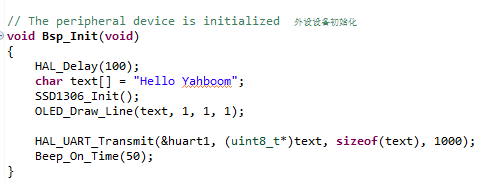
10.In Bsp_Init()function to add the initialization SSD1306 content, and display Hello Yahboom character in the OLED on.
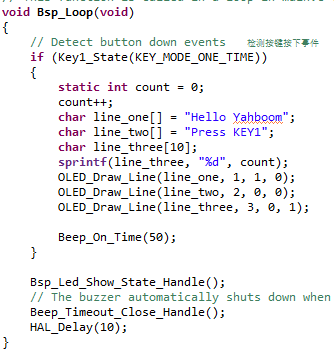
11.In Bsp_Loop()function to add the button to refresh the OLED screen display function.
16.5 hardware connection
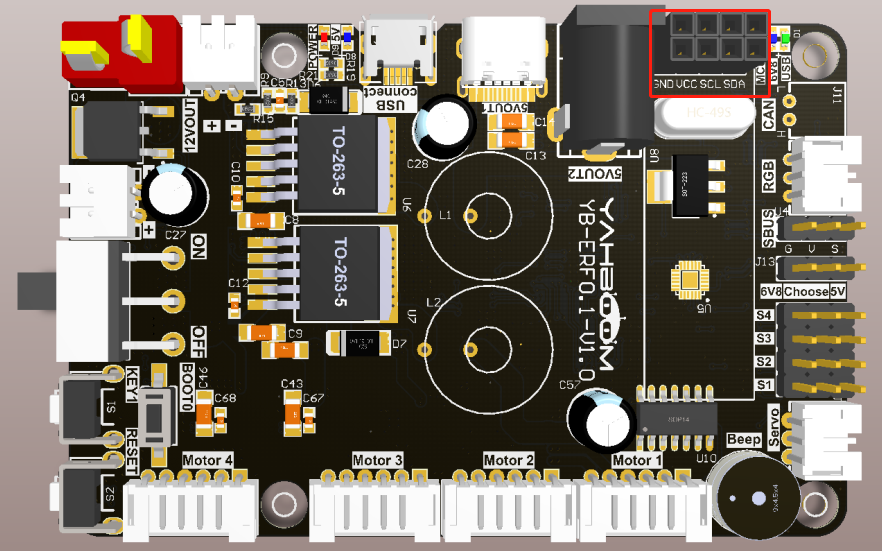
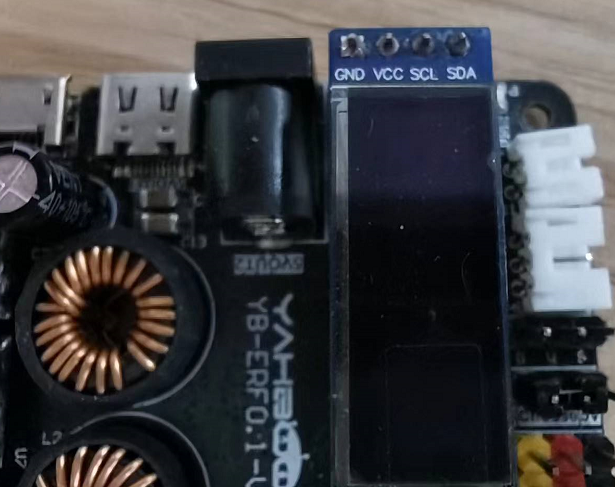
External I2C interface is a two-pin socket, two rows of pins in parallel, the OLED screen as long as the alignment in which a row of pins can be inserted.
16.6 the experimental effect
Flashcard program, LED lights every 200 MS Flash once. In this case the OLED screen is on the display Hello Yahboom, when we press the keys KEY1, OLED screen data will be refreshed each time you press the KEY1 number plus 1.
