yahboom
HomeTutorialsProduct
Solution
Blog
Online Store
About Us
EN/中文
Store
ROS Robot Expansion Board📖
1.Expansion board STM32 driver
  • 0. Precautions
  • 1.1Expansion Board Introduction_V4.0
  • 1.1 Expansion Board Introduction_V3.0
  • 1.1 Expansion Board Introduction_V1.0
  • 1.2 STM32 Development environment
  • 1.3 Button to control the buzzer to whistle
  • 1.4 FreeRTOS application
  • 1.5 Serial communication
  • 1.6 SBUS model aircraft remote control
  • 1.7 CAN bus communication
  • 1.8 RGB colorful light bar
  • 1.9 Timer interrupt to control PWM servo
  • 1.10 Control serial port servos
  • 1.11 Nine-axis attitude sensor to obtain data
  • 1.12 Control the forward and reverse rotation of the motor
  • 1.13 The timer captures the encoder data
  • 1.14.1 Robot kinematics analysis theory
  • 1.14.2 Mecanum wheel kinematics analysis
  • 1.15 PID control robot movement
  • 1.16 OLED character display
  • 1.17Host computer use
2.Python basic control
  • 2.0 Bind PCB port devices
  • 2.1 Update the firmware of the expansion board
  • 2.2 Turn off the self-starting large program at startup
  • 2.3 Install the Rosmaster driver library
  • 2.4 Buzzer whistle
  • 2.5 Control PWM servo
  • 2.6 RGB colorful light bar special effects display
  • 2.7 Control the forward and reverse rotation of the motor
  • 2.8 Control the movement of the robot
  • 2.9 Control Serial Servo
3.ROS1 Basic Course
  • 1.ROS introduction
  • 2.ROS installation
  • 3.ROS common command tools
  • 4.ROS workspace
  • 5.ROS function package
  • 6.ROS node
  • 7.ROS topic publisher
  • 8.ROS topic subscribers
  • 9.ROS service client
  • 10.ROS service server
  • 11.ROS action client
  • 12.ROS action server
  • 13.ROS custom message reception
  • 14.ROS-launch file
  • 15.ROS-TF transformation
  • 16.ROS parameter service
  • 17.ROS-rviz use
  • 18.ROS-rqt tool usage
  • 19.Topic message recording and playback
  • 20.urdf model introduction
  • 21.gazebo introduction
  • 22.ROS distributed communication
4.ROS1 robot control
  • 0. Bind PCB port devices
  • 1. Package Use the tutorial
  • 2. Package Description
  • 3. Robot keyboard control
  • 4. Robot state estimation
  • 5. Robot imu calibration
  • 6. Robot URDF Model
5.ROS2 Basic Course
  • 1.Introduction to ROS2
  • 2.ROS2 install Humble
  • 3.ROS2 development environment
  • 4.ROS2 workspace
  • 5.ROS2 function package
  • 6.ROS2 node
  • 7.ROS2 topic communication
  • 8.ROS2 service communication
  • 9.ROS2 action communication
  • 10.ROS2 custom interface message
  • 11.ROS2 parameter service case
  • 12.ROS2 meta-function package
  • 13.ROS2 distributed communication
  • 14.ROS2 DDS
  • 15.ROS2 time related API
  • 16.ROS2 common command tools
  • 17.ROS2 rviz2 use
  • 18.ROS2 rqt toolbox
  • 19.ROS2 Launch startup file configuration
  • 20.ROS2 recording and playback tool
  • 21.ROS2 URDF model
  • 22.ROS2 Gazebo simulation platform
  • 23.ROS2 TF2 coordinate transformation
6.ROS2 robot control
  • 0. Bind PCB port devices
  • 1. Package Use the tutorial
  • 2. Robot information release
  • 3. Robot keyboard control
  • 4. Robot state estimation
  • 5. Robot calibration
  • 6. URDF model
7.RDK X3 course
  • 1. Update the firmware of the expansion board
  • 2. Turn off the self-starting large program at startup
  • 3. Install the Rosmaster driver library
  • 4. Buzzer whistle
  • 5. Control PWM servo
  • 6. RGB colorful light bar special effects
  • 7. Control motor forward reverse
  • 8. Control robot movement
  • 9. Control Serial Servo
Download
  • Rules_File
  • Hardware Info
  • Code
  • 3D Model File
  • RDK Code
  • ROS2_Basic_VM
  • PC_Software
Download ZIP

Welcome to ROS Robot Expansion Board repository

1.Introduction to ROS2

1.Introduction to ROS2

1. Overview of ROS2

ROS2 is the second-generation Robot Operating System, an upgrade to ROS1 that addresses some of its issues. The first ROS2 version, Arden, was released in 2017. With continuous updates and optimizations, it now has a stable version. As with ROS1, the choice of Linux version is also relevant to the ROS2 version. The corresponding versions are listed below.
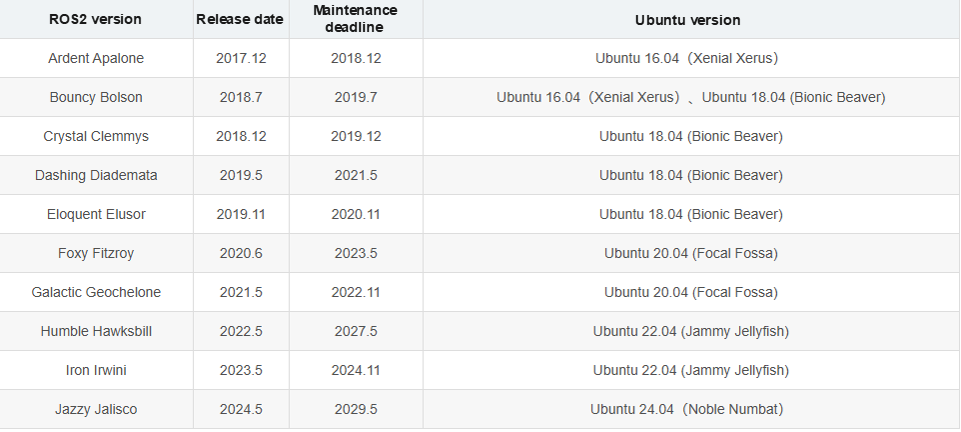
image-1

  • Note: Download the appropriate ROS2 version for your Linux distribution. This series of courses uses the Humble version as an example. The programs and examples presented in the course are applicable to all ROS2 versions.

2. Features of ROS2

2.1. ROS2 Fully Supports Three Platforms

  • Ubuntu
  • Mac OS X
  • Windows 10

2.2. Implemented a Distributed Architecture

The master node is eliminated, enabling distributed node discovery, publish/subscribe, and request/response communication.

2.3. Real-time Support

2.4. New Programming Language

  • C++11
  • Python 3.5+

2.5. Using the new build system Ament (Catkin for ROS)

2.6. ROS1 can communicate with ROS 2 via rosbridge

3. Differences between ROS2 and ROS1

3.1. Platform

ROS1 currently only supports Linux, and is commonly built and used in Ubuntu. ROS2, on the other hand, can be built and used in Ubuntu, Windows, and even on embedded development boards, making it a more widely used platform.

3.2. Language

  • C++

ROS1's core is C++03, while ROS2 makes extensive use of C++11.

  • Python

ROS1 uses Python 2, while ROS2 requires at least Python 3.5. Foxy uses Python 3.8.

3.3 Middleware

ROS 1 requires starting roscore before starting. This master controls all inter-node communication. ROS 2, however, does not have this. Instead, it uses an abstract middleware interface for data transmission. Currently, all implementations of this interface are based on the DDS standard. This enables ROS 2 to provide various high-quality QoS policies, improving communication across different networks.
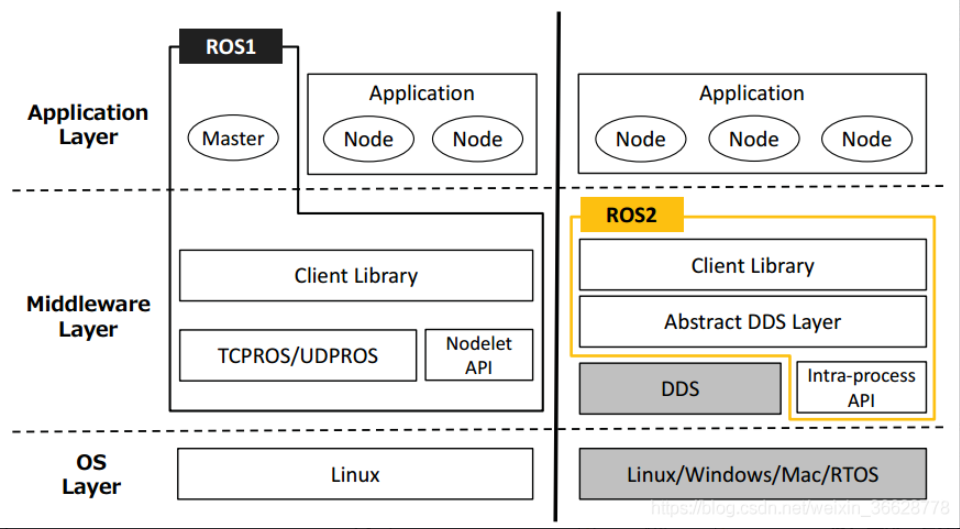
image-20230427150532854

3.4 Compilation Commands

ROS 1 compiles using the catkin_make command, while ROS 2 compiles using the colcon build command.

Robot URDF Model
ROS2 install Humble

COMPANY

  • About us
  • Team Style
  • Blog

LEARNING & EXPLORATION

  • Tutorials
  • Edge AI hardware
  • Educational robots
  • Embedded intelligent hardware

WHERE TO BUY

  • Yahboom Online Store
  • Amazon
  • Alibaba
  • AliExpress
  • Mercado

TECHNOLOGY SUPPORT

  • Email: support@yahboom.com

BE A DISTRIBUTOR

  • Email: sales@yahboom.com
QR Code

Copyright © 2017-2026 Yahboom. All Rights Reserved.

EN/中文