yahboom
HomeLearn
Solution
Blog
Online Store
About Us
EN/中文
Roboduino V2📖
0.Instruction manual
  • Instruction manual
1.Get started quickly
  • 01.Assembly of the Car
  • 02.Remote Control Car
  • 03.Common Problem Analysis
  • 04. Lithium Battery Pack and Charger Usage Guidelines
  • 05. Important Notes (Read Before Starting)
2.Environment Construction
  • 01.Serial port driver installation
  • 02.Arduino IDE Installation
  • 03.Arduino IDE usage
  • 04.Using third-party libraries
  • 05.Program compilation and upload
3.Basic car course
  • 01.RGB Control
  • 02.Serial Print
  • 03.KEY Read
  • 04.Buzzer control
  • 05.Logo Breath
  • 06.Servos Control
  • 07.Motor Control
  • 08.Ultrasonic Ranging
  • 09.Track Print
  • 10.Infrared Remote Print
  • 11.WIFI Camera
4.Advanced car course
  • 01.RGB Breath
  • 02.Play Music
  • 03.KEY Control RGB
  • 04.KEY Control Buzzer
  • 05.Serial Parse Data
  • 06.Parse Data Control Motor
  • 07.Parse Data Control RGB
  • 08.Parse Data Control Buzzer
  • 09.Parse Data Control Servo
5.Car motion control
  • 00.Mecanum wheel motion principle
  • 01.Car Vertical Movement
  • 02.Car Diagonal Movement
  • 03.Car Sideways Movement
  • 04.Car Rotational Movement
  • 05.Car Patrol
6.Comprehensive gameplay of car
  • 01.Car tracking
  • 02.Car Obstacle Avoid
  • 03.Car Follow Hand
  • 04.Car tracking Avoid
  • 05.Car Infrared Remote
  • 06.WiFi Control Car
  • 07.IR WiFi Control Car
7.AI vision course
  • 1. Cat(dog) detection
  • 2. Color recognition
  • 3. QR code instructions
  • 4. Person Recognition
  • 5. Face Detection
  • 6. Color Follows
  • 7. Face following
8.Expand peripherals
  • 01.Digital Tube Display
  • 02.Color Recognition
Download
  • Code
  • Library
  • Hardware manual
  • Software
  • 3D Model
  • Instruction Manual
Download ZIP

Welcome to Roboduino V2 repository

02.Serial Print

Serial Print

Serial PrintDevice connectionHardware connectionSoftware connectionSerial port printingCode analysisExperimental results

Use the serial port to print the message Hello, Yahboom!.

Device connection

Hardware connection

Use the Type-B data cable to connect the Arduino Uno and the computer.

Software connection

Open the "Arduino IDE" software and select the model and serial port number corresponding to the development board.

Serial port printing

Use the serial port to print some variables to monitor program variables and debug the program in real time!

Code analysis

Here we only briefly introduce the code content. For detailed code, please refer to the corresponding code file, which is provided in the download area!

  • Initialization code

Our code uniformly uses the serial port baud rate of 115200, which is also consistent with the WiFi camera communication baud rate.

void setup() {
  Serial.begin(115200);  // 初始化串口波特率115200 Initialize serial communication at 115200 bps
}
  • Run code in a loop

xxxxxxxxxx
void loop() {
  Serial.println("Hello, Yahboom!");  // 串口打印Hello, Yahboom!字符 Send "Hello, Yahboom!" via serial
  delay(1000);
}
  • Notes

Using the Serial.println() function will automatically wrap lines;

Using the Serial.print() function will not automatically wrap lines.

Experimental results

After compiling the program successfully, upload the code to the Arduino Uno development board.

After the program starts, open the serial monitor that comes with the Arduino IDE, and you can see that the serial port keeps printing Hello, Yahboom! content.

If there is no display content, you can check whether the serial port baud rate is consistent with the code setting, and then press the RESET button on the development board.

xxxxxxxxxx
The burning program cannot use other programs to occupy the serial port or an external serial port communication module (for example: WiFi camera module), otherwise the program cannot be burned or an error message will be prompted!
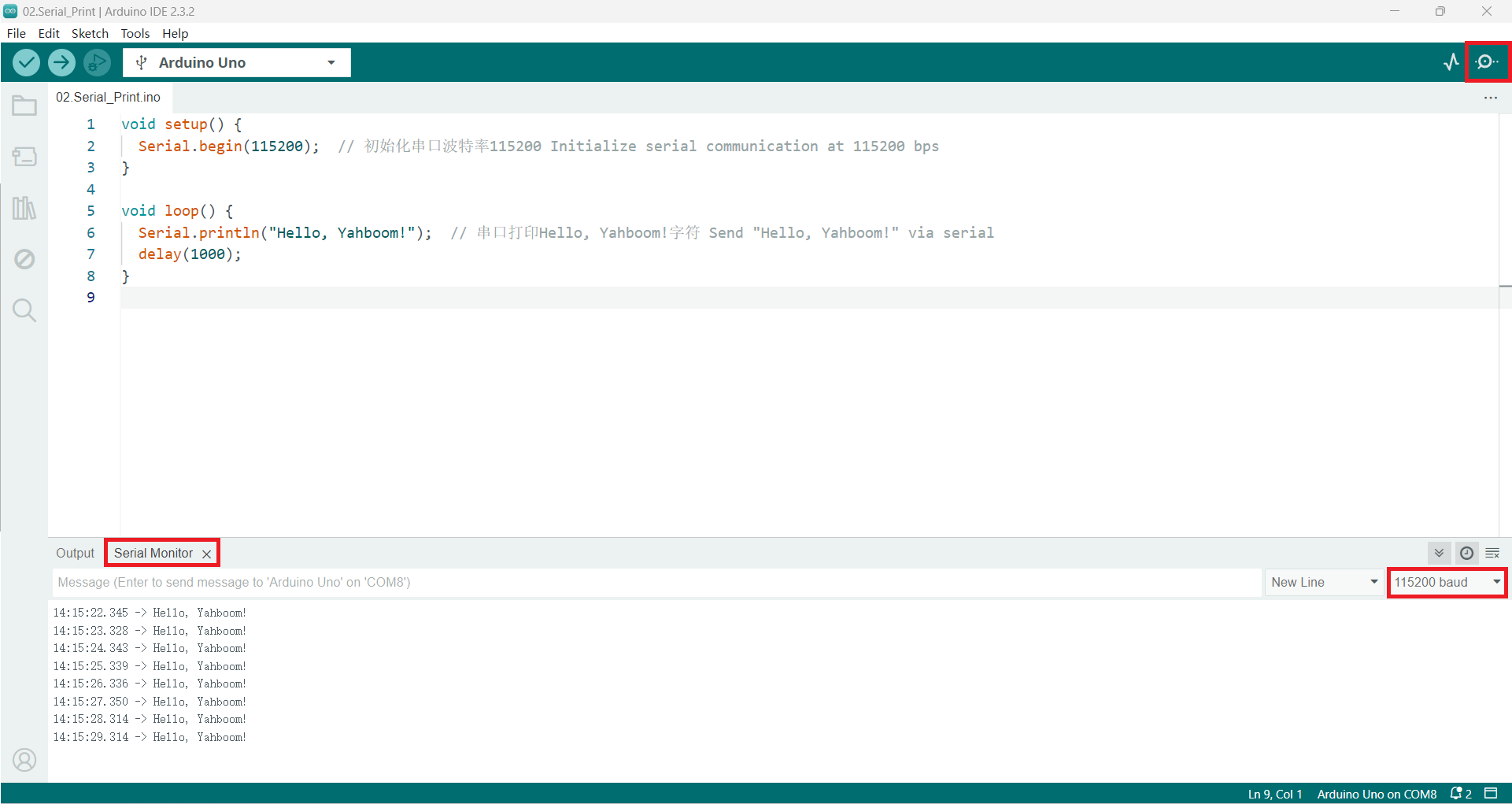
image-20240612141538685

RGB Control
KEY Read

COMPANY

  • About us
  • Team Style
  • Blog

LEARNING & EXPLORATION

  • Tutorials
  • Edge AI hardware
  • Educational robots
  • Embedded intelligent hardware

WHERE TO BUY

  • Yahboom Online Store
  • Amazon
  • Alibaba
  • AliExpress
  • Mercado

TECHNOLOGY SUPPORT

  • Email: support@yahboom.com

BE A DISTRIBUTOR

  • Email: sales@yahboom.com
QR Code

Copyright © 2017-2026 Yahboom. All Rights Reserved.

EN/中文