yahboom
HomeLearn
Solution
Blog
Online Store
About Us
EN/中文
K210 Module📖
0.Camera changes
  • Precautions for camera changes
1.K210-AI-Camera introduction
  • 1.K210 main chip introduction
  • 2.K210 visual recognition module introduction
  • 3.Module pin assignments
  • 4.MicroPython Introduction
  • 5. FAQ analysis
  • 6.Bracket installation
2.Development Environment Setup
  • 1.To install the serial port assistant
  • 2.Install CanMV IDE development software
  • 3.Flashcard factory firmware
  • 4.IDE import routine
  • 5.Call custom py library
  • 6.MicroPython API documentation
3.Basic experimental routines
  • 1.Lighting the RGB light experiment
  • 2.Key features of the experiment
  • 3.Timer experiment
  • 4.PWM breathing light experiment
  • 5.LCD display experiment
  • 6.The touchpad read the coordinates of the experiment
  • 7.The camera shows the experimental
  • 8.Memory card read and write files of the experiment
  • 9.External interface experimental
4.Graphical manipulation routines
  • 1.Draw graphics
  • 2.Button and the click event
  • 3.Slider
  • 4.Chart animation
  • 5.Multi-label layout
5.AI visual experiments routines
  • How to import the model file into memory cardnew
  • 1.Color recognition
  • 2.Barcode recognition
  • 3.QR code recognition
  • 4.Apriltags recognition
  • 5.Face detection
  • 6.Face feature detection
  • 7.Mask detection
  • 8.Face recognition
  • 9.Object detection
  • 10.Self-learning classification
  • 11.Handwritten digit recognition
  • 12. Multiple color recognition
  • 13. Human body detectionnew
  • 14. Yolo hand detectionnew
  • 15. License Plate Recognitionnew
  • 16. Autonomous training modelnew
6.Extended routines (sold separately)
6.1.For STM32 Car
  • 10. stm_ K210 Autonomous Learning Classification
  • 1.automatic driving
  • 2.color follow
  • 3.Handwriting digital operation
  • 4.Color reaction
  • 5.Road sign indicating the operation
  • 6.Following the apriltag
  • 7.QR code instruction
  • 8.PTZ tracking color
  • 9.PTZ tracking face
6.2.1 arduino_k210
  • 1.ard_k210-Color recognition
  • 2.ard_k210-Bar code identification
  • 3.ard_k210-QR code identification
  • 4.ard_ K210-mechanical code identification
  • 5.ard_ K210-Face Detection
  • 6. ard_ K210-facial feature detection
  • 7. ard_ K210-mask detection
  • 8. ard_ K210-facial recognition
  • 9. ard_ K210-object detection
  • 10. ard_ K210 Autonomous Learning Classification
  • 11. ard_ K210 Handwritten Digit Recognition
6.2 K210 as a coprocessor
  • ReadMe
6.2.2 stm32_k210
  • 1.stm_ K210 color recognition
  • 2. stm_ K210 barcode recognition
  • 3. stm_ K210 QR code recognition
  • 4. stm_ K210 mechanical code identification
  • 5. stm_ K210 Face Detection
  • 6.stm_ K210 facial feature detection
  • 7. stm_ K210 mask detection
  • 8. stm_ K210 facial recognition
  • 9. stm_ K210 object detection
  • 11. stm_ K210 Handwritten Digit Recognition
6.2.3 microbit_k210
  • 1.microbit_ K210 color recognition
  • 2.microbit_ K210 barcode recognition
  • 3.microbit_ K210 QR code recognition
  • 4.microbit_ K210 mechanical code identification
  • 5. microbit_ K210 Face Detection
  • 6. microbit_ K210 facial feature detection
  • 7. microbit_ K210 mask detection
  • 8. microbit_ K210 facial recognition
  • 9. microbit_ K210 object detection
  • 10. microbit_ K210 autonomous classification learning
  • 11. microbit_ K210 Handwritten Digit Recognition
6.2.4 pico_k210
  • 1. pico_ K210 color recognition
  • 2. Pico_ K210 barcode recognition
  • 3. Pico_ K210 QR code recognition
  • 4. pico_ K210 machine code recognition
  • 5. pico_ K210 Face Detection
  • 6. pico_ K210 facial feature detection
  • 7. pico_ K210 mask recognition
  • 8. pico_ K210 facial recognition
  • 9. pico_ K210 object detection
  • 10. pico_ K210 Autonomous Learning Classification
  • 11. pico_ K210 Handwritten Digit Recognition
6.2.5 MSPM0G3507_k210
  • 1.MSPM0_K210 color recognition
  • 2.MSPM0_K210 barcode recognition
  • 3.MSPM0_K210 QR code recognition
  • 4.MSPM0_K210 mechanical code recognition
  • 5.MSPM0_K210 face detection
  • 6.MSPM0_K210 facial feature detection
  • 7.MSPM0_K210 mask detection
  • 8.MSPM0_K210 face recognition
  • 9.MSPM0_K210 Object Detection
  • 10.MSPM0_K210 Self-study classification
  • 11.MSPM0_K210 handwritten digit recognition
6.2.6 MSPM0G3519_k210
  • 1. MSPM0_K210 Color Recognitionnew
  • 2. MSPM0_K210 Barcode Recognitionnew
  • 3. MSPM0_K210 QR Code Recognitionnew
  • 4. MSPM0_K210 Mechanical Code Recognitionnew
  • 5. MSPM0_K210 Face Detectionnew
  • 6. MSPM0_K210 Facial Feature Detectionnew
  • 7. MSPM0_K210 Mask Detectionnew
  • 8. MSPM0_K210 Face Recognitionnew
  • 9. MSPM0_K210 Object Detectionnew
  • 10. MSPM0_K210 Self-study Classificationnew
  • 11. MSPM0_K210 Handwritten Digit Recognitionnew
6.3 For 24 channel servo drive board
  • 1. 2DOF PTZ Color Tracking
  • 2. 2DOF Face Tracking
  • 3. 2DOF Fruit sorting
6.4 For autopilot map
  • 1.k210 model training
  • 2.Assembly and wiring of stm32 car
  • 3.Recognize left and right sign
  • 4.Identify and remove speed limit
  • 5.Identify parking spaces and park
  • 6.STM32 car autopilot
6.5.1 For MSPM0G3507_Wheeled Chassis Kit
  • 1.MSPM0-Automatic Driving
  • 2.MSPM0-Color follow
  • 3.MSPM0-Number recognition
  • 4.MSPM0-Color reaction
  • 5.MSPM0-Road signs
  • 6.MSPM0-Machine code following
  • 7.MSPM0-QR code recognition
6.5.2 For MSPM0G3519_Wheeled Chassis Kit
  • 1.MSPM0-Automatic Drivingnew
  • 2.MSPM0-Color follownew
  • 3.MSPM0-Number recognitionnew
  • 4.MSPM0-Color reactionnew
  • 5.MSPM0-Road signsnew
  • 6.MSPM0-Machine code followingnew
  • 7.MSPM0-QR code recognitionnew
6.5.3 For STM32_Wheeled Chassis Kit
  • 1.STM32-Automatic Driving
  • 2.STM32-Color follow
  • 3.STM32-Number recognition
  • 4.STM32-K210-Color Reaction
  • 5.STM32-Road signs
  • 6.STM32-Machine code following
  • 7.STM32-QR code recognition
Download
  • Driver development software
  • AI model
  • Source code
  • Instruction manual
  • Hardware_3DModelFile
  • K210_Chip_Data
Download ZIP

Welcome to K210 Module repository

15. License Plate Recognition

15. License plate recognition

15. License plate recognition15.1 Experimental objectives15.2 Preparation before the experiment15.3 Experimental process15.4 Experimental results15.5 Experimental summary

15.1 Experimental objectives

This lesson mainly studies the K210 license plate recognition function.

The reference code path for this experiment is: CanMV\05-AI\car_licenseplate_recog_cn.py

15.2 Preparation before the experiment

! Note! : Since the model and weight files used in this case are large, the lite version firmware must be flashed before running, otherwise it will freeze.
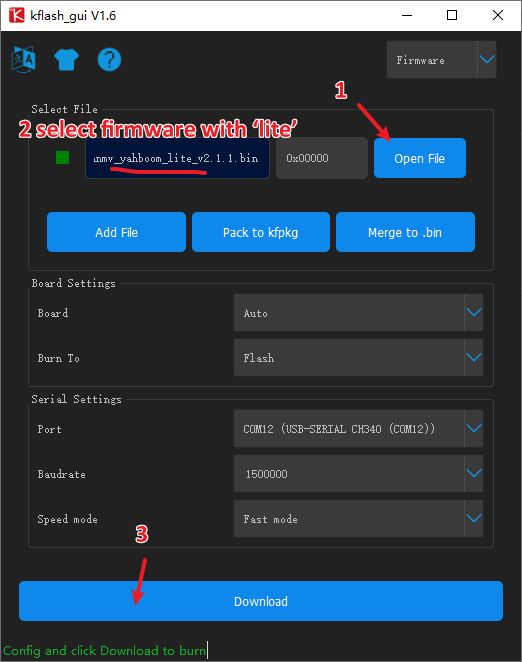
image-20241017163721299

Please confirm whether the sd card model, font library and weight file are imported successfully:

  1. /sd/KPU/car_licenseplate_recog/lp_detect.kmodel
  2. /sd/KPU/car_licenseplate_recog/lp_recog.kmodel
  3. /sd/0xA00000.Dzk
  4. /sd/KPU/car_licenseplate_recog/lp_weight.bin

15.3 Experimental process

The factory firmware of the module has integrated the AI ​​vision algorithm module. If you have downloaded other firmware, please burn it back to the factory firmware before conducting the experiment.

  1. Initialize the font library and the parameters required for the model
xxxxxxxxxx
image.font_load(image.UTF8, 16, 16, "/sd/0xA00000.Dzk")
#image.font_load(image.UTF8, 16, 16, 0xA00000)
​
province = ("皖沪津渝冀晋蒙辽吉黑苏浙京闽赣鲁豫鄂湘粤桂琼川贵云藏陕甘青宁新")
ads = ('A', 'B', 'C', 'D', 'E', 'F', 'G', 'H', 'J', 'K', 'L', 'M', 'N', 'P', 'Q', 'R', 'S', 'T', 'U', 'V', 'W', 'X', 'Y', 'Z', '0', '1', '2', '3', '4', '5', '6', '7', '8', '9')
names = []
anchor = (8.30891522166988, 2.75630994889035, 5.18609903718768, 1.7863757404970702, 6.91480529053198, 3.825771881004435, 10.218567655549439, 3.69476690620971, 6.4088204258368195, 2.38813526350986)
  1. Loading model file
xxxxxxxxxx
lp_det_kpu = KPU()
lp_det_kpu.load_kmodel("/sd/KPU/car_licenseplate_recog/lp_detect.kmodel")
lp_det_kpu.init_yolo2(anchor, anchor_num=len(anchor) // 2, img_w=320, img_h=240, net_w=320, net_h=240, layer_w=20, layer_h=15, threshold=0.7, nms_value=0.3, classes=len(names))
​
lp_recog_kpu = KPU()
lp_recog_kpu.load_kmodel("/sd/KPU/car_licenseplate_recog/lp_recog.kmodel")
​
# load after-process data
lp_recog_kpu.lp_recog_load_weight_data("/sd/KPU/car_licenseplate_recog/lp_weight.bin")
  1. Define the function for drawing the license plate border
xxxxxxxxxx
def extend_box(x, y, w, h, scale):
    x1_t = x - scale*w
    x2_t = x + w + scale*w
    y1_t = y - scale*h
    y2_t = y + h + scale*h
    x1 = int(x1_t) if x1_t>1 else 1
    x2 = int(x2_t) if x2_t<320 else 319
    y1 = int(y1_t) if y1_t>1 else 1
    y2 = int(y2_t) if y2_t<256 else 255
    cut_img_w = x2-x1+1
    cut_img_h = y2-y1+1
    return x1, y1, cut_img_w, cut_img_h
  1. Main program: frame the license plate and recognize the license plate text
xxxxxxxxxx
try:
    while 1:
        gc.collect()
        clock.tick()                    # Update the FPS clock.
        img = sensor.snapshot()
        lp_det_kpu.run_with_output(img)
        lps = lp_det_kpu.regionlayer_yolo2()
        for lp in lps:
            # 框出车牌位置 Frame the license plate location
            x, y, w, h = extend_box(lp[0], lp[1], lp[2], lp[3], 0.08)
            img.draw_rectangle(x, y, w, h, color=(0, 255, 0))
            # 识别车牌 License plate recognition
            lp = []
            lp_img = img.cut(x, y, w, h)
            resize_img = lp_img.resize(208, 64)
            resize_img.replace(hmirror=True)
            resize_img.pix_to_ai()
            lp_recog_kpu.run_with_output(resize_img)
            output = lp_recog_kpu.lp_recog()
            for o in output:
                lp.append(o.index(max(o)))
            show_lp_str = "%s  %s-%s%s%s%s%s" %(province[lp[0]], ads[lp[1]],ads[lp[2]], ads[lp[3]], ads[lp[4]], ads[lp[5]], ads[lp[6]])
            # 此处需要重新加载字体文件, 否则中文显示会异常
            # You need to reload the font file here, otherwise the Chinese display will be abnormal
            image.font_load(image.UTF8, 16, 16, "/sd/0xA00000.Dzk")
            img.draw_string(x + 2, y - 20 - 2, "%s"%show_lp_str,color=(255, 0, 0),x_spacing=2, mono_space=False,scale=2)
            del lp
            del lp_img
            del resize_img
            gc.collect()
        lcd.display(img)
except Exception as e:
    print(e)
    lp_det_kpu.deinit()
    lp_recog_kpu.deinit()
    del lp_det_kpu
    del lp_recog_kpu
    gc.collect()
​

15.4 Experimental results

Connect the K210 module to the computer via a microUSB data cable, click the connection button in CanMV IDE, and click the run button after the connection is completed to run the example code. You can also download the code as main.py to the K210 module and run it.

After waiting for the system to initialize, the LCD displays the camera image, and the license plate on the screen will be framed by a green frame and the license plate information will be recognized.
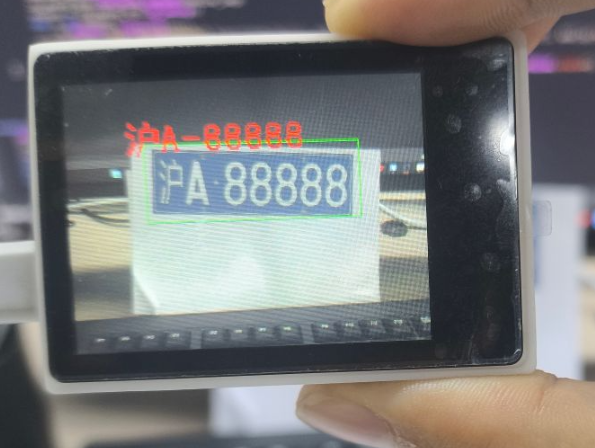
image-20241017164836723

15.5 Experimental summary

Hand recognition requires a memory card to load the model file, so you need to import the model file into the memory card in advance, and then insert the memory card into the memory card slot of the K210 module. If the model file in the memory card cannot be read, an error will be reported. The model and weight files used in this case are large, and the lite version firmware needs to be flashed before running, otherwise it will freeze. In this experiment, we learned how to implement the license plate recognition function based on yolo on the K210 platform. Due to the limitation of model size, the recognition accuracy may be affected. You can train a better model by yourself.

Yolo hand detection
Autonomous training model

COMPANY

  • About us
  • Team Style
  • Blog

LEARNING & EXPLORATION

  • Tutorials
  • Edge AI hardware
  • Educational robots
  • Embedded intelligent hardware

WHERE TO BUY

  • Yahboom Online Store
  • Amazon
  • Alibaba
  • AliExpress
  • Mercado

TECHNOLOGY SUPPORT

  • Email: support@yahboom.com

BE A DISTRIBUTOR

  • Email: sales@yahboom.com
QR Code

Copyright © 2017-2026 Yahboom. All Rights Reserved.

EN/中文