yahboom
HomeTutorialsProduct
Solution
Blog
Online Store
About Us
EN/中文
Store
K210 Module📖
0.Camera changes
  • Precautions for camera changes
1.K210-AI-Camera introduction
  • 1.K210 main chip introduction
  • 2.K210 visual recognition module introduction
  • 3.Module pin assignments
  • 4.MicroPython Introduction
  • 5. FAQ analysis
  • 6.Bracket installation
2.Development Environment Setup
  • 1.To install the serial port assistant
  • 2.Install CanMV IDE development software
  • 3.Flashcard factory firmware
  • 4.IDE import routine
  • 5.Call custom py library
  • 6.MicroPython API documentation
3.Basic experimental routines
  • 1.Lighting the RGB light experiment
  • 2.Key features of the experiment
  • 3.Timer experiment
  • 4.PWM breathing light experiment
  • 5.LCD display experiment
  • 6.The touchpad read the coordinates of the experiment
  • 7.The camera shows the experimental
  • 8.Memory card read and write files of the experiment
  • 9.External interface experimental
4.Graphical manipulation routines
  • 1.Draw graphics
  • 2.Button and the click event
  • 3.Slider
  • 4.Chart animation
  • 5.Multi-label layout
5.AI visual experiments routines
  • How to import the model file into memory cardnew
  • 1.Color recognition
  • 2.Barcode recognition
  • 3.QR code recognition
  • 4.Apriltags recognition
  • 5.Face detection
  • 6.Face feature detection
  • 7.Mask detection
  • 8.Face recognition
  • 9.Object detection
  • 10.Self-learning classification
  • 11.Handwritten digit recognition
  • 12. Multiple color recognition
  • 13. Human body detectionnew
  • 14. Yolo hand detectionnew
  • 15. License Plate Recognitionnew
  • 16. Autonomous training modelnew
6.Extended routines (sold separately)
6.1.For STM32 Car
  • 10. stm_ K210 Autonomous Learning Classification
  • 1.automatic driving
  • 2.color follow
  • 3.Handwriting digital operation
  • 4.Color reaction
  • 5.Road sign indicating the operation
  • 6.Following the apriltag
  • 7.QR code instruction
  • 8.PTZ tracking color
  • 9.PTZ tracking face
6.2 K210 as a coprocessor
  • ReadMe
6.2.1 arduino_k210
  • 1.ard_k210-Color recognition
  • 2.ard_k210-Bar code identification
  • 3.ard_k210-QR code identification
  • 4.ard_ K210-mechanical code identification
  • 5.ard_ K210-Face Detection
  • 6. ard_ K210-facial feature detection
  • 7. ard_ K210-mask detection
  • 8. ard_ K210-facial recognition
  • 9. ard_ K210-object detection
  • 10. ard_ K210 Autonomous Learning Classification
  • 11. ard_ K210 Handwritten Digit Recognition
6.2.2 stm32_k210
  • 1.stm_ K210 color recognition
  • 2. stm_ K210 barcode recognition
  • 3. stm_ K210 QR code recognition
  • 4. stm_ K210 mechanical code identification
  • 5. stm_ K210 Face Detection
  • 6.stm_ K210 facial feature detection
  • 7. stm_ K210 mask detection
  • 8. stm_ K210 facial recognition
  • 9. stm_ K210 object detection
  • 11. stm_ K210 Handwritten Digit Recognition
6.2.3 microbit_k210
  • 1.microbit_ K210 color recognition
  • 2.microbit_ K210 barcode recognition
  • 3.microbit_ K210 QR code recognition
  • 4.microbit_ K210 mechanical code identification
  • 5. microbit_ K210 Face Detection
  • 6. microbit_ K210 facial feature detection
  • 7. microbit_ K210 mask detection
  • 8. microbit_ K210 facial recognition
  • 9. microbit_ K210 object detection
  • 10. microbit_ K210 autonomous classification learning
  • 11. microbit_ K210 Handwritten Digit Recognition
6.2.4 pico_k210
  • 1. pico_ K210 color recognition
  • 2. Pico_ K210 barcode recognition
  • 3. Pico_ K210 QR code recognition
  • 4. pico_ K210 machine code recognition
  • 5. pico_ K210 Face Detection
  • 6. pico_ K210 facial feature detection
  • 7. pico_ K210 mask recognition
  • 8. pico_ K210 facial recognition
  • 9. pico_ K210 object detection
  • 10. pico_ K210 Autonomous Learning Classification
  • 11. pico_ K210 Handwritten Digit Recognition
6.2.5 MSPM0G3507_k210
  • 1.MSPM0_K210 color recognition
  • 2.MSPM0_K210 barcode recognition
  • 3.MSPM0_K210 QR code recognition
  • 4.MSPM0_K210 mechanical code recognition
  • 5.MSPM0_K210 face detection
  • 6.MSPM0_K210 facial feature detection
  • 7.MSPM0_K210 mask detection
  • 8.MSPM0_K210 face recognition
  • 9.MSPM0_K210 Object Detection
  • 10.MSPM0_K210 Self-study classification
  • 11.MSPM0_K210 handwritten digit recognition
6.2.6 MSPM0G3519_k210
  • 1. MSPM0_K210 Color Recognitionnew
  • 2. MSPM0_K210 Barcode Recognitionnew
  • 3. MSPM0_K210 QR Code Recognitionnew
  • 4. MSPM0_K210 Mechanical Code Recognitionnew
  • 5. MSPM0_K210 Face Detectionnew
  • 6. MSPM0_K210 Facial Feature Detectionnew
  • 7. MSPM0_K210 Mask Detectionnew
  • 8. MSPM0_K210 Face Recognitionnew
  • 9. MSPM0_K210 Object Detectionnew
  • 10. MSPM0_K210 Self-study Classificationnew
  • 11. MSPM0_K210 Handwritten Digit Recognitionnew
6.3 For 24 channel servo drive board
  • 1. 2DOF PTZ Color Tracking
  • 2. 2DOF Face Tracking
  • 3. 2DOF Fruit sorting
6.4 For autopilot map
  • 1.k210 model training
  • 2.Assembly and wiring of stm32 car
  • 3.Recognize left and right sign
  • 4.Identify and remove speed limit
  • 5.Identify parking spaces and park
  • 6.STM32 car autopilot
6.5.1 For MSPM0G3507_Wheeled Chassis Kit
  • 1.MSPM0-Automatic Driving
  • 2.MSPM0-Color follow
  • 3.MSPM0-Number recognition
  • 4.MSPM0-Color reaction
  • 5.MSPM0-Road signs
  • 6.MSPM0-Machine code following
  • 7.MSPM0-QR code recognition
6.5.2 For MSPM0G3519_Wheeled Chassis Kit
  • 1.MSPM0-Automatic Drivingnew
  • 2.MSPM0-Color follownew
  • 3.MSPM0-Number recognitionnew
  • 4.MSPM0-Color reactionnew
  • 5.MSPM0-Road signsnew
  • 6.MSPM0-Machine code followingnew
  • 7.MSPM0-QR code recognitionnew
6.5.3 For STM32_Wheeled Chassis Kit
  • 1.STM32-Automatic Driving
  • 2.STM32-Color follow
  • 3.STM32-Number recognition
  • 4.STM32-K210-Color Reaction
  • 5.STM32-Road signs
  • 6.STM32-Machine code following
  • 7.STM32-QR code recognition
Download
  • Driver development software
  • AI model
  • Source code
  • Instruction manual
  • Hardware_3DModelFile
  • K210_Chip_Data
Download ZIP

Welcome to K210 Module repository

1.K210 main chip introduction

1. the main chip introduction

1. the main chip introduction 1.1 what is K210 chip? 1.2 what is the RISC-V instruction set?

1.1 what is K210 chip?

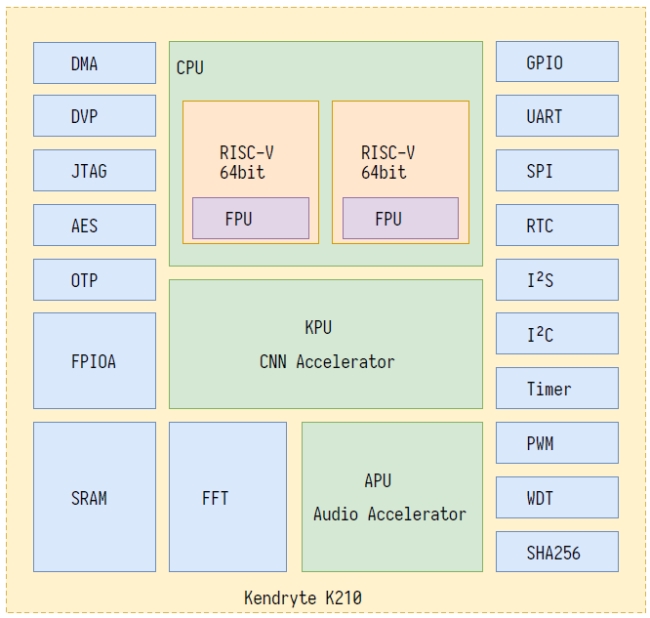
  1. K210 is based on the RISC-V RISC of a MCU, in many features, the chip architecture contains a self-study of neural network hardware accelerator KPU belong to the most characteristic, and can be high-performance convolutional neural network operation. In the MCU AI computing context, K210 chip power is very great, according to the Jia Nan official website of description, K210 the KPU hash rate can reach 0. 8TFLOPS, which is equivalent to what level? For example, the latest Raspberry PI 4B power less than 0. 1TFLOPS, and to the neural network processing as a selling point of the Jetson Nano has 128 CUDA unit, the hash rate is only 0. 47TFLOPS。

  2. In addition to the KPU's hash rate good addition, K210 chip support FPIOA (field programmable IO array, you can each peripheral freely mapped to any pin, simplifying the developer's pin assignments and GPIO wiring problem.

  3. K210 chip with dual-core CPU, the instruction sets for RISC-V 64-bit, each of the core built-in FPU, can be a separate floating-point arithmetic.

  4. In order to better in machine vision and hearing on the role of the K210 chip comes with computing the convolutional artificial neural network accelerator KPU, as well as the processing of the microphone array of the APU can be a high-performance machine vision and auditory processing.

  5. Not only that, K210 also built-in Fast Fourier transform accelerator, can be complex FFT calculation.

  6. In the strong performance of the premise, K210 chip also very focused on security, built-in AES and SHA256 algorithm accelerator for user data security provides effective protection.

  7. Then look at the MCU aspect of the property, K210 chip has a rich peripheral units, respectively, DVP, JTAG, OTP, FPIOA, GPIO, UART, SPI, RTC, I2S, I2C, WDT, TIMER, PWM, these peripherals in actual use play a huge role, basically meet most of the MCU peripherals needs.

  8. K210 also have a high-performance, low-power SRAM, for a total of 8M, 2M dedicated to AI computing, 6M for the program; dedicated external FLASH interface, increasing its storage space; the data transfer can use the powerful DMA, the data throughput capacity of the aspects of performance is excellent.

  9. The following is K210 chip architecture diagram, for reference only, with specific reference to the information available K210 chip technical manual document. wps1
 

1.2 what is the RISC-V instruction set?

RISC-V is based on a reduced instruction set, RISC principle of open-source instruction set architecture ISA is. V represents the fifth generation of reduced instruction set, University of California, Berkeley after the previous four generations of improvements and upgrades come. The project began in 2010 and the University of California at Berkeley, and later through the many contributors of hard work, after 10 years‘sword’, the RISC-V instruction set has been on the worldwide gradually active, I believe in the near future there will be more and better of the RISC-V chip was launched.

RISC-V has the following characteristics:

  1. Fully open source: any business can be free free to use the RISC-V instruction set to the manufacturing and marketing its own chip, without the need to pay high licensing fees, and can according to their own needs extended instruction set, their extended instruction set need not be open, you can achieve a differentiated development.

  2. Architecture simple: with the mainstream of the X86 and ARM architecture compared to RISC-V is a new instruction set, need not be compatible with older products, so extraordinarily simple, the entire RISC-V base instruction set only 40 more, plus the other modular extensions instruction in total it was only several tens of bars.

  3. Easy to transplant, modern operating systems do a privilege level instruction and a user-level command of the separation, the privileged instructions can only operating system calls, and the user-level instructions to the user-mode call, the security of the operating system stable. RISC-V provides privilege level instruction and a user-level instruction, while providing detail of the RISC-V privileged instruction specification and RISC-V user-level instruction specification details so that developers can very easily ported to linux and the unix system to the RISC-V platform.

  4. Modular design: RISC-V architecture may be composed of different modules for different functions, and flexible use of the module combination, can be customized to your own needs of MCU. For example, for a small area of low-power embedded scene, you can select the RV32IC combination of instruction set, only the use of a machine mode, you can greatly reduce the power consumption and the volume itself; and high-performance applications operating system of the scene can be selected RV32IMFDC instruction set, can use the machine mode and user mode, in order to achieve higher performance.

  5. A complete tool chain: a tool chain for the CPU, it can be understood as a screwdriver for the screws without a screwdriver role, the screw is simply unable to hold the play to its performance. The tool chain is a software development and CPU interaction of the window, if there is no tool chain, a software developer can't even get the CPU to work together. Fortunately, the RISC-V due to the contributors to years of enthusiastic contribution to the community has been to provide a complete tool chain, and by the RISC-V Foundation for the maintenance of the tool chain.

Precautions for camera changes
K210 visual recognition module introduction

COMPANY

  • About us
  • Team Style
  • Blog

LEARNING & EXPLORATION

  • Tutorials
  • Edge AI hardware
  • Educational robots
  • Embedded intelligent hardware

WHERE TO BUY

  • Yahboom Online Store
  • Amazon
  • Alibaba
  • AliExpress
  • Mercado

TECHNOLOGY SUPPORT

  • Email: support@yahboom.com

BE A DISTRIBUTOR

  • Email: sales@yahboom.com
QR Code

Copyright © 2017-2026 Yahboom. All Rights Reserved.

EN/中文