yahboom
HomeLearn
Solution
Blog
Online Store
About Us
EN/中文
310 Motor📖
1.Hardware parameter
  • Hardware parameter
2.ROS robot control board tutorials
  • 3.0 ReadMe
  • 3.1 Control motor
  • 3.2 Timer got encoder data
  • 3.3 PID control robot movement
  • 3.4 4WD Robot kinematics analysis
  • 3.5 Ackerman Robot kinematics analysis
  • 3.6 Mecanum wheel kinematics analysis
3.STM32 smart car tutorials
0. Get started quickly
  • 14.Infrared sensor obstacle avoidance
  • 0. Installation Instructions
  • 1. Version configuration
  • 2. Smart car installation video
  • 3. Precautions for use
1. Introduction to STM32 board
  • 1. Learn about STM32
  • 2. Introduction to STM32 development board
  • 3. Development board pin assignment
  • 4. Introduction to HAL library and LL library
2. Development environment
  • 1. Common development tools
  • 2. STM32CubeMX Install - Use
  • 3. STM32CubeIDE Install - Use
  • 4. Common Driver Installation
  • 5. Program download and simulation
  • 6. Engineering experience and migration
3. Car expansion tutorial
  • 1.Servo control
  • 2.Basic use ultrasonic servo PTZ
  • 3.Motor control
  • 4.OLED display light sensitivity value
  • 5.Infrared sensor
  • 6.Four-way tracking module
  • 7.Infrared remote control
  • 8.Ultrasonic ranging
  • 9.PS2 controller test
  • 10.Car line patrol
  • 11.Ultrasonic follow
  • 12.Ultrasonic obstacle avoidance
  • 13.Ultrasonic obstacle avoidance (servo PTZ version)
  • 15.Infrared remote control
  • 16.PS2 handle remote control
4.2-channel motor drive module tutorial
  • 2.1 Introduction of Module
  • 2.2 For STM32
  • 2.3 For Arduino
  • 2.4 For RaspberryPi
  • 2.5 For RaspberryPi Pico
  • 2.6 For jetson nano
  • 2.7 For MSPM0G3507
  • 2.8 For MSPM0G3519new
5.4-channel motor drive tutorials
Introduction and debugging
  • 0.Motor introduction and usage
  • 1.Introduction to 4-channel motor drive board
  • 2.Control command
  • 3.PC host
USART communication
  • For Arduino
  • For Jetson NANO
  • For MSPM0G3507
  • For MSPM0G3519new
  • For PICO2
  • For RDK X5
  • For RPi5
  • For STM32
IIC communication
  • For Arduino
  • For ESP32
  • For ESP32
  • For Jetson NANO
  • For MSPM0G3507
  • For MSPM0G3519new
  • For PICO2
  • For RDK X5
  • For RPi5
  • For STM32
Download
  • Motor_3D_Model_File
  • Annex_ROSRobotControlBoard
  • Annex_STM3RobotCar
  • Annex_2-channelMotorDriveModule
  • Annex_4-channelMotorDriveModule
Download ZIP

Welcome to 310 Motor repository

2. Introduction to STM32 development board

Introduction to STM32 development board

Introduction to STM32 development board1、Initial understanding of STM32F103ZET61.1、ST official study materials1.2、Peripherals of STM32F103ZET62、STM32F103ZET6 programming methodST-LINK burning method

1、Initial understanding of STM32F103ZET6

1.1、ST official study materials

  1. www.stmcu.org.cn :This website is a link to the ST Chinese community, which includes information on all MCUs of ST, such as: STM32F1 latest chip documentation (reference manual, data manual, errata manual, programming manual, etc.), software resources (firmware library, configuration tools, PC software, etc.), hardware resources (various official evaluation boards), etc.

  2. https://www.st.com/content/st_com/zh.html :This URL is the official link of ST. You can get the latest and most complete information about ST on the website. For beginners, it is okay to obtain ST official information from the ST Chinese community. Because the information of the ST Chinese community is generally moved from ST's official website, but if you want to find the latest STM32 information, you still have to go to ST's official website to search.

1.2、Peripherals of STM32F103ZET6

As you can see from the figure below, the peripherals supported by ZET6 include: 2 basic timers, 4 general timers, 2 advanced timers, 2 DMA controllers (total 12 channels), 3 SPI, 2 I2C, 5 serial ports, 1 USB, 1 CAN, 3 12-bit ADCs, 1 12-bit Dacs, 1 SDIO interface, 1 FSMC interface, and 112 general IO interfaces
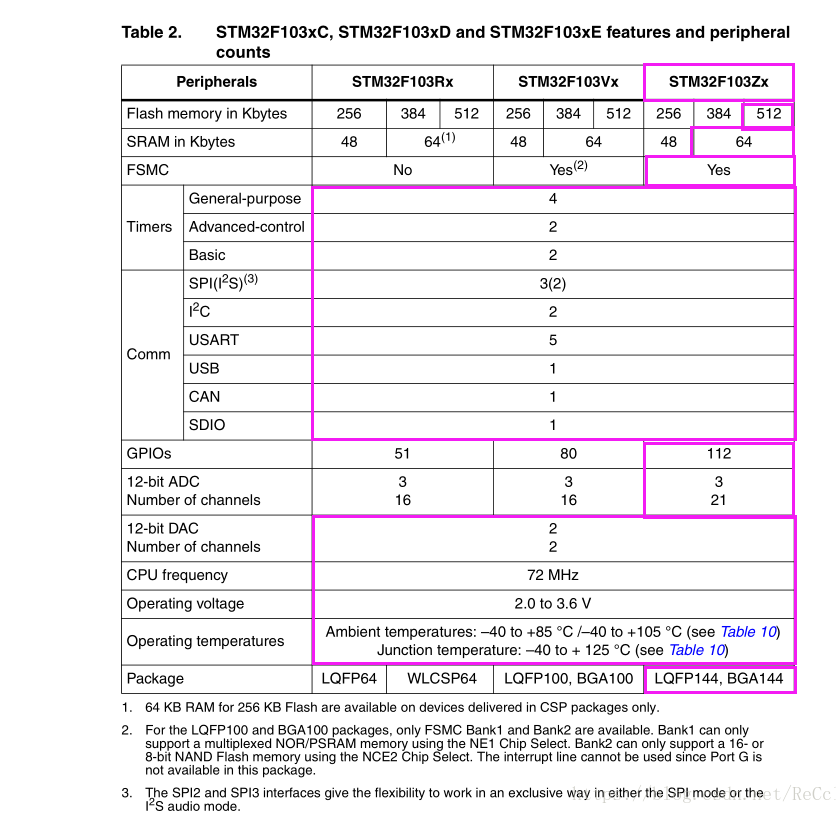
image-2023022700005

2、STM32F103ZET6 programming method

ST-LINK burning method

wiring

ST-link V2 debug downloaderSTM32F103ZET6
VCC3V3
SWDIOSWDIO
SWCLKSWCLK
GNDGND

Software used: STM32CubeIDE

For the specific construction of the development environment, please refer to the [Development Environment Construction and Use] content in the tutorial, so I won’t go into details here.

Learn about STM32
Development board pin assignment

COMPANY

  • About us
  • Team Style
  • Blog

LEARNING & EXPLORATION

  • Tutorials
  • Edge AI hardware
  • Educational robots
  • Embedded intelligent hardware

WHERE TO BUY

  • Yahboom Online Store
  • Amazon
  • Alibaba
  • AliExpress
  • Mercado

TECHNOLOGY SUPPORT

  • Email: support@yahboom.com

BE A DISTRIBUTOR

  • Email: sales@yahboom.com
QR Code
QR Code

Copyright © 2017-2026 Yahboom. All Rights Reserved.

EN/中文