yahboom
HomeLearn
Solution
Blog
Online Store
About Us
EN/中文
310 Motor📖
1.Hardware parameter
  • Hardware parameter
2.ROS robot control board tutorials
  • 3.0 ReadMe
  • 3.1 Control motor
  • 3.2 Timer got encoder data
  • 3.3 PID control robot movement
  • 3.4 4WD Robot kinematics analysis
  • 3.5 Ackerman Robot kinematics analysis
  • 3.6 Mecanum wheel kinematics analysis
3.STM32 smart car tutorials
0. Get started quickly
  • 14.Infrared sensor obstacle avoidance
  • 0. Installation Instructions
  • 1. Version configuration
  • 2. Smart car installation video
  • 3. Precautions for use
1. Introduction to STM32 board
  • 1. Learn about STM32
  • 2. Introduction to STM32 development board
  • 3. Development board pin assignment
  • 4. Introduction to HAL library and LL library
2. Development environment
  • 1. Common development tools
  • 2. STM32CubeMX Install - Use
  • 3. STM32CubeIDE Install - Use
  • 4. Common Driver Installation
  • 5. Program download and simulation
  • 6. Engineering experience and migration
3. Car expansion tutorial
  • 1.Servo control
  • 2.Basic use ultrasonic servo PTZ
  • 3.Motor control
  • 4.OLED display light sensitivity value
  • 5.Infrared sensor
  • 6.Four-way tracking module
  • 7.Infrared remote control
  • 8.Ultrasonic ranging
  • 9.PS2 controller test
  • 10.Car line patrol
  • 11.Ultrasonic follow
  • 12.Ultrasonic obstacle avoidance
  • 13.Ultrasonic obstacle avoidance (servo PTZ version)
  • 15.Infrared remote control
  • 16.PS2 handle remote control
4.2-channel motor drive module tutorial
  • 2.1 Introduction of Module
  • 2.2 For STM32
  • 2.3 For Arduino
  • 2.4 For RaspberryPi
  • 2.5 For RaspberryPi Pico
  • 2.6 For jetson nano
  • 2.7 For MSPM0G3507
  • 2.8 For MSPM0G3519new
5.4-channel motor drive tutorials
Introduction and debugging
  • 0.Motor introduction and usage
  • 1.Introduction to 4-channel motor drive board
  • 2.Control command
  • 3.PC host
USART communication
  • For Arduino
  • For Jetson NANO
  • For MSPM0G3507
  • For MSPM0G3519new
  • For PICO2
  • For RDK X5
  • For RPi5
  • For STM32
IIC communication
  • For Arduino
  • For ESP32
  • For ESP32
  • For Jetson NANO
  • For MSPM0G3507
  • For MSPM0G3519new
  • For PICO2
  • For RDK X5
  • For RPi5
  • For STM32
Download
  • Motor_3D_Model_File
  • Annex_ROSRobotControlBoard
  • Annex_STM3RobotCar
  • Annex_2-channelMotorDriveModule
  • Annex_4-channelMotorDriveModule
Download ZIP

Welcome to 310 Motor repository

2.6 For jetson nano

Jetson nano

1. Preparation

Connect the motor drive board and Jetson nano according to the wiring diagram, connect the battery to the power input interface on motor drive module.
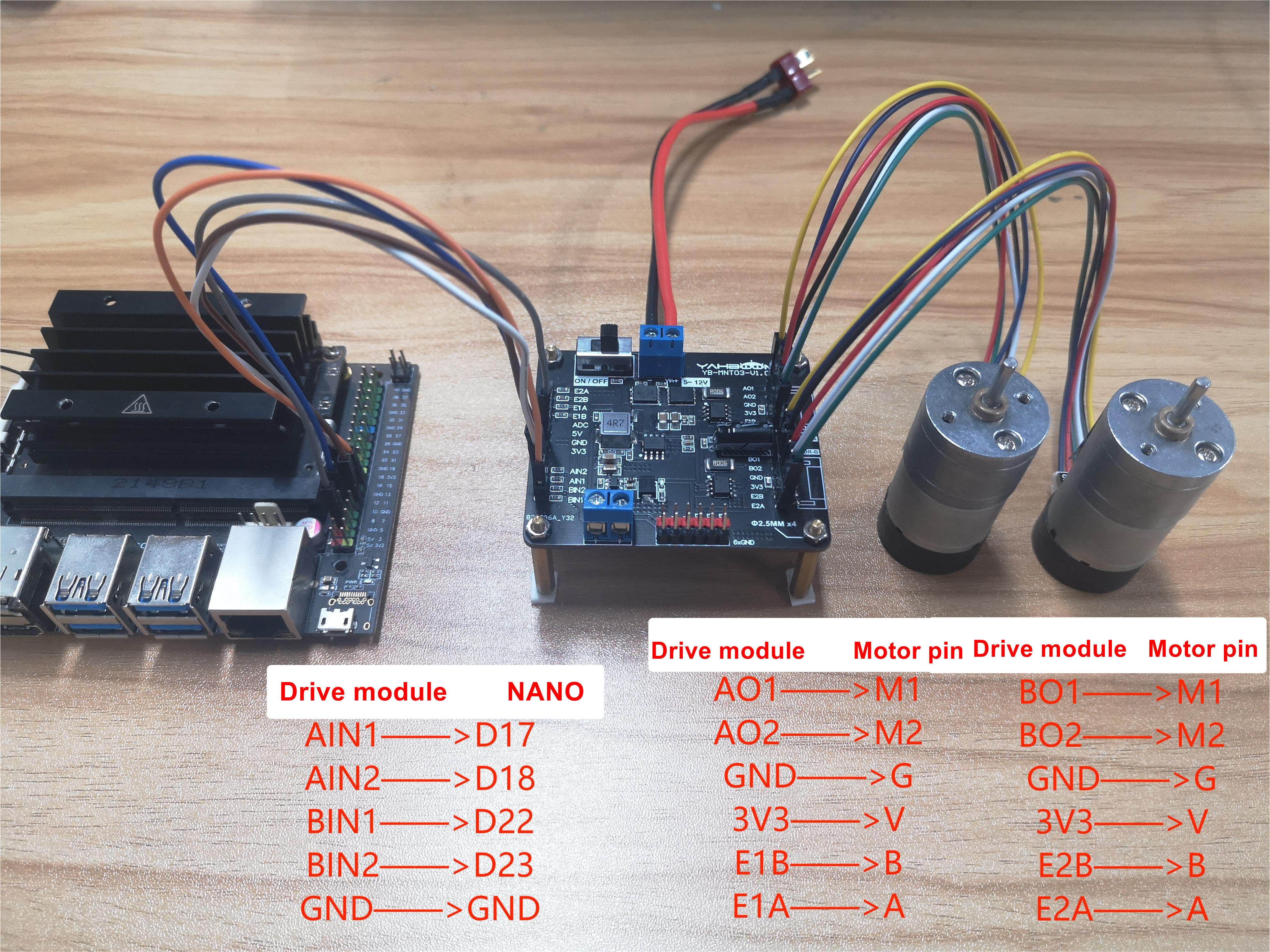
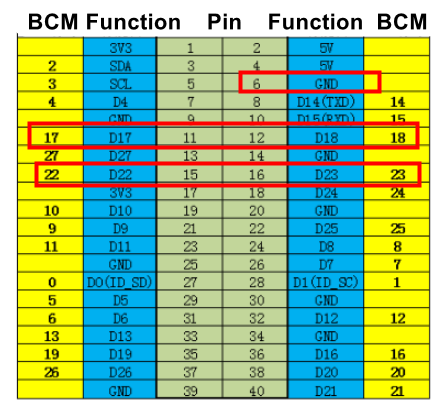
jetson nano接线图

主板引脚

Note: The motor interface wire sequence of the dual motor drive board should correspond to the motor pin! Otherwise, the motor drive plate will be damaged.

Note: The motor interface wire sequence of the dual motor drive board.
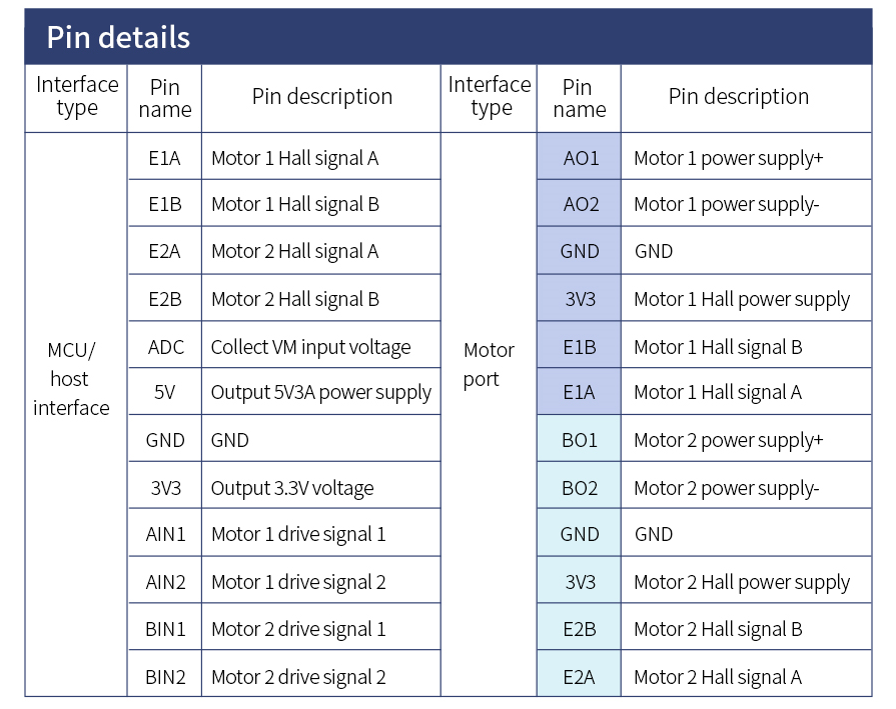
image-20230215160150782

2. Code
​x
import RPi.GPIO as GPIO  #Import library
import time

GPIO.setmode(GPIO.BCM)  #Set pin
AIN1 = 17
AIN2 = 18
BIN1 = 22 
BIN2 = 23
GPIO.setwarnings(False)   #Remove warning
GPIO.setup(AIN1, GPIO.OUT)  #Set pin to output mode
GPIO.output(AIN1, 0)
GPIO.setup(AIN2, GPIO.OUT)
GPIO.output(AIN2, 0)
GPIO.setup(BIN1, GPIO.OUT)
GPIO.output(BIN1, 0)
GPIO.setup(BIN2, GPIO.OUT)
GPIO.output(BIN2, 0)

def forward():  #Motor rotation
    GPIO.output(AIN1,1)
    GPIO.output(AIN2,0)
    GPIO.output(BIN1,1)
    GPIO.output(BIN2,0)
    
def stop():   #Motor stop
    GPIO.output(AIN1,0)
    GPIO.output(AIN2,0)
    GPIO.output(BIN1,0)
    GPIO.output(BIN2,0)

forward()   #Motor rotation
time.sleep(5)   #Delay 5 seconds
stop()   #stop
GPIO.cleanup()  #clean up

3. Experimental result

Jetson nano runs the program. The motor drive board drives the motor to rotate, delaying for 5s, and then stops rotating.

For RaspberryPi Pico
For MSPM0G3507

COMPANY

  • About us
  • Team Style
  • Blog

LEARNING & EXPLORATION

  • Tutorials
  • Edge AI hardware
  • Educational robots
  • Embedded intelligent hardware

WHERE TO BUY

  • Yahboom Online Store
  • Amazon
  • Alibaba
  • AliExpress
  • Mercado

TECHNOLOGY SUPPORT

  • Email: support@yahboom.com

BE A DISTRIBUTOR

  • Email: sales@yahboom.com
QR Code
QR Code

Copyright © 2017-2026 Yahboom. All Rights Reserved.

EN/中文