yahboom
HomeTutorialsProduct
Solution
Blog
Online Store
About Us
EN/中文
Store
MicroROS Robot📖
01. Introduction
  • 0.Unpacking and reviewing video
  • 1. ReadMe - learning route
  • 2. Introduction to lidar
  • 3. Introduction to microROS control board
  • 4. FAQ
  • 5. About charging
02. Assembly course
  • Assembly steps
03. Preparation
  • First Trial
  • 1. Write firmware
  • 2. How to install and use VM
  • 3. microROS control board configuration
  • 4. Connect to microROS agent
04. VM Remote control course
  • 1. VM keyboard remote control
  • 2. VM handle remote control
05.ROS-WiFi module configuration
  • 0. Serial port configuration WiFi instructions
  • 1.Module usage in car(ReadMe)
  • 2.Connection module proxy
  • 3.Camera picture correction(ReadMe)
  • 4.Calibrate servo PTZ(ReadMe)
06.ROS+OpenCV course
  • 1.OpenCV Getting started
  • 2.Geometric transformation
  • 3.Image processing and drawing text line segments
  • 4.Image beautification
07.Mediapipe course
  • 1. Hand detection
  • 2. Posture detection
  • 3. Overall inspection
  • 4. Face detection
  • 5. Face recognition
  • 6. Facial effects
  • 7. 3D object recognition
  • 8. Brush
  • 9. Finger control
  • 10. Gesture recognition
08. Robot basic course
  • 1. Robot information release
  • 2. Robot keyboard control
  • 3. Robot handle control
  • 4. Robot state estimation
  • 5. Linear speed calibration
  • 6. Angular velocity calibration
  • 7. Robot URDF model
09. Lidar course
  • 1. Lidar avoid
  • 2. Lidar following
  • 3. Lidar guard
  • 4. Lidarpatrol
  • 5. Gmapping mapping
  • 6. Cartographer mapping
  • 7. Navigation2 navigation avoid
  • 8. ROS Robot APP mapping
  • 9. ROS Robot APP navigation
10. Multi-machine course
  • 1. Multi-machine handle control
  • 2.Multi-machine keyboard control
  • 3. Multi-machine navigation
11.Robot visual interaction
  • 1. Color tracking
  • 2. Object recognition and tracking
  • 3.Face recognition tracking
  • 4.Autonomous driving line patrol
  • 5.QR code motion control
  • 6.Gesture control car movement
  • 7.Palm control car movement
  • 8.Gesture control car action group
  • 9.Palm control 2DOF servo PTZ
12. Linux basic course
  • 1. Introduction to Linux system
  • 2. Ubuntu file system
  • 3. Ubuntu common commands
  • 4. Ubuntu common editors
  • 5. Ubuntu software operation commands
  • 6. Virtual machine installation
  • 7. SSH remote control
  • 8. VNC remote control
  • 9. Remote file transfer
  • 10. Driver library and communication
  • 11. Static IP and hotspot mode
  • 12. Bind device ID
  • 13. Capacity expansion and resource allocation
  • 14. Update system software source
  • 15. set root password
  • 16. sudo free password
  • 17. Connect to WiFi network
  • 18. View system version
  • 19. Customized service management
  • 20. Back up system image
13. Docker course
  • 1. Overview and installation
  • 2. Common commands
  • 3. In-depth understand and publishing images
  • 4. Hardware interaction and data processing
  • 5. Enter robot docker container
18.ROS2 basic course
  • 1. Introduction to ROS2
  • 2.ROS2 install Humble
  • 3. ROS2 development environment
  • 4. ROS2 workspace
  • 5. ROS2 function package
  • 6. ROS2 node
  • 7.ROS2 topic communication
  • 8. ROS2 service communication
  • 9. ROS2 action communication
  • 10. ROS2 custom interface message
  • 11. ROS2 parameter service case
  • 12. ROS2 meta-function package
  • 13. ROS2 distributed communication
  • 14. ROS2 DDS
  • 15. ROS2 time related API
  • 16. ROS2 common command tools
  • 17. ROS2 rviz2 use
  • 18. ROS2 rqt toolbox
  • 19. ROS2 Launch startup file configuration
  • 20. ROS2 recording and playback tool
  • 21. ROS2 URDF model
  • 22. ROS2 Gazebo simulation platform
  • 23.ROS2 TF2 coordinate transformation
15. microROS control board development environment
  • 1. Introduction to microROS control board
  • 2. Set up ESP32-IDF development environment
  • 3. ESP32-IDF configuration tool
  • 4. Install ESP32-microros components
  • 5. Install and start microROS agent
  • 6. Flash-tool burning firmware
16. ESP32 basic course
  • 1. Turn on the LED light
  • 2. Button function
  • 3. Drive the buzzer
  • 4. Serial communication
  • 5. Battery voltage detection
  • 6. Drive PWM servo
  • 7. Drive motor
  • 8. Read motor encoder data
  • 9. PID controls car speed
  • 10. Read IMU data
  • 11. Read radar data
  • 12. Flash access data
  • 13. Partition table and memory
  • 14. Bluetooth communication
  • 15. WiFi networking
  • 16. Robot kinematics analysis
  • 17. ROS-WiFi camera module
17. microros basic course
  • 1. Publish topic
  • 2. Subscribe topic
  • 3. Multi-topic subscribe and publish
  • 4. Subscribe buzzer topics
  • 5. Subscribe PWM servo topics
  • 6. Subscribe speed control topics
  • 7. Release speed topic
  • 8. Release IMU data topic
  • 9. Publish lidar data topics
  • 10. Customized transmission method
Download
  • Mapping_APP(iOS_Android)
  • Code and firmware
  • Hardware info and driver software
  • VM image file
  • Instruction manual
  • SystemFile_RPi
  • SystemFile_JetsonNANO
  • 3D_Model_File
  • ROS2_Basic_VM
Download ZIP

Welcome to MicroROS Robot repository

2. Introduction to lidar

2. Introduction to lidar

As a low-cost measurement single-line high-precision lidar sensor, the MS200 radar adopts the TOF measurement method. The small size of the MS200 radar allows it to be built into the robot body, optimizing the space usage of the robot content. Although small in size, it integrates a variety of long-distance measurement optimization algorithms, with a 90% reflectivity ranging range of up to 12.0m. At the same time, its power system uses a custom-optimized brushless DC motor with a service life of more than 10,000 hours.

Specifications are as follows:

parameternumerical valueexplanation
Measuring range0.03m-12.0mUnder the condition of 90% reflectivity
measurement accuracyTypical values: ≤4mm(0.2m-2.0m)、≤15mm(2.0m-12.0m)Under the condition of 90% reflectivity, the radar collected data statistical results 100 times.
Scan angle360°-
Frequency4500 points/second-
spinning speed10Hz-
Angular resolution0.8°@10Hz-
Laser emission pitch angle0.5°-2°Based on the bottom surface of the radar base frame
Laser zero emission azimuth angle0±2°-
Operating VoltageDC 5.0±0.5V-
Operating temperature-10℃~50℃Typical value 25℃
Working currenttypical:260mA-
Starting currentless than 500mA-
Product Size37.7×37.5×33.0Length × Width × Height (Unit: mm)
net weightAbout 40g-
Serial port baud rate230400-

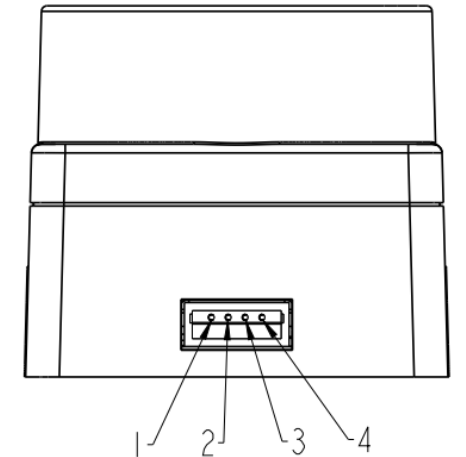
Interface definition:

image-20240116165155185

PinSignalAttributesdescribe
1TxSerial data sendingTx(Send locally,0V~3.3V)
2RxSerial port data receptionRx(Local reception,0V~3.3V)
3GNDInput power negative poleGND(0V)
4VCCInput power positive poleDC 5V(4.5V~5.5V)

Serial port configuration parameters:

baud ratedata bitsStop bitCheck Digitflow control
23040081NoneNone


ReadMe - learning route
Introduction to microROS control board

COMPANY

  • About us
  • Team Style
  • Blog

LEARNING & EXPLORATION

  • Tutorials
  • Edge AI hardware
  • Educational robots
  • Embedded intelligent hardware

WHERE TO BUY

  • Yahboom Online Store
  • Amazon
  • Alibaba
  • AliExpress
  • Mercado

TECHNOLOGY SUPPORT

  • Email: support@yahboom.com

BE A DISTRIBUTOR

  • Email: sales@yahboom.com
QR Code

Copyright © 2017-2026 Yahboom. All Rights Reserved.

EN/中文