yahboom
HomeLearn
Solution
Blog
Online Store
About Us
EN/中文
MicroROS Robot📖
01. Introduction
  • 0.Unpacking and reviewing video
  • 1. ReadMe - learning route
  • 2. Introduction to lidar
  • 3. Introduction to microROS control board
  • 4. FAQ
  • 5. About charging
02. Assembly course
  • Assembly steps
03. Preparation
  • First Trial
  • 1. Write firmware
  • 2. How to install and use VM
  • 3. microROS control board configuration
  • 4. Connect to microROS agent
04. VM Remote control course
  • 1. VM keyboard remote control
  • 2. VM handle remote control
05.ROS-WiFi module configuration
  • 0. Serial port configuration WiFi instructions
  • 1.Module usage in car(ReadMe)
  • 2.Connection module proxy
  • 3.Camera picture correction(ReadMe)
  • 4.Calibrate servo PTZ(ReadMe)
06.ROS+OpenCV course
  • 1.OpenCV Getting started
  • 2.Geometric transformation
  • 3.Image processing and drawing text line segments
  • 4.Image beautification
07.Mediapipe course
  • 1. Hand detection
  • 2. Posture detection
  • 3. Overall inspection
  • 4. Face detection
  • 5. Face recognition
  • 6. Facial effects
  • 7. 3D object recognition
  • 8. Brush
  • 9. Finger control
  • 10. Gesture recognition
08. Robot basic course
  • 1. Robot information release
  • 2. Robot keyboard control
  • 3. Robot handle control
  • 4. Robot state estimation
  • 5. Linear speed calibration
  • 6. Angular velocity calibration
  • 7. Robot URDF model
09. Lidar course
  • 1. Lidar avoid
  • 2. Lidar following
  • 3. Lidar guard
  • 4. Lidarpatrol
  • 5. Gmapping mapping
  • 6. Cartographer mapping
  • 7. Navigation2 navigation avoid
  • 8. ROS Robot APP mapping
  • 9. ROS Robot APP navigation
10. Multi-machine course
  • 1. Multi-machine handle control
  • 2.Multi-machine keyboard control
  • 3. Multi-machine navigation
11.Robot visual interaction
  • 1. Color tracking
  • 2. Object recognition and tracking
  • 3.Face recognition tracking
  • 4.Autonomous driving line patrol
  • 5.QR code motion control
  • 6.Gesture control car movement
  • 7.Palm control car movement
  • 8.Gesture control car action group
  • 9.Palm control 2DOF servo PTZ
12. Linux basic course
  • 1. Introduction to Linux system
  • 2. Ubuntu file system
  • 3. Ubuntu common commands
  • 4. Ubuntu common editors
  • 5. Ubuntu software operation commands
  • 6. Virtual machine installation
  • 7. SSH remote control
  • 8. VNC remote control
  • 9. Remote file transfer
  • 10. Driver library and communication
  • 11. Static IP and hotspot mode
  • 12. Bind device ID
  • 13. Capacity expansion and resource allocation
  • 14. Update system software source
  • 15. set root password
  • 16. sudo free password
  • 17. Connect to WiFi network
  • 18. View system version
  • 19. Customized service management
  • 20. Back up system image
13. Docker course
  • 1. Overview and installation
  • 2. Common commands
  • 3. In-depth understand and publishing images
  • 4. Hardware interaction and data processing
  • 5. Enter robot docker container
18.ROS2 basic course
  • 1. Introduction to ROS2
  • 2.ROS2 install Humble
  • 3. ROS2 development environment
  • 4. ROS2 workspace
  • 5. ROS2 function package
  • 6. ROS2 node
  • 7.ROS2 topic communication
  • 8. ROS2 service communication
  • 9. ROS2 action communication
  • 10. ROS2 custom interface message
  • 11. ROS2 parameter service case
  • 12. ROS2 meta-function package
  • 13. ROS2 distributed communication
  • 14. ROS2 DDS
  • 15. ROS2 time related API
  • 16. ROS2 common command tools
  • 17. ROS2 rviz2 use
  • 18. ROS2 rqt toolbox
  • 19. ROS2 Launch startup file configuration
  • 20. ROS2 recording and playback tool
  • 21. ROS2 URDF model
  • 22. ROS2 Gazebo simulation platform
  • 23.ROS2 TF2 coordinate transformation
15. microROS control board development environment
  • 1. Introduction to microROS control board
  • 2. Set up ESP32-IDF development environment
  • 3. ESP32-IDF configuration tool
  • 4. Install ESP32-microros components
  • 5. Install and start microROS agent
  • 6. Flash-tool burning firmware
16. ESP32 basic course
  • 1. Turn on the LED light
  • 2. Button function
  • 3. Drive the buzzer
  • 4. Serial communication
  • 5. Battery voltage detection
  • 6. Drive PWM servo
  • 7. Drive motor
  • 8. Read motor encoder data
  • 9. PID controls car speed
  • 10. Read IMU data
  • 11. Read radar data
  • 12. Flash access data
  • 13. Partition table and memory
  • 14. Bluetooth communication
  • 15. WiFi networking
  • 16. Robot kinematics analysis
  • 17. ROS-WiFi camera module
17. microros basic course
  • 1. Publish topic
  • 2. Subscribe topic
  • 3. Multi-topic subscribe and publish
  • 4. Subscribe buzzer topics
  • 5. Subscribe PWM servo topics
  • 6. Subscribe speed control topics
  • 7. Release speed topic
  • 8. Release IMU data topic
  • 9. Publish lidar data topics
  • 10. Customized transmission method
Download
  • Mapping_APP(iOS_Android)
  • Code and firmware
  • Hardware info and driver software
  • VM image file
  • Instruction manual
  • SystemFile_RPi
  • SystemFile_JetsonNANO
  • 3D_Model_File
  • ROS2_Basic_VM
Download ZIP

Welcome to MicroROS Robot repository

18. View system version

18.View system version

18.View system version1. View system version information2. jetson nano Check jetpack version

The following content takes the jetson nano system version as an example to display the system version information.

1. View system version information

Check system kernel version

uname -rv

image-20231024102459667

View machine hardware platform

xxxxxxxxxx
uname -m

image-20231024102703347

View all system version information

xxxxxxxxxx
uname -a

image-20231024101512843


2. jetson nano Check jetpack version

Enter the following command in the jetson nano system terminal to check that the system version is R32.7.3

xxxxxxxxxx
cat /etc/nv_tegra_release

image-20231024103326276

Open the Jetson Linux Archive website in your browser to check the corresponding version.

xxxxxxxxxx
https://developer.nvidia.com/embedded/jetson-linux-archive

Find the corresponding version, click to enter the 32.7.3 version information, and you can see that R32.7.3 corresponds to the Jetpack 4.6.3 version.
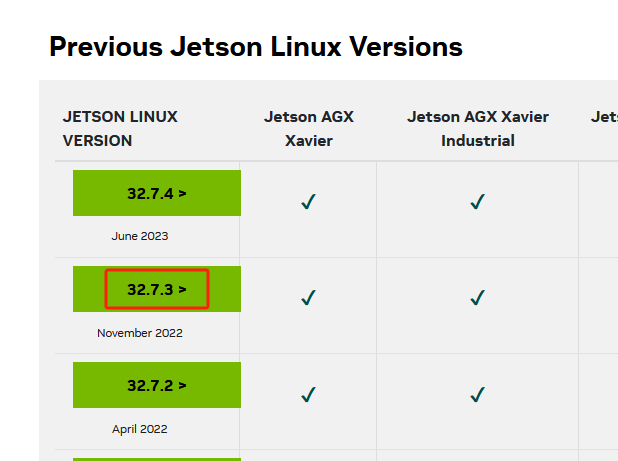
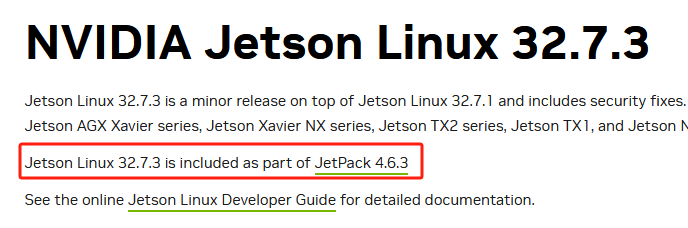
image-20231024103946806

image-20231024104050908

Connect to WiFi network
Customized service management

COMPANY

  • About us
  • Team Style
  • Blog

LEARNING & EXPLORATION

  • Tutorials
  • Edge AI hardware
  • Educational robots
  • Embedded intelligent hardware

WHERE TO BUY

  • Yahboom Online Store
  • Amazon
  • Alibaba
  • AliExpress
  • Mercado

TECHNOLOGY SUPPORT

  • Email: support@yahboom.com

BE A DISTRIBUTOR

  • Email: sales@yahboom.com
QR Code

Copyright © 2017-2026 Yahboom. All Rights Reserved.

EN/中文


