yahboom
HomeLearn
Solution
Blog
Online Store
About Us
EN/中文
RDK X3 Board📖
1. RDK X3 Board Introduction
  • 1.1 About RDK X3 board
  • 1.2 Write system
  • 1.3 SD expansion
  • 1.4 Hardware interface
  • 1.5 Install case antenna
2. Basic setting
  • 2.1 Network Configuration
  • 2.2 Remote Login
  • 2.3 System Update
  • 2.4 Configure srpi-config
  • 2.5 confit.txt file
  • 2.6 Thermal control-CPU frequency
  • 2.7 Auto-start at boot
  • 2.8 RDK-specific commands usage
  • 2.9 Linux command usage
  • 2.10 GPIO read write
  • 2.11 Image classification algorithm
  • 2.12 USB camera usage
  • 2.13 MIPI camera uasge
3. Basic course
C language
  • 1. Camera image display
  • 2. Save camera image
  • 3. Camera image encoding
  • 4. Video decoding display
  • 5. VPS scaling example
  • 6. Object detection algorithm-fcos
  • 7. Object detection algorithm—YOLOv5
Python
  • 1. Using GPIO
  • 2. Using PWM
  • 3. Using serial port
  • 4. Using I2C
  • 5. Using SPI
Download
  • Image_system
  • Code
  • Software_Tools
Download ZIP

Welcome to RDK X3 Board repository

1.5 Install case antenna

Install case antenna

Install case antenna1.Assembly steps2. Wiring3.Completed

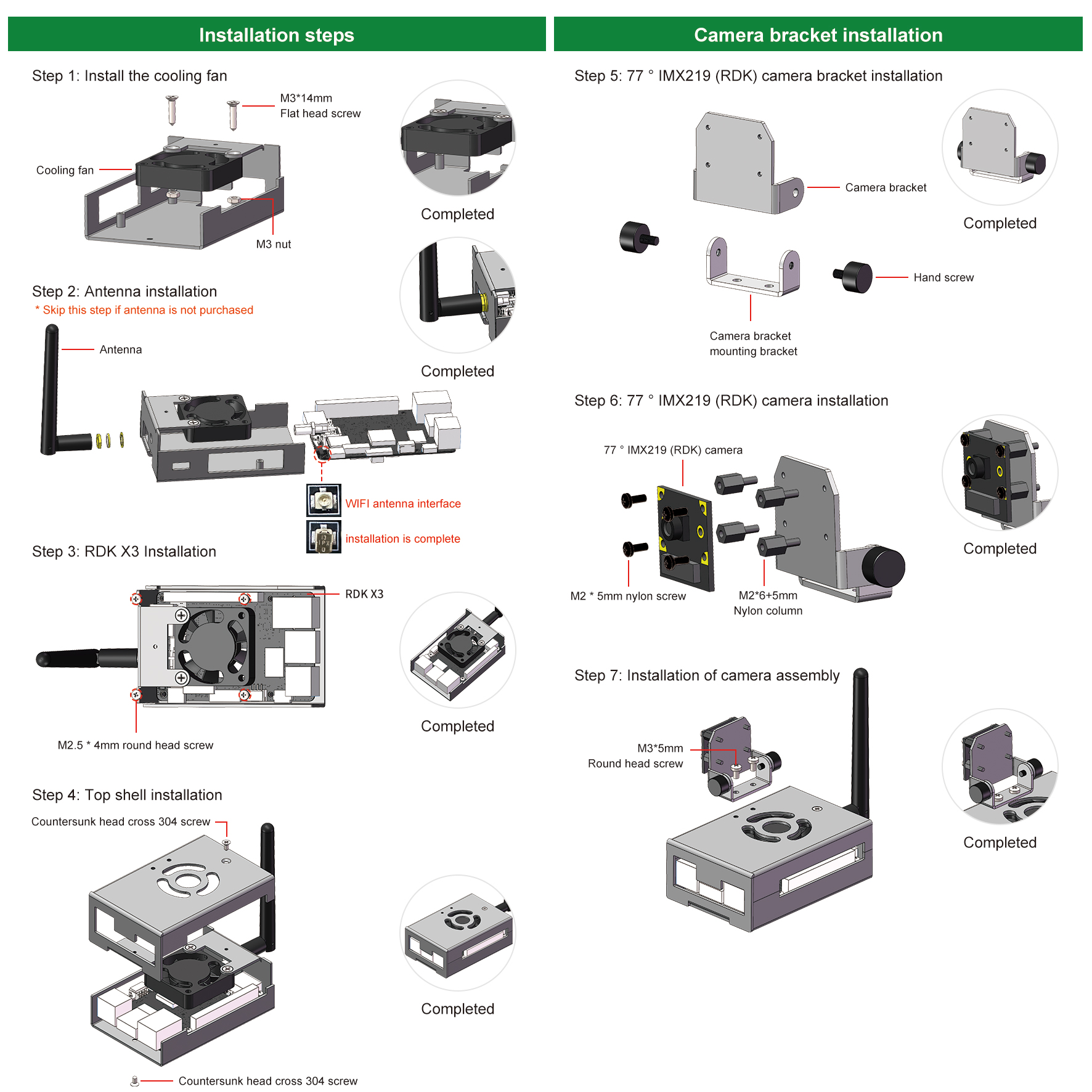
1.Assembly steps

1

2. Wiring

The fan is connected to the outermost pin of the RDK X3 board.

The second pin connected to fan VCC (red line).

The third pin connected to fan GND (black line).
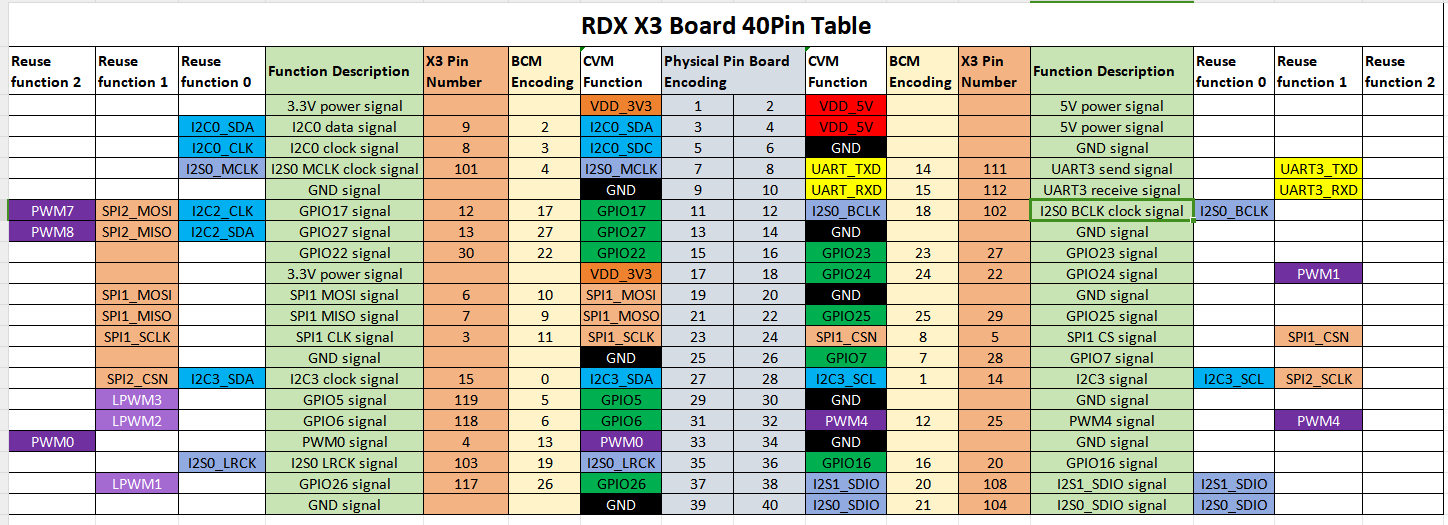
40

风扇

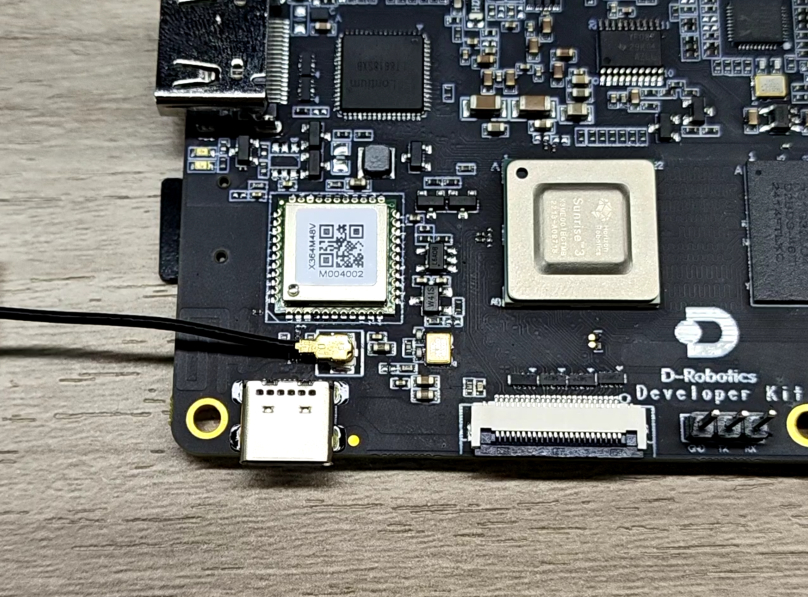
Antenna connection, as shown below.

天线安装

3.Completed

安装完成

Hardware interface
Network Configuration

COMPANY

  • About us
  • Team Style
  • Blog

LEARNING & EXPLORATION

  • Tutorials
  • Edge AI hardware
  • Educational robots
  • Embedded intelligent hardware

WHERE TO BUY

  • Yahboom Online Store
  • Amazon
  • Alibaba
  • AliExpress
  • Mercado

TECHNOLOGY SUPPORT

  • Email: support@yahboom.com

BE A DISTRIBUTOR

  • Email: sales@yahboom.com
QR Code

Copyright © 2017-2026 Yahboom. All Rights Reserved.

EN/中文