Welcome to RDK X3 Board repository
2.8 RDK-specific commands usage
RDK-specific commands usage
RDK-specific commands usage1. devmem2. hrut_boardid3. hrut_ps4. hrut_socid5. hrut_somstatus6. rdk-miniboot-update7. rdkos_info
1. devmem
devmem is a command in busybox. It is possible to read and write the values of hardware registers. By using the mmap method in the/dev/mem driver through the mmap function, the device's memory is mapped to user space, enabling read and write operations on these physical addresses.
Grammar explanation
xxxxxxxxxxdevmem ADDRESS [WIDTH [VALUE]]    Read/write from physical address
ADDRESS Address to act upon WIDTH Width (8/16/...) VALUE Data to be written- Address: The physical address where the operation is to be performed. This is a required parameter used to specify the address to be read or written.
- WIDTH: Optional parameter that represents the bit width of the data. Can be specified as 8, 16, or 32, used to specify the data bit width for reading or writing. If this parameter is not provided, it defaults to 32 bits.
- VALUE: Optional parameter representing the data value to be written. If the WIDTH parameter is provided, VALUE should match the specified bit width. If 'VALUE' is not provided, the command will perform a read operation.
Common commands

- Read register
x
Read 32-bit: devmem 0xa600307c 32Read 16-bit: devmem 0xa600307c 16Read 8-bit: devmem 0xa600307c 8- Write register
x
Read 32-bit: devmem 0xa6003078 32 0x1000100Read 16-bit: devmem 0xa6003078 16 0x1234Read 8-bit: devmem 0xa6003078 8 0x12
2. hrut_boardid
The hrutdboardid command is used to obtain the current development board number (different development boards have different numbers).
⚠️Boardid can affect the initialization of hardware during startup, please set it carefully.
Grammar explanation
xxxxxxxxxxUsage: hrut_boardid [OPTIONS] <Values>Example:hrut_boardid gOptions:g get board id(veeprom)s set board id(veeprom)G get board id(bootinfo)S set board id(bootinfo)c clear board id(veeprom)C clear board id(bootinfo)h display this help text- g: Obtain the development board number from 'veeprom'.
s: Set the development board number from 'veeprom'.
G: Obtain the development board number from
bootinfo. S: Set the development board number frombootinfo. c: Clear the development board number configuration in 'veeprom'. C: Clear the development board number configuration in 'bootinfo'. h: Get help information.
- g: Obtain the development board number from 'veeprom'.
s: Set the development board number from 'veeprom'.
G: Obtain the development board number from
Definition of Boardid Number
| Meaning | Length | Value range | |
|---|---|---|---|
| auto detect | DDR automatic detection function | 1bit [31] | 0x0:auto detection 0x1:Do not use LPDDR4 auto detection function |
| model | DDR manufacturer information | 3bit [30:28] | 0x0: auto detection 0x1: hynix,0x2: micron,0x3: samsung |
| ddr_type | DDR type | 4bit [27:24] | 0x0: auto detection 0x1: LPDDR4 0x2: LPDDR4X 0x3: DDR4 0x4: DDR3L |
| frequency | DDR frequency | 4bit [23:20] | 0x0: auto detection 0x1: 667 0x2: 1600 0x3: 2133 0x4: 2666 0x5: 3200 0x6: 3733 0x7: 4266 0x8: 1866 0x9: 2400 0xa: 100 0xb: 3600 |
| capacity | DDR capacity | 4bit [19:16] | 0x0: auto detection 0x1: 1GB 0x2: 2GB 0x4: 4GB |
| ecc | 4bit [15:12] | 0x0: default ECC config 0x1: inline ECC all 0x2: inline ecc option1 0x3: inline ecc option2 | |
| som_type | SOM types | 4bit [11:8] | 0x0: auto detection 0x3:sdb v3 0x4:sdb v4 0x5:RDK X3 v1 0x6:RDK X3 v1.2 0x8:RDK X3 v2 0xb:RDK Module 0xF: X3E |
| DFS EN | FM enable position | 1bit [7] | 1: Enable FM function 0: Do not enable FM function |
| alternative | alternaive paramter | 3bit [6:4] | 0x0: default configure 0x1: config1 |
| base_board_type | Bottom plate type | 4bit [3:0] | 0x0: auto detection 0x1: X3 DVB 0x4: X3 SDB 0x5: customer board |
The definitions of each field are as follows:
- model: hynix 和 micron, samsung
- ddr_type:LPDDR4、LPDDR4X、DDR4、DDR3L
- frequency: 667、1600、2133、2666、3200、3733、4266
- capacity: 1G、2G、4G
- som_type: sdb v3、sdb v4、RDK X3 v1、RDK X3 v1.2、RDK X3 v2、RDK Module、X3E
- base_board_type: x3dvb、X3 SDB、customer_board
3. hrut_ps
The hrut-ps command prints process status information that is not supported by busybox's ps command, including process number, parent process number, priority, memory, virtual memory, etc.
Grammar explanation
xxxxxxxxxx hrut_psSupporting information

pid: Process number.
Each process in the operating system has a unique identifier called a process ID (PID). It is used to uniquely identify and recognize a process in the system.
ppid: Parent process number. It indicates the parent process that created the process.
state
:Running status.
I:IdleR:RunningS:SleepingD:Disk SleepingT:StoppedX:DeadZ:Zombiet:Tracing stopP:Parked
prio : Priority. Indicates the scheduling priority of a process, usually a numerical value. Higher values indicate higher priority, and processes may be more likely to obtain CPU time slices.
Nice: Scheduling priority. Indicates the scheduling priority of a process, usually an integer value. A lower nice value indicates higher priority, allowing processes to obtain CPU time more frequently.
rt_prio : Real time priority. Indicates the priority of real-time processes, with lower values indicating higher real-time priority.
policy : Scheduling strategy. The scheduling strategy for a process is usually a scheduling algorithm, such as first come, first served (FIFO), round robin, etc.
vsize : Virtual memory size. Represents the virtual memory size of a process, which is the size of the virtual address space that the process can access.
rss : Physical memory usage. Indicates the current physical memory size occupied by the process, which is the actual physical RAM size allocated to the process.
comm: Command name. Contains the command name or executable file name of a process, used to identify the type or purpose of the process.
4. hrut_socid
hrut-socid command prints the UID (unique identifier) of the current SOC chip.
Grammar explanation
xxxxxxxxxxhrut_socidCommon commands

5. hrut_somstatus
The hrut-somstatus command can obtain the temperature sensor temperature, CPU/BPU operating frequency, and BPU load.
Grammar explanation
xxxxxxxxxxsudo hrut_somstatusCommon commands
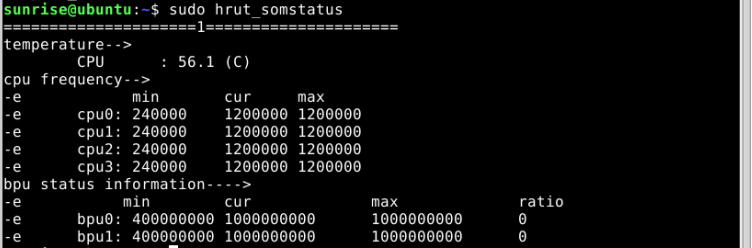
**temperature:
- CPU: Indicates CPU temperature, current value is 61.3℃.
cpu frequency:
min:The lowest frequency at which CPU can run.cur:The current operating frequency of CPU.max:The maximum frequency at which the CPU can run.- These pieces of information represent the frequency range of each CPU core, including minimum, current, and maximum frequencies.
**bpu status information:
min:The minimum frequency at which BPU can operate.cur:The current operating frequency of BPU.max:The maximum frequency at which BPU can operate.ratio:The load rate during BPU operation.- These pieces of information represent the frequency range of BPU, including minimum, current, and maximum frequencies and loads.
6. rdk-miniboot-update
rdk-miniboot-update
This command is used to update the minimum boot image (miniboot) of RDK hardware.
Grammar explanation
xxxxxxxxxxsudo rdk-miniboot-update [options]... [FILE]Option Description
All options are optional and not mandatory. If run without any option parameters, rdk-miniboot-updatewill use the latest version of the minibootimage to complete the upgrade and update.
-f:Install the specified files instead of installing the latest applicable updates.-h:Display the help text and exit.-l:Return the complete path of the latest available 'miniboot' image based on the settings of FIRMWARE-RELEASEVNet and FIRMWARE_iMAGE-DIR.You can view what image files will be used for updates without option parameters.
-s:Do not display progress messages.Common commands
Update the minibootimage to the latest version.
xxxxxxxxxxsudo rdk-miniboot-updateUpdate to use the specifiedminibootimage.
xxxxxxxxxxsudo rdk-miniboot-update -f /userdata/miniboot.imgWhat image file will be used for updating when viewing without option parameters.
xxxxxxxxxxsunrise@ubuntu:~$ rdk-miniboot-update -l/lib/firmware/rdk/miniboot/default/disk_nand_minimum_boot_2GB_3V3_20230413.img7. rdkos_info
rdkos_info command is used to collect the software and hardware versions, driver loading list, RDK software package installation list, and the latest system logs of the RDK system at once, making it convenient for users to quickly obtain the current system status information.
Grammar explanation
xxxxxxxxxxsudo rdkos_info [options]Option description
All options are optional and not mandatory. If run without any option parameters,,rdkos_infowill default to installing concise mode to output information.
-b:Basic output mode, does not collect system logs.-s:Simplified output mode (default), outputting 30 lines of the latest system log.-d:Detailed output mode, outputting 300 lines of the latest system log.-v:Display version information.-h:Display help information.Common commands
Default Usage
xxxxxxxxxxsudo rdkos_infoPartial outputs are as follows.
================ RDK System Information Collection ================
[Hardware Model]:        Hobot X3 PI V2.1 (Board Id = 8)
[CPU And BPU Status]:        =====================1=====================        temperature-->                CPU      : 56.6 (C)        cpu frequency-->                      min       cur     max                cpu0: 240000    1500000 1500000                cpu1: 240000    1500000 1500000                cpu2: 240000    1500000 1500000                cpu3: 240000    1500000 1500000        bpu status information---->                     min        cur             max             ratio                bpu0: 400000000 1000000000      1000000000      0                bpu1: 400000000 1000000000      1000000000      0
[Total Memory]:         1.9Gi[Used Memory]:          644Mi[Free Memory]:          986Mi[ION Memory Size]:      672MB

[RDK OS Version]:        2.1.0
[RDK Kernel Version]:        Linux ubuntu 4.14.87 #3 SMP PREEMPT Sun Nov 26 18:38:22 CST 2023 aarch64 aarch64 aarch64 GNU/Linux
[RDK Miniboot Version]:        U-Boot 2018.09-00012-g5e7d58f7-dirty (Nov 26 2023 - 18:47:14 +0800)