Welcome to JetCobot repository
9.Target tracking algorithm
9、Target tracking algorithm
Locating objects in consecutive frames of a video is called tracking. In OpenCV, you can use traditional target tracking algorithms (such as mean tracking, Kalman filtering, etc.)Or target trackers based on deep learning (such as MOSSE, CSRT, etc.) for target tracking. Deep learning object trackers generally perform better in accuracy and robustness
9.1、Use
Source code launch file path:~/jetcobot_ws/src/opencv_apps/launch
Step 1: Start the camera
roslaunch jetcobot_visual opencv_apps.launch img_flip:=false
img_flip parameter: whether the image needs to be flipped horizontally, the default is false.
Step 2: Start the corner detection function of Opencv_apps
x
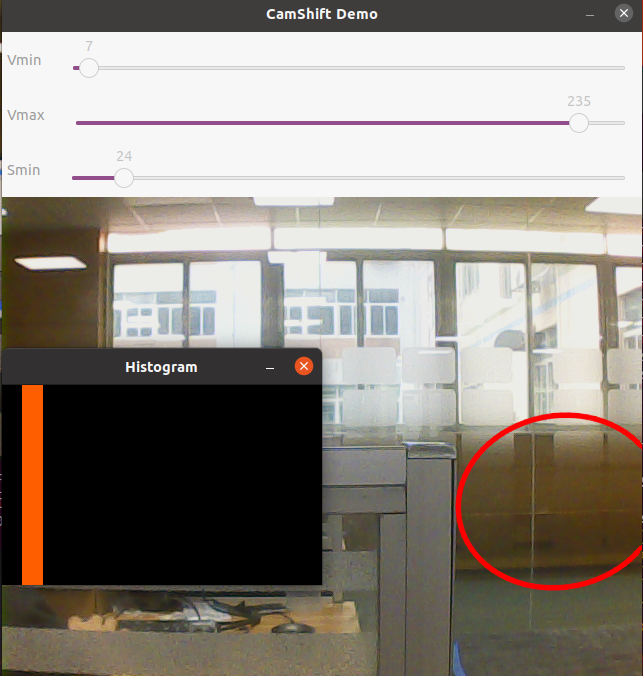
roslaunch opencv_apps camshift.launch # target tracking algorithmEach functional case will have a parameter [debug_view], Boolean type, whether to use Opencv to display images, which is displayed by default.
If no display is required, set it to [False], for example.
xxxxxxxxxxroslaunch opencv_apps contour_moments.launch debug_view:=FalseHowever, after starting in this way, some cases cannot be displayed in other ways, because in the source code, some [debug_view] is set to [False], which will turn off image processing.
9.2、Display method
rqt_image_view
Enter the following command to select the corresponding topic
xxxxxxxxxxrqt_image_view
opencv
The system displays it by default and no processing is required.
9.3、Effect display
You can see an adjustable window appear on the screen, followed by a red frame.