Welcome to RDK S600 Developer Kit repository
01.YOLO26 environment
YOLO Environment Setup
YOLO Environment Setup1. One-Click Installation2. Installation Directory3. Example Source Code Porting
This chapter applies to those who set up using the RDK official image. If you are using the YAHBOOM version image, you can ignore this tutorial.
1. One-Click Installation
The following command automatically installs the environment required for yolov26. Please wait patiently.
xxxxxxxxxxpip install -U ultralytics --break-system-packages
After installation is complete, restart the RDK development board.
xxxxxxxxxxsudo reboot
2. Installation Directory
Use the following command to view the installation directory
xxxxxxxxxxpip show ultralytics
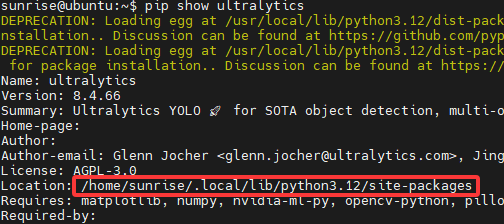
The source code is in the /home/sunrise/.local/lib/python3.12/site-packages/ultralytics directory.
xxxxxxxxxxcd /home/sunrise/.local/lib/python3.12/site-packages/ultralytics
3. Example Source Code Porting
Port the source code provided in the materials to the /home/sunrise/ directory.

Add environment and permissions
xxxxxxxxxxpip install ncnn --break-system-packagespip install --break-system-packages "onnx>=1.12.0,<2.0.0" onnxruntime "onnxslim>=0.1.82"pip install --break-system-packages pnnx
chmod +x /home/sunrise/ultralytics26/yahboom_demo/*