Welcome to RDK S600 Developer Kit repository
06.Image classification
Image Classification
Image Classification1. Model Introduction2. Image Classification: ImagesPreview3. Image Classification: VideoPreview4. Image Classification: Real-time Detection4.1 USB CameraPreviewReference
Demonstrating Ultralytics image classification on images, videos, and real-time detection using Python.
1. Model Introduction
Image classification is the simplest of the three tasks, involving classifying an entire image into one of a set of predefined categories.
The output of an image classifier is a single class label and a confidence score. Image classification is very useful when you only need to know which category an image belongs to, without knowing the location or exact shape of objects within that class.
2. Image Classification: Images
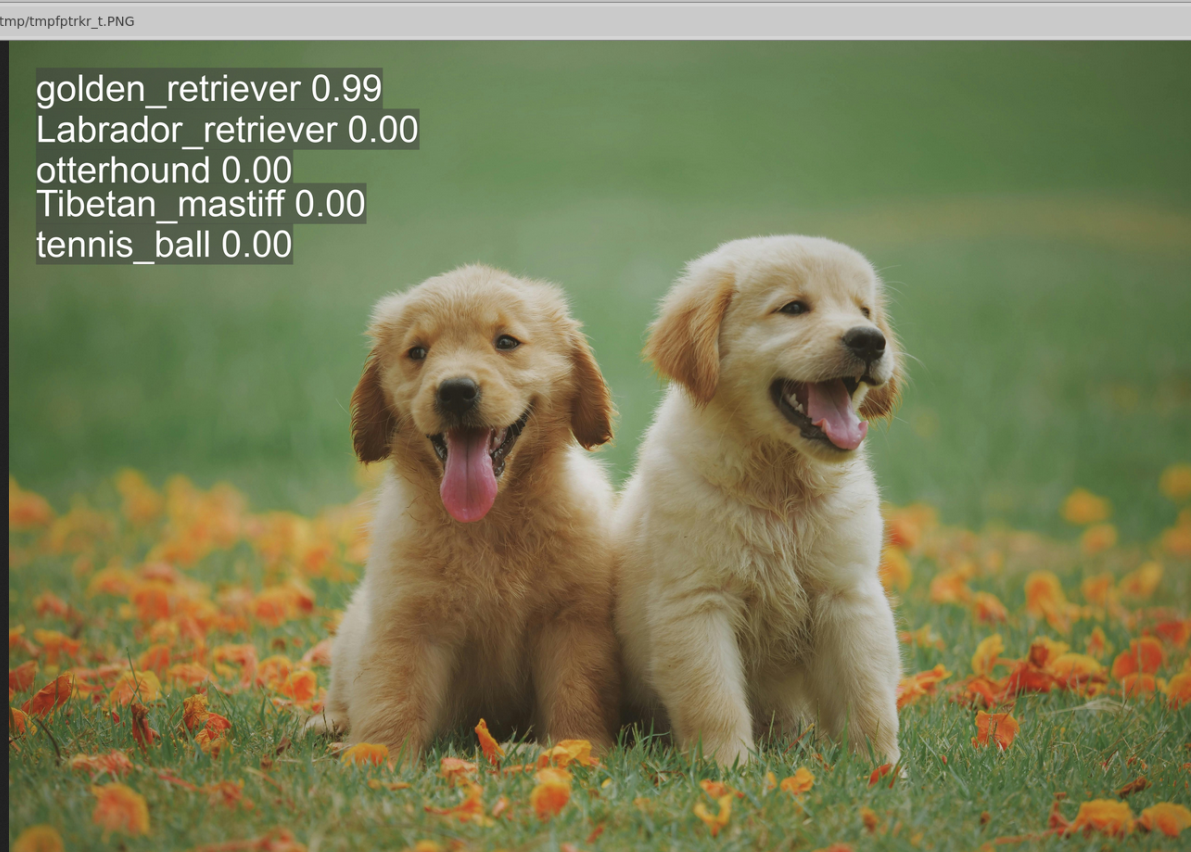
Use yolo26n-cls_ncnn_model to predict images in the ultralytics26 folder (non-Ultralytics built-in images).
Enter the code folder:
cd /home/sunrise/ultralytics26/yahboom_demo
Run the code:
xxxxxxxxxxpython3 04.classification_image.py
Preview
Output image location for YOLO recognition: /home/sunrise/ultralytics26/output/
Example code:
xfrom ultralytics import YOLO
# Load a model#model = YOLO("/home/sunrise/ultralytics26/yolo26n-cls.pt")model = YOLO("/home/sunrise/ultralytics26/yolo26n-cls_ncnn_model")
# Run batched inference on a list of imagesresults = model("/home/sunrise/ultralytics26/assets/dog.jpg") # return a list of Results objects
# Process results listfor result in results: # boxes = result.boxes # Boxes object for bounding box outputs # masks = result.masks # Masks object for segmentation masks outputs # keypoints = result.keypoints # Keypoints object for pose outputs probs = result.probs # Probs object for classification outputs # obb = result.obb # Oriented boxes object for OBB outputs result.show() # display to screen result.save(filename="/home/sunrise/ultralytics26/output/dog_output.jpg") # save to disk
3. Image Classification: Video
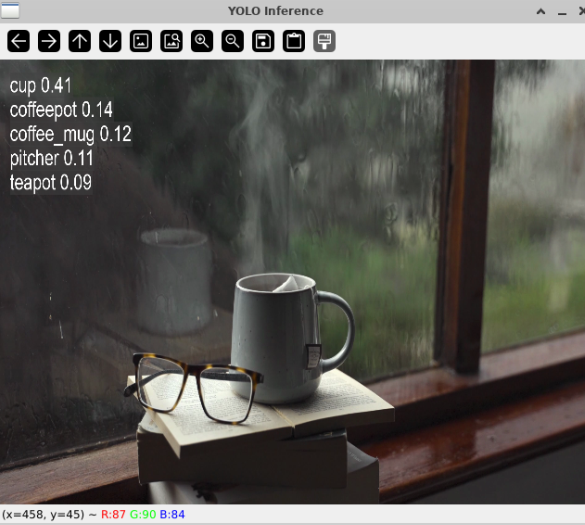
Use yolo26n-cls_ncnn_model to predict videos in the ultralytics26 folder (non-Ultralytics built-in videos).
Enter the code folder:
xxxxxxxxxxcd /home/sunrise/ultralytics26/yahboom_demo
Run the code:
xxxxxxxxxxpython3 04.classification_video.py
Preview
Output video location for YOLO recognition: /home/sunrise/ultralytics26/output/
Example code:
xxxxxxxxxximport cv2from ultralytics import YOLO
# Load the YOLO model#model = YOLO("/home/sunrise/ultralytics26/yolo26n-cls.pt")model = YOLO("/home/sunrise/ultralytics26/yolo26n-cls_ncnn_model")
# Open the video filevideo_path = "/home/sunrise/ultralytics26/videos/cup.mp4"cap = cv2.VideoCapture(video_path)
# Get the video frame size and frame rateframe_width = int(cap.get(cv2.CAP_PROP_FRAME_WIDTH))frame_height = int(cap.get(cv2.CAP_PROP_FRAME_HEIGHT))fps = int(cap.get(cv2.CAP_PROP_FPS))
# Define the codec and create a VideoWriter object to output the processed videooutput_path = "/home/sunrise/ultralytics26/output/04.cup_output.mp4"fourcc = cv2.VideoWriter_fourcc(*'mp4v')  # You can use 'XVID' or 'mp4v' depending on your platformout = cv2.VideoWriter(output_path, fourcc, fps, (frame_width, frame_height))
# Loop through the video frameswhile cap.isOpened():    # Read a frame from the video    success, frame = cap.read()
    if success:        # Run YOLO inference on the frame        results = model(frame)
        # Visualize the results on the frame        annotated_frame = results[0].plot()
        # Write the annotated frame to the output video file        out.write(annotated_frame)
        # Display the annotated frame        cv2.imshow("YOLO Inference", cv2.resize(annotated_frame, (640, 480)))
        # Break the loop if 'q' is pressed        if cv2.waitKey(1) & 0xFF == ord("q"):            break    else:        # Break the loop if the end of the video is reached        break# Release the video capture and writer objects, and close the display windowcap.release()out.release()cv2.destroyAllWindows()
4. Image Classification: Real-time Detection
4.1 USB Camera
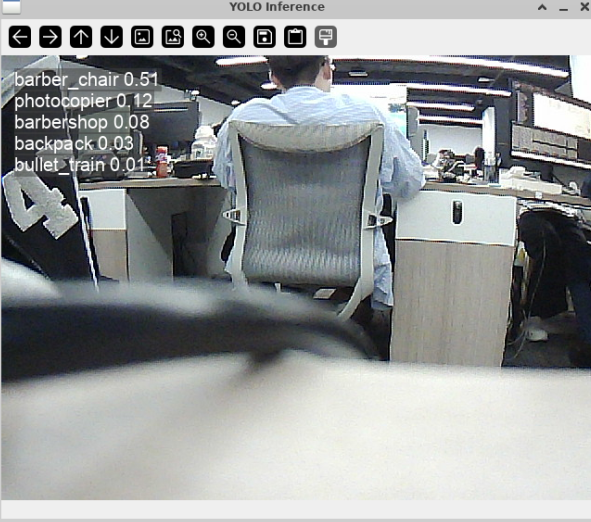
Use yolo26n-cls_ncnn_model to predict USB camera feed.
Enter the code folder:
xxxxxxxxxxcd /home/sunrise/ultralytics26/yahboom_demo
Run the code: Click the preview window and press 'q' to terminate the program!
xxxxxxxxxxpython3 04.classification_camera_usb.py
Preview
Output video location for YOLO recognition: /home/sunrise/ultralytics26/output/
Example code:
xxxxxxxxxximport cv2from ultralytics import YOLO
# Load the YOLO model#model = YOLO("/home/sunrise/ultralytics26/yolo26n-cls.pt")model = YOLO("/home/sunrise/ultralytics26/yolo26n-cls_ncnn_model")
# Open the cammeracap = cv2.VideoCapture(0)cap.set(6, cv2.VideoWriter.fourcc('M', 'J', 'P', 'G'))cap.set(cv2.CAP_PROP_FRAME_WIDTH, 640)cap.set(cv2.CAP_PROP_FRAME_HEIGHT, 480)
# Get the video frame size and frame rateframe_width = int(cap.get(cv2.CAP_PROP_FRAME_WIDTH))frame_height = int(cap.get(cv2.CAP_PROP_FRAME_HEIGHT))fps = int(cap.get(cv2.CAP_PROP_FPS))
# Define the codec and create a VideoWriter object to output the processed videooutput_path = "/home/sunrise/ultralytics26/output/04.classification_camera_usb.mp4"fourcc = cv2.VideoWriter_fourcc(*'mp4v')  # You can use 'XVID' or 'mp4v' depending on your platformout = cv2.VideoWriter(output_path, fourcc, fps, (frame_width, frame_height))
# Loop through the video frameswhile cap.isOpened():    # Read a frame from the video    success, frame = cap.read()
    if success:        # Run YOLO inference on the frame        results = model(frame)
        # Visualize the results on the frame        annotated_frame = results[0].plot()
        # Write the annotated frame to the output video file        out.write(annotated_frame)
        # Display the annotated frame        cv2.imshow("YOLO Inference", cv2.resize(annotated_frame, (640, 480)))
        # Break the loop if 'q' is pressed        if cv2.waitKey(1) & 0xFF == ord("q"):            break    else:        # Break the loop if the end of the video is reached        break# Release the video capture and writer objects, and close the display windowcap.release()out.release()cv2.destroyAllWindows()