Welcome to AI View Depth camera repository
18.Text and picture drawing
Text and picture drawing
Function call: cv2.putText(img, str, origin, font, size, color, thickness)
The parameters are: picture, added text, upper left corner coordinate (integer), font, font size, color, and font thickness.
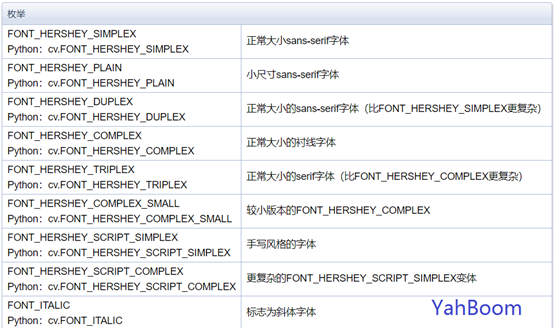
Font types are as follows:
Start Docker
After entering the Raspberry Pi 5 desktop, open a terminal and run the following command to start the container corresponding to Dofbot:
xxxxxxxxxx./Docker_Ros.sh
Access Jupyter Lab within Docker:
xxxxxxxxxxIP:9999 // Example: 192.168.1.11:9999
Code path:/root/Dofbot/4.opencv/3.draw_picture/06_draw_world.ipynb
ximport cv2import numpy as np
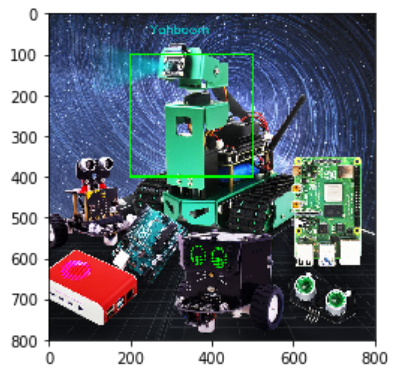
img = cv2.imread('yahboom.jpg',1)
font = cv2.FONT_HERSHEY_SIMPLEX
cv2.rectangle(img,(200,100),(500,400),(0,255,0),3)
# 1 dst 2 text content 3 coordinates 4 5 font size 6 color 7 thickness 8 line type
cv2.putText(img,'Yahboom',(250,50),font,1,(200,200,0),2,cv2.LINE_AA)
#cv2.imshow('src',img)
#cv2.waitKey(0)xxxxxxxxxximport matplotlib.pyplot as plt
img = cv2.cvtColor(img, cv2.COLOR_BGR2RGB)
plt.imshow(img)
plt.show()