yahboom
HomeLearn
Solution
Blog
Online Store
About Us
EN/中文
AI View Depth camera📖
01.Linux basic course
  • 1.Introduction to Linux system
  • 2.Ubuntu file system
  • 3.Ubuntu common commands
  • 4.Ubuntu common editors
  • 5.Ubuntu software operation commands
  • 6.Virtual machine installation
  • 7.SSH remote control
  • 8.VNC remote control
  • 9.Transfer files remotely
  • 10.Driver library and communication
  • 11.Static IP and hotspot mode
  • 12.Bind device ID
  • 13.Capacity expansion and resource allocation
  • 14.Update system software sources
  • 15.Set root user password
  • 16.sudo free password
  • 17.Connect to WiFi network
  • 18.View system version
  • 19.Customized service management
  • 20.Back up system image
02.ROS1-camera usage course
  • 1. Camera usage instructions
  • 2. Environment Construction
  • 3. Camera recording video
03.ROS1-OpenCV course
  • 1.Opencv Source CV Introduction
  • 2.Image reading and display
  • 3.Picture writing
  • 4.Picture Quality
  • 5.Pixel Operation
  • 6.Picture scaling
  • 7.Picture cutting
  • 8.Picture translation
  • 9.Picture mirroring
  • 10.Affine transformation
  • 11.Picture rotation
  • 12.Perspective transformation
  • 13.Grayscale processing
  • 14.Image binarization
  • 15.Edge detection
  • 16.Line segment drawing
  • 17.Rectangle and circle drawing
  • 18.Text and picture drawing
4.ROS1-basic course
  • 1.ROS introduction
  • 2.ROS installation
  • 3.ROS common command tools
  • 4.ROS workspace
  • 5.ROS function package
  • 6.ROS node
  • 7.ROS topic publisher
  • 8.ROS topic subscribers
  • 9.ROS service client
  • 10.ROS service server
  • 11.ROS action client
  • 12.ROS action server
  • 13.ROS custom message reception
  • 14.ROS-launch file
  • 15.ROS-TF transformation
  • 16.ROS parameter service
  • 17.ROS-rviz use
  • 18.ROS-rqt tool usage
  • 19.Topic message recording and playback
  • 20.urdf model introduction
  • 21.gazebo introduction
  • 22.ROS distributed communication
5.ROS1-Mediapipe course
  • 1.Hand detection
  • 2.Posture detection
  • 3.Overall detection
  • 4.Face detection
  • 5.Face recognition
  • 6.Face effects
  • 7.3D object recognition
  • 8.Brush
  • 9.Finger control
  • 10.Gesture recognition
6.ROS+Opencv application
  • 1.Camera calibration
  • 2.QR code
  • 3.Human body pose estimation
  • 4.Target detection
  • 5.ROS+Opencv basics
  • 6.Face recognition
  • 7.Harris corner detection
  • 8.Target tracking algorithm
  • 9.Contour moment
  • 10.Polygon outline
  • 11.Discrete Fourier transform algorithm
  • 12.Edge detection algorithm
  • 13.Face detection algorithm
  • 14.Optical flow detection algorithm
  • 15.Contour detection
  • 16.General contour detection
  • 17.Feature point tracking
  • 18.HLS color filtering
  • 19.Hough circle detection
  • 20.Hough line detection
  • 21.HSV color filtering
  • 22.LK optical flow algorithm
  • 23.Human body detection algorithm
  • 24.Phase-related displacement detection
  • 25.Image pyramid sampling algorithm
  • 26.RGB color filtering
  • 27.Clear background detection algorithm
  • 28.Simplified optical flow algorithm
  • 29.Simple filter
  • 30.Threshold image processing
  • 31.Watershed segmentation algorithm
  • 32.View point cloud data
  • 33.AR vision
  • 34.AR QR code tracking
  • 35.Color tracking
  • 36.Object tracking
07.ROS2-camera usage course
  • Instructions for using camera
08.ROS2-basic course
  • 1.Introduction to ROS2
  • 2.ROS2 install Humble
  • 3.ROS2 development environment
  • 4.ROS2 workspace
  • 5.ROS2 function package
  • 6.ROS2 node
  • 7.ROS2 topic communication
  • 8.ROS2 service communication
  • 9.ROS2 action communication
  • 10.ROS2 custom interface message
  • 11.ROS2 parameter service case
  • 12.ROS2 meta-function package
  • 13.ROS2 distributed communication
  • 14.ROS2 DDS
  • 15.ROS2 time related API
  • 16.ROS2 common command tools
  • 17.ROS2 rviz2 use
  • 18.ROS2 rqt toolbox
  • 19.ROS2 Launch startup file configuration
  • 20.ROS2 recording and playback tool
  • 21.ROS2 URDF model
  • 22.ROS2 Gazebo simulation platform
  • 23.ROS2 TF2 coordinate transformation
09.ROS2-OpenCV course
  • 1. ROS+opencv application
  • 2. QR code creation and recognition
  • 3. AR vision
10.ROS2-Mediapipe course
  • 1.Hand detection
  • 2.Posture detection
  • 3.Overall detection
  • 4.Face detection
  • 5.Personal insurance identification
11.ROS2-Depth camera course
  • 1. Use of depth camera
  • 2. Camera internal parameter calibration
  • 3. Color tracking
  • 4. KCF object tracking
  • 5. ORB_SLAM2 basics
  • 6. ORB_SLAM2 PCL mapping
  • 7. ORB_SLAM2 Octomap mapping
12.Bracket installation video
  • Bracket installation video
Download
  • VM_ROS1
  • VM_ROS2
  • Code-ROS1
  • Code-ROS2
  • 3D_File
  • ROS_Basic_VM
Download ZIP

Welcome to AI View Depth camera repository

2.QR code

2. Opencv Application

2.1. Overview

OpenCV is a cross-platform computer vision and machine learning software library released under the BSD license (open source), which can run on Linux, Windows, Android and MacOS operating systems. [1] It is lightweight and efficient - consisting of a series of C functions and a small number of C++ classes, while providing interfaces for languages such as Python, Ruby, and MATLAB, and implementing many common algorithms in image processing and computer vision.

2.2. QR code

2.2.1. Introduction to QR code

QR code is a type of two-dimensional barcode. QR comes from the abbreviation of "Quick Response" in English, which means quick response. It comes from the inventor's hope that QR code can allow its content to be decoded quickly. QR code not only has large information capacity, high reliability and low cost, but also can express a variety of text information such as Chinese characters and images, has strong confidentiality and anti-counterfeiting properties and is very convenient to use. More importantly, the QR code technology is open source.

2.2.2, QR code structure
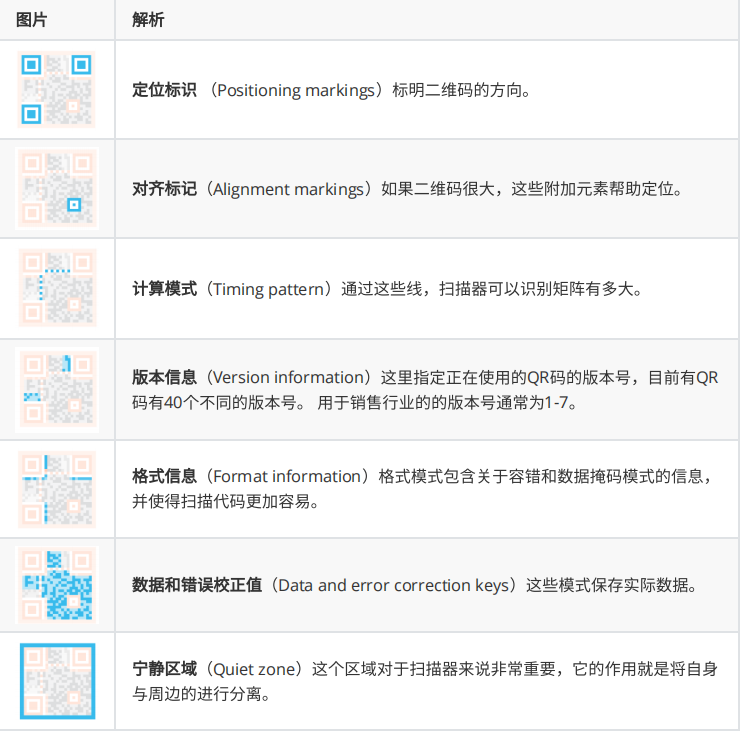
image-20231017164941761

2.2.3, QR code characteristics

The data value in the QR code contains repeated information (redundant value). Therefore, even if up to 30% of the two-dimensional code structure is destroyed, it does not affect the readability of the two-dimensional code. The storage space of the QR code is up to 7089 bits or 4296 characters, including punctuation marks and special characters, which can be written into the QR code. In addition to numbers and characters, words and phrases (such as URLs) can also be encoded. As more data is added to the QR code, the code size increases and the code structure becomes more complex.

2.2.4, QR code creation and recognition

Install the relevant environment (the supporting virtual machine has already set up the environment)

xxxxxxxxxx
python3 -m pip install qrcode pyzbar
sudo apt-get install libzbar-dev
  • Create

Source code location: ~/orbbec_ws/src/astra_visual/qrcode/QRcode_Create.py

xxxxxxxxxx
cd ~/orbbec_ws/src/astra_visual/qrcode
python QRcode_Create.py

Enter the content to be generated in the terminal and press Enter to confirm.
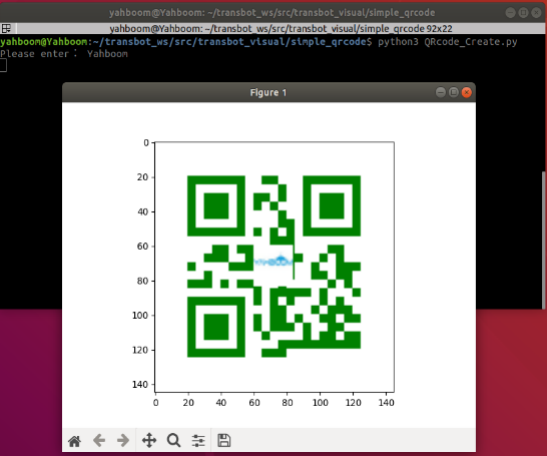
image-20231017165418209

  • Recognition

Source code location: ~/orbbec_ws/src/astra_visual/qrcode/QRcode_Parsing.py

xxxxxxxxxx
cd ~/orbbec_ws/src/astra_visual/qrcode
python QRcode_Parsing.py

If the following situation occurs, replug the camera and run it again.

image-20231017165626702

After normal startup, put the QR code in front of the camera. After recognizing the QR code, the QR code will be framed and the QR code content will be printed out.
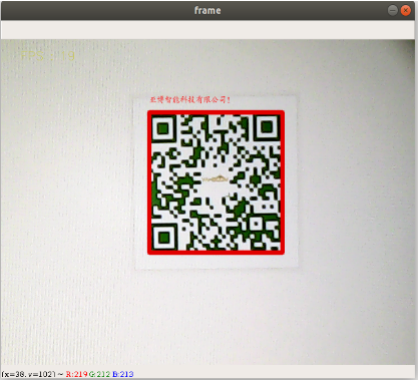
image-20231017170429552

Camera calibration
Human body pose estimation

COMPANY

  • About us
  • Team Style
  • Blog

LEARNING & EXPLORATION

  • Tutorials
  • Edge AI hardware
  • Educational robots
  • Embedded intelligent hardware

WHERE TO BUY

  • Yahboom Online Store
  • Amazon
  • Alibaba
  • AliExpress
  • Mercado

TECHNOLOGY SUPPORT

  • Email: support@yahboom.com

BE A DISTRIBUTOR

  • Email: sales@yahboom.com
QR Code

Copyright © 2017-2026 Yahboom. All Rights Reserved.

EN/中文