Welcome to AI View Depth camera repository
10.Gesture recognition
10.Gesture recognition
Gesture recognition
The potential recognition designed based on the right direction can accurately recognize when specific conditions are met. The recognizable gestures include: [Zero, One, Two, Three, Four, Five, Six, Seven, Eight, Okay, Rock, Thumb_up (like), Thumb_down (thumb down), Heart_single (single)], totaling 14 categories.
1) Start
Input following command:
cd /home/yahboom/orbbec_ws/src/yahboomcar_mediapipe/scriptspython3 11_GestureRecognition.py
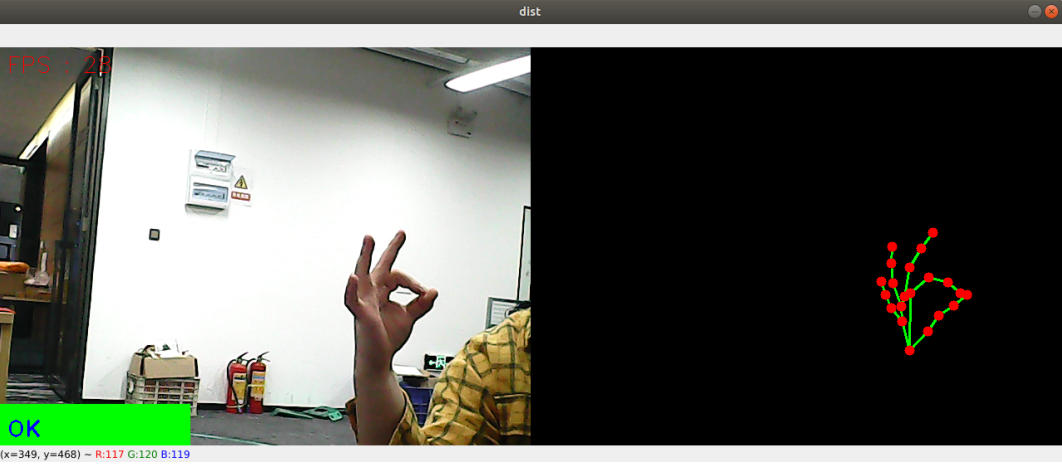
2) Code
Code path: /home/yahboom/orbbec_ws/src/yahboomcar_mediapipe/scripts/11_GestureRecognition.py
x#!/usr/bin/env python3# encoding: utf-8import mathimport timeimport cv2 as cvimport numpy as npimport mediapipe as mp
class handDetector: def __init__(self, mode=False, maxHands=2, detectorCon=0.5, trackCon=0.5): self.tipIds = [4, 8, 12, 16, 20] self.mpHand = mp.solutions.hands self.mpDraw = mp.solutions.drawing_utils self.hands = self.mpHand.Hands( static_image_mode=mode, max_num_hands=maxHands, min_detection_confidence=detectorCon, min_tracking_confidence=trackCon ) self.lmList = [] self.lmDrawSpec = mp.solutions.drawing_utils.DrawingSpec(color=(0, 0, 255), thickness=-1, circle_radius=6) self.drawSpec = mp.solutions.drawing_utils.DrawingSpec(color=(0, 255, 0), thickness=2, circle_radius=2)
def get_dist(self, point1, point2): x1, y1 = point1 x2, y2 = point2 return abs(math.sqrt(math.pow(abs(y1 - y2), 2) + math.pow(abs(x1 - x2), 2)))
def calc_angle(self, pt1, pt2, pt3): point1 = self.lmList[pt1][1], self.lmList[pt1][2] point2 = self.lmList[pt2][1], self.lmList[pt2][2] point3 = self.lmList[pt3][1], self.lmList[pt3][2] a = self.get_dist(point1, point2) b = self.get_dist(point2, point3) c = self.get_dist(point1, point3) try: radian = math.acos((math.pow(a, 2) + math.pow(b, 2) - math.pow(c, 2)) / (2 * a * b)) angle = radian / math.pi * 180 except: angle = 0 return abs(angle)
def findHands(self, frame, draw=True): self.lmList = [] img = np.zeros(frame.shape, np.uint8) img_RGB = cv.cvtColor(frame, cv.COLOR_BGR2RGB) self.results = self.hands.process(img_RGB) if self.results.multi_hand_landmarks: for i in range(len(self.results.multi_hand_landmarks)): if draw: self.mpDraw.draw_landmarks(frame, self.results.multi_hand_landmarks[i], self.mpHand.HAND_CONNECTIONS, self.lmDrawSpec, self.drawSpec) self.mpDraw.draw_landmarks(img, self.results.multi_hand_landmarks[i], self.mpHand.HAND_CONNECTIONS, self.lmDrawSpec, self.drawSpec) for id, lm in enumerate(self.results.multi_hand_landmarks[i].landmark): h, w, c = frame.shape cx, cy = int(lm.x * w), int(lm.y * h) self.lmList.append([id, cx, cy]) return frame, img
def frame_combine(slef,frame, src): if len(frame.shape) == 3: frameH, frameW = frame.shape[:2] srcH, srcW = src.shape[:2] dst = np.zeros((max(frameH, srcH), frameW + srcW, 3), np.uint8) dst[:, :frameW] = frame[:, :] dst[:, frameW:] = src[:, :] else: src = cv.cvtColor(src, cv.COLOR_BGR2GRAY) frameH, frameW = frame.shape[:2] imgH, imgW = src.shape[:2] dst = np.zeros((frameH, frameW + imgW), np.uint8) dst[:, :frameW] = frame[:, :] dst[:, frameW:] = src[:, :] return dst
def fingersUp(self): fingers=[] # Thumb if (self.calc_angle(self.tipIds[0], self.tipIds[0] - 1, self.tipIds[0] - 2) > 150.0) and ( self.calc_angle( self.tipIds[0] - 1, self.tipIds[0] - 2, self.tipIds[0] - 3) > 150.0): fingers.append(1) else: fingers.append(0) # 4 finger for id in range(1, 5): if self.lmList[self.tipIds[id]][2] < self.lmList[self.tipIds[id] - 2][2]: fingers.append(1) else: fingers.append(0) return fingers
def get_gesture(self): gesture = "" fingers = self.fingersUp() if self.lmList[self.tipIds[0]][2] > self.lmList[self.tipIds[1]][2] and \ self.lmList[self.tipIds[0]][2] > self.lmList[self.tipIds[2]][2] and \ self.lmList[self.tipIds[0]][2] > self.lmList[self.tipIds[3]][2] and \ self.lmList[self.tipIds[0]][2] > self.lmList[self.tipIds[4]][2] : gesture = "Thumb_down"
elif self.lmList[self.tipIds[0]][2] < self.lmList[self.tipIds[1]][2] and \ self.lmList[self.tipIds[0]][2] < self.lmList[self.tipIds[2]][2] and \ self.lmList[self.tipIds[0]][2] < self.lmList[self.tipIds[3]][2] and \ self.lmList[self.tipIds[0]][2] < self.lmList[self.tipIds[4]][2] and \ self.calc_angle(self.tipIds[1] - 1, self.tipIds[1] - 2, self.tipIds[1] - 3) < 150.0 : gesture = "Thumb_up" if fingers.count(1) == 3 or fingers.count(1) == 4: if fingers[0] == 1 and ( self.get_dist(self.lmList[4][1:], self.lmList[8][1:])<self.get_dist(self.lmList[4][1:], self.lmList[5][1:]) ): gesture = "OK" elif fingers[2] == fingers[3] == 0: gesture = "Rock" elif fingers.count(1) == 3: gesture = "Three" else: gesture = "Four" elif fingers.count(1) == 0: gesture = "Zero" elif fingers.count(1) == 1: gesture = "One" elif fingers.count(1) == 2: if fingers[0] == 1 and fingers[4] == 1: gesture = "Six" elif fingers[0] == 1 and self.calc_angle(4, 5, 8) > 90: gesture = "Eight" elif fingers[0] == fingers[1] == 1 and self.get_dist(self.lmList[4][1:], self.lmList[8][1:]) < 50: gesture = "Heart_single" else: gesture = "Two" elif fingers.count(1)==5:gesture = "Five" if self.get_dist(self.lmList[4][1:], self.lmList[8][1:]) < 60 and \ self.get_dist(self.lmList[4][1:], self.lmList[12][1:]) < 60 and \ self.get_dist(self.lmList[4][1:], self.lmList[16][1:]) < 60 and \ self.get_dist(self.lmList[4][1:], self.lmList[20][1:]) < 60 : gesture = "Seven" if self.lmList[self.tipIds[0]][2] < self.lmList[self.tipIds[1]][2] and \ self.lmList[self.tipIds[0]][2] < self.lmList[self.tipIds[2]][2] and \ self.lmList[self.tipIds[0]][2] < self.lmList[self.tipIds[3]][2] and \ self.lmList[self.tipIds[0]][2] < self.lmList[self.tipIds[4]][2] and \ self.calc_angle(self.tipIds[1] - 1, self.tipIds[1] - 2, self.tipIds[1] - 3) > 150.0 : gesture = "Eight" return gesture
'''Zero One Two Three Four Five Six Seven EightOk: OKRock: rockThumb_up : 点赞Thumb_down: 拇指向下Heart_single: 单手比心'''
if __name__ == '__main__': capture = cv.VideoCapture(0) capture.set(6, cv.VideoWriter.fourcc('M', 'J', 'P', 'G')) capture.set(cv.CAP_PROP_FRAME_WIDTH, 640) capture.set(cv.CAP_PROP_FRAME_HEIGHT, 480) print("capture get FPS : ", capture.get(cv.CAP_PROP_FPS)) pTime = cTime = 0 hand_detector = handDetector(detectorCon=0.75) while capture.isOpened(): ret, frame = capture.read() # frame = cv.flip(frame, 1) frame, img = hand_detector.findHands(frame, draw=False) if len(hand_detector.lmList) != 0: totalFingers = hand_detector.get_gesture() cv.rectangle(frame, (0, 430), (230, 480), (0, 255, 0), cv.FILLED) cv.putText(frame, str(totalFingers), (10, 470), cv.FONT_HERSHEY_PLAIN, 2, (255, 0, 0), 2) if cv.waitKey(1) & 0xFF == ord('q'): break cTime = time.time() fps = 1 / (cTime - pTime) pTime = cTime text = "FPS : " + str(int(fps)) cv.putText(frame, text, (10, 30), cv.FONT_HERSHEY_SIMPLEX, 0.9, (0, 0, 255), 1) dist = hand_detector.frame_combine(frame, img) cv.imshow('dist', dist) # cv.imshow('frame', frame) # cv.imshow('img', img) capture.release() cv.destroyAllWindows()