yahboom
HomeLearn
Solution
Blog
Online Store
About Us
EN/中文
AI View Depth camera📖
01.Linux basic course
  • 1.Introduction to Linux system
  • 2.Ubuntu file system
  • 3.Ubuntu common commands
  • 4.Ubuntu common editors
  • 5.Ubuntu software operation commands
  • 6.Virtual machine installation
  • 7.SSH remote control
  • 8.VNC remote control
  • 9.Transfer files remotely
  • 10.Driver library and communication
  • 11.Static IP and hotspot mode
  • 12.Bind device ID
  • 13.Capacity expansion and resource allocation
  • 14.Update system software sources
  • 15.Set root user password
  • 16.sudo free password
  • 17.Connect to WiFi network
  • 18.View system version
  • 19.Customized service management
  • 20.Back up system image
02.ROS1-camera usage course
  • 1. Camera usage instructions
  • 2. Environment Construction
  • 3. Camera recording video
03.ROS1-OpenCV course
  • 1.Opencv Source CV Introduction
  • 2.Image reading and display
  • 3.Picture writing
  • 4.Picture Quality
  • 5.Pixel Operation
  • 6.Picture scaling
  • 7.Picture cutting
  • 8.Picture translation
  • 9.Picture mirroring
  • 10.Affine transformation
  • 11.Picture rotation
  • 12.Perspective transformation
  • 13.Grayscale processing
  • 14.Image binarization
  • 15.Edge detection
  • 16.Line segment drawing
  • 17.Rectangle and circle drawing
  • 18.Text and picture drawing
4.ROS1-basic course
  • 1.ROS introduction
  • 2.ROS installation
  • 3.ROS common command tools
  • 4.ROS workspace
  • 5.ROS function package
  • 6.ROS node
  • 7.ROS topic publisher
  • 8.ROS topic subscribers
  • 9.ROS service client
  • 10.ROS service server
  • 11.ROS action client
  • 12.ROS action server
  • 13.ROS custom message reception
  • 14.ROS-launch file
  • 15.ROS-TF transformation
  • 16.ROS parameter service
  • 17.ROS-rviz use
  • 18.ROS-rqt tool usage
  • 19.Topic message recording and playback
  • 20.urdf model introduction
  • 21.gazebo introduction
  • 22.ROS distributed communication
5.ROS1-Mediapipe course
  • 1.Hand detection
  • 2.Posture detection
  • 3.Overall detection
  • 4.Face detection
  • 5.Face recognition
  • 6.Face effects
  • 7.3D object recognition
  • 8.Brush
  • 9.Finger control
  • 10.Gesture recognition
6.ROS+Opencv application
  • 1.Camera calibration
  • 2.QR code
  • 3.Human body pose estimation
  • 4.Target detection
  • 5.ROS+Opencv basics
  • 6.Face recognition
  • 7.Harris corner detection
  • 8.Target tracking algorithm
  • 9.Contour moment
  • 10.Polygon outline
  • 11.Discrete Fourier transform algorithm
  • 12.Edge detection algorithm
  • 13.Face detection algorithm
  • 14.Optical flow detection algorithm
  • 15.Contour detection
  • 16.General contour detection
  • 17.Feature point tracking
  • 18.HLS color filtering
  • 19.Hough circle detection
  • 20.Hough line detection
  • 21.HSV color filtering
  • 22.LK optical flow algorithm
  • 23.Human body detection algorithm
  • 24.Phase-related displacement detection
  • 25.Image pyramid sampling algorithm
  • 26.RGB color filtering
  • 27.Clear background detection algorithm
  • 28.Simplified optical flow algorithm
  • 29.Simple filter
  • 30.Threshold image processing
  • 31.Watershed segmentation algorithm
  • 32.View point cloud data
  • 33.AR vision
  • 34.AR QR code tracking
  • 35.Color tracking
  • 36.Object tracking
07.ROS2-camera usage course
  • Instructions for using camera
08.ROS2-basic course
  • 1.Introduction to ROS2
  • 2.ROS2 install Humble
  • 3.ROS2 development environment
  • 4.ROS2 workspace
  • 5.ROS2 function package
  • 6.ROS2 node
  • 7.ROS2 topic communication
  • 8.ROS2 service communication
  • 9.ROS2 action communication
  • 10.ROS2 custom interface message
  • 11.ROS2 parameter service case
  • 12.ROS2 meta-function package
  • 13.ROS2 distributed communication
  • 14.ROS2 DDS
  • 15.ROS2 time related API
  • 16.ROS2 common command tools
  • 17.ROS2 rviz2 use
  • 18.ROS2 rqt toolbox
  • 19.ROS2 Launch startup file configuration
  • 20.ROS2 recording and playback tool
  • 21.ROS2 URDF model
  • 22.ROS2 Gazebo simulation platform
  • 23.ROS2 TF2 coordinate transformation
09.ROS2-OpenCV course
  • 1. ROS+opencv application
  • 2. QR code creation and recognition
  • 3. AR vision
10.ROS2-Mediapipe course
  • 1.Hand detection
  • 2.Posture detection
  • 3.Overall detection
  • 4.Face detection
  • 5.Personal insurance identification
11.ROS2-Depth camera course
  • 1. Use of depth camera
  • 2. Camera internal parameter calibration
  • 3. Color tracking
  • 4. KCF object tracking
  • 5. ORB_SLAM2 basics
  • 6. ORB_SLAM2 PCL mapping
  • 7. ORB_SLAM2 Octomap mapping
12.Bracket installation video
  • Bracket installation video
Download
  • VM_ROS1
  • VM_ROS2
  • Code-ROS1
  • Code-ROS2
  • 3D_File
  • ROS_Basic_VM
Download ZIP

Welcome to AI View Depth camera repository

3.Overall detection

3.Overall detection

3.1 Overall detection

Combining the content of the first two sections, 1. Hand detection/2. Post detection, this routine implementation can detect both palm and human functions.

1. Start

Input following command:

roscore
rosrun yahboom_mediapipe 03_Holistic.py
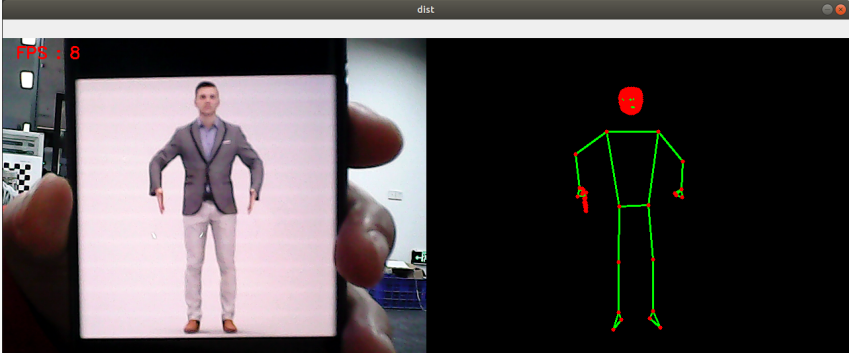
image-20231016101640707

2. Code

Code path: /home/yahboom/orbbec_ws/src/yahboomcar_mediapipe/scripts/03_Holistic.py

​x
#!/usr/bin/env python3
# encoding: utf-8
import time
import rospy
import cv2 as cv
import numpy as np
import mediapipe as mp
from geometry_msgs.msg import Point
from yahboomcar_msgs.msg import PointArray


class Holistic:
    def __init__(self, staticMode=False, landmarks=True, detectionCon=0.5, trackingCon=0.5):
        self.mpHolistic = mp.solutions.holistic
        self.mpFaceMesh = mp.solutions.face_mesh
        self.mpHands = mp.solutions.hands
        self.mpPose = mp.solutions.pose
        self.mpDraw = mp.solutions.drawing_utils
        self.mpholistic = self.mpHolistic.Holistic(
            static_image_mode=staticMode,
            smooth_landmarks=landmarks,
            min_detection_confidence=detectionCon,
            min_tracking_confidence=trackingCon)
        self.pub_point = rospy.Publisher('/mediapipe/points', PointArray, queue_size=1000)
        self.lmDrawSpec = mp.solutions.drawing_utils.DrawingSpec(color=(0, 0, 255), thickness=-1, circle_radius=3)
        self.drawSpec = mp.solutions.drawing_utils.DrawingSpec(color=(0, 255, 0), thickness=2, circle_radius=2)

    def findHolistic(self, frame, draw=True):
        pointArray = PointArray()
        img = np.zeros(frame.shape, np.uint8)
        img_RGB = cv.cvtColor(frame, cv.COLOR_BGR2RGB)
        self.results = self.mpholistic.process(img_RGB)
        if self.results.face_landmarks:
            if draw: self.mpDraw.draw_landmarks(frame, self.results.face_landmarks, self.mpFaceMesh.FACEMESH_CONTOURS, self.lmDrawSpec, self.drawSpec)
            self.mpDraw.draw_landmarks(img, self.results.face_landmarks, self.mpFaceMesh.FACEMESH_CONTOURS, self.lmDrawSpec, self.drawSpec)
            for id, lm in enumerate(self.results.face_landmarks.landmark):
                point = Point()
                point.x, point.y, point.z = lm.x, lm.y, lm.z
                pointArray.points.append(point)
        if self.results.pose_landmarks:
            if draw: self.mpDraw.draw_landmarks(frame, self.results.pose_landmarks, self.mpPose.POSE_CONNECTIONS, self.lmDrawSpec, self.drawSpec)
            self.mpDraw.draw_landmarks(img, self.results.pose_landmarks, self.mpPose.POSE_CONNECTIONS, self.lmDrawSpec, self.drawSpec)
            for id, lm in enumerate(self.results.pose_landmarks.landmark):
                point = Point()
                point.x, point.y, point.z = lm.x, lm.y, lm.z
                pointArray.points.append(point)
        if self.results.left_hand_landmarks:
            if draw: self.mpDraw.draw_landmarks(frame, self.results.left_hand_landmarks, self.mpHands.HAND_CONNECTIONS, self.lmDrawSpec, self.drawSpec)
            self.mpDraw.draw_landmarks(img, self.results.left_hand_landmarks, self.mpHands.HAND_CONNECTIONS, self.lmDrawSpec, self.drawSpec)
            for id, lm in enumerate(self.results.left_hand_landmarks.landmark):
                point = Point()
                point.x, point.y, point.z = lm.x, lm.y, lm.z
                pointArray.points.append(point)
        if self.results.right_hand_landmarks:
            if draw: self.mpDraw.draw_landmarks(frame, self.results.right_hand_landmarks, self.mpHands.HAND_CONNECTIONS, self.lmDrawSpec, self.drawSpec)
            self.mpDraw.draw_landmarks(img, self.results.right_hand_landmarks, self.mpHands.HAND_CONNECTIONS, self.lmDrawSpec, self.drawSpec)
            for id, lm in enumerate(self.results.right_hand_landmarks.landmark):
                point = Point()
                point.x, point.y, point.z = lm.x, lm.y, lm.z
                pointArray.points.append(point)
        self.pub_point.publish(pointArray)
        return frame, img

    def frame_combine(slef,frame, src):
        if len(frame.shape) == 3:
            frameH, frameW = frame.shape[:2]
            srcH, srcW = src.shape[:2]
            dst = np.zeros((max(frameH, srcH), frameW + srcW, 3), np.uint8)
            dst[:, :frameW] = frame[:, :]
            dst[:, frameW:] = src[:, :]
        else:
            src = cv.cvtColor(src, cv.COLOR_BGR2GRAY)
            frameH, frameW = frame.shape[:2]
            imgH, imgW = src.shape[:2]
            dst = np.zeros((frameH, frameW + imgW), np.uint8)
            dst[:, :frameW] = frame[:, :]
            dst[:, frameW:] = src[:, :]
        return dst


if __name__ == '__main__':
    rospy.init_node('Holistic', anonymous=True)
    capture = cv.VideoCapture(0)
    capture.set(6, cv.VideoWriter.fourcc('M', 'J', 'P', 'G'))
    capture.set(cv.CAP_PROP_FRAME_WIDTH, 640)
    capture.set(cv.CAP_PROP_FRAME_HEIGHT, 480)
    print("capture get FPS : ", capture.get(cv.CAP_PROP_FPS))
    pTime = cTime = 0
    holistic = Holistic()
    while capture.isOpened():
        ret, frame = capture.read()
        # frame = cv.flip(frame, 1)
        frame, img = holistic.findHolistic(frame,draw=False)
        if cv.waitKey(1) & 0xFF == ord('q'): break
        cTime = time.time()
        fps = 1 / (cTime - pTime)
        pTime = cTime
        text = "FPS : " + str(int(fps))
        cv.putText(frame, text, (20, 30), cv.FONT_HERSHEY_SIMPLEX, 0.8, (0, 0, 255), 2)
        dist = holistic.frame_combine(frame, img)
        cv.imshow('dist', dist)
        # cv.imshow('frame', frame)
        # cv.imshow('img', img)
    capture.release()
    cv.destroyAllWindows()


Posture detection
Face detection

COMPANY

  • About us
  • Team Style
  • Blog

LEARNING & EXPLORATION

  • Tutorials
  • Edge AI hardware
  • Educational robots
  • Embedded intelligent hardware

WHERE TO BUY

  • Yahboom Online Store
  • Amazon
  • Alibaba
  • AliExpress
  • Mercado

TECHNOLOGY SUPPORT

  • Email: support@yahboom.com

BE A DISTRIBUTOR

  • Email: sales@yahboom.com
QR Code

Copyright © 2017-2026 Yahboom. All Rights Reserved.

EN/中文