yahboom
HomeTutorialsProduct
Solution
Blog
Online Store
About Us
EN/中文
Store
MSPM0G3519 Development Board📖
1. Introduction to MSPM0
  • 1. Introduction to MSPM0
2. Development environment construction
  • 1. CCS Theia Development
  • 2. MDK Arm Development
  • 3. UniFlash Downloader
  • 4. DAP-LINK download program
  • 5. Program Simulation and Debugging
  • 6. Engineering transplantation
3. Keil basic case
  • 1. Turn on the LED light
  • 2. System Delay
  • 3. Button Control
  • 4. External Interruption
  • 5. Serial Communication
  • 6. Timer
  • 7. PWM Breathing Light
  • 8. ADC Acquisition
  • 9. DMA Transfer
  • 10. Get MPU6050 data (I2C)
  • 11. LCD Display (SPI)
4. CCS basic case
  • 1. Turn on the LED light
  • 2. System Delay
  • 3. Button Control
  • 4. External Interruption
  • 5. Serial Communication
  • 6. Timer
  • 7. PWM Breathing Light
  • 8. ADC Acquisition
  • 9. DMA Transfer
  • 10. Get MPU6050 data (I2C)
  • 11. LCD Display (SPI)
5. MSPM0 Robot Expansion Board
  • 1. MSPM0 Robot Expansion Board Introduction
  • 2. Custom Buttons
  • 3. Drive Buzzer
6. MSPM0-K230Vision module application
  • 1. K230 Color Recognition
  • 2. K230 Barcode Recognition
  • 3. K230 QR Code Recognition
  • 4. K230 Apriltag Code Recognition
  • 5. K230 DM Code Recognition
  • 6. K230 Face Detection
  • 7. K230 Gaze Direction
  • 8. K230 Face Recognition
  • 9. K230 Human Body Detection
  • 10. K230 Fall Detection
  • 11. K230 Palm Detection
  • 12. K230 Gesture Recognition
  • 13. K230 OCR Character Recognition
  • 14. K230 Object Detection
  • 15. K230 Target Tracking
  • 16. K230 Self-learning Object Recognition
  • 17. K230 License Plate Recognition
7. MSPM0-K210Vision module application
  • 0. K210 Prerequisites For Making A Coprocessor - Must-see
  • 1. MSPM0_K210 Color Recognition
  • 2. MSPM0_K210 Barcode Recognition
  • 3. MSPM0_K210 QR Code Recognition
  • 4. MSPM0_K210 Mechanical Code Recognition
  • 5. MSPM0_K210 Face Detection
  • 6. MSPM0_K210 Facial Feature Detection
  • 7. MSPM0_K210 Mask Detection
  • 8. MSPM0_K210 Face Recognition
  • 9. MSPM0_K210 Object Detection
  • 10. MSPM0_K210 Self-study Classification
  • 11. MSPM0_K210 Handwritten Digit Recognition
8. Expansion case
  • 1. Autonomous Driving Car
  • 2. Vehicle-mounted Balance Ball Motion Control System
Download
  • Code
  • Hardware_Info
  • Software_Tools
Download ZIP

Welcome to MSPM0G3519 Development Board repository

1. MSPM0 Robot Expansion Board Introduction

MSPM0 Robot Expansion Board Introduction

1. Product Introduction

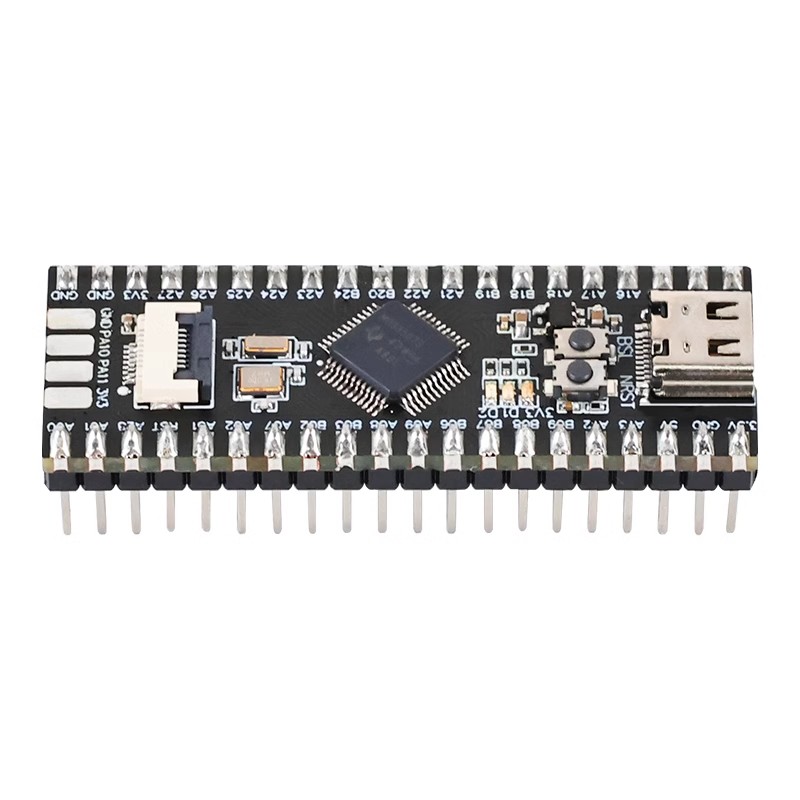
The MSPM0 Robot Expansion Board is an expansion board specifically designed for the Yahboom MSPM0G3519 development board. When connecting, pay attention to the orientation of the MSPM0G3519 development board. Do not insert it in reverse.

This expansion board supports connection of various competition-grade accessories, exclusively for electronic design competitions. It supports 5-12V wide voltage power supply and power output. The board features a 40-pin GPIO header, buzzer, four custom buttons, and power reverse connection protection circuit. It supports DIY expansion connections. It reserved expansion interfaces for three-way line following, four-way line following, eight-way line following, CCD vision line following, and electromagnetic line following, all with anti-reverse connection interfaces. It also reserved IIC and serial expansion interfaces, supporting connection of Bluetooth 5.0 and OLED display screens, as well as two PWM servo interfaces.

2. Pin Distribution Diagram
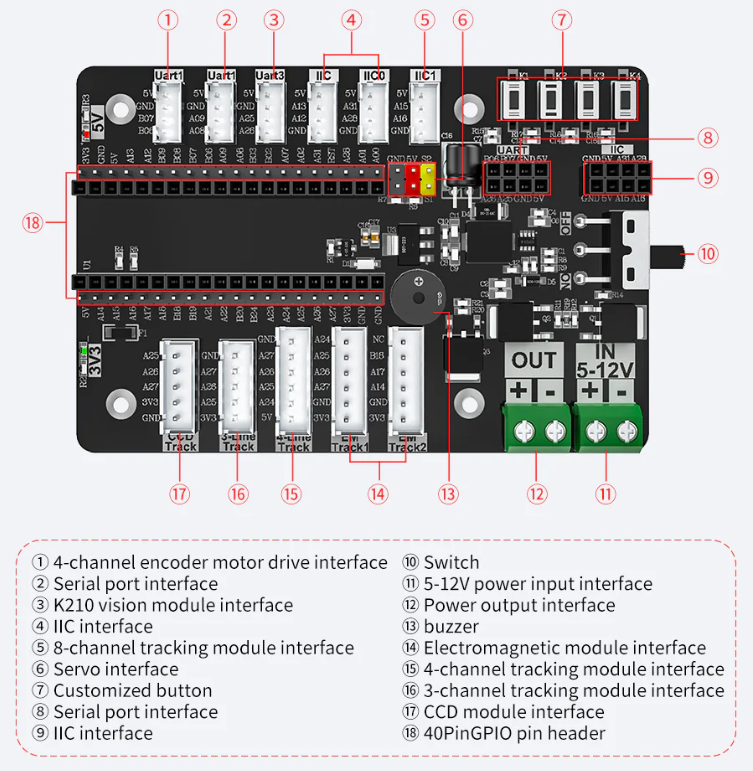
 

3. Compatible Core Board

This expansion board is exclusively designed for the Yahboom MSPM0G3519 development board. If you use development boards from other brands or models, be sure to confirm whether key pins such as 5V, 3.3V, and GND are compatible with this expansion board. Otherwise, pin incompatibility may cause damage to the development board.
LCD Display (SPI)
Custom Buttons

COMPANY

  • About us
  • Team Style
  • Blog

LEARNING & EXPLORATION

  • Tutorials
  • Edge AI hardware
  • Educational robots
  • Embedded intelligent hardware

WHERE TO BUY

  • Yahboom Online Store
  • Amazon
  • Alibaba
  • AliExpress
  • Mercado

TECHNOLOGY SUPPORT

  • Email: support@yahboom.com

BE A DISTRIBUTOR

  • Email: sales@yahboom.com
QR Code

Copyright © 2017-2026 Yahboom. All Rights Reserved.

EN/中文