yahboom
HomeLearn
Solution
Blog
Online Store
About Us
EN/中文
MSPM0G3519 Development Board📖
1. Introduction to MSPM0
  • 1. Introduction to MSPM0
2. Development environment construction
  • 1. CCS Theia Development
  • 2. MDK Arm Development
  • 3. UniFlash Downloader
  • 4. DAP-LINK download program
  • 5. Program Simulation and Debugging
  • 6. Engineering transplantation
3. Keil basic case
  • 1. Turn on the LED light
  • 2. System Delay
  • 3. Button Control
  • 4. External Interruption
  • 5. Serial Communication
  • 6. Timer
  • 7. PWM Breathing Light
  • 8. ADC Acquisition
  • 9. DMA Transfer
  • 10. Get MPU6050 data (I2C)
  • 11. LCD Display (SPI)
4. CCS basic case
  • 1. Turn on the LED light
  • 2. System Delay
  • 3. Button Control
  • 4. External Interruption
  • 5. Serial Communication
  • 6. Timer
  • 7. PWM Breathing Light
  • 8. ADC Acquisition
  • 9. DMA Transfer
  • 10. Get MPU6050 data (I2C)
  • 11. LCD Display (SPI)
5. MSPM0 Robot Expansion Board
  • 1. MSPM0 Robot Expansion Board Introduction
  • 2. Custom Buttons
  • 3. Drive Buzzer
6. MSPM0-K230Vision module application
  • 1. K230 Color Recognition
  • 2. K230 Barcode Recognition
  • 3. K230 QR Code Recognition
  • 4. K230 Apriltag Code Recognition
  • 5. K230 DM Code Recognition
  • 6. K230 Face Detection
  • 7. K230 Gaze Direction
  • 8. K230 Face Recognition
  • 9. K230 Human Body Detection
  • 10. K230 Fall Detection
  • 11. K230 Palm Detection
  • 12. K230 Gesture Recognition
  • 13. K230 OCR Character Recognition
  • 14. K230 Object Detection
  • 15. K230 Target Tracking
  • 16. K230 Self-learning Object Recognition
  • 17. K230 License Plate Recognition
7. MSPM0-K210Vision module application
  • 0. K210 Prerequisites For Making A Coprocessor - Must-see
  • 1. MSPM0_K210 Color Recognition
  • 2. MSPM0_K210 Barcode Recognition
  • 3. MSPM0_K210 QR Code Recognition
  • 4. MSPM0_K210 Mechanical Code Recognition
  • 5. MSPM0_K210 Face Detection
  • 6. MSPM0_K210 Facial Feature Detection
  • 7. MSPM0_K210 Mask Detection
  • 8. MSPM0_K210 Face Recognition
  • 9. MSPM0_K210 Object Detection
  • 10. MSPM0_K210 Self-study Classification
  • 11. MSPM0_K210 Handwritten Digit Recognition
8. Expansion case
  • 1. Autonomous Driving Car
  • 2. Vehicle-mounted Balance Ball Motion Control System
Download
  • Code
  • Hardware_Info
  • Software_Tools
Download ZIP

Welcome to MSPM0G3519 Development Board repository

0. K210 Prerequisites For Making A Coprocessor - Must-see

Prerequisites for Using K210 as a Coprocessor

Prerequisites for Using K210 as a Coprocessor1. Import Model Files to Memory Card2. K210 Auto-start AI Program3. Notes

1. Import Model Files to Memory Card

Preface: Since AI vision experiments require different model files, it is necessary to import all model files to the memory card in advance. You can import all model files at once to avoid importing model files each time. Model files are distinguished by different paths.

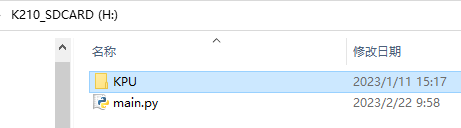
All model files are placed under the KPI folder. Please do not modify the file names in the KPI folder and subdirectories under KPI. Otherwise, the default example program will have the problem of not finding model files.

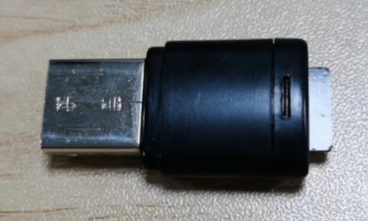
  1. Prepare a card reader and a memory card (microSD card). The capacity should not exceed 64G. Insert the memory card into the card reader slot.
    001

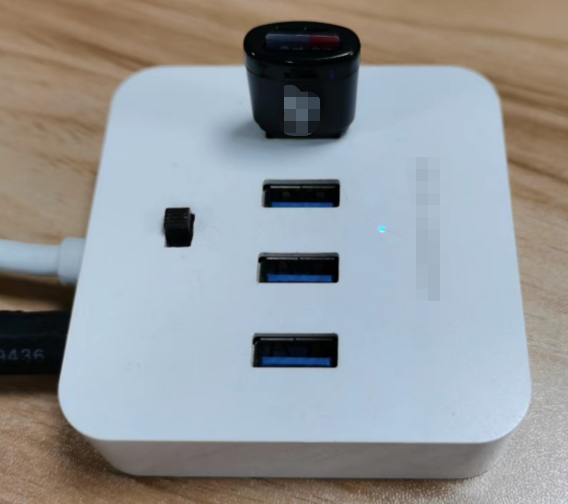
  2. Connect the card reader to the computer USB port and open the root directory of the memory card drive. Here we take drive H: as an example.
    001

  3. Download the model file archive from the materials and extract it. Copy the KPI folder to the root directory of drive H:.
    001

  4. Eject the card reader and remove the memory card to insert into the K210 module's memory card slot.
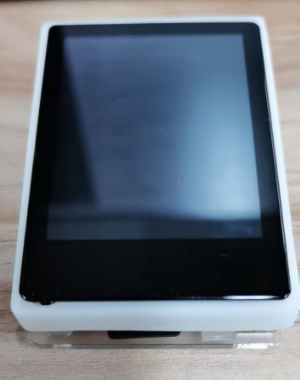
    001

2. K210 Auto-start AI Program

  1. Insert the SD card into the card reader and then into the computer. Copy one program from the 11 programs shown in the figure below to the SD card.
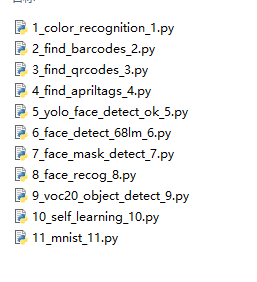
    001

  2. Rename it to a file named main.py.

    001

  3. Remove the SD card from the card reader, insert it into the K210's SD card slot, then power on the K210. After waiting for a period of time, the main.py program in the SD card will run, which means the AI program has started.

3. Notes

  1. If you want to know what each program sends, you can check the communication protocol under the k210 folder in the program source code folder.

  2. If you want to learn how the AI program performs image processing and recognition and displays it on the LCD screen, you can refer to Chapter 5 AI Program for program source code interpretation.

  3. This chapter focuses on K210 as a coprocessor, focusing on how to communicate with the upper computer and transmit data to the upper computer. Therefore, the explanation of AI image processing programs will not be involved.

K230 License Plate Recognition
MSPM0_K210 Color Recognition

COMPANY

  • About us
  • Team Style
  • Blog

LEARNING & EXPLORATION

  • Tutorials
  • Edge AI hardware
  • Educational robots
  • Embedded intelligent hardware

WHERE TO BUY

  • Yahboom Online Store
  • Amazon
  • Alibaba
  • AliExpress
  • Mercado

TECHNOLOGY SUPPORT

  • Email: support@yahboom.com

BE A DISTRIBUTOR

  • Email: sales@yahboom.com
QR Code

Copyright © 2017-2026 Yahboom. All Rights Reserved.

EN/中文