yahboom
HomeLearn
Solution
Blog
Online Store
About Us
EN/中文
MSPM0G3519 Development Board📖
1. Introduction to MSPM0
  • 1. Introduction to MSPM0
2. Development environment construction
  • 1. CCS Theia Development
  • 2. MDK Arm Development
  • 3. UniFlash Downloader
  • 4. DAP-LINK download program
  • 5. Program Simulation and Debugging
  • 6. Engineering transplantation
3. Keil basic case
  • 1. Turn on the LED light
  • 2. System Delay
  • 3. Button Control
  • 4. External Interruption
  • 5. Serial Communication
  • 6. Timer
  • 7. PWM Breathing Light
  • 8. ADC Acquisition
  • 9. DMA Transfer
  • 10. Get MPU6050 data (I2C)
  • 11. LCD Display (SPI)
4. CCS basic case
  • 1. Turn on the LED light
  • 2. System Delay
  • 3. Button Control
  • 4. External Interruption
  • 5. Serial Communication
  • 6. Timer
  • 7. PWM Breathing Light
  • 8. ADC Acquisition
  • 9. DMA Transfer
  • 10. Get MPU6050 data (I2C)
  • 11. LCD Display (SPI)
5. MSPM0 Robot Expansion Board
  • 1. MSPM0 Robot Expansion Board Introduction
  • 2. Custom Buttons
  • 3. Drive Buzzer
6. MSPM0-K230Vision module application
  • 1. K230 Color Recognition
  • 2. K230 Barcode Recognition
  • 3. K230 QR Code Recognition
  • 4. K230 Apriltag Code Recognition
  • 5. K230 DM Code Recognition
  • 6. K230 Face Detection
  • 7. K230 Gaze Direction
  • 8. K230 Face Recognition
  • 9. K230 Human Body Detection
  • 10. K230 Fall Detection
  • 11. K230 Palm Detection
  • 12. K230 Gesture Recognition
  • 13. K230 OCR Character Recognition
  • 14. K230 Object Detection
  • 15. K230 Target Tracking
  • 16. K230 Self-learning Object Recognition
  • 17. K230 License Plate Recognition
7. MSPM0-K210Vision module application
  • 0. K210 Prerequisites For Making A Coprocessor - Must-see
  • 1. MSPM0_K210 Color Recognition
  • 2. MSPM0_K210 Barcode Recognition
  • 3. MSPM0_K210 QR Code Recognition
  • 4. MSPM0_K210 Mechanical Code Recognition
  • 5. MSPM0_K210 Face Detection
  • 6. MSPM0_K210 Facial Feature Detection
  • 7. MSPM0_K210 Mask Detection
  • 8. MSPM0_K210 Face Recognition
  • 9. MSPM0_K210 Object Detection
  • 10. MSPM0_K210 Self-study Classification
  • 11. MSPM0_K210 Handwritten Digit Recognition
8. Expansion case
  • 1. Autonomous Driving Car
  • 2. Vehicle-mounted Balance Ball Motion Control System
Download
  • Code
  • Hardware_Info
  • Software_Tools
Download ZIP

Welcome to MSPM0G3519 Development Board repository

1. K230 Color Recognition

K230 Color Recognition

K230 Color RecognitionK230 and MSPM0 Communication1. Experiment Prerequisites2. Experiment Wiring3. Main Code Explanation4. Experimental Phenomenon

K230 and MSPM0 Communication

1. Experiment Prerequisites

This tutorial uses the MSPM0G3519 development board. The corresponding example path is 【14.export\MSPM0-K230\01_k230_color_detect】.

K230 needs to run the 【14.export\CanmvIDE-K230\01.color_detect.py】 program to start the experiment. It is recommended to download as an offline running program.

Items needed:

Windows system computer MSPM0G3519 development board K230 vision module (with TF card burned with image) Two type-C data cables Connection cables


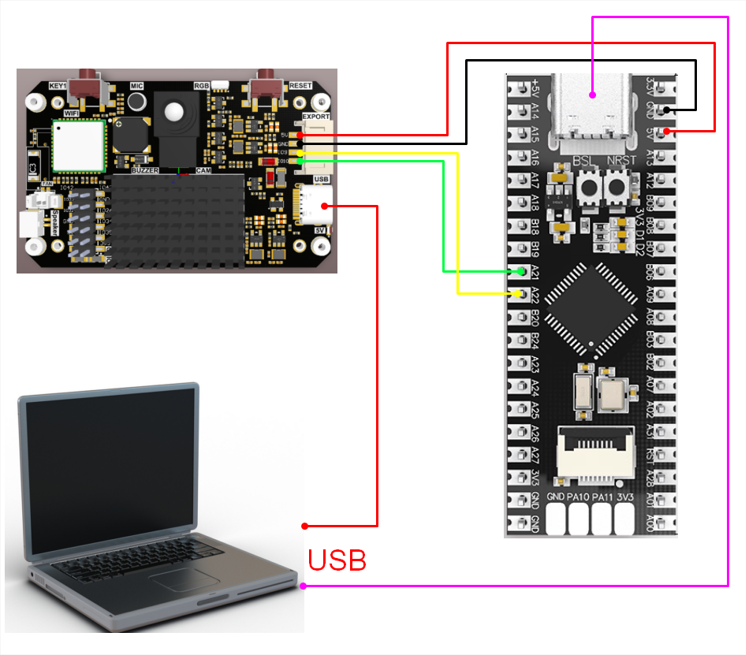
2. Experiment Wiring

K230 Vision ModuleMSPM0 Development Board
5VVCC
GNDGND
TXD(IO9)A22
RXD(IO10)A21

image-20250430180020894

3. Main Code Explanation

​x
void Pto_Data_Parse(uint8_t *data_buf, uint8_t num)
{
    uint8_t pto_head = data_buf[0];
    uint8_t pto_tail = data_buf[num-1];
    if (!(pto_head == PTO_HEAD && pto_tail == PTO_TAIL))
    {
        sprintf(print_buf, "pto error:pto_head=0x%02x , pto_tail=0x%02x\n", pto_head, pto_tail);
        uart0_send_string(print_buf);
        return;
    }
    uint8_t data_index = 1;
    uint8_t field_index[PTO_BUF_LEN_MAX] = {0};
    int i = 0;
    int values[PTO_BUF_LEN_MAX] = {0};
    for (i = 1; i < num-1; i++)
    {
        if (data_buf[i] == ',')
        {
            data_buf[i] = 0;
            field_index[data_index] = i;
            data_index++;
        }
    }

    for (i = 0; i < data_index; i++)
    {
        values[i] = Pto_Char_To_Int((char*)data_buf+field_index[i]+1);
    }

    uint8_t pto_len = values[0];

    if (pto_len != num)
    {
        sprintf(print_buf, "pto_len error:%d , data_len:%d\n", pto_len, num);
        uart0_send_string(print_buf);
        return;
    }
    uint8_t pto_id = values[1];
    if (pto_id != PTO_FUNC_ID)
    {
        sprintf(print_buf, "pto_id error:%d, func_id:%d\n", pto_id, PTO_FUNC_ID);
        uart0_send_string(print_buf);
        return;
    }
    int x = values[2];
    int y = values[3];
    int w = values[4];
    int h = values[5];
    sprintf(print_buf, "color:x:%d, y:%d, w:%d, h:%d\n", x, y, w, h);
    uart0_send_string(print_buf);
}

The above function parses K230 data. Only data conforming to the specific protocol can be parsed to get the corresponding data.

Where:

  • x: is the x-coordinate of the upper-left corner of the recognized box

  • y: is the y-coordinate of the upper-left corner of the recognized box

  • w: is the width of the recognized box

  • h: is the height of the recognized box


4. Experimental Phenomenon

  1. After connecting the wires, run the K230 vision module offline. Connect K230 to CanMV IDE and open the corresponding program. Click 【Save open script to CanMV board (as main.py)】 in the toolbar, then restart K230.
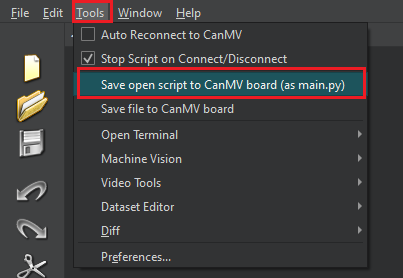
    image-20250429194108060

  2. MSPM0 burns the hex file generated from the example.
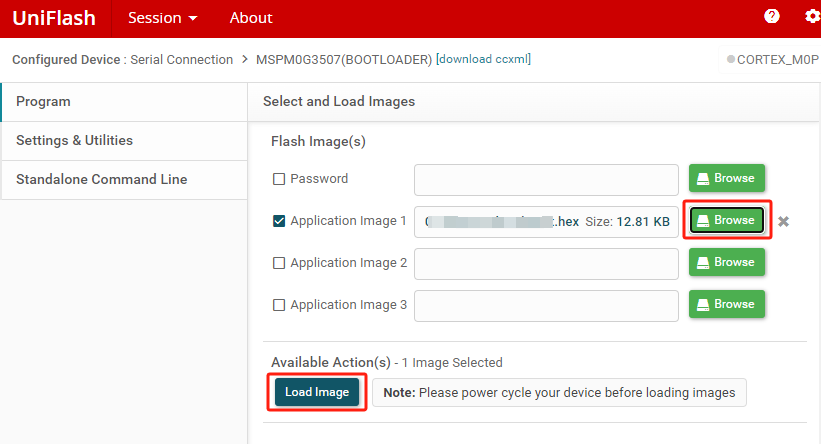
image-20250430182131132

  1. Set the serial assistant interface as shown in the figure. image-2023060600004
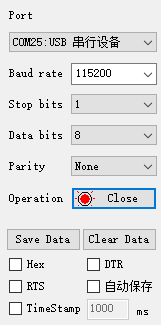
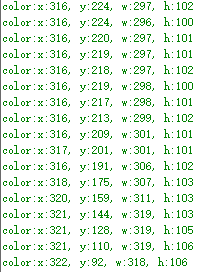
  2. When the K230 camera image recognizes red color, the serial assistant will print the information transmitted by K230 to MSPM0.

    Where:

    • x: is the x-coordinate of the upper-left corner of the recognized box

    • y: is the y-coordinate of the upper-left corner of the recognized box

    • w: is the width of the recognized box

    • h: is the height of the recognized box

    As shown in the figure below: image-20250430113605535
 

Drive Buzzer
K230 Barcode Recognition

COMPANY

  • About us
  • Team Style
  • Blog

LEARNING & EXPLORATION

  • Tutorials
  • Edge AI hardware
  • Educational robots
  • Embedded intelligent hardware

WHERE TO BUY

  • Yahboom Online Store
  • Amazon
  • Alibaba
  • AliExpress
  • Mercado

TECHNOLOGY SUPPORT

  • Email: support@yahboom.com

BE A DISTRIBUTOR

  • Email: sales@yahboom.com
QR Code

Copyright © 2017-2026 Yahboom. All Rights Reserved.

EN/中文