yahboom
HomeLearn
Solution
Blog
Online Store
About Us
EN/中文
MSPM0G3519 Development Board📖
1. Introduction to MSPM0
  • 1. Introduction to MSPM0
2. Development environment construction
  • 1. CCS Theia Development
  • 2. MDK Arm Development
  • 3. UniFlash Downloader
  • 4. DAP-LINK download program
  • 5. Program Simulation and Debugging
  • 6. Engineering transplantation
3. Keil basic case
  • 1. Turn on the LED light
  • 2. System Delay
  • 3. Button Control
  • 4. External Interruption
  • 5. Serial Communication
  • 6. Timer
  • 7. PWM Breathing Light
  • 8. ADC Acquisition
  • 9. DMA Transfer
  • 10. Get MPU6050 data (I2C)
  • 11. LCD Display (SPI)
4. CCS basic case
  • 1. Turn on the LED light
  • 2. System Delay
  • 3. Button Control
  • 4. External Interruption
  • 5. Serial Communication
  • 6. Timer
  • 7. PWM Breathing Light
  • 8. ADC Acquisition
  • 9. DMA Transfer
  • 10. Get MPU6050 data (I2C)
  • 11. LCD Display (SPI)
5. MSPM0 Robot Expansion Board
  • 1. MSPM0 Robot Expansion Board Introduction
  • 2. Custom Buttons
  • 3. Drive Buzzer
6. MSPM0-K230Vision module application
  • 1. K230 Color Recognition
  • 2. K230 Barcode Recognition
  • 3. K230 QR Code Recognition
  • 4. K230 Apriltag Code Recognition
  • 5. K230 DM Code Recognition
  • 6. K230 Face Detection
  • 7. K230 Gaze Direction
  • 8. K230 Face Recognition
  • 9. K230 Human Body Detection
  • 10. K230 Fall Detection
  • 11. K230 Palm Detection
  • 12. K230 Gesture Recognition
  • 13. K230 OCR Character Recognition
  • 14. K230 Object Detection
  • 15. K230 Target Tracking
  • 16. K230 Self-learning Object Recognition
  • 17. K230 License Plate Recognition
7. MSPM0-K210Vision module application
  • 0. K210 Prerequisites For Making A Coprocessor - Must-see
  • 1. MSPM0_K210 Color Recognition
  • 2. MSPM0_K210 Barcode Recognition
  • 3. MSPM0_K210 QR Code Recognition
  • 4. MSPM0_K210 Mechanical Code Recognition
  • 5. MSPM0_K210 Face Detection
  • 6. MSPM0_K210 Facial Feature Detection
  • 7. MSPM0_K210 Mask Detection
  • 8. MSPM0_K210 Face Recognition
  • 9. MSPM0_K210 Object Detection
  • 10. MSPM0_K210 Self-study Classification
  • 11. MSPM0_K210 Handwritten Digit Recognition
8. Expansion case
  • 1. Autonomous Driving Car
  • 2. Vehicle-mounted Balance Ball Motion Control System
Download
  • Code
  • Hardware_Info
  • Software_Tools
Download ZIP

Welcome to MSPM0G3519 Development Board repository

10. MSPM0_K210 Self-study Classification

MSPM0_K210 Self-learning Classification

1. K210 and MSPM0 Communication

1.1 Experimental Prerequisites

This tutorial uses the MSPM0G3519 development board. K210 needs to run the program in K210-AI(MSPM0) to start the experiment.

MSPM0G3519 *1

K210 vision module *1 (with SD card (with AI model) and camera)

USB to TTL module *1

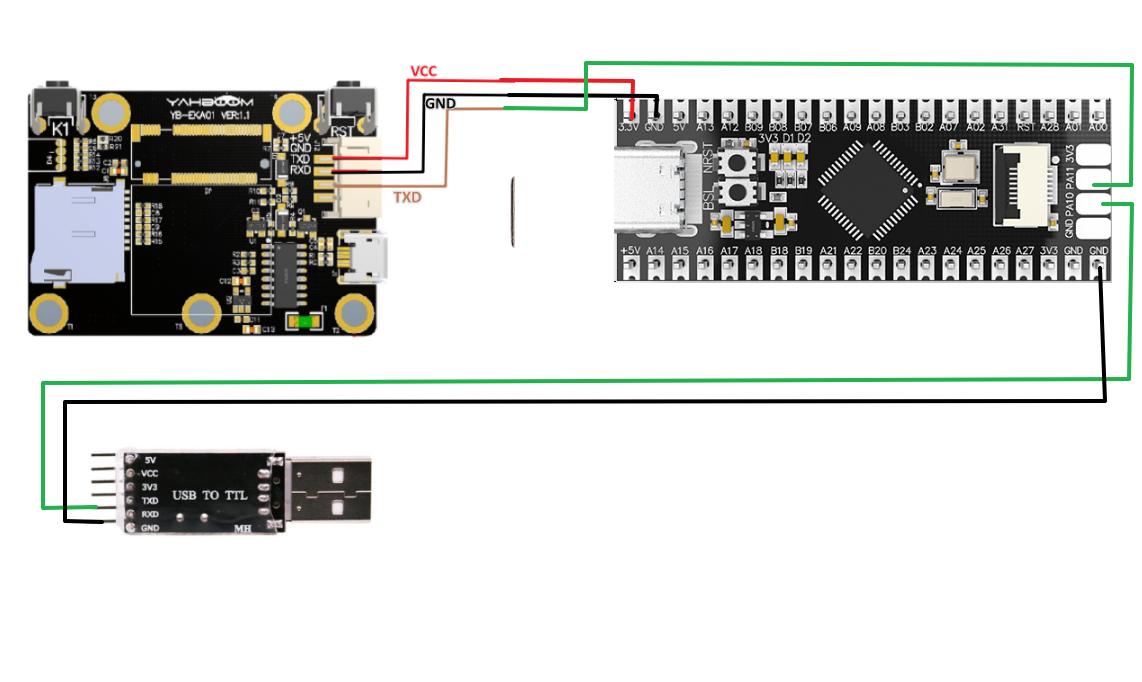
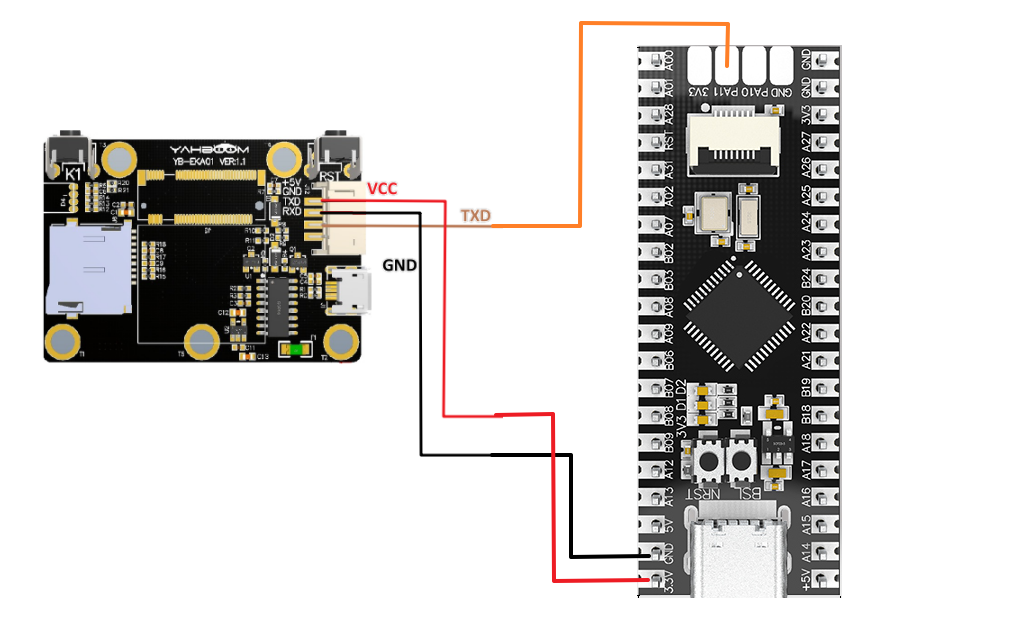
1.2 Experimental Wiring

Method 1: Using USB to TTL module

MSPM0GK210 Vision Module
RXTXD
GNDGND
VCC5V
MSPM0GUSB to TTL Module
TXRXD
GNDGND

img

Method 2: Using onboard Type-C port

img

1.3 Main Code Explanation

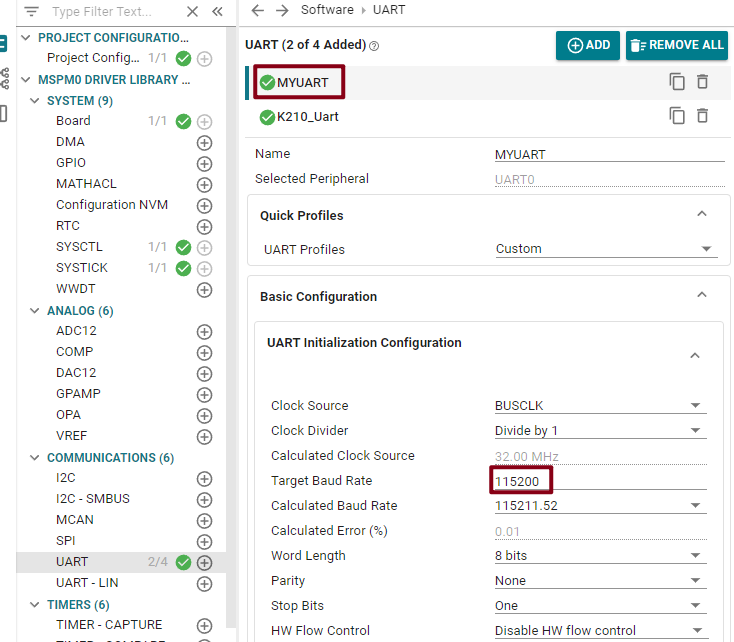
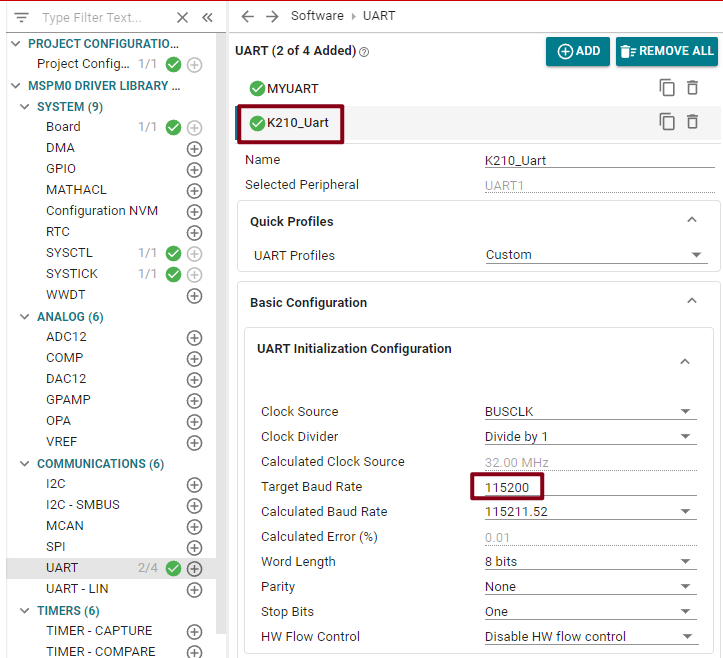
This example sets the serial port print baud rate to 115200 bps, and the K210 module connection baud rate is also set to 115200 bps.
5

6

​x
int main(void)
{
    SYSCFG_DL_init();

    NVIC_ClearPendingIRQ(MYUART_INST_INT_IRQN);//Clear serial port interrupt flag
    NVIC_EnableIRQ(MYUART_INST_INT_IRQN);//Enable serial port interrupt


    while (1)
    {
         if (k210_msg.class_n != 0)//Example number is not empty
        {
            if(k210_msg.class_n == 10)//Self-learning classification
            {
                sprintf(buff_com,"id = %c\r\n",k210_msg.id);
                uart0_send_string(buff_com);

                k210_msg.class_n = 0;//Clear example number
            }

        }
        delay_ms(500);

    }
}

After the above program runs this example, the k210_msg structure members will have corresponding values and will be printed via serial port.

k210_msg: is the structure for receiving information. Its main members are:

  • x: is the x-coordinate of the upper-left corner of the recognized box (range: 0-240)

  • y: is the y-coordinate of the upper-left corner of the recognized box (range: 0-320)

  • w: is the width of the recognized box (range: 0-240)

  • h: is the height of the recognized box (range: 0-320)

  • id: is the recognized label

  • class_n: example number

  • msg_msg[20]: valid data

After data reception and processing, each member of k210_msg will store valid information. If you want to do secondary development, you can directly call the members of k210_msg.

Note: The Keil project source code must be placed under the SDK path for compilation.

1.4 Experimental Phenomenon

  1. After connecting the cables, the K210 vision module runs offline. Press key1 on K210 to record object information. Take 15 photos (5 photos for each object), storing 3 objects.

    K210 offline running method

  2. Set the serial assistant interface as shown in the figure
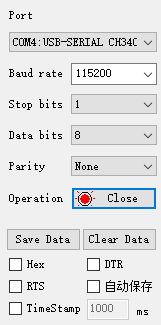
    3

  3. Then run the self-learning classification example. The serial assistant will print the important information transmitted by K210 to MSPM0G, as shown in the figure below.
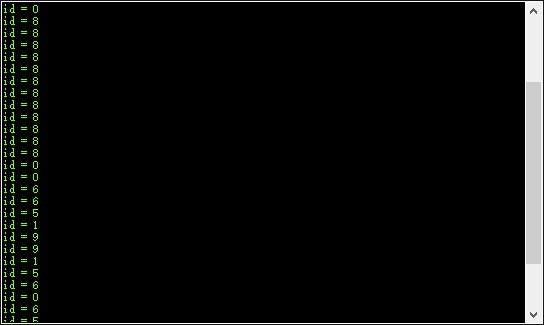
    4

Object detection only transmits the 1 member variable of k210_msg: id.

id: is the object ID when taking photos. The range of id is (1-3)

MSPM0_K210 Object Detection
MSPM0_K210 Handwritten Digit Recognition

COMPANY

  • About us
  • Team Style
  • Blog

LEARNING & EXPLORATION

  • Tutorials
  • Edge AI hardware
  • Educational robots
  • Embedded intelligent hardware

WHERE TO BUY

  • Yahboom Online Store
  • Amazon
  • Alibaba
  • AliExpress
  • Mercado

TECHNOLOGY SUPPORT

  • Email: support@yahboom.com

BE A DISTRIBUTOR

  • Email: sales@yahboom.com
QR Code

Copyright © 2017-2026 Yahboom. All Rights Reserved.

EN/中文