yahboom
HomeLearn
Solution
Blog
Online Store
About Us
EN/中文
MicroROS Self-balancing Robot Car📖
01.Introduction
  • 0.Unboxing and Reviewing
  • 1. Must read before use - learning route
  • 2. Introduction to LiDAR
  • 3. Balance car interface description
  • 4. Analysis of common problems
  • 5. Robot charging and battery precautions
02.Assembly tutorial
  • Robot assembly steps
03.Preparation
  • 0.Quick Start (Must Read)
  • 1.Write firmware
  • 2.How to install and use VM
  • 3.ESP32 communication board configuration parameters
  • 4.Connect to microROS agent
04.ROS-WiFi module configuration
  • 0.Serial port configuration WiFi instructions
  • 1.Use ROS-WiFi cam module(must read)
  • 2.Connect to ROS-WiFi cam module agent
  • 3.Camera image correction (optional)
05.Quick start control
  • 1.Keyboard remote control
  • 2.Handle remote control
06.ROS+OpenCV course
  • 1.OpenCV Getting started
  • 2.Geometric transformation
  • 3.Image processing and drawing text line segments
  • 4.Image beautification
07.Mediapipe course
  • 1. Hand detection
  • 2. Posture detection
  • 3. Overall inspection
  • 4. Face detection
  • 5. Face recognition
  • 6. Facial effects
  • 7. 3D object recognition
  • 8. Brush
  • 9. Finger control
  • 10. Gesture recognition
08.Robot basic course
  • 1.Robot information release
  • 2.Robot keyboard control
  • 3.Robot handle control
  • 4.Robot state estimation
  • 5.Line speed calibration
  • 6.Angular velocity calibration
  • 7.Robot URDF model
09.Lidar course
  • 1.Lidar avoid
  • 2.Lidar following
  • 3.Lidar guard
  • 5.Gmapping mapping
  • 6.Cartographer mapping
  • 7.Navigation2 navigation avoid
  • 8.Navigation2 fast relocation navigation
  • 9.ROS Robot APP mapping
  • 10.ROS Robot APP navigation
10.Robot visual interaction
  • 1.Color tracking
  • 2.Object recognition and tracking
  • 3.Face recognition tracking
  • 4.Autonomous driving line patrol
  • 5.QR code motion control
  • 6.Gesture control car movement
  • 7.Palm control car movement
  • 8.Gesture control car action group
  • 9.Palm recognition and tracking
  • 10.Human body posture recognition and tracking
11.Multi-machine course
  • 1.Multi-machine handle control
  • 2.Multi-machine keyboard control
  • 3.Multi-machine navigation
  • 4.Multi-machine rapid relocation navigation
12.STM32 balancing case
01.Environment construction and development
  • 13.Window Watchdog (WWDG)
  • 01.MDK-ARM installation
  • 02.STM32CubeIDE installation
  • 03.Common driver installation
  • 04.Download the program
  • 05.MDK-ARM project usage
  • 06.Program simulation
02.STM32 getting started course
  • 01.Project creation
  • 02.LED Control(GPIO)
  • 03.Buzzer control(GPIO)
  • 04.Button control(EXTI)
  • 05.Serial communication(USART)
  • 06.Voltage detection(ADC)
  • 07.Basic timer(TIM)
  • 08.Universal timer(TIM)
  • 09.Advanced Timer(TIM)
  • 10.I2C Communication(I2C)-OLED
  • 11.SPI communication(SPI)-2.4G handle
  • 12.Independent Watchdog (IWDG)
  • 14.DMA-USART
  • 15.DMA-I2C
03.STM32 expansion course
  • 01.Battery voltage detection (ADC)
  • 02.Ultrasonic module-measuring distance (TIM)
  • 03.Motor drive+encoder (TIM)
  • 04.OLED Data-Display(I2C)
  • 05.MPU6050-Data Read (I2C)
04.Robot car PID control course
  • 01.PID basic concept
  • 02.PID example analysis
  • 03.P, PI, PD controller theory
  • 04.Position PID
  • 05.Incremental PID
  • 06.Cascade PID
  • 07.Balance principle of car
  • 08.Car upright control (PD)
  • 09.Car speed ​​control (PI)
  • 10.Car steering control (PD)
  • 11.Got angle and angular velocity (DMP algorithm)
  • 12.Got angle and angular velocity (Kalman filter algorithm)
  • 13.Got angle and angular velocity(Complementary filter algorithm)
05.Robot car basic course
  • 01.Car parameter adjustment
  • 02.Ultrasonic obstacle avoidance
  • 03.Ultrasonic follow
  • 04.Bluetooth remote control
  • 05.Load balance
  • 06.Radar obstacle avoidance
  • 07.Radar guard
  • 08.Radar follow
  • 09.Radar patrol
  • 10.Radar wall following go in a straight line
  • 11.Radar tracking wall multiple walls
06.Robot car LQR control
  • Balance car LQR high-level control
07.Circuit design
  • 01.Overall circuit design
  • 02.STM32 minimum system
  • 03.Serial port circuit design
  • 04.Power circuit design
  • 05.MPU6050 Circuit Design
  • 06.Motor drive circuit design
08.Mathematical model
  • Balance car mathematical model
13.Linux basic course
  • 1.Introduction to Linux system
  • 2.Ubuntu file system
  • 3.Ubuntu common commands
  • 4.Ubuntu common editors
  • 5.Ubuntu software operation commands
  • 6.Virtual machine installation
  • 7.SSH remote control
  • 8.VNC remote control
  • 9.Transfer files remotely
  • 10.Driver library and communication
  • 11.Static IP and hotspot mode
  • 12.Bind device ID
  • 13.Capacity expansion and resource allocation
  • 14.Update system software sources
  • 15.Set root user password
  • 16.sudo free password
  • 17.Connect to WiFi network
  • 18.View system version
  • 19.Customized service management
  • 20.Back up system image
14.Docker course
  • 1. Overview and installation
  • 2. Common commands
  • 3. Docker images deeply understand and publish images
  • 4. Docker hardware interaction and data processing
  • 5. Enter the bot's docker container
15.ROS2 basic course
  • 1.Introduction to ROS2
  • 2.ROS2 install Humble
  • 3.ROS2 development environment
  • 4.ROS2 workspace
  • 5.ROS2 function package
  • 6.ROS2 node
  • 7.ROS2 topic communication
  • 8.ROS2 service communication
  • 9.ROS2 action communication
  • 10.ROS2 custom interface message
  • 11.ROS2 parameter service case
  • 12.ROS2 meta-function package
  • 13.ROS2 distributed communication
  • 14.ROS2 DDS
  • 15.ROS2 time related API
  • 16.ROS2 common command tools
  • 17.ROS2 rviz2 use
  • 18.ROS2 rqt toolbox
  • 19.ROS2 Launch startup file configuration
  • 20.ROS2 recording and playback tool
  • 21.ROS2 URDF model
  • 22.ROS2 Gazebo simulation platform
  • 23.ROS2 TF2 coordinate transformation
Download
  • RemoteCtrl_APP(Android)
  • Mapping_APP(iOS_Android)
  • Code
  • Hardware Information
  • software tools
  • 3D model file
  • Instruction manual
  • VM image file
  • ROS2_Basic_VM
Download ZIP

Welcome to MicroROS Self-balancing Robot Car repository

3.Lidar guard

Radar Guard

Note: The virtual machine needs to be in the same LAN as the car, and the ROS_DOMAIN_ID needs to be the same. You can check [Must Read Before Use] to set the IP and ROS_DOMAIN_ID on the board.

1. Program Function Description

The car connects to the proxy and runs the program. The radar on the car scans the nearest object within the set range and tracks the object by rotating. If the object is closer to the radar than the set distance, the buzzer on the car will sound as a warning. The dynamic parameter regulator can be used to adjust the parameters such as the radar detection range and obstacle avoidance detection distance.

2. Start and connect the agent

Take the matching virtual machine as an example, enter the following command to start the agent,

sudo docker run -it --rm -v /dev:/dev -v /dev/shm:/dev/shm --privileged --net=host microros/micro-ros-agent:humble udp4 --port 8899 -v4

image-20241226101427280

Then, turn on the car switch and wait for the car to connect to the agent. The connection is successful as shown in the figure below,
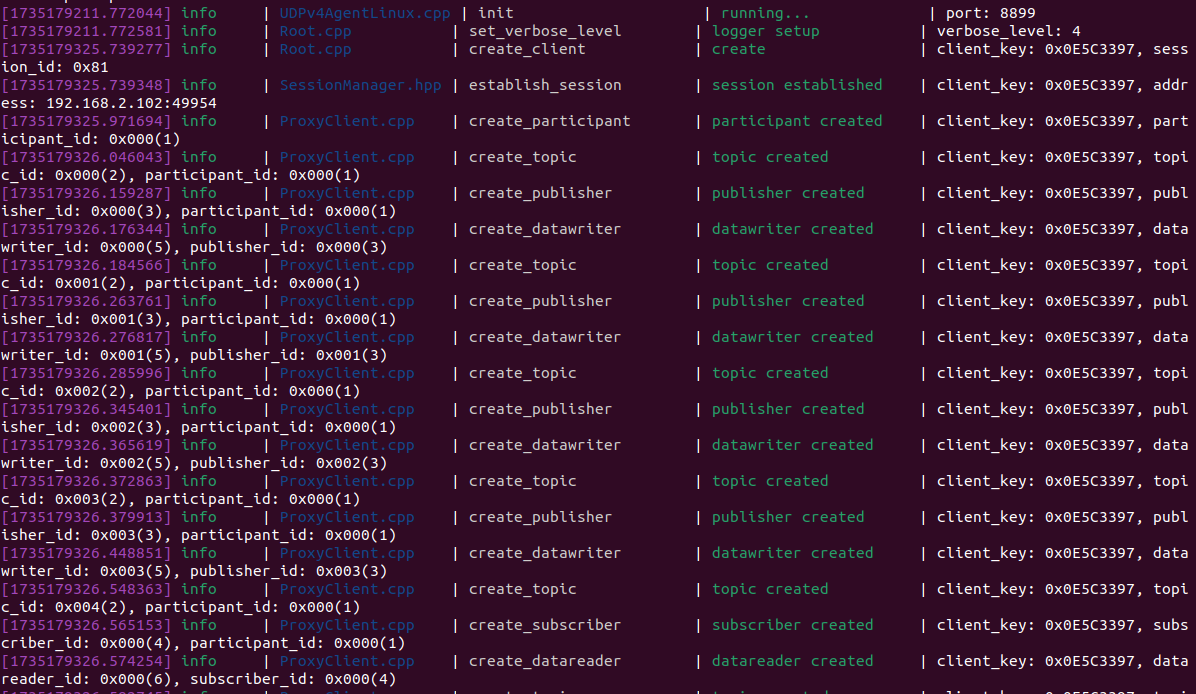
image-20241226101559446

3. Start the program

3.1 Run command

Take the matching virtual machine as an example, input in the terminal,

xxxxxxxxxx
ros2 run yahboomcar_laser laser_Warning
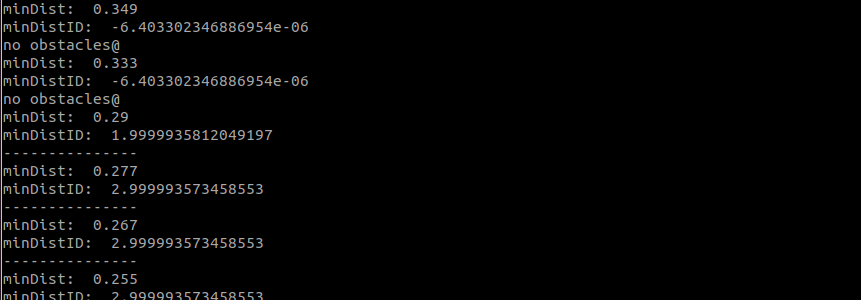
image-20231218154818575

After the program is started, it will look for the nearest object within the radar scanning range, slowly move the object, and the car will track the object by rotating.

As shown in the figure above, if it does not exceed the set range, it will print [no obstacles@], and if there is an obstacle, it will print [---------------] and the buzzer will sound. You can set some parameters through the dynamic parameter regulator, terminal input,

xxxxxxxxxx
ros2 run rqt_reconfigure rqt_reconfigure
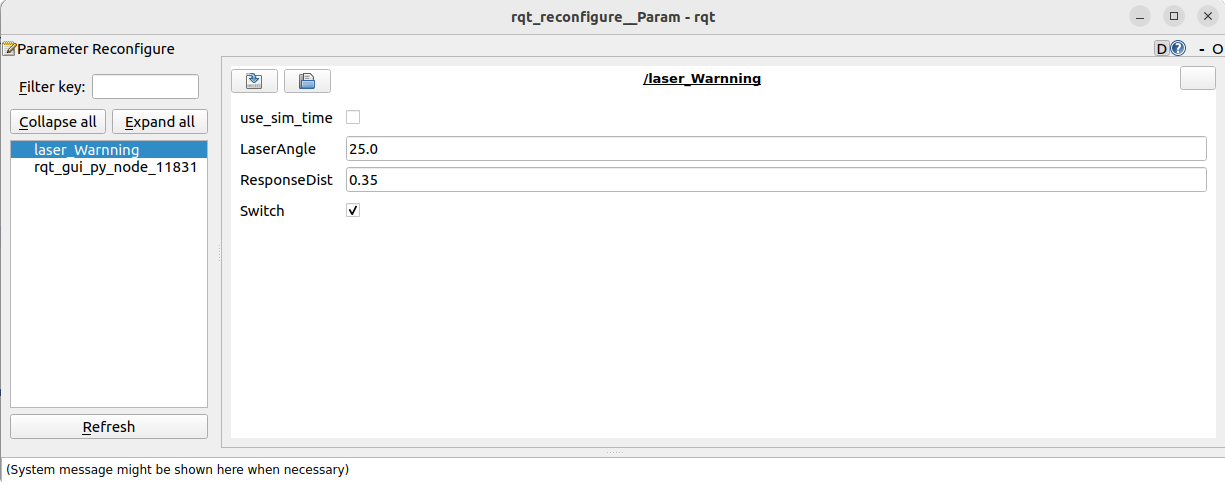
image-20241228113913076

Note: The above nodes may not be available when you first open it. Click Refresh to see all the nodes. The displayed laser_Warnning is the node of the radar guard.

Explanation of the above parameters:

  • LaserAngle: Radar detection angle

  • ResponseDist: Tracking distance

  • Switch: Gameplay switch

After modifying the above parameters, you need to click on the blank space to pass the parameters into the program.

4. Code analysis

Source code reference path (taking the supporting virtual machine as an example):

xxxxxxxxxx
/home/yahboom/yahboomcar_ws/src/yahboomcar_laser/yahboomcar_laser

laser_Warnning.py, the core code is as follows,

xxxxxxxxxx
#Create a radar subscriber to subscribe to radar data and remote control data, a speed publisher to publish speed data, and a buzzer publisher to publish buzzer control data
#create a sub
self.sub_laser = self.create_subscription(LaserScan,"/scan",self.registerScan,1)
self.sub_JoyState = self.create_subscription(Bool,'/JoyState', self.JoyStateCallback,1)

#create a pub
self.pub_vel = self.create_publisher(Twist,'/cmd_vel_bl',1)
self.pub_Buzzer = self.create_publisher(UInt16,'/beep',1)

#Radar callback function: process subscribed radar data
def registerScan(self, scan_data):
    if not isinstance(scan_data, LaserScan): return

    ranges = np.array(scan_data.ranges)
    minDistList = []
    minDistIDList = []

    for i in range(len(ranges)):
        angle = (scan_data.angle_min + scan_data.angle_increment * i) * RAD2DEG
        
#According to the set radar detection angle, find the nearest object within the radar detection range
if angle > 180: angle = angle - 360
if  abs(angle) < self.LaserAngle and ranges[i] > 0:
    minDistList.append(ranges[i])
    minDistIDList.append(angle)
if len(minDistList) != 0: 
    minDist = min(minDistList)
    minDistID = minDistIDList[minDistList.index(minDist)]
else:
    return

#Calculate the angular velocity based on the position deviation from the tracked object so that the car's front end is aligned with the object
if self.Joy_active  or self.Switch == True:
    angle_pid_compute = self.ang_pid.pid_compute(minDistID/48, 0)
    if abs(angle_pid_compute) < 0.1:
        velocity.angular.z = 0.0
    else:
        velocity.angular.z = angle_pid_compute * 200
    if minDist< self.ResponseDist * 2:
        self.pub_vel.publish(velocity)
        
#Judge whether the radar detection distance of the smallest object is less than the set range, and then determine whether the buzzer needs to sound
if minDist <= self.ResponseDist:
    print("---------------")
    b = UInt16()
    b.data = 1
    self.pub_Buzzer.publish(b)

else:
    print("no obstacles@")
    b = UInt16()
    b.data = 0
    self.pub_Buzzer.publish(UInt16())


Lidar following
Gmapping mapping

COMPANY

  • About us
  • Team Style
  • Blog

LEARNING & EXPLORATION

  • Tutorials
  • Edge AI hardware
  • Educational robots
  • Embedded intelligent hardware

WHERE TO BUY

  • Yahboom Online Store
  • Amazon
  • Alibaba
  • AliExpress
  • Mercado

TECHNOLOGY SUPPORT

  • Email: support@yahboom.com

BE A DISTRIBUTOR

  • Email: sales@yahboom.com
QR Code

Copyright © 2017-2026 Yahboom. All Rights Reserved.

EN/中文